

An antivirus receipt lands in your inbox, and the total makes you look twice. You cannot remember agreeing to anything that expensive.
The Webroot 820-465-3380 email scam starts with that uncomfortable moment. Before you reach for the cancellation number, take a closer look at the receipt.
Overview
A large renewal charge supplies the reason to call
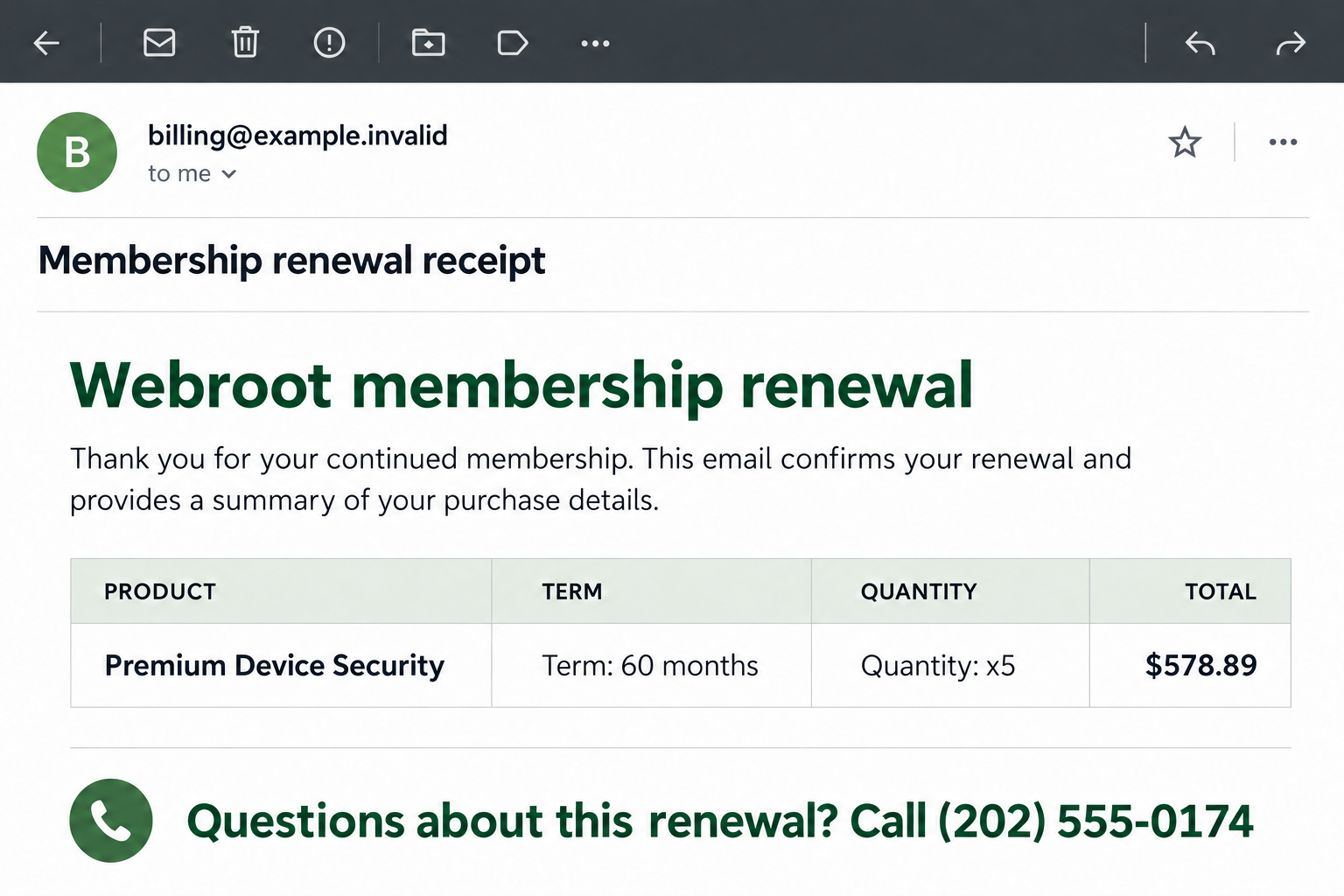
The reported message presents a Webroot membership renewal dated July 13, 2026. It claims a $578.89 payment for 60 months and lists a quantity of five.
Its contact number is 820-465-3380, also written with an initial 1. These details identify the reported receipt, not a verified charge on your account.
The receipt borrows the identity of a real security company
Webroot is a legitimate cybersecurity brand. An email using its name does not establish that the sender sold your subscription or can cancel it.
The image illustrates the receipt-and-callback approach using fictional contact details. It is not an authenticated copy of the reported email.
Your records matter more than the message’s confidence
Separate the claim from the evidence before doing anything else:
- The email says a payment happened. Your independently opened bank account can show whether a transaction actually exists.
- The plan description lists a quantity and term. Your original order identifies what you purchased and from whom.
- The callback promises help. An independently located support route establishes whom you are contacting.
No call to this number or analysis of an original message file was performed for this report. Its present operator and individual victims’ transactions remain unverified.
What Makes This Particular Receipt Worth Questioning?
A long term can make a startling total feel plausible
Five years of coverage sounds substantial. Add a quantity field, and an unexpected total may seem like an expensive purchase rather than an invented one.
That explanation can distract you from a simpler question: where is the order you authorized?
Do not work backward from the email’s price to justify the purchase. Start with your own receipt, subscription account, or retailer order history.
Even dividing the amount by the listed months proves nothing about authorization. Arithmetic can explain a price; it cannot establish that you agreed to pay it.
A receipt is a claim, not a bank statement
Scam messages often sound as though the only task left is deciding whether to keep the purchase. That wording quietly skips the authorization question.
A fabricated receipt can be emailed without charging anything. A real unauthorized payment is also possible, so neither reassurance nor panic should replace checking your account.
Look for the actual merchant description, amount, date, and transaction status. A pending authorization is different from a settled payment or a declined attempt.
If an unfamiliar charge exists, your bank can investigate its payment record. The stranger whose number appears on the disputed email should not direct that investigation.
The number is part of the lure, not independent verification
An email can supply a detailed invoice and a polished support signature while keeping every route back to the same sender.
Calling its number does not give you a second source. It simply moves the conversation from the inbox to a person connected with that message.
A number’s area code, toll-free appearance, or search results cannot authenticate a subscription. Reports about a number also do not establish permanent ownership.
How the Webroot Renewal Email Scam Works
Step 1: A completed-payment notice interrupts your day
The opening move is an apparent receipt rather than a sales pitch. You are invited to react to a purchase that supposedly already happened.
That changes the emotional starting point. Instead of deciding whether you want security software, you start wondering how to undo an expensive mistake.
Someone who already uses Webroot may worry about an unwanted renewal. Someone who does not may assume their payment details have been stolen.
Either reaction can make an immediate phone call feel reasonable. The safest interruption is to put the email aside while checking records you already control.
Step 2: Product details give the story an administrative appearance
The receipt’s quantity and coverage period make it look processed and specific. Specificity feels reassuring because genuine orders usually contain similar details.
But a product description is easy to write. It is not an independent connection to your existing license or payment method.
Compare the whole purchase, not one familiar word. A genuine subscription should connect to an account, retailer, order number, and payment you can trace.
You do not need to investigate every formatting mistake. One missing piece of authorization is enough reason to stop using the email’s instructions.
Step 3: The callback becomes the supposed cancellation route
The message gives a phone number for questions about the renewal. In this kind of scheme, that helpful-looking escape route is the main attraction.
You may think you are calling to prevent a loss. The person answering can then introduce whatever procedure supposedly unlocks the cancellation or refund.
Watch for requests to open an unfamiliar website, install a support program, provide payment details, or reveal a code sent to your device.
Those requests are escalation signs, not actions confirmed during a test of this particular number. Do not continue a suspicious call to find out its ending.
Step 4: A refund conversation can become an access request
Common refund scams turn a billing question into a request for remote control. A caller may describe screen sharing as necessary paperwork.
A genuine remote-support application can still be dangerous when you give its session access to an impostor. The application’s reputation does not identify the caller.
The FTC’s tech-support scam guidance describes fake renewal notices that lead to remote access and fraudulent refund stories.
Keep online banking out of any unexpected support session. Do not expose account balances simply because someone says they need to check a refund.
Step 5: The caller may ask you to pay to correct the problem
An impersonator might claim a refund was too large, a cancellation requires a fee, or money must move somewhere temporarily.
At that point, the proposed solution creates a new payment. It does not verify or reverse the original alleged subscription charge.
Do not send gift-card codes, cryptocurrency, or transfers to settle a caller’s accounting error. End the conversation and speak to your financial institution independently.
A caller’s screenshot or spoken balance is not proof that money arrived. Your bank’s own transaction history is the relevant record.
How to Check a Real Webroot Renewal Without Using the Email
Identify the seller before choosing support
A subscription bought directly from a software company may have a different billing route from one purchased through a retailer.
Find the original order in your existing records. Use the seller shown there, not whichever company name is most prominent on the unexpected receipt.
Webroot’s official contact page provides support routes, including a separate path for Best Buy subscription questions.
Choose the route that matches your purchase. A real retailer receipt is useful evidence; the suspicious sender’s statement that they represent that retailer is not.
Verify the term without changing anything under pressure
Review the renewal date and product associated with your account. Do not assume a different term proves fraud by itself, since plans and sellers can vary.
If your account shows a legitimate renewal you no longer want, use its documented cancellation or refund process. The scam warning does not cancel a real contract.
Save the outcome of your independent check. A screenshot of the subscription status can prevent confusion if more renewal notices arrive later.
Keep the billing and device questions separate
A frightening invoice does not mean your computer is infected. Likewise, deleting an email does not reverse a real payment or remove software you installed afterward.
Think about what actually happened: receipt only, phone conversation, disclosure, remote session, or payment. Each calls for a different response.
Webroot’s scam-awareness guidance warns about fraudulent support sites and numbers. Use its independently published routes rather than a callback supplied in an alarming message.
What to Ask Verified Billing Support About the Receipt
Match the purchase before discussing a refund
Give the verified seller enough information to locate your genuine order. Start with the original purchase reference and the email address associated with that purchase.
Ask whether the unexpected receipt corresponds to anything in your account. You do not need to read a full card number to an unverified caller to answer that question.
If support cannot find the transaction, keep that answer with your records. Then check any actual bank charge separately rather than letting the email define the merchant.
Clarify what the quantity actually describes
The reported receipt lists a quantity of five, but that label does not establish five protected devices. It could be ambiguous or simply fabricated billing text.
Do not infer a license arrangement from it. Ask the real seller what your actual purchase includes and which devices, if any, are attached to the account.
The same caution applies to a long coverage term. A label can describe a claimed product without documenting the renewal conditions you previously accepted.
Keep any confirmed term, renewal date, and seller reference together. That makes a later legitimate reminder easier to distinguish from a new unexpected invoice.
Keep helpful evidence while limiting disclosure
A support request can include the suspicious message as evidence when sent through a verified channel. Remove unrelated financial or household information from screenshots.
For your own file, keep these records distinct:
- The original subscription order and its seller.
- The unexpected email and its callback instructions.
- Any actual transaction visible in your bank account.
- The verified support response and case reference.
That separation helps everyone investigate the right issue. A nonexistent renewal email, an unwanted real renewal, and money sent during a scam call are not interchangeable.
What to Do if You Have Fallen Victim to This Scam
-
End the conversation and keep a simple record. Stop answering the purported renewal agent. Save the message, displayed number, approximate call time, and any websites they directed you toward.
Write down what you shared or installed while it is fresh. That practical timeline is more useful to your bank than trying to prove the caller’s identity.
-
Check payments through your financial institution. Open your trusted banking app or call the number printed on your card. Explain any charge, transfer, or card disclosure accurately.
Ask what can be blocked, replaced, disputed, or recalled. An authorized transfer made under deception may require a different process from a purchase you never approved.
-
Close remote access if you granted it. Disconnect the affected device from the network if someone still controls it. Use a separate trusted device for urgent account protection.
Record the support application’s name and obtain trusted help removing unwanted access. Closing its window may not disable unattended access that was configured during the call.
-
Change exposed passwords and review sessions. Start with any email account visible during the interaction, then banking, payment, and shopping accounts that were accessed.
Use new, unique passwords from a clean device. Review recovery details and recent sign-ins, and enable available multifactor authentication without sharing the resulting codes.
-
Inspect the device only when exposure warrants it. If you installed software or allowed remote control, update its operating system and run a reputable security scan.
Malwarebytes can help check for malicious or unwanted software. A clean result cannot prove that no files or account information were viewed.
AdGuard may help reduce malicious advertising and tracking during browsing. It does not cancel the invoice, recover transfers, or replace account remediation.
-
Report the impersonation through independently found channels. Tell genuine Webroot support about the message. In the US, submit relevant fraud details through ReportFraud.ftc.gov.
Keep original records privately. Remove names, card information, account balances, and active security codes before sharing a warning publicly with other readers.
-
Confirm the real subscription status afterward. If you are an actual customer, check that your legitimate protection and billing preferences remain as intended.
Do not cancel useful software merely because somebody impersonated its brand. Resolve genuine account matters with the verified seller, separately from reporting the fraudulent message.
Frequently Asked Questions
Does receiving this email mean $578.89 was deducted?
No. The figure is a claim in the reported email. Check your own financial records before deciding whether there is a real payment to investigate.
Is 820-465-3380 verified Webroot support?
It appears in the reported suspicious receipt. This report does not establish its current ownership. Use Webroot’s independently published contact routes instead of testing the number.
Does the five-year term prove the subscription is fake?
Not by itself. Seller arrangements vary. The important question is whether the claimed subscription connects to an order and payment you actually authorized.
What if I called but did not share anything?
End contact and block further attempts. Calling alone does not prove account compromise. Watch for follow-up messages that exploit details mentioned during the conversation.
Should I remove Webroot from my computer?
Not because of this email alone. Legitimate security software is separate from an impostor’s receipt. Investigate any additional application the caller persuaded you to install.
Can a security scan get my refund?
No. Scanning addresses software risks. Payment disputes belong with your financial institution or verified seller, and neither route guarantees that lost money can be recovered.
The Bottom Line
Do not use the callback in the Webroot 820-465-3380 email scam to challenge a supposed renewal. Verify the payment and seller through records you already trust.
If you already responded, act on the exposure: alert your bank about payments, close unwanted remote access, and secure affected accounts before discussing any further refund.

Join the discussion
0 commentsShare your experience or ask a question about this article.
Discussion
Start the conversation
Have a question or something useful to share? Add the first comment.