

A reward page promises the kind of RAID loot that would make a real difference to your account. The first question looks harmless: your character name or ID.
That small opening is why the RaidChest.com scam question deserves a closer look. Before entering anything, separate the page’s promises from what its appearance actually proves.
Overview
RaidChest presents itself as a RAID reward event
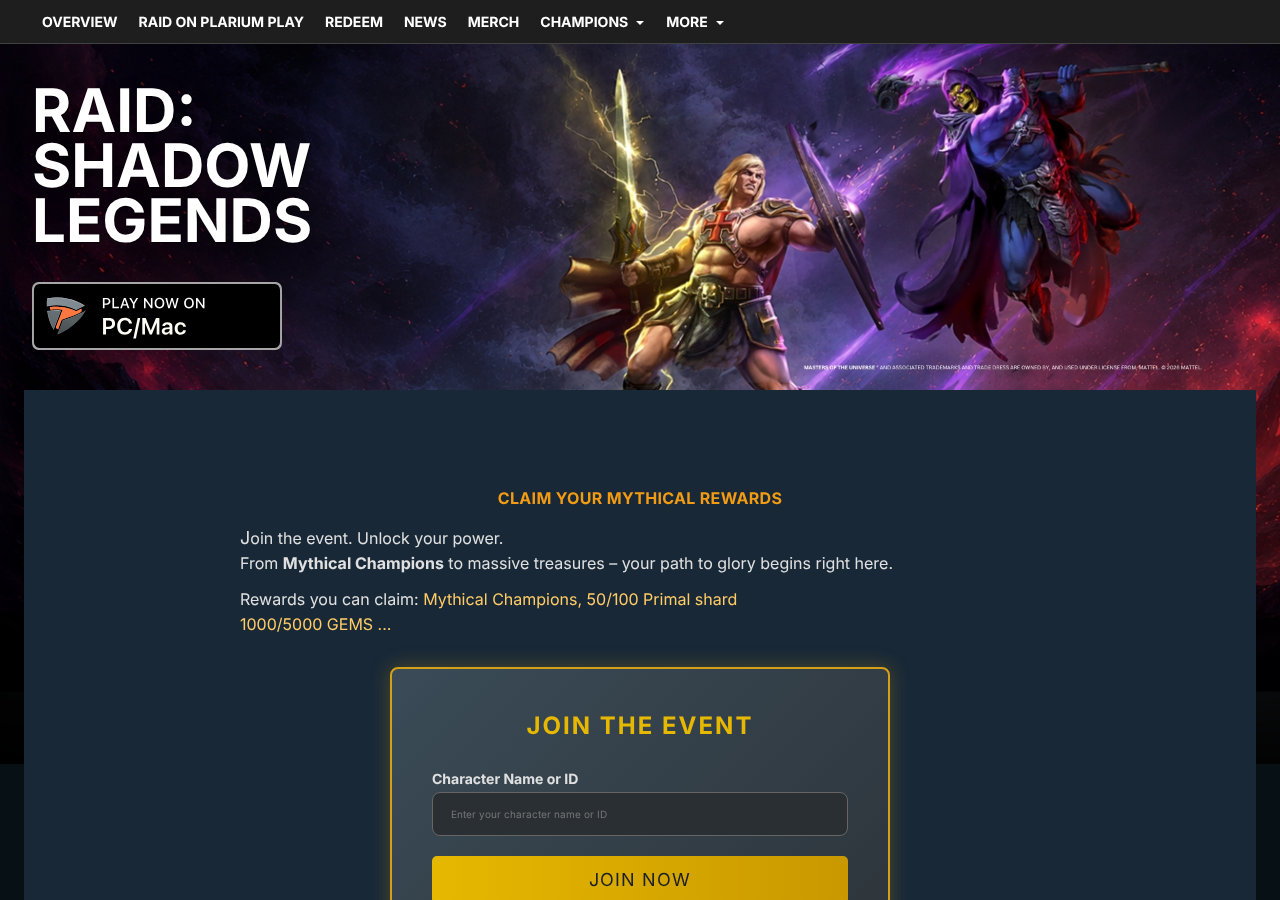
The page advertises Mythical Champions, Primal shards, and gems. A prominent event form asks for a character name or ID and offers a joining button.
Its surrounding artwork, navigation, and Plarium copyright wording resemble an official game promotion. Several navigation links point toward genuine RAID or Plarium destinations.
The first field does not reveal the whole journey
The image is an original capture of RaidChest.com, not an illustration. The inspected first page displayed a character field, not a password field.
Reports describe a credential-phishing concern, but no identifier was submitted here. Any subsequent form, reward delivery, or account access was not tested.
Verify the event before sharing account information
These are the distinctions that matter:
- A game ID can identify an account without being its password.
- Official-looking graphics do not establish who operates a website.
- A genuine link elsewhere on a page does not authenticate its event form.
- A password or authentication code requested by an unverified reward page creates a much greater risk than a public identifier.
Do not use the offer as your verification route. Check the promotion through the game or independently reached official support before participating.
What the RaidChest Page Shows, and What It Does Not
The rewards are concrete, but the authorization is not
The displayed offer includes two possible Primal-shard quantities and two gem quantities. It also highlights a Mythical reward claim rather than an ordinary promo-code entry.
Those specifics make the offer easy to imagine. A player can picture the summons or upgrades they might obtain, which makes checking the organizer feel secondary.
The reward names may be familiar. What still needs confirmation is whether Plarium authorized this event and the way it collects account information.
A realistic reward description is not that connection. Neither is familiarity with the game’s artwork or terminology.
The first form offers a low-friction commitment
A name-or-ID field can feel like a reasonable way to direct a reward. It asks for much less than a bank card or recovery code.
That does not make every such field malicious. Legitimate redemption services may also need an identifier to locate the correct player.
The concern is what you are joining and who receives the information. Once you start, a later request can seem like finishing an action already underway.
Set the boundary before submitting: no password, email login, security code, payment, or download merely to collect an unverified gift.
Links to real sites can surround an unverified form
The inspected page includes navigation toward official game information and redemption resources. That can make a quick link check appear reassuring.
But links are not endorsements flowing in the opposite direction. A website can link to Plarium without Plarium recommending that website.
Look for confirmation reached from a genuine game announcement or official support channel. A claim made only by the reward page is not independent confirmation.
HTTPS also has a limited role: it protects the connection to the domain you visited. It does not certify that a publisher approved the promotion.
How the Reported RAID Rewards Scam Works
Step 1: Desirable loot creates the reason to investigate
A large reward offer reaches people who already understand its in-game value. The attraction is progress, not necessarily money arriving in a bank account.
That can lower the apparent stakes. A player may feel they are trying a promotion rather than making a risky financial decision.
However, an account can contain purchased items, years of progress, and linked personal information. Protecting it should not depend on whether the offer mentions a price.
Before following an event link, look for the same announcement through the game or a verified publisher channel you reached independently.
Step 2: Familiar branding makes the destination seem official
The landing page uses a recognizable game setting and promotion language. At a glance, it resembles somewhere a player might legitimately claim rewards.
A copyright line adds an administrative finishing touch. Neither a line of text nor copied design establishes ownership or authorization.
Read the actual hostname, not just the page title. A branded title describes what the page claims to be, while the hostname identifies where you are.
Do not assume that every unfamiliar fan site is fraudulent. Instead, hold account-related forms to a higher verification standard than ordinary gameplay advice.
Step 3: A character identifier starts the participation process
This is the stage directly visible on the inspected RaidChest page. It asks for a character name or ID and describes rewards arriving in an inbox.
A user may supply that information because it appears necessary to locate their account. The form also creates an expectation that the next page will finish delivery.
If you already entered an ID, do not assume that alone handed over your account. Record what else happened and whether you supplied any actual authentication secret.
There is no reason to continue through additional pages just to discover whether a gift is real. Verification should happen outside the reward funnel.
Step 4: Any request for login secrets changes the risk
Credential-phishing versions of game giveaways ask players to sign in, verify ownership, or provide a code before releasing the promised items.
The report about RaidChest raises that concern, but a downstream password form was not inspected here. Do not mistake the first-page screenshot for evidence of later fields.
If a subsequent page asks for a Plarium password or email-account login, stop. A gift claim should not persuade you to authenticate with an unverified operator.
The same applies to a person who contacts you afterward and offers to finish the redemption. Their knowledge of your character name does not prove publisher affiliation.
Step 5: Stolen credentials can be used somewhere else
If a player discloses credentials, an attacker may attempt to sign in separately. Reusing that password elsewhere can put additional accounts at risk.
A shared authentication code can also approve an action the player did not intend. The caller’s explanation does not override the warning printed in the genuine code message.
These are consequences of credential disclosure, not a claim that every RaidChest visitor was compromised. The response should match the information actually exposed.
A missing reward is frustrating. Continuing to provide more secrets in pursuit of it can create a much more serious problem.
Player ID, Plarium ID, and Password: Do Not Confuse Them
A player identifier directs activity to an account
Game identifiers help services locate the right profile. Sharing one is not equivalent to revealing a password, although unnecessary disclosure can assist targeting.
For example, someone who knows your character details can personalize a follow-up message. Recognition of those details should not become a substitute for authenticating the sender.
When asking for help publicly, avoid combining identifiers with private receipts, recovery information, or screenshots displaying email addresses and active codes.
A Plarium sign-in controls access
Login credentials belong in verified publisher authentication flows, not in a form you trust solely because it promises a champion or shards.
Plarium’s phishing guidance warns against sharing passwords or two-factor codes and against messages promising free resources while posing as support.
Use that distinction even when a page asks politely. A friendly verification request can be unsafe without obvious threats, spelling mistakes, or alarming red banners.
A genuine promo code is not your security code
A promotion code is intended for redemption. An authentication code helps authorize access or another protected account action. They are not interchangeable.
The official RAID redemption website provides a separate route for promo codes. Reach it independently instead of treating a reward page’s link as approval.
A real code can also have eligibility restrictions. An expired or ineligible code is not a reason to reveal a password to somebody offering a workaround.
Questions a Reward Page Should Answer Before You Join
Which event is this, and who confirms it?
Look for an identifiable promotion rather than a general promise of rare loot. You should be able to check its description somewhere other than the collection page.
A shared screenshot in a clan chat can tell you what another player saw. It cannot establish that the game publisher approved the offer.
Ask for the underlying official announcement, not a second copy of the same promotional link. If nobody can locate one, there is no good reason to rush.
Who qualifies, and what must they provide?
Promotions can have real eligibility conditions. A reward for a new account does not necessarily apply to an established profile, even when the item itself is genuine.
Read those conditions before trying a code. A failure message should not send you looking for somebody who claims they can bypass account restrictions.
Be especially cautious when an offer changes its requirements after participation begins. A character identifier does not justify a later demand for your email password.
Similarly, do not pay someone privately to activate an alleged free reward. Ask publisher support whether the promotion exists before considering any related transaction.
What would establish that the reward arrived?
Check the actual game account through your existing login. A congratulatory screen or animated progress bar on another website is not an independent delivery record.
Do not let simulated success persuade you to grant more access. A page can display an account name you typed without demonstrating that it controls the genuine reward system.
If a legitimate promotion fails, retain its published conditions and the error you saw. Official support can address that specific issue without strangers needing your authentication secrets.
For clan administrators, a useful precaution is to remove unverified claim links while checking them. Members should not have to test an offer to help investigate it.
What to Do if You Have Fallen Victim to This Scam
-
Stop the redemption attempt and record the exposure. Save the domain, visible offer, and any follow-up messages. List exactly which fields you completed.
Distinguish a character ID from a password, a code, a purchase, and installed software. That distinction prevents both unnecessary panic and an incomplete response.
-
Change any password you entered on an unverified page. Open the genuine game or publisher account independently. If the same password protects other services, replace those copies too.
Start with the linked email account if it was also exposed. A secure game password is not enough when another person controls its recovery mailbox.
-
Check sessions and account-security settings. Review available login history and end sessions you do not recognize. Inspect recovery details for unexpected changes.
Use Plarium’s two-factor setup instructions to add protection. Do not share setup secrets or approval codes with anyone offering to help collect rewards.
-
Contact official support if access changed or disappeared. Follow the RAID account-access guide rather than hiring a stranger who promises account recovery.
Provide ownership information only through the verified support process. Keep purchase receipts and previous account details available privately; do not post them in comment threads.
-
Tell your payment provider about any charge. If a claimed reward led to card disclosure or a payment, describe the offer and transaction to the relevant provider.
Ask about replacing an exposed card and disputing an improper charge. Neither game support nor a security scan can guarantee that a completed payment will be reversed.
-
Inspect unexpected downloads or applications. If you installed something to claim rewards, remove untrusted additions and update the device before using it for sensitive sign-ins.
A scan with Malwarebytes can help identify unwanted software. AdGuard can reduce some advertising and tracking risks during future browsing.
Those tools do not replace password changes after disclosure. Merely visiting a page, without another sign of exposure, is not proof that your device needs malware removal.
-
Warn other players without spreading the form. Share the relevant warning in your existing community, with private details removed and without encouraging people to test the offer.
Send the domain and evidence to official game support. Avoid attacking a website or confronting suspected operators; neither helps restore your account safely.
Frequently Asked Questions
Is RaidChest.com an official RAID redemption website?
No official authorization for its advertised event was established in this review. Use the independently reached official redemption route or ask publisher support before participating.
Did the inspected page ask for a password?
The visible first form requested a character name or ID. No submission was made, so this report cannot authenticate what a later stage would request.
Can someone steal my account using only its player ID?
An identifier is not normally an authentication secret. Assess any additional disclosure, sign-in approval, recovery change, or suspicious session rather than assuming an ID alone proves takeover.
Are all websites sharing RAID codes scams?
No. Fan resources and authorized creators can discuss promotions. The important boundary is whether an unverified destination asks for secrets, payment, or unexpected software.
Does a link to Plarium prove a giveaway is endorsed?
No. Anyone can place a link to a genuine website. Look for confirmation of the actual promotion from an independently reached publisher source.
What if the page says rewards will arrive later?
A delayed-delivery promise is not verification. Do not give additional information while waiting. Check your actual game account and ask genuine support about the promotion.
The Bottom Line
Skip the unverified RaidChest reward claim and use official RAID promotion channels instead. The offer’s appearance is not enough reason to entrust it with account information.
If the RaidChest.com scam concern brought you here after participating, identify what you shared, secure exposed credentials, and contact genuine support immediately if account access changed.

Join the discussion
0 commentsShare your experience or ask a question about this article.
Discussion
Start the conversation
Have a question or something useful to share? Add the first comment.