

An automated voice says Fraudstop has detected an €800 transfer. If you didn’t authorize it, pressing 1 sounds like the obvious way to reach your bank.
The message gives you almost no time to think. That first choice, whether to follow the recording or make your own call, matters.
Overview
The €800 warning is a route into a fraudulent conversation
The Fraudstop call scam uses a recorded payment alert to make an unsolicited call feel like an emergency banking service.
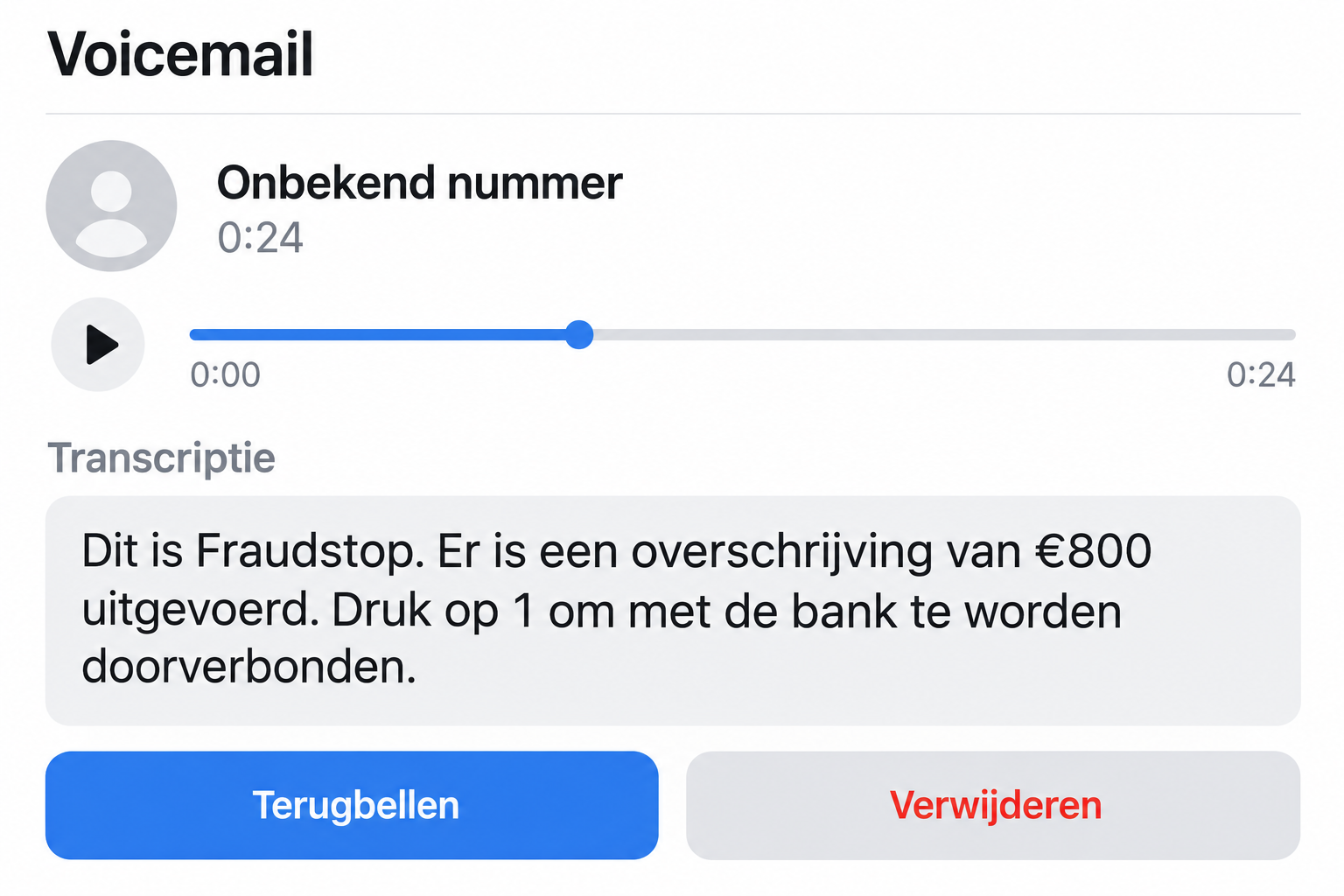
Safeonweb has identified the Fraudstop recording as vishing, or voice phishing. It claims €800 was transferred and asks recipients to press 1 for the bank.
The voicemail interface above illustrates the reported script. It is not an actual recording or evidence of a transfer from a particular account.
The caller wants information you would normally protect
Once connected, scammers try to obtain personal information, passwords, or banking details. The claim that they’re stopping fraud is what makes those requests sound helpful.
Safeonweb also states that Fraudstop doesn’t initiate contact itself. Don’t accept this unexpected recording as an authenticated warning from your bank.
Criminals are borrowing an anti-fraud name. Check a real payment concern through your own bank, not this recording’s transfer route.
You can investigate the supposed transfer without cooperating
- End the call instead of pressing the suggested key.
- Check banking activity through your usual app, independently of the caller.
- Reach the bank using its established contact details if something needs investigation.
- Keep passwords, card PINs, and authentication codes out of the conversation.
- Tell the bank promptly if you already shared information or approved an action.
You aren’t abandoning a real fraud report by hanging up. You’re choosing a route where you can establish who you’re speaking to.
Why the Recording Makes Hanging Up Feel Wrong
The message doesn’t ask whether you’d like to hear a banking offer. It says something has happened to your money and places the solution one button away.
That creates a difficult feeling: if you hang up, perhaps the payment will go through. If you press 1, perhaps someone can stop it.
But the recording is the source of both assumptions. It hasn’t proved the transfer exists, that it can stop anything, or that it represents your bank.
A precise amount makes the story easier to picture. €800 sounds like a transaction someone could recognize, even when the recipient has never authorized one.
The fraud-prevention name adds another layer. You expect an anti-fraud service to ask urgent questions, so an intrusive request may feel like part of its job.
That expectation is what the attacker borrows. The call attempts to turn your wish to protect an account into cooperation with someone who hasn’t earned access.
You don’t need to argue with the recording or announce that you recognize a scam. Ending the connection is enough to interrupt its next step.
How the Fraudstop Call Scam Works
Step 1: An unsolicited recording announces a completed transfer
The documented message comes from a hidden number and presents the €800 transfer as a fact. You haven’t opened a banking service or requested assistance.
The warning arrives in the middle of your day. That interruption reduces the chance you’ll stop to compare the claim with your actual account activity.
Don’t rely on the caller’s number either. A local number or familiar label wouldn’t prove this recording came from your bank.
Step 2: Pressing 1 appears to connect you to the bank
The keypress is presented as a convenient transfer to help. In the fraudulent setup, the destination is part of the same unverified conversation.
You didn’t choose a bank number yourself. You accepted the route offered by the caller who invented the problem.
Pressing a key alone isn’t proof that your bank account has been emptied. The more important question is what information or approvals followed.
Step 3: The conversation becomes a request for protected details
The scammer tries to win trust and draw out personal or financial information. A calm voice may make the exchange seem more credible than the initial recording.
The title of the supposed department doesn’t change the sensitivity of a request. A card PIN remains private when the caller describes it as verification.
Likewise, an authentication code may authorize something beyond a conversation. Don’t read it aloud just because someone says doing so will cancel a transfer.
Step 4: The recipient follows the caller instead of the account evidence
As the conversation continues, the attacker becomes the interpreter of everything you see. A missing transaction can be explained away as pending or temporarily hidden.
Treat those explanations as part of the unverified call, not independent confirmation. Let the actual bank investigate through a contact route you establish yourself.
Requests to transfer money, install software, or approve a login would add risk. Don’t assume those escalations are harmless because the conversation began with fraud prevention.
Fraudstop Is Not a Shortcut Around Bank Verification
The name in the recording may sound connected to your bank, but it doesn’t establish any relationship with your specific account.
Ask yourself what you independently know. Did the banking app show a transaction before the call, or did the caller supply the entire story?
Even accurate account information doesn’t settle the caller’s identity. A stranger may possess details from other sources, and knowing something isn’t permission to collect more.
Don’t test the caller with a password fragment, a small approval, or a transfer you hope to reverse. Those actions expose you without authenticating the other person.
Instead, end the conversation completely. Find the bank’s contact through a card, an established app, or its official website rather than a number in a follow-up message.
If you find an unexpected transaction, report it to that bank. A genuine concern makes independent contact more important, not less.
And if no transaction appears, don’t return to the suspicious caller for reassurance. Let the bank explain anything you can’t reconcile.
Read the Approval, Not the Caller’s Story
The caller’s explanation and an approval screen can describe different things. Someone may say you’re cancelling a transfer while a prompt actually concerns access or payment.
Read the service name, action, recipient, and amount shown by the genuine app. Don’t substitute the caller’s narration for those details.
If you don’t understand the prompt, decline it and ask the real bank. You don’t owe an unsolicited caller a demonstration that you can follow instructions.
A code also isn’t harmless because it expires quickly. Its limited lifetime may be precisely why the person wants you to read it out immediately.
Never send a screenshot containing a live code to prove you’ve received it. Sharing the screen can reveal the same secret as reading it aloud.
If you already accepted something, avoid trying an opposite action on the caller’s advice. A supposed reversal can be another request with a different consequence.
Tell genuine support what the app displayed, not just what the caller called it. That distinction can help identify which access or transaction needs investigation.
When you can’t remember the wording, say so. Check account records through the bank instead of reconnecting with the impostor to ask what happened.
You can also ask a trusted person to help keep track while you speak to real support. They don’t need your PIN or password to offer practical help.
Keep any legitimate case reference separate from the caller’s invented details. Use it when following up with your bank through the same verified channel.
What Different Responses Actually Mean
You listened or received a voicemail
Hearing a recording doesn’t give it access to your financial accounts. Save relevant details if you want to report it, then delete or block the nuisance.
Don’t call back to ask the sender to remove you. That creates another conversation with an unverified party and isn’t necessary to protect your bank.
A worried relative can check their account through normal channels. They don’t need to replay the message repeatedly to decide whether the voice sounds professional.
You pressed 1 and spoke to someone
Write down what happened next. Merely reaching a person is different from supplying a password, reading a code, authorizing a payment, or allowing remote access.
Don’t let uncertainty make you delay. Tell your bank which requests you remember, and distinguish what you actually did from what the caller merely suggested.
If you disclosed only basic contact information, watch for targeted follow-ups. Someone may refer to this incident to make a new approach sound legitimate.
You gave banking details or completed an approval
Contact your bank immediately through another, verified route. Tell it the warning concerned a supposed €800 transfer and describe every sensitive action you took.
The bank can assess the actual exposure and the protective steps available. Don’t rely on a stranger’s assurance that the account is now safe.
Save reference numbers from genuine support, and ask how to dispute suspicious transactions. Recovery depends on the circumstances; a caller can’t guarantee the outcome.
What to Do if You Have Fallen Victim to This Scam
-
Break contact with the impostor. Stop the conversation, reject follow-up instructions, and don’t call a number supplied to supposedly finish the fraud check.
If someone calls back claiming to be a supervisor, verify them separately. Continuing the same story doesn’t create a trusted connection.
-
Reach your own bank. Explain that you responded to a fake Fraudstop recording and describe any credentials, codes, approvals, or payments involved.
Ask what needs blocking and which account activity should be disputed. Don’t postpone that call while trying to assemble a perfect report.
-
Block compromised payment methods where appropriate. In Belgium, Card Stop’s official number is 078 170 170. Your bank should also assess banking-app access.
Blocking a card and protecting online banking aren’t automatically the same task. Tell support whether the caller interacted with either or both.
-
Change exposed passwords safely. Use a trusted device and the service’s real settings, not a reset page sent by the caller.
Replace reused passwords on other accounts too. Review available session controls and recovery details if someone may have logged in.
-
Handle any software exposure separately. If the conversation led to an installation or remote access, disconnect the affected device and obtain trusted cleanup help.
Malwarebytes may help check for malicious software on supported systems. It cannot withdraw an approval already granted or promise the return of stolen funds.
If malicious links or advertising were also involved, AdGuard can add filtering afterward. It won’t authenticate a phone call or block every fraudulent destination.
-
Record the incident without returning to the scammer. Keep the voicemail, call time, displayed number if present, related messages, and payment references.
Don’t share account numbers or codes in a public warning. Give sensitive evidence only to the bank, police, or an established reporting service.
-
Report theft and follow the genuine investigation. Provide the police with the facts if money was lost, and retain the bank’s case information.
Be suspicious of paid investigators who contact you unexpectedly and promise guaranteed recovery. A second payment can turn one loss into another.
A Better Household Rule Than Recognizing Every Scam Name
Fraudstop is only the label used in this warning. You shouldn’t have to keep a mental directory of every possible anti-fraud department to protect an account.
A more useful rule is that an incoming payment warning never decides your next contact. You choose the bank’s verified channel yourself.
This also helps people who genuinely receive fraud alerts. They can investigate promptly without becoming dependent on whichever caller happens to reach them first.
If someone in your family is frightened by the message, offer to sit with them while they contact their bank. Don’t dismiss the worry or blame them.
Ask what was shared rather than whether they were fooled. The answer guides protection much more effectively than an argument about how obvious the recording sounded.
For someone managing another person’s finances, keep genuine support details accessible ahead of time. Searching urgently during a frightening call makes an unsafe shortcut more tempting.
Frequently Asked Questions
Is the Fraudstop recording about an €800 transfer genuine?
Safeonweb identifies that script as a voice-phishing scam. Hang up and check any payment concern with your bank through independently obtained contact details.
Does pressing 1 automatically give someone my bank password?
No. The keypress isn’t the same as disclosing credentials. Assess what you shared or authorized afterward, and report any sensitive exposure promptly.
What if the call came from a hidden number?
That matches the documented warning, but a visible number wouldn’t establish legitimacy either. Don’t use caller ID as permission to share financial secrets.
Should I ignore a real unexpected transaction?
Absolutely not. Investigate it using your established banking app or genuine bank support. Rejecting the suspicious call doesn’t mean ignoring your account.
Are Fraudstop and Card Stop the same thing?
Don’t treat the recording as Card Stop. If you need payment-method blocking in Belgium, obtain Card Stop’s contact directly from its official site or your bank.
What should I say when I contact my bank?
Describe the fake transfer alert, what you disclosed, and any actions you completed. Include approximate times so support can examine the relevant activity.
The Bottom Line
Don’t press 1 or surrender banking codes because a Fraudstop recording announces an €800 transfer. That warning is the documented lure, not independent proof of an emergency.
Hang up and contact your own bank. If you already cooperated, report the specific information and approvals involved so the bank can act on the real exposure.

Join the discussion
0 commentsShare your experience or ask a question about this article.
Discussion
Start the conversation
Have a question or something useful to share? Add the first comment.