

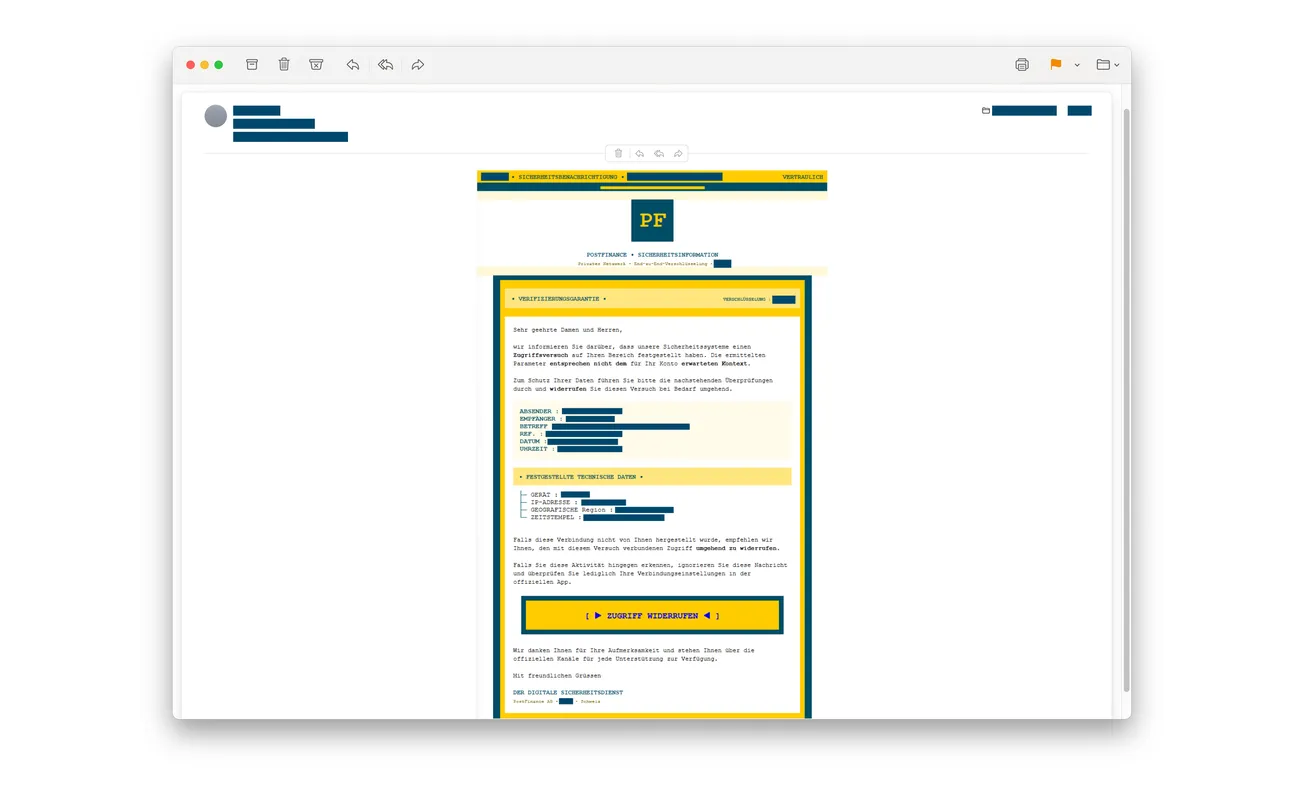
An email says someone tried to access your PostFinance account from abroad. A yellow button offers to revoke that access before anything worse happens.
It looks like a chance to stop a problem early. The next page asks for far less than you might expect.
Overview
The login warning is the impersonation, not proof of a break-in
The PostFinance login alert scam claims an unexpected foreign login needs your attention. Its link opens a website impersonating the Swiss financial institution.
The first form described by police requests your first name, last name, and phone number. It doesn’t need to start by asking for a banking password.
Zurich cantonal police’s October 14 warning confirms the deceptive email and cloned website. The original email above retains the police’s privacy redactions.
Receiving it doesn’t establish that anyone entered your real bank account. The apparent security incident is the story used to make you respond.
A small form can prepare a much more convincing phone call
The collected information can help criminals contact recipients while pretending to work for PostFinance. They may also use it for other fraud.
A later caller can know the name you supplied and the security issue you thought you reported. That familiarity isn’t independent confirmation.
- A supposed login from another country creates a reason to act.
- The email offers a button for revoking the unwanted access.
- A lookalike page gathers names and a callback number.
- Those details can support a later bank-impersonation approach.
- The real account must be checked outside the message and any resulting call.
Check with the bank before following the supposed security process
Open your genuine PostFinance app or use a trusted bookmark. If you’re unsure about account activity, contact the bank through its established support route.
Don’t use the suspicious page to request a callback. That leaves the person collecting your information in control of who calls next.
The warning concerns outsiders impersonating PostFinance. It is not an allegation that the institution sent the fraudulent email or stole customer information.
Why “I Only Gave My Phone Number” Still Matters
People know they shouldn’t hand a stranger their banking password. A form asking for contact details can feel like a safer category of request.
It may resemble the information you’d give a genuine support desk. The question is who operates that desk, not whether the fields look ordinary.
Here, the supposed bank incident supplies a believable reason for someone to telephone you. The form connects that story to a reachable person.
If a caller later mentions the attempted login, you might assume the bank saw your report. In reality, you may be hearing your own submission repeated.
That distinction helps you respond without panicking. Names and phone numbers aren’t the same as a banking login, but they can make the next approach persuasive.
You should tell the bank what you disclosed, while keeping actual account access separate from the fake email’s claims.
Don’t assume every unknown call afterward belongs to the same criminals. Apply the independent-callback rule rather than trying to identify callers by intuition.
You can end a call politely without deciding who is speaking. The real institution can handle your inquiry through a number you obtain yourself.
How the PostFinance Login Alert Scam Works
Step 1: A security message makes an ordinary inbox feel urgent
The email claims the bank detected an unexpected attempt to enter your account. A subject such as “Sicherheitsüberprüfung nötig” frames the message as a necessary security check.
The original example uses yellow branding, security language, and apparent technical details. These features dress the request as an account-protection notice.
A list of device, location, and time fields can look like a bank record. It doesn’t prove the sender actually checked your account.
A familiar logo can make you recognize the brand while missing the more important question: who supplied the instruction?
Step 2: The email offers a reassuring choice
Recipients are told to revoke the access if they didn’t initiate it. If they recognize the activity, the email refers them to settings in the official app.
That second, sensible-looking option can make the whole message feel measured. It appears to distinguish a genuine user action from a suspicious one.
But a legitimate recommendation in one sentence doesn’t authenticate the button in another. Scammers can mix useful advice with a harmful next step.
Use the real app independently for either situation. Don’t let the email determine which website should collect your response.
Step 3: The revoke-access button opens a cloned page
The button labeled “Zugriff widerrufen” leads to an imitation of PostFinance’s website. The next request is for identification and contact information.
Your first and last names and telephone number go to the page’s operators. Filling it in doesn’t revoke anything on your actual bank account.
The published warning doesn’t establish that this initial form collects every kind of security credential. Be precise about what you actually entered.
If you stopped before submitting, don’t return to test the form. You don’t need to complete a fraud attempt to report it.
Step 4: The information can be reused as apparent bank knowledge
A subsequent caller may impersonate a bank employee and use the collected details to make the conversation feel expected.
The dangerous assumption is that knowing about your concern proves the caller belongs to the bank. The concern may have reached the criminal first.
Police warn about this potential follow-up, not that every recipient necessarily receives an identical call or loses money.
If a caller introduces a new task, stop and verify it independently. Don’t treat the earlier form as permission for whatever they ask next.
When the “Bank” Calls Back
Take control of the contact route
Say you’ll contact PostFinance yourself, then end the call. Find the number in the genuine app, an existing bank document, or the official website.
Don’t accept a number dictated by the caller or a transfer to another supposed department. Those options keep the same conversation in control.
Explain to the real bank that you entered details through a false login warning. Ask whether anything needs checking on your actual account.
If the caller insists that hanging up will cause a loss, that’s an additional reason to pause. Verification should not depend on obeying their instructions.
Don’t confuse a security check with giving someone control
PostFinance separately warns about fraudulent callers requesting software installation, security information, or weakened device protections. Those are not harmless ways to prove you’re the account holder.
That broader warning doesn’t establish that the October email always leads to software. It tells you which later request needs an immediate stop.
Never approve a login or transfer while someone is coaching you through an alleged investigation. Read the actual prompt rather than the caller’s explanation.
If you cannot understand an approval request, decline it and ask the genuine bank. Uncertainty should not be resolved by giving the caller another code.
Record facts without investigating the caller yourself
Keep the number displayed, the call time, and what was requested. The displayed number can be a useful record without proving who controlled the call.
Don’t call it back to challenge the person or post a real employee’s name as an accusation. Borrowed identities are part of this kind of fraud.
Tell relatives or colleagues helping you which route was independently verified. That prevents somebody from returning to the suspicious message while trying to assist.
If you expect a legitimate callback, arrange it through the real bank after explaining the incident. Don’t use the suspicious form as your appointment system.
Keep the agreed contact arrangements somewhere you can find them. A caller who reaches you first shouldn’t automatically inherit the authority of the bank you’re expecting.
If somebody else submitted the household’s details, ask which phone number they used. The next approach may reach a different person from the one who clicked.
That person needs the warning too. Explain the false foreign-login story without sending them an active link to the imitation page.
Match Your Next Action to What You Shared
If you only received the email, you don’t need to accept its claim of foreign access. Report it and use your real account for reassurance.
If you submitted names and a phone number, expect that information to be available for targeted approaches. A password change alone won’t erase those details.
If a later conversation obtained login information or approvals, the problem has moved beyond the initial form. Tell the bank about both stages.
Separate a payment you see in actual bank records from a transaction the caller merely describes. The bank needs the former to investigate a loss.
For a shared or business account, involve the authorized account contact. Don’t let several people independently follow instructions from the same suspicious caller.
Keep a brief timeline: email received, page opened, information submitted, calls received, and any action approved. It helps without requiring another visit to the website.
What to Do if You Have Fallen Victim to This Scam
-
Stop the false security process. Close the page and end calls arising from it. Don’t submit another form to cancel the first submission.
Preserve the original email before removing it from your normal inbox. Keep the suspicious destination already recorded, but don’t reopen it for screenshots.
-
Contact the real PostFinance support team. Use the bank’s official suspected-fraud instructions to choose the appropriate blocking or assistance route.
Tell staff whether you shared contact details, credentials, card information, or an approval. These aren’t interchangeable exposures and shouldn’t be reported as if they were.
-
Protect actual access if it was exposed. Follow the bank’s directions for blocking or restoring the affected login or payment method.
Replace disclosed or reused passwords through the genuine services. Check your email account too if its password was shared or reused.
-
Report any payment immediately. Supply the real amount, time, beneficiary, and transaction reference. Ask what action is still possible.
Don’t wait for the supposed investigator to finish a security review. A caller’s promise to reverse a payment isn’t a completed bank recovery.
-
Handle software exposure separately. If a caller persuaded you to install something or grant remote access, disconnect that session and obtain trusted technical help.
Malwarebytes may help check suspicious software. AdGuard can reduce exposure to known malicious destinations, but neither removes contact details already collected or reverses banking approvals.
-
Warn anyone helping with the account. Explain that a callback mentioning the email isn’t automatically authentic. Agree to reach the bank independently.
Keep evidence private. A safe description is enough to warn others without publishing your full contact details or account documents.
-
Use the appropriate police reporting route. Cybercrimepolice’s reporting guidance distinguishes threat tips from formal criminal complaints.
If money was lost or personal data misused, contact your competent local police. Save bank and police case references together for follow-up.
Before Trusting the Next Security Alert
A useful habit is to separate the alert from the action. You can take a possible problem seriously without using the link that announced it.
Go to the genuine account, then decide what needs doing. That keeps a false message from appointing its own website as the solution.
PostFinance also publishes guidance on genuine email security. Read that through the real site, not through instructions inside a questionable message.
Don’t reduce the check to a logo, a polished layout, or the presence of security language. All three can appear in the material you’re trying to verify.
For family members who prefer telephone help, keep the genuine bank contact somewhere easy to find. A trusted route is more useful than a long blacklist.
And if you’ve already made a mistake, say exactly what happened. A clear description lets support act faster than trying to minimize or exaggerate the exposure.
Frequently Asked Questions
Does this email prove somebody logged into my bank account?
No. The supposed foreign login is part of the fraudulent message. Check actual account activity through the genuine bank independently.
Why would the fake page ask only for my name and phone number?
Those details can prepare a convincing follow-up call. An apparent bank employee may repeat the concern you submitted to make the contact feel expected.
Is a callback mentioning my security report trustworthy?
Not by itself. If the report went to a criminal’s page, that person already knows about it. End the call and contact PostFinance independently.
Did submitting the form revoke the alleged access?
No. The imitation page isn’t a bank security control. Ask the real bank about actual access if you disclosed anything or approved an action.
Should I change every password after sharing only a phone number?
Match the response to the exposure. Tell the bank what you shared and watch for targeted calls; secure any credentials actually disclosed or reused.
Can an antivirus scan stop the caller using my details?
No. A scan can address relevant device threats, not information already handed over. Independent contact and account protection remain necessary.
The Bottom Line
Don’t revoke bank access through the PostFinance login alert scam. Check the real account and reach the bank through a contact route you control.
If you already submitted details, tell PostFinance what you shared. Treat a knowledgeable callback as unverified and report any credentials, approvals, or payments promptly.

Join the discussion
0 commentsShare your experience or ask a question about this article.
Discussion
Start the conversation
Have a question or something useful to share? Add the first comment.