

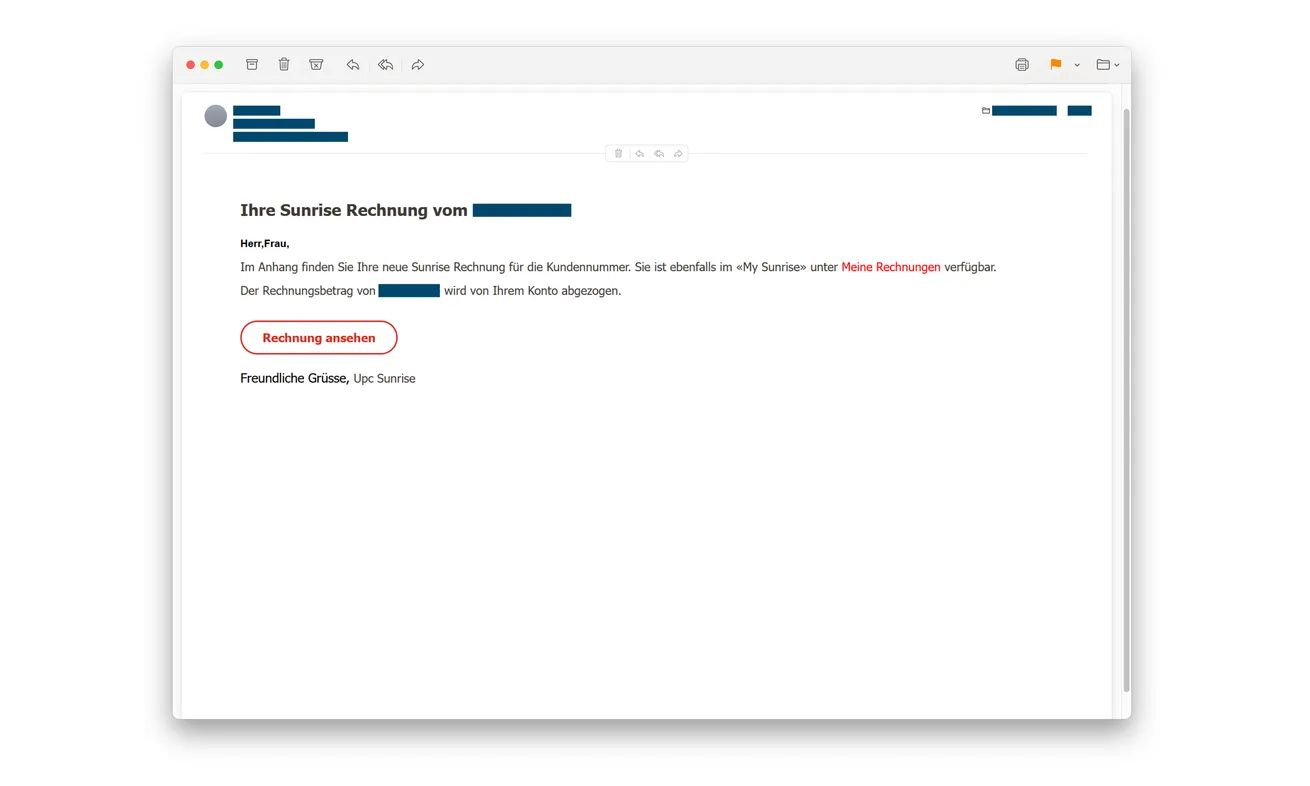
Your new Sunrise bill is apparently ready. The email looks like routine account mail, with a familiar-looking button inviting you to view the invoice.
The page that opens even warns about phishing. That reassuring detail is worth looking at much more closely.
Overview
A fake invoice sends customers to an imitation login
The Sunrise invoice phishing scam starts with an email about an apparent bill. Its “Rechnung ansehen” button takes the recipient to a fraudulent website.
That page copies Sunrise’s appearance and asks for the email address and password used for the customer’s account.
Zurich cantonal police’s October 7 advisory confirms the credential-theft mechanism. Information entered in the imitation login goes to the criminals.
The original email above was published with identifying fields obscured. Sunrise is the impersonated provider, not the operator of the fake page.
The security notice belongs to the same deceptive page
Beside the login form sits an “important notice” warning about phishing emails, suspicious links, and giving away personal information.
At the same time, the page asks for the very account information the criminals want. The warning doesn’t authenticate the form next to it.
- An ordinary-looking billing email creates a familiar reason to sign in.
- The invoice button leads away from the genuine account route.
- The destination borrows Sunrise branding and login design.
- Anti-phishing advice provides reassurance without protecting the submitted password.
- The safe billing check happens through the real provider, outside the email.
Protect the login without neglecting a real bill
Open Sunrise through your established app or a known website bookmark. Check whether an actual invoice needs attention there.
If you entered your password on the fake page, change it through the genuine service and contact Sunrise about the exposure.
Ignoring the fraudulent message doesn’t settle a genuine balance. Treat the real account and the impersonation as separate matters.
Why a Phishing Warning Can Become Part of the Bait
Most people associate scam pages with obvious pressure or sloppy writing. A detailed warning about online safety can feel like evidence that somebody responsible runs the site.
That feeling is useful to an impersonator. The text appears to answer your concern before you’ve checked who controls the page.
A warning can be accurate as general advice while sitting beside a fraudulent form. Its meaning doesn’t establish the identity of the person publishing it.
The same applies to a lock icon or HTTPS address. An encrypted connection can protect data in transit while delivering it to the wrong recipient.
Ask where the information is going, not merely whether the page talks about protecting it. The destination is the question the security copy cannot answer.
Once you see that distinction, you don’t have to decide whether the notice sounds sincere. You can check the bill through the real account instead.
The copied brand is another shortcut for recognition. A customer may notice the provider’s colors and move straight to the password field.
But recognizing a design isn’t the same as recognizing an authenticated account session. A criminal can reproduce the former without controlling the latter.
How the Sunrise Invoice Phishing Scam Works
Step 1: A billing email arrives as ordinary administration
The message claims a new Sunrise invoice is available. It presents viewing the bill as a normal task rather than an unusual financial offer.
The original example refers to a bill amount and customer context, with those fields redacted by the publisher. It also points to an apparent invoice button.
That doesn’t establish that the sender knows your real balance or contract. The presence of billing language isn’t proof of access to provider records.
If you weren’t expecting a bill, don’t use the email to resolve that uncertainty. Your actual customer account is the better starting point.
Step 2: The view-invoice button changes the destination
Clicking “Rechnung ansehen” opens the fraudulent site. The reader’s purpose still feels harmless: see a document and understand a charge.
The site now decides what must happen before that document appears. A login prompt can look like a natural continuation of the billing process.
Don’t enter credentials just because you’ve already clicked. Reaching a page doesn’t commit you to completing the next instruction.
Close it and start again through your known Sunrise route. You can inspect a genuine invoice without accepting the sender’s chosen login page.
Step 3: Borrowed design and safety advice reduce suspicion
The destination resembles the provider’s site. Alongside the sign-in form, the supposed security notice warns against the kind of attack currently taking place.
This is the distinctive part of the documented campaign. The criminals don’t avoid talking about phishing; they use the subject to look protective.
Check the actual web address and how you reached it. Neither a familiar logo nor an anti-scam paragraph establishes ownership of the site.
You can read the warning without trusting the form. Close the page and reach the account yourself before entering anything.
Step 4: The login fields deliver account information to the operators
The form requests the email address and password for the Sunrise account. Submitting them gives the criminals those credentials.
That exposure can exist even if the page fails afterward or never displays a bill. An error message doesn’t return the information you submitted.
Don’t repeatedly try a second password because the first seems rejected. Stop and secure the actual account through the genuine service.
The police warning establishes credential collection, not a malware infection in every visitor. Respond to what you entered and any separate download or installation.
Step 5: Reused credentials can widen the problem
If you used the same password elsewhere, those services need attention too. The stolen combination may be useful beyond the provider account.
Prioritize any email account sharing that password because recovery messages for other services may arrive there.
Don’t assume changing one account automatically changes another. Replace exposed credentials individually through each real service and use different passwords.
Tell Sunrise about the incident so account activity can be reviewed. A password reset is important, but it isn’t proof that no changes occurred beforehand.
Check the Actual Invoice Without Revisiting the Fake Page
Use the billing route you already know
Open the provider’s genuine app or independently navigate to its website. Avoid a search advertisement promising an easier support login.
Look for your actual billing period, amount, and payment status. Compare those records with what the email claimed, without supplying information back to the sender.
The original email even says the invoice is available under “Meine Rechnungen” in My Sunrise. You can check that claim without using its red button.
Open the real account as you normally would and inspect its own invoice list. A legitimate bill should be investigated there, not through an imitation sign-in.
If a family member handles payments, compare notes before somebody retries the suspicious link. Knowing who actually pays can clarify an unexpected reminder.
Don’t send that person your password as part of the check. They can review their authorized records or help you reach genuine support.
Keep any actual invoice you find separate from the phishing message. The two may concern the same provider without belonging to the same communication.
If the account shows an unpaid bill, handle it through the established process. The scam doesn’t make legitimate payment obligations disappear.
Ask support about the specific message
Explain that an invoice email led to a login page displaying an anti-phishing warning. That detail helps distinguish this campaign from a routine bill question.
Give the subject and time received. If support needs the original, ask how to provide it safely rather than forwarding it to an unfamiliar address.
Sunrise’s official phishing report page accepts suspicious website addresses. Reporting a URL doesn’t itself secure an exposed customer login.
Keep account identity separate from account appearance
A saved password manager entry or trusted bookmark can help keep you on the intended service. Don’t override an unexpected destination just because the design seems right.
Look at the complete address, not a familiar name embedded somewhere inside it. A brand word can appear in an address owned by somebody else.
A page can also change while an email stays the same. Your response should not depend on the imitation remaining online long enough to inspect it again.
What to Review After a Password Was Entered
Start with whether you can still access the real account. If not, use genuine provider recovery rather than a reset link sent by the suspicious page.
Review contact details and recent activity where available. Report changes you don’t recognize instead of silently correcting them and losing track of what happened.
If the account is shared within a household or managed for a business, tell the authorized person. They may otherwise mistake fraudulent changes for yours.
Check whether you submitted anything besides the login: identity information, payment details, an authentication code, or a downloaded file.
A bank needs to know if a card was exposed. Provider support needs to know about the customer login. One report doesn’t automatically reach both.
Keep the actions you actually completed separate from instructions you merely saw. That makes the response more useful than assuming the worst at every stage.
What to Do if You Have Fallen Victim to This Scam
-
Leave the imitation login. Don’t try another password, pay a verification amount, or wait for the page to display the promised invoice.
Save the message and any destination already available in your records. There is no need to visit the fake site again to prove you clicked.
-
Replace the exposed Sunrise password. Reach the actual account independently and follow its password-change or recovery process.
Use a fresh password not shared with other services. If you can’t regain access, contact the provider through genuine support without delay.
-
Check reused passwords and available protections. Secure other accounts using the same login information, especially your email account.
Enable additional authentication where the real service supports it. Don’t approve an unexpected prompt while somebody claiming to help is directing you.
-
Notify Sunrise about possible account misuse. Describe the false invoice, the information submitted, and any activity you didn’t authorize.
Ask what account review or session protection is available. Don’t assume the provider has already seen the fake form simply because it uses their branding.
-
Call the payment provider if financial details were also shared. Identify any card submission, approval, or actual charge separately from the login exposure.
Discuss blocking or disputing affected transactions through the bank. No security notice on the fraudulent site can guarantee that money is protected.
-
Address downloads only if they happened. If you opened an unexpected file or installed something, use trusted technical assistance and consider a Malwarebytes scan.
AdGuard can help block known harmful destinations. It cannot change the stolen password for you or undo information already sent through the form.
-
Report the fraud and retain your records. Send a tip through the genuine police portal or provider route, not a contact supplied by the fake page.
Where loss or misuse occurred, contact local police about a formal report. The portal’s reporting guidance explains that distinction.
A Safety Paragraph Isn’t a Safety Certificate
You don’t need to memorize the exact wording of this campaign. Another version can change the invoice subject while retaining the same false reassurance.
The durable question is whether you independently reached the real provider before entering a password. That remains useful when the page becomes more polished.
For someone helping a relative, explain the contradiction plainly: the page warns against giving away information while asking them to give it to that page.
Then provide the genuine billing route. Replacing the risky action with a practical alternative is more helpful than saying every online invoice is dangerous.
If the password has already been exposed, focus on securing it now. Embarrassment doesn’t protect an account; accurate, prompt reporting can help contain the incident.
Frequently Asked Questions
Is the security warning on the fake Sunrise page genuine protection?
No. Useful-sounding advice doesn’t authenticate its publisher. Police identified a fraudulent login beside the warning, with submitted credentials going to criminals.
Does every Sunrise invoice email belong to this scam?
No. The provider sends legitimate communications. Check an unexpected invoice through the real account rather than trusting a message’s button.
What if the login page rejected my password?
Assume a submitted password may be exposed even if an error appeared. Don’t enter alternatives; change the relevant password through the genuine service.
Must I pay the amount shown in the suspicious email?
Verify the actual balance independently. Handle real bills through the provider’s established process, not through a payment or login route chosen by the email.
Does clicking the invoice button prove my device is infected?
No. This documented attack collects credentials. Describe any separate files or installations before deciding whether device cleanup is needed.
Is reporting the fake URL enough after entering a password?
No. Reporting helps flag the site, but you still need to protect the exposed login, reused credentials, and any other information submitted.
The Bottom Line
Don’t sign in through the Sunrise invoice phishing email. Its anti-phishing notice is reassurance on an imitation page, not proof that the login is safe.
If you entered credentials, secure the real account and contact Sunrise now. Check genuine bills separately and report any additional payment or software exposure.

Join the discussion
0 commentsShare your experience or ask a question about this article.
Discussion
Start the conversation
Have a question or something useful to share? Add the first comment.