

Your groceries depend on the balance on that card. So a text about a declined EBT purchase can interrupt your day in a way ordinary spam doesn’t.
It may look like a helpful warning from Virginia’s benefits system. Before calling the number it provides, look closely at what the message wants you to do.
Overview
A benefits warning becomes a request for secret information
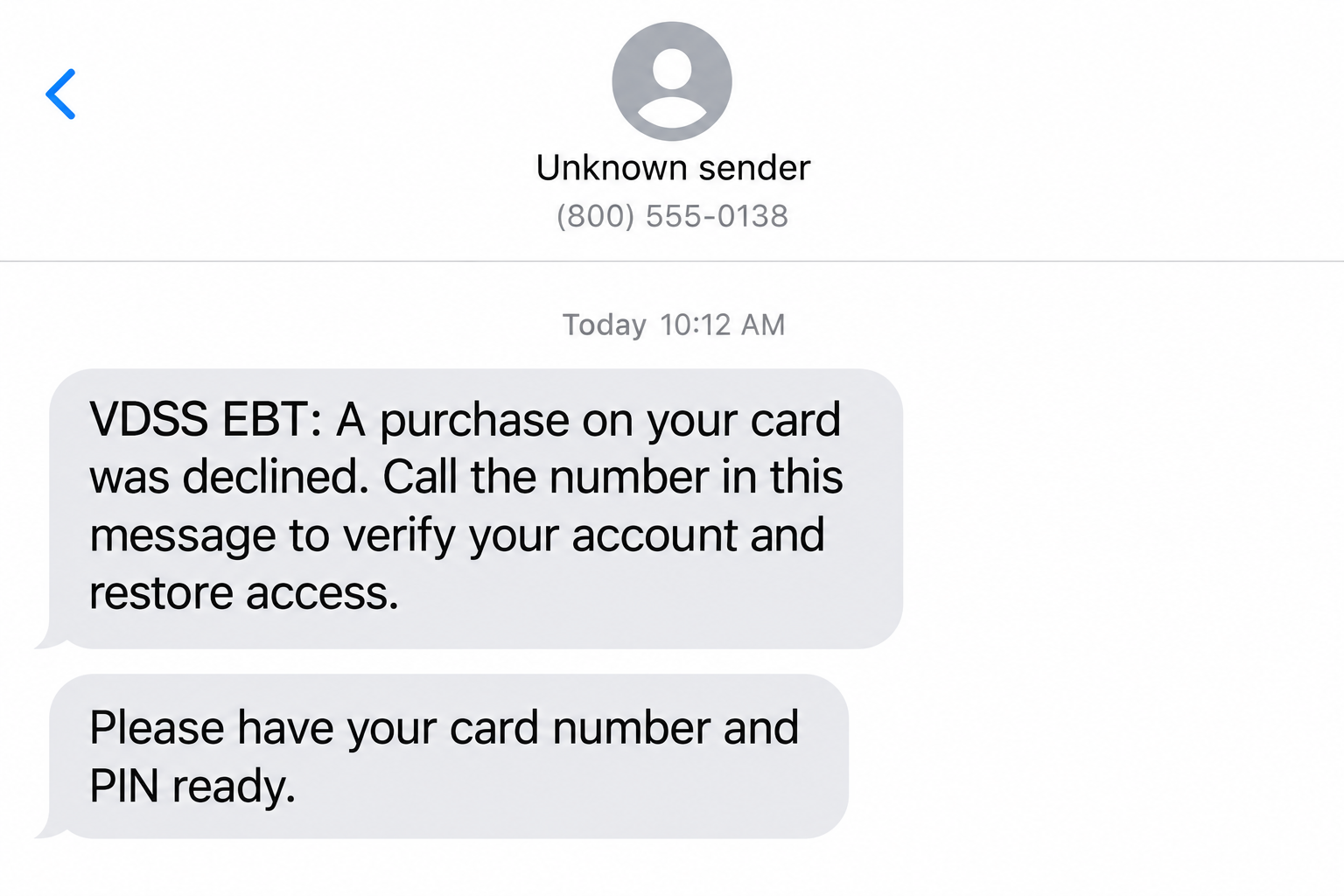
The Virginia EBT text scam uses an alleged account problem to steer cardholders toward a caller, recording, or page that asks for sensitive benefits information.
A declined purchase, locked card, or verification request supplies the reason to respond. The dangerous turn is surrendering a card number or PIN through that unverified route.
The sample image is an illustration with invented contact details, not an authentic delivered text. Its purpose is to make the request easier to recognize.
Virginia publishes a different route for account help
The Virginia Department of Social Services warns about messages asking for EBT information. It directs customers to its helpdesk when they initiate contact themselves.
The published Virginia EBT customer-service number is 866-281-2448, available around the clock. Confirm it through the state website or your card before using it.
The state’s EBT scam warning specifically identifies account-verification links and requests for card numbers or PINs as dangers.
The message’s display is not an identity check
- A state-agency abbreviation can be typed into an ordinary message.
- A specific purchase amount can make a warning sound precise without proving account access.
- A short code or notification-service label doesn’t authenticate the instructions by itself.
- A toll-free callback may sound professional while remaining unverified.
- A request for your PIN should stop the conversation, not speed it up.
A notification label doesn’t tell you who wrote the request. Verify the account problem through VDSS rather than trying to identify the sender from the display.
Why the Declined-Purchase Story Feels Urgent
A fabricated purchase creates two worries at once. Perhaps somebody has your card, or perhaps your household won’t be able to buy food when needed.
The message offers a quick way to settle both questions: call now, answer a few prompts, and restore normal access.
That apparent convenience is the problem. You’re being asked to let the same unverified message define the emergency and choose the person who will supposedly fix it.
A familiar store name or small amount doesn’t settle whether the purchase happened. Check the actual transaction history through your established account instead.
If the account doesn’t show the claimed transaction, that gives you a concrete fact to discuss with genuine support. Don’t return to the message for an explanation.
If there is an unfamiliar transaction, treat the account concern seriously. It still doesn’t make the message’s callback trustworthy.
You don’t have to decide between ignoring your benefits and obeying the text. The official app, portal, and card helpdesk give you another route.
How the Virginia EBT Text Scam Works
Step 1: A short notice imitates an account alert
The opening message uses the language of routine account monitoring. It may refer to a declined purchase or claim access has been interrupted.
There doesn’t need to be a real transaction behind it. A warning can be distributed without the sender having access to your account history.
Receiving one is therefore not, by itself, evidence that somebody has already spent your benefits. Your authentic account record is the place to check.
Keep the text if you need to report it, but don’t reply to ask which purchase it means. That continues the conversation on the sender’s terms.
Step 2: The notice points you toward its own help route
The text supplies a telephone number or link as the next necessary step. Check that route separately, even if the account warning sounds believable.
A number being toll-free doesn’t identify its operator. An official-looking page title doesn’t identify who controls the form beneath it.
The FTC’s unexpected-text guidance recommends finding the organization through information you already trust, rather than using the message’s instructions.
Open your previously installed benefits app yourself. If you need telephone help, use the physical card or the state’s published customer-service information.
Step 3: A verification process asks for the card and PIN
The caller or page may present the request as a routine identity check. A recording can sound familiar even when the people operating it are not authorized.
Entering digits into a telephone keypad is still disclosure. You don’t have to speak to a person for an untrusted system to receive what you enter.
The same applies to a web form. Typing secret information into the wrong page can expose it before you receive any useful confirmation.
Don’t experiment by supplying only part of the information. Stop and contact the actual benefits service if you have started entering card details.
Step 4: The stolen details put the balance at risk
Card information and a PIN can be used to attempt unauthorized benefit purchases. The account problem the message claimed to solve can become a real loss.
You might still have the physical card. Possession of the plastic doesn’t rule out exposure of the information used to authorize transactions.
Check activity promptly rather than waiting for your next shopping trip. A replacement card and a PIN change address different parts of the exposure.
Ask verified support what protection is needed for your particular account. Don’t assume changing an unrelated email password will secure an exposed EBT card.
Step 5: Another instruction delays the real response
A follow-up may tell you to wait for access to return or offer another verification step. Continuing the exchange postpones contact with genuine support.
You don’t need a final error message or a missing balance before acting. Sharing sensitive information through an unverified route is enough reason to seek help.
Don’t send a photo of a replacement card to prove the issue is resolved. Keep new credentials separate from every contact that came from the original message.
If someone promises reimbursement for a fee, verify that claim with the administering agency. A stranger’s promise isn’t a benefit-replacement decision.
Virginia’s Real Account Tools and What They Actually Do
Use the official ConnectEBT route
Virginia identifies ConnectEBT as its approved app for SNAP EBT account management. Reach it through the state’s EBT page, not a sponsored download or forwarded link.
Check your balance and transaction history there. Comparing the real record with the text is more useful than arguing with whoever sent the warning.
Install updates through your established app store. Don’t install a separate security utility, remote-access application, or replacement benefits app because a text tells you to.
Lock the card between purchases
Virginia’s card-lock instructions explain how to choose Lock My Card Everywhere in ConnectEBT. Unlock only when you are ready to use the card.
While locked, purchases are blocked, but deposits, credits, and refunds can still arrive. A lock is not the same as closing your benefits case.
If your household has multiple EBT cards, Virginia says each must be locked for the feature to work. Check every relevant card rather than assuming one switch covers all.
Locking helps protect future spending. It doesn’t refund an earlier unauthorized transaction, replace exposed card details, or establish who sent a suspicious message.
A new chip card doesn’t make a PIN request safe
Virginia began its chip-card rollout in September 2026. The state says these cards make skimming and cloning more difficult than with the older magnetic-stripe cards.
That’s useful protection against a different route to theft. It doesn’t turn a fraudulent call into a safe place to share account secrets.
The state’s chip-card announcement still emphasizes guarding card numbers and PINs. Don’t assume new hardware removes the need to check a message’s instructions.
Questions about card delivery or mailing details belong with your local agency. Don’t send identity documents to a person who approaches you about speeding up delivery.
What to Do if You Have Fallen Victim to This Scam
- Stop using the callback or link.
End the call and close the page. Save the suspicious notice separately so you can describe it without reopening its link.
If you only received the text and disclosed nothing, start by checking your real account. Receipt alone doesn’t require assuming your balance has been stolen.
- Secure the EBT card through Virginia’s actual support.
Call the helpdesk using the state-published number or your card. Explain whether you supplied the card number, PIN, account password, or other information.
Request guidance on replacing the card and resetting exposed access. Use ConnectEBT’s card lock where available while you arrange the appropriate response.
Choose a different PIN rather than a minor change to the old one. Don’t disclose the new number to anyone who follows up about the suspicious text.
- Review the transaction history with support.
Write down unfamiliar merchants, amounts, dates, and times. Separate an actual unauthorized purchase from the purchase merely described in the scam message.
Ask how to document suspected electronic theft and which office handles the report. Keep any incident or reference number you receive.
Don’t assume a reporting form guarantees replacement benefits. Ask the local agency which current rules, deadlines, and assistance options apply to your loss.
- Protect any additional information you supplied.
If you reused the exposed password elsewhere, replace it on those accounts through their genuine sites. Review your recovery contacts for unauthorized changes.
When Social Security or identity-document details were disclosed, use IdentityTheft.gov to choose suitable protective steps. Keep the response proportionate to what actually left your control.
Report unrelated bank-card information to the relevant financial institution too. An EBT helpdesk cannot secure a separate debit card or bank account for you.
- Preserve the evidence and report the message.
Keep the full text, sender display, callback number, timestamp, and any page address. Save transaction records without including your PIN in the report.
Use your messaging service’s reporting feature and the state’s official assistance channels. You can also submit the impersonation to the FTC’s fraud-reporting service.
A public warning doesn’t need your full card, household case number, or unredacted statement. Share those details only through appropriate verified channels when required.
- Deal separately with any software or device exposure.
If the contact persuaded you to install software, remove the unwanted program and run a reputable security check, such as Malwarebytes, on a supported device.
AdGuard can add filtering against some malicious pages and advertising. Neither tool replaces changing an exposed PIN or reporting unauthorized benefit purchases.
Reading an SMS doesn’t mean malware is installed. Device cleanup is relevant to a download, permission, or access event, not every unwanted message.
Keep Grocery Access and Fraud Reporting Separate
Finding an unfamiliar purchase can leave you worrying about tonight’s meal before any investigation begins. Tell the local agency about that immediate practical problem.
Ask what food-assistance resources are available while your account is being secured. Don’t treat a promise from the text sender as an alternative to verified help.
If you help manage benefits for another household member, explain which card or account was affected. Avoid changing unrelated credentials without checking who needs access.
Store the verified helpdesk number somewhere independent of your text inbox. It’s easier to choose a trusted route when you don’t have to locate it under pressure.
After shopping, take a moment to relock the card if you use that feature. Building the step into your routine is more reliable than remembering only after warnings.
Review the account again after securing it. If new activity appears, bring the updated details to support rather than assuming the earlier report covers everything.
Frequently Asked Questions
Will VDSS text me to ask for my EBT PIN?
VDSS warns against these requests. Don’t disclose the PIN through an unsolicited message, callback, or linked form. Initiate contact using the state’s verified support route.
Does a declined-purchase amount prove the sender can see my account?
No. A realistic amount can be invented. Compare the claim with the transaction history inside your authentic account and discuss unfamiliar activity with genuine support.
Is every message from a short code or notification service fraudulent?
No. The display alone doesn’t establish the sender or authenticate an EBT request. Examine the instructions and use independently verified account tools instead.
Will locking my Virginia EBT card stop benefit deposits?
Virginia says purchases are blocked while the card is locked, but deposits, credits, and refunds continue. Unlock the card when you’re ready to shop.
Can I safely enter card details when I call the real helpdesk?
The key difference is selecting the correct number independently. Follow the verified system’s account-assistance process, not prompts reached through an unexpected text.
Are stolen SNAP benefits automatically reimbursed?
Don’t assume automatic replacement. Report the loss promptly and ask your local benefits office about the rules and available assistance applying to your situation.
The Bottom Line
Do not follow a Virginia EBT text scam into a PIN request. Check the real account yourself and use VDSS’s published helpdesk rather than the message’s callback.
If you disclosed secrets, act now: secure the card, reset exposed access, review purchases, and report any loss. A polished alert is not authorization to share benefits information.

Join the discussion
0 commentsShare your experience or ask a question about this article.
Discussion
Start the conversation
Have a question or something useful to share? Add the first comment.