

The link looked suspicious, so you checked it. The scanner found nothing worrying. Yet the page still wants your password, and something about the message doesn’t feel right.
That mismatch deserves attention. A clean scan can be useful information without answering the question you actually need answered: should you trust this particular request?
Overview
A phishing site can choose who sees the dangerous page
Phishing cloaking means hiding deceptive content from some visitors while presenting it to others. A scanner and a recipient may therefore encounter different versions of one address.
The deception still depends on a familiar request: sign in, confirm a payment, open a document, or complete an allegedly necessary step.
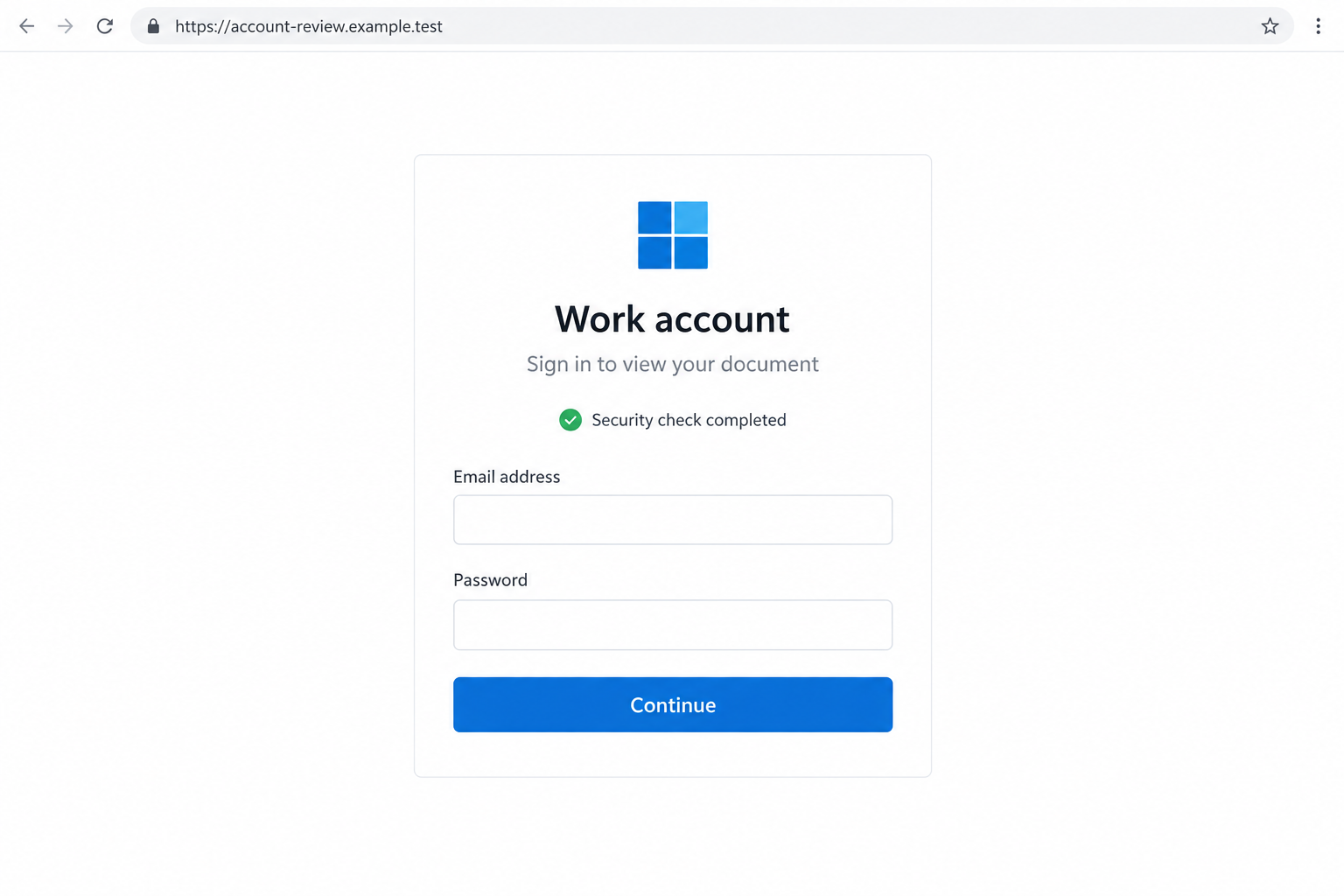
The interface above is a non-functional illustration, not a captured campaign page. It shows why a reassuring security message cannot authenticate the login form that follows.
Researchers have documented conditional delivery and verification gates
Microsoft has described malicious infrastructure that delivered a macOS download lure to selected visitors and decoy content to others. A harmless-looking response didn’t settle the domain’s purpose.
A separate Microsoft investigation documented a phishing journey with a CAPTCHA before credential theft. That gate appeared intended to hinder automated inspection.
These are examples of observed behavior, not proof that every unavailable website is cloaked or that every CAPTCHA belongs to a scam.
Judge the request as well as the scan result
- Was the message expected, and can you verify it without using its link?
- Does the destination belong to the service whose credentials it requests?
- Are you being hurried into a payment, login, download, or verification approval?
- Does a security-looking page ask you to run a command or install something?
- Can the same task be completed by opening the genuine app directly?
A scanner is one layer of protection. An unexpected request shouldn’t become trustworthy simply because a result page shows no detection.
What a Clean Result Does and Doesn’t Tell You
A scan reports what a particular service could assess under its own conditions. It isn’t a personal guarantee covering every later interaction with that address.
The destination may change, redirect elsewhere, or require an interaction the initial inspection never completed. Some threats may also be too new for available reputation information.
There isn’t just one type of scanner. A reputation lookup, a browser protection service, and a system that follows a page’s behavior answer somewhat different questions.
Calling them all a single test makes it easier to misread the result. Look at what was examined rather than treating a green label as permission.
Microsoft’s Safe Links documentation, for example, describes checks during message processing and at click time. Some defenses do much more than inspect a link once.
That doesn’t mean you should disable them when something feels wrong. Keep the protection and choose a different way to verify the underlying message.
A login opened through your usual app avoids depending on the suspicious link’s journey. You’re changing the route, not trying to outguess the attacker.
How a Cloaked Phishing Scam Works
Step 1: A believable message supplies a reason to click
The opening might be a shared document, an account notice, or a parcel problem. Its job is to make the destination seem connected to something you need.
A familiar brand can supply instant context, but the sender’s claim and the destination’s identity are separate questions. Both deserve checking.
For work messages, compare the request with what you were actually expecting. A surprise disciplinary document or urgent invoice deserves confirmation through an established contact.
Don’t reply to the questionable message as your only check. Reach the person through a saved conversation, known telephone number, or your organization’s normal system.
Step 2: The destination decides which experience to show
Conditional delivery lets malicious infrastructure present different material depending on the visit. The selection can leave some observers seeing an innocuous page instead of the lure.
In Microsoft’s macOS cloaking investigation, qualifying visits received a counterfeit download experience. Other requests could receive unrelated decoy content.
That example involved malware delivery, not simply a stolen-password form. Cloaking describes the hiding behavior; the harmful action behind it can differ.
You may see a real-looking login while someone checking from another environment sees an unrelated page. Their result doesn’t cancel your reason to stop.
Step 3: A security-looking interruption keeps the journey moving
A verification challenge can make a suspicious destination appear careful about security. You may interpret the extra step as evidence that someone responsible is protecting access.
But the challenge and the page behind it are separate. Completing a legitimate-looking browser check doesn’t establish who will receive the information entered afterward.
Microsoft’s code-of-conduct phishing analysis describes a CAPTCHA before a credential-harvesting journey. The challenge helped gate access; it did not make the destination authentic.
Don’t treat every challenge as malicious, either. The warning comes from the surrounding request, destination, and behavior, not from a checkbox existing on the page.
Step 4: A familiar form asks for something valuable
Once through the gate, the page may imitate an account login or another trusted workflow. A copied logo can make the transition feel seamless.
Slow down at the point where information leaves your control. A password field on an unrelated domain is not fixed by a reassuring banner above it.
Some phishing journeys also seek verification codes or relay an authentication session. Entering a one-time code can therefore matter as much as sharing a password.
If the request concerns a workplace account, contact your IT team before attempting another sign-in. They can examine the account, message, and destination together.
Step 5: The page can create another task after the first response
A loading screen or error may encourage you to retry, use another account, or complete an additional check. Don’t assume failed access means nothing was submitted.
A malware lure can instead demand a download or a command presented as a verification fix. That is a different exposure requiring a device-security response.
Never paste commands into a terminal because a webpage says it is necessary to prove you’re human. Close the page rather than troubleshoot its instructions.
You don’t need to complete the sequence to determine whether the original request was appropriate. Stop when it asks for an action you cannot independently justify.
Step 6: A later check may fail to reproduce what you saw
A different visitor might see an error or a harmless destination. That mismatch can make a recipient doubt their own experience or dismiss a colleague’s warning.
Preserve what you already have: the original message, time, visible address, and a description of the request. Those details are more useful than repeatedly reopening the link.
Don’t conclude that a blank page proves cloaking. A broken server, expired link, ordinary access restriction, or removed page could also explain the result.
Let a security team investigate the discrepancy. You can protect your account without proving which technical explanation applies.
Checks That Don’t Require Following the Suspicious Link
Look for the task inside the real service
Open the genuine account portal from a bookmark or established app. A supposed document, billing notice, or security event may be checkable there.
If it isn’t visible, contact support through that service. Don’t use the suspicious page’s chat window to verify the same page.
This approach also helps with legitimate messages that look unusual. You can complete a real task without deciding whether an unfamiliar email layout is genuine.
Check what the address actually identifies
A service name placed inside a longer address isn’t necessarily the domain controlling it. Read the destination carefully before entering anything sensitive.
In the illustration, example.test is a deliberately non-functional example, not your employer’s identity provider. An official-looking form cannot change who controls its address.
Long links and approved third-party services can be legitimate. When the ownership or purpose isn’t clear, ask through a known channel rather than guessing.
Keep the original message for your security team
For a work account, use the organization’s phishing-reporting method. Forwarding a cropped screenshot alone may leave out routing and sender information an investigator needs.
Describe what happened without including your password or verification code. Mention whether you merely opened a page or actually entered information.
Don’t publish personalized login or document links in public comments. A link can include account-specific information even when the page itself looks ordinary.
What to Do if You Have Fallen Victim to This Scam
- Stop interacting with the destination.
Close the page and stop approving prompts associated with it. Don’t supply a second account because the first sign-in appeared to fail.
If all you did was view the page, record that accurately. Seeing a suspicious login isn’t the same as giving it your password.
- Restore account control through the genuine service.
Use the trusted app or known website to change an exposed password. Replace it elsewhere if you reused the same secret.
Review recovery contacts and available sign-out or session controls. For an organizational account, ask IT to investigate and revoke unauthorized access where needed.
Don’t assume a password reset automatically resolves every active session. Tell support if you also entered an authentication code or approved a notification.
- Check for actions performed through the account.
Look for unfamiliar sign-ins, sent messages, changed recovery details, or unexpected account activity. Review relevant settings with support rather than changing controls you don’t understand.
If your account sent messages to colleagues or contacts, alert the people affected through a trustworthy channel. Explain which earlier message they should avoid.
The FTC’s account recovery guide provides practical checks after email or social-account compromise.
- Respond separately to payment or identity exposure.
Contact the financial institution through its established channels if you entered card or banking details. Identify the account and any transaction you do not recognize.
Ask what can be secured, replaced, or disputed. Don’t wait for an account password change to address a payment instrument exposed on another form.
For disclosed identity information, consider a recovery plan through IdentityTheft.gov. Avoid broad emergency measures unrelated to the information you supplied.
- Address downloads, commands, or remote access.
If you installed software or followed command instructions, tell your security team immediately. Describe the action without running it again to demonstrate what happened.
On a supported personal device, a scan with Malwarebytes can help identify unwanted software. A clean device scan doesn’t by itself restore a stolen account session.
AdGuard may provide another filtering layer against harmful destinations and advertising. Treat it as additional protection, not a guarantee that an unfamiliar login is genuine.
- Report the message without trying to defeat its gate.
Give your organization’s security team the original message and the sequence you encountered. For personal accounts, use the service’s own abuse or phishing-reporting route.
Include when you visited and what the destination requested. Don’t continue solving challenges, changing networks, or retrying to force the dangerous page to reappear.
The FTC’s phishing guidance also explains reporting and account-protection steps. Keep a copy of the evidence before deleting the message.
A Sensible Rule for the Next Suspicious Link
Start with the task, not the scanner score. If somebody says a document is waiting, establish that the document exists through a known conversation or account.
Then consider what you’re being asked to provide. A routine file shouldn’t require an unexplained software installation or a command copied from a web page.
Keep browser warnings and security tools enabled. If a destination is blocked, verify the request elsewhere instead of looking for a way around the warning.
This doesn’t require becoming an analyst. You don’t have to reproduce cloaking, identify a kit, or determine the operator’s location before choosing not to sign in.
For families and teams, agree that a clean result never overrides a suspicious request. That rule is easier to remember than a list of rotating domains.
Frequently Asked Questions
Does a clean URL scan prove a link is safe?
No. It reports the service’s assessment under its inspection conditions. Consider the message, destination, and requested action instead of relying on that result alone.
Is every website that displays a CAPTCHA a phishing site?
No. Real services use verification challenges too. A CAPTCHA doesn’t authenticate the page behind it, and its presence alone doesn’t prove malicious intent.
Does an empty page prove that a scam is using cloaking?
No. Outages, expired links, removal, and access restrictions are other explanations. Treat inconsistent behavior as context for investigation, not a conclusive verdict.
Can a phishing attack get past a one-time code?
Some attacks relay authentication or steal sessions. Tell the service if you shared a code, and ask about session revocation and stronger authentication options.
Should I keep opening the link until the suspicious form returns?
No. Preserve the original message and describe your earlier visit. Repeated interaction adds exposure without being necessary to protect your account or report the problem.
What if I opened the page but entered nothing?
Close it and note whether anything downloaded or requested permission. Viewing alone doesn’t establish credential theft; respond to any actual disclosure, installation, or access event.
The Bottom Line
Don’t enter credentials or run a verification command because a phishing link passed a scan. A cloaked destination can present different content to different visitors.
Open the genuine service independently. If you already responded, secure the affected account and sessions, address any download or payment exposure, and report the original message.

Join the discussion
0 commentsShare your experience or ask a question about this article.
Discussion
Start the conversation
Have a question or something useful to share? Add the first comment.