

A tax refund message can arrive at exactly the right moment: you’re waiting for money, and someone says there’s just one detail left to confirm.
The promise sounds simple. Before sending that detail, though, it’s worth looking at where the instructions actually lead.
Overview
The message offers a refund while asking you to supply information
The Alabama tax refund text scam impersonates the Alabama Department of Revenue, commonly called ALDOR. It claims a refund has been approved or processed.
Then comes the request: hand over personal or financial details through the text’s link. The sender isn’t simply delivering an update anymore.
ALDOR’s official warning identifies these messages as fraudulent. The agency says it does not send texts asking for personal information.
The authority’s own example shows the pressure behind the promise
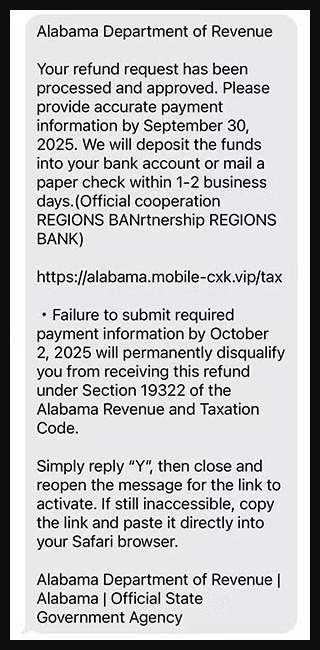
The image above is ALDOR’s published example, captured from its official website. It isn’t a newly received message or a generated illustration.
That historical sample uses September and October 2025 deadlines. Those dates belong to the fraudulent message, not to a real deadline readers need to meet.
- The reward: A supposedly approved refund, delivered by deposit or paper check.
- The request: Supply payment information through the sender’s website.
- The pressure: Act before a deadline or allegedly lose eligibility.
- The extra push: Reply with a letter and reopen the conversation to activate the link.
A genuine tax question needs a separate answer
Someone awaiting a refund can have a legitimate reason to check its progress. That doesn’t make an unsolicited message the right place to provide banking details.
Keep the two questions apart: whether Alabama owes you a refund, and whether this sender is entitled to collect your information.
The first belongs with the real agency. The second is answered by ALDOR’s warning: don’t follow this refund-claim text.
What Makes the Approved-Refund Story Convincing?
It sounds like an update rather than a request from a stranger
The word approved suggests a decision has already been made. You aren’t being asked to apply for something uncertain; you’re being told money is waiting.
That framing can make the information request feel administrative. A person may focus on choosing a deposit rather than checking who is collecting the account details.
If you’ve recently filed a return, the timing can feel meaningful. The text itself does not establish that its sender knows anything about that filing.
It may also reach someone who isn’t expecting a refund. An official-looking notice can prompt them to wonder whether they missed a credit or overpaid.
A bank name and legal reference add weight without authentication
ALDOR’s sample includes a claimed banking partnership and a legal-code reference. Those details are part of the impostor’s presentation, not verified government instructions.
A bank’s name in a message doesn’t establish that the bank sent it, endorsed the website, or has any connection with the sender.
You don’t need to research the cited provision before rejecting this demand. The actual revenue department has already warned about the information-collection message.
If you’re concerned about a genuine tax issue, use the real agency’s explanation of your account. Don’t let the text appoint itself as the interpreter.
How the Alabama Tax Refund Text Scam Works
Step 1: The sender announces money you supposedly qualify to receive
The first stage supplies good news under the revenue department’s identity. Your refund has supposedly moved through processing and is ready for the next step.
That is the point where an ordinary notification begins to feel personal. The recipient may connect it with a recent return, a delayed payment, or household expenses.
Nothing in the unsolicited announcement proves those connections. Treat them as reasons to check your actual tax account, not reasons to trust the message.
Step 2: A short deadline makes the refund feel easy to lose
The sample threatens loss of eligibility if information isn’t provided in time. It turns a possible financial benefit into something you feel responsible for rescuing.
Someone already worried about a late refund may be especially reluctant to delay. The sender’s instruction appears to offer a way to avoid another setback.
But the deadline doesn’t come from a verified account notice. It belongs to the same stranger who supplied the claim about an approved refund.
Don’t pay a fee or send identifying documents to keep that promise alive. First establish the matter through the real revenue department.
Step 3: The text encourages you to make its link usable
In the published example, the recipient is told to reply and reopen the message. If that doesn’t work, the text suggests copying the address into a browser.
The sender wants you to concentrate on making the link work. You’re being encouraged to solve a technical problem instead of questioning the destination.
Don’t troubleshoot a phishing link. Whether you tap it or manually paste it, the destination hasn’t gained any government authority.
The reply is unnecessary for checking a legitimate refund. Leave the suspicious conversation and start your own visit to the official service instead.
Step 4: The requested information becomes the price of receiving money
The message asks for payment information while promising a deposit or check. That makes disclosure sound like a practical requirement for getting your own money.
ALDOR identifies collection of personal and financial information as the risk. The exact fields on every linked page are not established by its public warning.
A page that requests your account number or identity information should therefore not be treated as an innocent refund form because its heading looks familiar.
Record what you entered if you already responded. A bank-account number, account password, and Social Security number each raise different recovery questions.
Step 5: The promised refund can distract from the exposure
After entering information, a recipient might wait for the promised payment rather than immediately question the website. Waiting doesn’t protect the details already disclosed.
Don’t use an apparent confirmation as evidence that a state refund is coming. Check the real account and speak with the institution whose information you shared.
If another message asks you to correct an error, repeat the process, or pay a release charge, stop. Another instruction from the sender isn’t independent verification.
Checking Your Actual Alabama Refund Without the Text
Use the refund route published by ALDOR
Open the revenue department’s website yourself and find its refund information. Its refund FAQ explains where to check status and how review can affect a return.
Use the My Alabama Taxes link provided there, rather than a sponsored result or a page the message calls an official payment partner.
Gather the information needed for the genuine service privately. Don’t paste your tax return into a chat or send it to an unfamiliar address seeking help.
If a tax preparer filed for you, reconnect using contact details you already know. Ask about the filed return, not the offer in the text.
A request for more information can be real, but its route matters
ALDOR explains that some returns need examiner review. A delay isn’t proof of fraud, and a genuine request for clarification shouldn’t simply be ignored.
The department’s identity-protection guidance also describes a real confirmation quiz. When it requests that quiz, the agency says it notifies taxpayers by mail.
Use that published process to verify a concern. Don’t let an unsolicited refund link substitute for instructions delivered through a genuine tax matter.
Filed-return notifications serve a different purpose
The same guidance describes an opt-in notification service within My Alabama Taxes. It can notify an enrolled taxpayer when a return uses their Social Security number.
A filed-return notification isn’t the same as an unsolicited instruction to surrender financial details to unlock approved money.
If you receive an alert about activity you don’t recognize, check it through your independently accessed account. Ask ALDOR what the record means before assuming a cause.
Before Forwarding the Text to Someone Who Handles Your Taxes
Ask about the filing without adopting the message’s claim
If a spouse or preparer handles the paperwork, ask whether a refund was expected and whether any genuine correspondence requested further information.
That conversation can explain your actual situation. It should not begin with an instruction to open the text’s link or complete its form for you.
Send a screenshot with private details concealed when possible. You don’t need to circulate a full return, bank statement, or account password to discuss the warning.
Keep a short record if information was already supplied
Tell your trusted contact what you actually entered and when. Distinguish a bank number from a login, a tax identifier, or an uploaded document.
A clear inventory helps you contact the right institution instead of repeating the entire story to unrelated offices while the important protection steps wait.
Keep that record somewhere private. If professional assistance becomes necessary, ask how to share sensitive documents securely rather than attaching everything to an unsolicited reply.
What to Do if You Have Fallen Victim to This Scam
Use the following steps according to what you shared. Someone who only received a text doesn’t need the same response as someone who disclosed account credentials.
- Keep the message, but stop following its instructions.
Save a copy showing the sender, date, wording, and visible address. Keep any existing screenshots or transaction records without reopening the suspicious page.
Don’t reply to explain the problem or request deletion of your information. A conversation with the impostor isn’t a reliable way to undo disclosure.
- Notify the bank if account or card details were supplied.
Reach your institution through its genuine app or an established number. Explain which information you gave and whether a transaction occurred.
Ask about appropriate restrictions, account monitoring, and replacing an exposed card. Don’t assume a card lock alone resolves disclosure of a bank-account number.
Review activity with the institution and promptly identify anything unfamiliar. Follow its instructions for reporting disputed or unauthorized transactions, retaining the case reference.
- Take tax-identity concerns to the real agencies.
If you supplied a Social Security number or tax documents, consult ALDOR through its official contact route and describe the actual exposure.
Use IdentityTheft.gov to find relevant protection and recovery steps. An unexpected return or agency notice deserves prompt attention through a verified channel.
Receiving this scam by itself doesn’t show that a fraudulent return was filed. Keep any actual filing problem separate from the sender’s invented refund story.
- Replace credentials entered on the linked page.
Visit the genuine account directly to change its password. If the password was reused, update the other affected accounts rather than only the tax portal.
Check recovery settings and unfamiliar sessions where available. Enable multifactor authentication, and tell the provider if you also shared a code or approved a login.
- Check downloads or permissions without assuming an infection.
Close the untrusted page. If it prompted a file, application, or unusual permission, note what was accepted and seek trustworthy help if needed.
For supported devices, Malwarebytes can assist with malicious-software checks. AdGuard offers advertising and tracking controls that can reduce unwanted browsing distractions.
Use those tools for their actual roles. They cannot retrieve a tax refund, withdraw a submitted identifier, or make an exposed password safe again.
- Ask the right provider about any money you sent.
If the interaction led to a payment, contact the organization that handled it immediately. Explain how the refund claim persuaded you to transfer money.
The FTC’s scam recovery guidance separates the routes for cards, bank transfers, and payment services. Recovery depends on the circumstances; no one can promise it here.
- Report the attempt and remain alert to a second approach.
Report the text through your messaging provider or 7726 where supported. Tell the FTC at ReportFraud.ftc.gov, then remove the message after keeping needed evidence.
Decline anyone offering to recover the refund for an advance payment. Continue dealing with the genuine agency and financial institution, not a newly introduced recovery contact.
Frequently Asked Questions
Is the Alabama tax refund approval text legitimate?
The information-collection text described here is fraudulent. ALDOR has publicly warned about messages claiming an approved refund while seeking personal and financial details.
Why does the sample mention a bank partnership?
That claim appears in the fraudulent message. It doesn’t show that the named bank is involved, authorized the website, or promised anyone a refund.
Should I reply Y to activate the refund link?
No. You don’t need to make that link work. Find refund services through ALDOR’s official website and leave the unsolicited message unanswered.
What if I really am waiting for an Alabama refund?
Check your actual return through the official refund route. Waiting for genuine money does not make this unrelated request for information trustworthy.
Can an old deadline make a refund message safe to open?
No. A date that has passed doesn’t authenticate the sender or destination. The older dates in ALDOR’s published example are not current filing instructions.
Does this text mean someone already filed taxes in my name?
Not by itself. If you shared sensitive identifiers or discover an unfamiliar return, seek targeted guidance from ALDOR and the official identity-recovery service.
The Bottom Line
Don’t claim a refund through this Alabama tax text or reply to activate its link. The real revenue department has rejected the information-collection message.
Check pending money through ALDOR’s published refund services. If you disclosed banking details, credentials, or tax identifiers, begin the corresponding protection steps now instead of waiting for a deposit.

Join the discussion
0 commentsShare your experience or ask a question about this article.
Discussion
Start the conversation
Have a question or something useful to share? Add the first comment.