

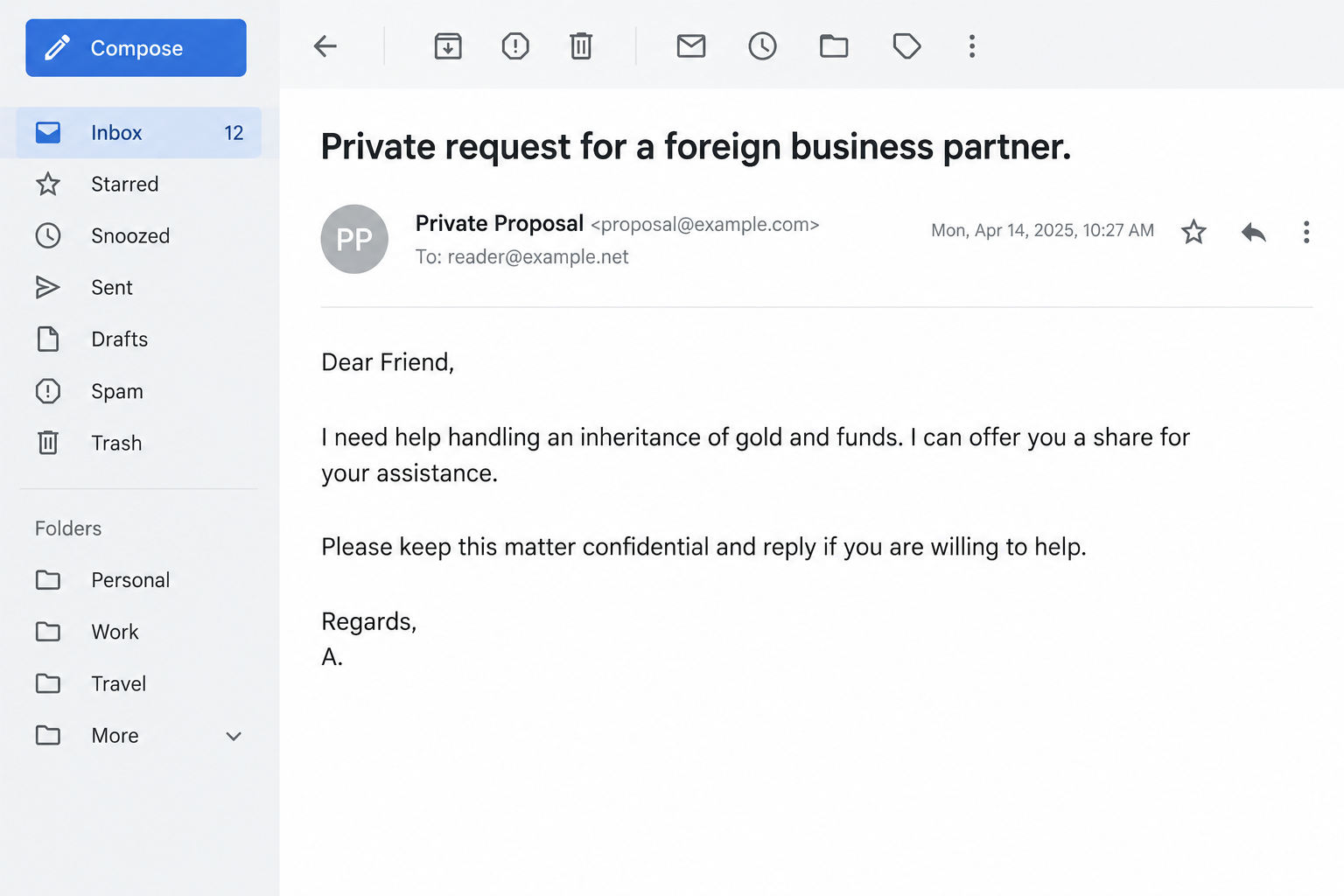
A stranger needs a foreign business partner to help with a private inheritance. There’s a difficult family situation, valuable gold, and a promised share for your help.
The first request may sound almost harmless: reply, keep the matter confidential, and hear the details. Before answering, consider the role you’re being offered.
Overview
A personal tragedy introduces a profitable favor
The Foreign Business Partner email scam offers a financial opportunity wrapped in a plea for help. It invites an unrelated recipient into a supposedly private inheritance problem.
One reported version uses the name Amara Rattanakosin. The sender claims to be a young Bangkok resident whose parents died in an earthquake.
The story describes inherited gold and funds worth $4.5 million. The reader is offered a share for helping recover them while keeping the arrangement from relatives.
Those are claims in the deceptive message, not verified facts about an identifiable person, family, estate, or earthquake survivor.
The reply begins the arrangement, not the payout
This is an advance-fee setup: a large future benefit gives the sender a reason to request money or sensitive information before the recipient receives anything.
The opening message need not name the fee. A conversation can first establish trust, identify what the recipient can afford, and make the promised payment feel attainable.
Possible later charges include supposed processing or legal costs. No completed payment trail or specific later fee schedule has been verified for this particular message.
Secrecy removes the people most likely to question it
The request to keep relatives uninformed is central to the pitch. It discourages the reader from seeking an independent opinion before becoming more involved.
A real tragedy does not authenticate a private inheritance offer from an unknown sender. Compassion can be genuine without making this proposed transaction legitimate.
- An unknown person offers wealth in exchange for acting in a role you never held.
- The story makes secrecy a condition of receiving help or money.
- A promised future payment substitutes for independently verifiable authority.
- Personal details or advance payments may become the price of continuing.
Why the Story Can Pull Sensible People In
It’s tempting to think inheritance fraud succeeds only because someone wants easy money. That explanation misses the emotional work the message is doing.
The recipient may see an opportunity to help someone vulnerable. The promised share can be presented as gratitude rather than a speculative investment.
At first, replying may feel like a way to learn more without committing anything. The sender benefits from making that first step seem reversible and inconsequential.
Once a conversation begins, the request becomes personal. Ignoring an anonymous email is easier than walking away from someone who repeatedly describes you as their trusted helper.
Embarrassment can then make it harder to ask a friend for perspective. The sender’s secrecy request and the recipient’s growing doubts start reinforcing each other.
If you’ve already replied, that does not mean you must see it through. There is no obligation to complete a fraudulent arrangement or pay to end contact.
The U.S. Postal Inspection Service’s inheritance warning describes impostor intermediaries and recommends discussing unexpected inheritance offers with trusted people.
How the Foreign Business Partner Scam Works
Step 1: The stranger offers a special reason for choosing you
A proposal needs to explain why a valuable opportunity landed in a stranger’s inbox. The explanation may flatter the recipient’s honesty, nationality, profession, or apparent trustworthiness.
That is not a background check. An unfamiliar sender can select an email address without knowing whether its owner has the skills or authority the story supposedly requires.
Ask what an authentic appointment would involve. A person managing an estate would need documented authority, identified parties, and a defensible reason for selecting a representative.
A private email claiming confidence in your character supplies none of that. It creates a feeling of selection while avoiding an actual verification process.
Step 2: A practical barrier makes outside help seem necessary
The sender introduces a problem that allegedly prevents direct access to the money. This makes your participation sound like a solution rather than an unexplained giveaway.
The obstacle might concern family pressure, documentation, geography, or a supposed administrative rule. A plausible-sounding explanation is still something the sender controls.
Don’t try to settle the case by researching one isolated legal detail. Even a real rule would not prove that this sender owns an estate or can appoint you.
More importantly, you should not claim to have been someone’s business partner when you weren’t. A promised commission doesn’t make a false representation appropriate.
Step 3: Private correspondence builds commitment
The exchange can move from a general proposal to forms, identity requests, or introductions. A recipient who has invested time may become reluctant to abandon the opportunity.
A second person described as an attorney or bank official can make the story appear corroborated. Two cooperating senders are not two independent sources of verification.
This is a common inheritance-fraud pattern, not evidence that those exact roles appeared in every version of the message discussed here.
Documents can create a similar effect. A stamp, letterhead, or certificate may look important without proving that a real institution issued or recognizes it.
Verify an institution through independently found channels if a genuine matter needs checking. Do not let the original sender nominate every person who will confirm the story.
Step 4: The promised fortune becomes a reason to pay
An advance charge can look small beside a large promised return. That comparison makes the fee feel manageable while distracting from the absence of a verified entitlement.
For example, a hypothetical $250 processing demand might be framed as trivial beside millions. The example illustrates the pressure, not a documented charge in this campaign.
The relevant question isn’t whether the fee sounds affordable. It is why an unknown person should receive your money to release an unverified benefit.
Once one payment is made, another obstacle can appear. The next demand may be described as the final requirement, even though the previous payment supposedly settled everything.
You cannot make earlier spending worthwhile by paying again. Stop assessing the next request as an investment in recovering the last one.
Step 5: Continued contact creates more ways to lose
Financial loss isn’t the only risk. A recipient may disclose identity documents, contact information, signatures, or banking details while trying to satisfy the arrangement.
That information can make later approaches more convincing. A follow-up may refer to genuine details you supplied, which makes it feel more informed than the first email.
Another approach may promise to recover lost fees. A fee for releasing a refund can recreate the same structure as the fee for releasing the inheritance.
Break the pattern by ending contact and involving your payment provider or authorities independently. Do not appoint the sender’s suggested recovery agent.
How to Assess the Claimed Identity and Paperwork
A name is not a verified person
Search results for the sender’s name can be inconclusive. A matching profile might belong to an unrelated person or have been copied to support the deception.
Don’t contact strangers with similar names or publish their photographs as proof. The relevant evidence is the communication and payment request, not a superficial name match.
The same caution applies to nationalities. A story mentioning Thailand does not establish the operator’s location or imply that residents of that country are responsible.
Certificates should be checked with their supposed issuer
A genuine issuer should be identifiable independently of the document. Contact details printed on questionable paperwork may simply return you to another person controlling the story.
Don’t upload the file to random verification websites. If it contains your own ID or account details, careless checking can spread sensitive information further.
A screenshot of funds isn’t evidence that the balance exists, belongs to the sender, or can legally be transferred to you.
Receiving money for a stranger can create additional trouble
If the conversation shifts to receiving a payment and forwarding part elsewhere, stop. You may be asked to move funds whose source you cannot establish.
Do not spend or forward an unexpected deposit before speaking with your bank. A visible credit does not automatically settle questions about ownership or final payment.
Explain the arrangement accurately to the bank. Do not follow instructions to conceal the purpose of a transfer or describe the sender as a long-standing business contact.
What to Do If You Have Fallen Victim to This Scam
End the conversation without negotiating another condition. Don’t send a withdrawal fee, cancellation payment, or final document to make the sender close the case.
Block new approaches after preserving the evidence you need. You don’t have to convince the sender that you understand the deception before leaving.
Contact the provider used for any payment. Explain when and how it was sent, who received it, and why you now believe the transaction involved fraud.
Ask whether a transfer can be stopped, recalled, or investigated. Report quickly, but don’t assume that a bank transfer, card payment, and cryptocurrency transfer have identical recovery options.
List the personal information you disclosed. Separate contact details from passwords, identity documents, banking information, or signatures. The response should match the exposure.
If identity documents were shared, consult the issuing authority and your local identity-theft reporting process. For U.S. identity misuse, use IdentityTheft.gov through an independently opened browser.
Protect accounts only where credentials or access were exposed. Replace a password supplied to the sender or entered into a linked form. Review recovery information and unfamiliar sessions.
Simply telling someone your name does not require resetting every account. Focus your effort where the sender obtained a secret or a usable authorization.
If files or software entered the picture, check the device. Don’t reopen them for curiosity. On a workplace system, notify the team responsible before making changes.
Malwarebytes is an option for checking a personal computer after suspicious software exposure. Reading the inheritance proposal alone does not establish a malware infection.
AdGuard may help limit malicious advertisements on the web. Neither an ad blocker nor an antivirus can authenticate an estate or retrieve an advance payment.
Build an evidence folder and report financial loss. Keep messages, complete email headers where available, receipts, recipient account details, and a short sequence of events.
Report through your local police or official cybercrime channel. U.S. internet-fraud complaints can go to the FBI’s Internet Crime Complaint Center.
Tell one trusted person what happened. A calm second opinion can make it easier to refuse new demands and recognize a supposed recovery agent’s approach.
If the fraud affected shared funds, inform the other account holder. Keeping the loss secret can leave them exposed to follow-up requests using the same story.
Is Your Device Infected? Run a Free Malware Scan
Slow performance, constant pop-ups, or strange behavior? These are classic signs of a malware infection. The fastest way to find out is to scan your device with Malwarebytes Free — one of the most trusted malware removal tools available.
The free version detects and removes the most common threats, including:
- Adware — the cause of those annoying pop-ups
- Browser hijackers — unwanted redirects and changed homepages
- Trojans and spyware — hidden programs stealing your data
- Potentially unwanted programs (PUPs) — software you never asked for
👉 Select your device below — Windows, Mac, or Android — then follow the simple steps to download Malwarebytes, scan your system, and remove any threats it finds. The scan usually takes 5 to 20 minutes.
Run a Malware Scan with Malwarebytes for Windows
Malwarebytes is one of the most popular and trusted anti-malware tools for Windows — and it’s completely free for removing infections. It catches threats that many antivirus programs miss, including adware, browser hijackers, and trojans. Follow the steps below to scan and clean your PC in just a few minutes.
Download Malwarebytes
Click the button below to download the latest version of Malwarebytes for Windows from the official source. The free version is all you need — it will scan your computer and remove adware, browser hijackers, and other malicious software at no cost.
Download MalwarebytesOfficial installer for Windows 11 and 10. Your download starts right away.Want real-time protection? See Malwarebytes Premium Malwarebytes Free for WindowsScans and removes malware at no cost
-
Install Malwarebytes
When the download finishes, open your Downloads folder and double-click the MBSetup file. If Windows shows a User Account Control pop-up, click “Yes” to allow the installation.

Follow the On-Screen Prompts to Install Malwarebytes
The setup wizard will walk you through a few quick screens:
-
Choose where you’re installing the program — “Personal Computer” or “Work Computer” — then click Next.

-
Malwarebytes will now install on your device. This usually takes under a minute.

-
When installation is complete, the “Welcome to Malwarebytes” screen will open automatically.

-
On the final screen, click Open Malwarebytes to launch the program.

-
Enable “Scan for Rootkits”
Before scanning, turn on rootkit detection so Malwarebytes can find even the most hidden threats. Click the Settings gear icon on the left side of the screen.

In the settings menu, find “Scan for rootkits” and click the toggle so it turns blue.

Done? Click “Dashboard” in the left pane to return to the main screen.
Start the Scan
Click the blue Scan button. Malwarebytes will automatically update its virus database and start checking your computer for malware.

-
Wait for the Scan to Finish
The scan checks your entire system for browser hijackers and other malicious programs, so it can take 5 to 20 minutes depending on your computer. Feel free to do something else — just check back occasionally to see the progress.

-
Quarantine the Detected Threats
When the scan is done, you’ll see a list of everything Malwarebytes found — malware, adware, and potentially unwanted programs. Click the “Quarantine” button to remove all of them at once.

Malwarebytes will now remove the malicious files and registry entries and move them safely into quarantine.

-
Restart Your Computer
Some threats can only be fully removed after a reboot. If Malwarebytes asks you to restart, click Yes. Once you’re logged back in, Malwarebytes has finished removing the threats it found.

That’s it — your Windows PC is now clean of trojans, adware, and other malware, and should be back to running smoothly.
If you are still having problems with your computer after completing these instructions, then please follow one of the steps:
- Run a computer scan with ESET Online Scanner
- Ask for help in our Windows Malware Removal Help & Support forum.
Run a Malware Scan with Malwarebytes for Mac
Malwarebytes for Mac is a free on-demand scanner that removes the malware other security software tends to miss — adware, browser hijackers, and unwanted programs included. Cleaning an infected Mac with Malwarebytes has always been completely free, and it’s our go-to recommendation. Follow the steps below to scan and clean your Mac in just a few minutes.
-
Download Malwarebytes for Mac
Click the button below to download the latest version of Malwarebytes for Mac.
Download MalwarebytesOfficial installer for macOS. Your download starts right away.Want real-time protection? See Malwarebytes PremiumMalwarebytes Free for MacScans and removes malware at no cost -
Open the Malwarebytes setup file
When the download finishes, open your Downloads folder and double-click the setup file to begin the installation.

-
Follow the On-Screen Prompts to Install Malwarebytes
The Malwarebytes for Mac Installer will guide you through a few quick screens. Click “Continue” and keep following the prompts until the installation completes.



When the installation is complete, Malwarebytes opens to the Welcome to Malwarebytes screen. Click “Get started“.
-
Select “Personal Computer” or “Work Computer”
Malwarebytes will ask what type of computer you’re installing it on. Click either Personal Computer or Work Computer, whichever applies.

-
Start the Scan
Click the “Scan” button. Malwarebytes will automatically update its detection database and begin checking your Mac for malware.

-
Wait for the Scan to Finish
Malwarebytes will scan your Mac for adware, browser hijackers, and other malicious programs. This can take a few minutes, so feel free to do something else — just check back occasionally to see the progress.

-
Quarantine the Detected Threats
When the scan is done, you’ll see a list of everything Malwarebytes found. Click the “Quarantine” button to remove all the threats at once.

-
Restart Your Mac
Malwarebytes will now remove all the malicious files it found. Some threats can only be fully removed after a reboot — if Malwarebytes asks you to restart, allow it. Once you’re logged back in, your Mac is clean.

That’s it — your Mac is now free of adware, rogue browser extensions, and other potentially harmful software.
If you are still experiencing problems while trying to remove a malicious program from your computer, please ask for help in our Mac Malware Removal Help & Support forum.
Run a Malware Scan with Malwarebytes for Android
Malwarebytes for Android automatically detects and removes dangerous threats like malware and ransomware so you don’t have to worry about your most-used device being compromised. Aggressive detection of adware and potentially unwanted programs keeps your Android phone or tablet running smooth.
-
Download Malwarebytes for Android.
You can download Malwarebytes for Android by clicking the link below.
Get Malwarebytes for AndroidOpens Google Play in a new tab.Want real-time protection? See Malwarebytes Premium for AndroidMalwarebytes for AndroidScans your phone and removes malware at no cost -
Install Malwarebytes for Android on your phone.
In the Google Play Store, tap “Install” to install Malwarebytes for Android on your device.

When the installation process has finished, tap “Open” to begin using Malwarebytes for Android. You can also open Malwarebytes by tapping on its icon in your phone menu or home screen.

-
Follow the on-screen prompts to complete the setup process
When Malwarebytes will open, you will see the Malwarebytes Setup Wizard which will guide you through a series of permissions and other setup options.
This is the first of two screens that explain the difference between the Premium and Free versions. Swipe this screen to continue.
Tap on “Got it” to proceed to the next step.
Malwarebytes for Android will now ask for a set of permissions that are required to scan your device and protect it from malware. Tap on “Give permission” to continue.
Tap on “Allow” to permit Malwarebytes to access the files on your phone.
-
Update database and run a scan with Malwarebytes for Android
You will now be prompted to update the Malwarebytes database and run a full system scan.

Click on “Update database” to update the Malwarebytes for Android definitions to the latest version, then click on “Run full scan” to perform a system scan.

-
Wait for the Malwarebytes scan to complete.
Malwarebytes will now start scanning your phone for adware and other malicious apps. This process can take a few minutes, so we suggest you do something else and periodically check on the status of the scan to see when it is finished.

-
Click on “Remove Selected”.
When the scan has been completed, you will be presented with a screen showing the malware infections that Malwarebytes for Android has detected. To remove the malicious apps that Malwarebytes has found, tap on the “Remove Selected” button.

-
Restart your phone.
Malwarebytes for Android will now remove all the malicious apps that it has found. To complete the malware removal process, Malwarebytes may ask you to restart your device.
That’s it — your Android phone is now clean — no more malicious apps, adware, or browser redirects.
If you are still having problems with your phone after completing these instructions, then please follow one of the steps:
- Restore your phone to factory settings by going to Settings > General management > Reset > Factory data reset.
- Ask for help in our Mobile Malware Removal Help & Support forum.
Stay Protected: Block Ads and Malicious Sites
Now that your device is clean, keep it that way. Most infections start with a malicious ad or a fake download button — so blocking them at the source is your best defense.
We recommend AdGuard, which blocks malicious ads, phishing pages, and dangerous redirects before they can reach you.
👉 Download AdGuard and browse safely
How to Help Someone Who Still Believes the Offer
Ridicule can push a person back toward the sender, especially when they already feel embarrassed. Start with the immediate payment decision rather than an argument about intelligence.
Ask them to pause all transfers while a bank or independently chosen adviser reviews the arrangement. A genuine entitlement shouldn’t depend on avoiding every outside opinion.
Look together at what is independently established. Separate a real disaster, a polished certificate, or a familiar institution’s name from evidence that this particular estate belongs to them.
Offer to help preserve receipts and contact the payment provider. Practical support is often more valuable than repeatedly pointing out details they overlooked.
Be clear about boundaries around shared savings or borrowing. Further payments can increase the harm, even when they are described as necessary to recover earlier losses.
Agree on a pause before any new payment and keep the bank involved. That practical boundary matters more than persuading the person to accept every warning at once.
If a supposed representative threatens legal action for withdrawing, preserve the threat. Seek independent advice rather than sending money to the same contact who invented the obligation.
The fact that someone invested time in the exchange doesn’t validate the offer. It does mean they may need patient support while ending contact and organizing recovery.
Frequently Asked Questions
Is the Foreign Business Partner email a genuine opportunity?
No. Treat this unsolicited inheritance partnership proposal as an advance-fee scam. Do not provide money, documents, or an invented business relationship to participate.
Why doesn’t the opening message ask for a fee?
The first objective can be a reply and a willing participant. Payment demands may arrive after correspondence has made the arrangement feel personal and achievable.
Does a real earthquake make the inheritance story credible?
A real event doesn’t prove the sender’s identity, family circumstances, ownership of gold, or authority to arrange a transfer. The claimed connection still needs authentic evidence.
Can I reply without giving my bank details?
It’s better not to engage. A reply gives the sender an opportunity to continue persuading you, even if you withhold financial details at first.
What if I’ve already paid a supposed release charge?
Stop further payments and contact the payment provider immediately. Keep the receipt and recipient details. Do not pay a second charge to unlock a refund.
Should I trust a lawyer introduced by the sender?
Not without independent verification. An introduced intermediary may be part of the same deception. Choose your own adviser through an established professional channel if necessary.
The Bottom Line
Do not accept the secret foreign-business-partner arrangement. An unsolicited promise of inherited wealth is not a sound basis for payments, identity disclosure, or pretending to hold authority.
If you’ve already engaged, stop sending anything further. Preserve the correspondence, involve your payment provider where money changed hands, and bring a trusted person into the situation.

Join the discussion
0 commentsShare your experience or ask a question about this article.
Discussion
Start the conversation
Have a question or something useful to share? Add the first comment.