

A hockey game on the wall, friends on the couch, and a projector that costs less than a night out. ChelCast knows the scene it is selling.
The $89.99 price makes it tempting to skip straight to the bundle selector. First, check what the big-screen promise actually includes.
Overview
An inexpensive projector with a very expansive pitch
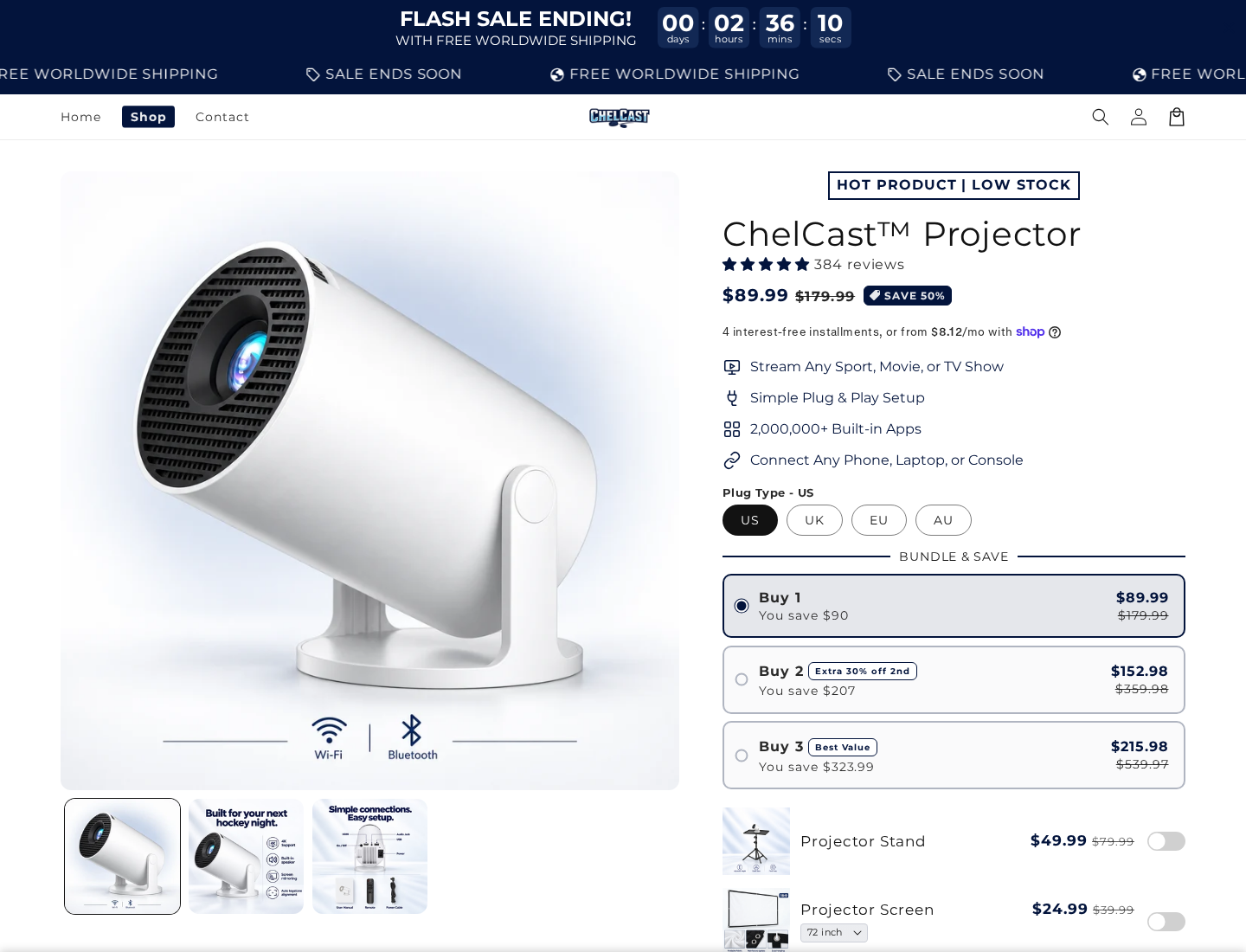
ChelCast advertises a compact projector for sports, movies, television, and games. The captured USD offer lists one unit at $89.99, against a $179.99 reference price.
The selling points include HDMI, casting, built-in speakers, Bluetooth, and an unusually large claim of more than two million built-in apps.
The FAQ adds an important qualification: paid streaming services still require their own subscriptions. Buying the projector does not buy access to every program.
The performance questions are more useful than the app count
A buyer needs the native display resolution, measured brightness, supported streaming services, and operating-system details. General Ultra HD wording does not answer all of those questions.
The product page reviewed does not provide a sufficiently clear specification set to judge the promised experience. This was a website investigation, not a hands-on test.
- HDMI connectivity does not establish gaming responsiveness or image quality.
- An app being available does not establish reliable, licensed playback at a particular resolution.
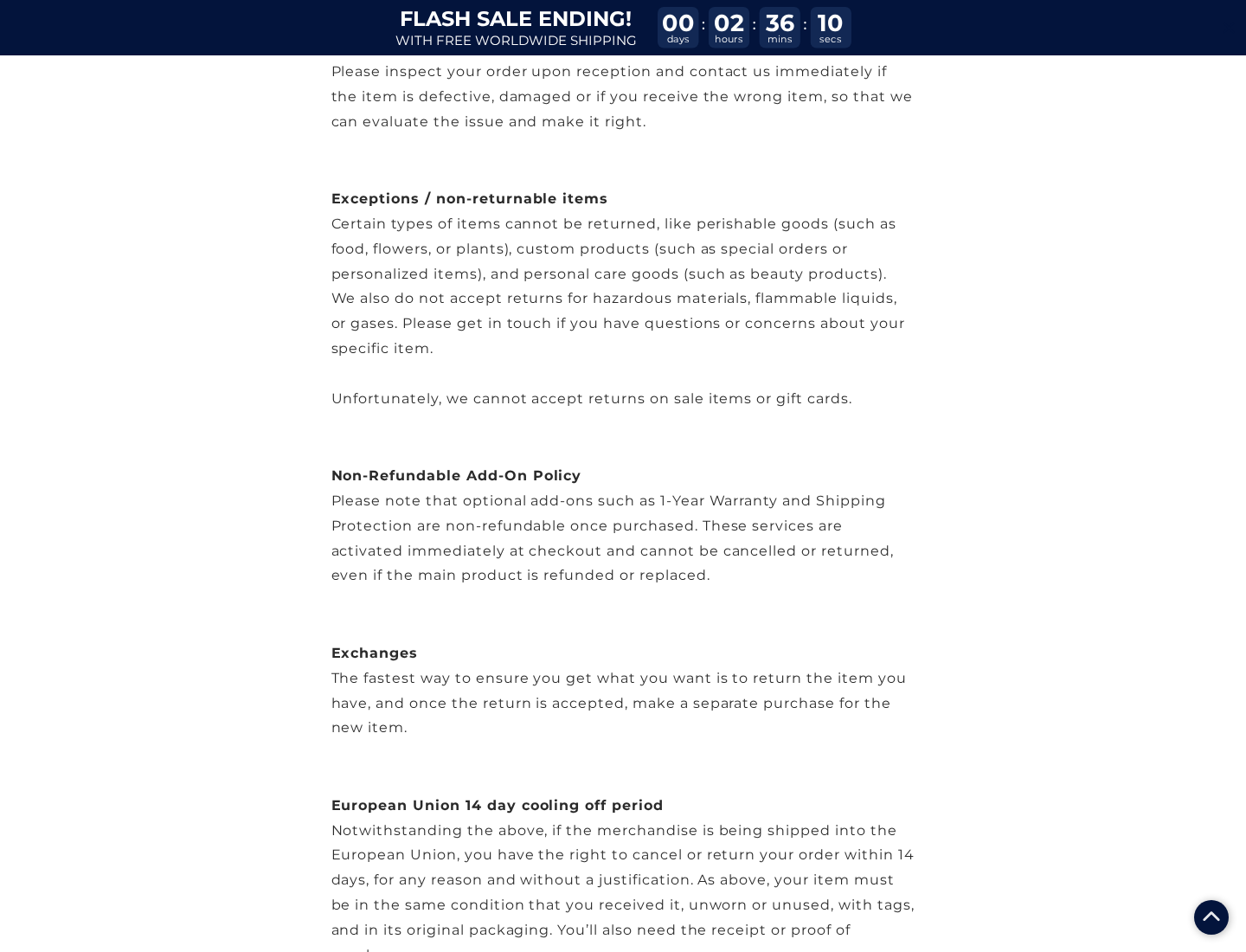
- A 30-day guarantee sits beside a return policy requiring unused condition and excluding sale items.
- The policy treats certain optional warranty and shipping-protection add-ons as non-refundable, even if the projector is refunded.
The recommendation concerns the offer, not every budget projector
Do not buy this ChelCast offer because of the app-count headline or the half-price badge. Neither explains the quality of the picture you will receive.
The unclear performance detail and restrictive refund wording make the offer unsuitable to recommend as presented. That is not proof of non-delivery or a defective unit.
If you already bought one, document the advertised specifications and clarify return eligibility before the thirty-day window becomes a dispute.
The Specifications That Change Your Movie Night
Accepted video and native resolution are different
A projector can accept a high-resolution signal and display a lower-resolution image. The incoming file format and the physical display are different parts of the process.
That is why a phrase such as Ultra HD needs a specific explanation. Ask for the native pixel resolution, not only the highest supported input.
Text, subtitles, sports graphics, and fine detail can expose the difference. A dramatic promotional photograph cannot substitute for that specification.
Brightness needs a defined measurement
How large you make the image and how much light enters the room both affect the viewing experience. A bright advertisement is not a brightness test.
Ask for measured output using a recognized method, along with the conditions under which it was measured. An unexplained large number is difficult to compare.
Also establish the usable image size for your room. A giant maximum diagonal is not a promise that the picture remains bright at that size.
Gaming compatibility is not a low-latency guarantee
The page says consoles such as PlayStation, Xbox, and Switch connect through HDMI. That describes an input option, not the delay between a button press and the picture.
Someone buying for casual films may tolerate a limitation that makes fast games frustrating. Ask for input-lag information at the resolution and refresh rate you intend to use.
Do not confuse Bluetooth audio support with video connectivity. Check how your actual console, speakers, and preferred streaming source will connect.
How the ChelCast Sales Funnel Works
Step 1: The room transformation takes center stage
The offer sells a social scene, especially watching sport with friends. Portability and a straightforward setup make the purchase feel smaller than a traditional home-theater project.
That is a reasonable attraction. The difficulty begins when the imagined experience fills gaps left by the technical information.
Write down your intended use before buying: daytime television, a dark-room film, live sport, console gaming, or occasional travel.
A projector suitable for one of those uses is not automatically suitable for all of them. The room and source device belong in the comparison.
Step 2: A countdown and reference price encourage a quick choice
The captured page displays sale-ending language and a countdown. It presents $89.99 as 50% below a $179.99 reference price.
Those are promotional elements, not proof that waiting will cost you $90. The reference price alone does not establish a normal transaction history.
The timer’s presence is documented here; its behavior over repeated visits was not tested. Do not turn that observation into a claim that it resets deceptively.
Ignore the clock long enough to obtain the specifications and return answer. A deadline should not decide whether a projector meets your needs.
Step 3: Bundles and accessories expand the purchase
The offer lists two projectors at $152.98 and three at $215.98. The lower unit cost can distract from the larger total.
Separate accessories include a $49.99 stand, a screen starting at $24.99, and a $19.99 case. They are not part of the basic contents list.
Adding all three starting-price accessories to one $89.99 unit brings that example to $184.96 before any other applicable charges.
That calculation is an illustration of listed prices, not an observed completed order. You may not need every accessory, and your selected screen size may cost more.
Check your plug type as well as the quantity. A cheaper bundle is not useful if you only need one projector or receive an unsuitable power adapter.
Step 4: Built-in apps can be mistaken for included entertainment
The two-million-app headline sounds generous, but the page’s FAQ says paid services require subscriptions. Software availability and content rights are separate purchases.
Ask which specific services are supported, whether their official apps work on this model, and what resolution they actually deliver.
Make a short list of the services you already pay for. Confirm each one individually instead of letting an enormous app count stand in for compatibility.
Also ask how those apps receive security and playback updates. A service working in a promotional demonstration does not answer how support will be maintained.
A built-in browser or an unofficial download is not necessarily equivalent to a supported streaming application. Avoid entering account credentials into an unfamiliar substitute.
Casting a phone screen can introduce another limitation. Netflix’s connection guidance explains that some mirroring methods are unsupported and compatibility depends on the device.
The FAQ also suggests connecting an external streaming device through HDMI. Factor that possibility into your setup rather than assuming the built-in system answers every need.
Step 5: The guarantee becomes more conditional after you open the policy
The product page displays a 30-day money-back guarantee. The policy measures the return-request period from receipt but requires unused condition and original packaging.
It also excludes sale items. Since the main offer is presented as a sale, the seller should explain whether this projector qualifies.
Testing focus, brightness, noise, and playback normally requires switching the device on. Ask whether doing so affects a change-of-mind return.
The policy separately says optional one-year warranty and shipping-protection add-ons are non-refundable. Returning the main product may therefore not reverse the entire amount.
For someone buying primarily to try the picture at home, that distinction is significant. Establish the trial conditions before opening the box.
Merchant Identity, Shipping, and After-Sales Support
The contact page identifies a trade name, not a full company record
The inspected contact-information page lists ChelCast and chel.cast@outlook.com. It does not itself provide a complete legal company name, physical address, or telephone number.
Using Outlook is not evidence of fraud. The buying concern is practical: who is responsible if the projector arrives late, fails, or does not match its description?
Ask for the legal seller name and invoice details before purchase. Compare them with the merchant shown on any payment confirmation.
Global warehouses do not identify the factory or return country
The shipping policy says orders leave global warehouses. It describes processing separately and excludes customs delays from ordinary shipping expectations.
The policy does not identify which individual warehouse will handle your order. Its general wording also leaves the return country and manufacturer unspecified.
Request the dispatch country, carrier, and return destination if those affect your decision. Keep the answers rather than inferring them from delivery estimates.
The delivery statements deserve a direct clarification
The product FAQ gives standard shipping as ten to fourteen days and express as five to nine. The captured page also shows a nearer estimated delivery range.
Those presentations can leave shoppers with different expectations. Ask which timeframe covers your location and whether it includes order processing.
No test order or support message was sent. A displayed email address is a contact route, not a demonstrated response time or successful refund history.
Support depends on identifying the actual hardware
For replacement adapters, firmware, repairs, or a warranty claim, a precise model number is more useful than a marketing name.
Ask for the manufacturer, model, manual, warranty provider, and update policy. These details help determine what support remains available after the first purchase.
Do not install unknown firmware supplied through an unsolicited message. Confirm that any update instructions belong to the exact device and an established support channel.
What the Reviews Do and Do Not Tell You
The page displays a star summary and customer feedback. Some review labels identify content collected from another provider, rather than an invitation from this store.
That is not automatically fabricated feedback. It does mean a shopper should not assume each entry documents a purchase through the current ChelCast merchant.
Look for the product model, source of the review, and the problem being described. A general statement that a projector is nice offers little technical detail.
Separate image quality from delivery and support. A person can like the picture without having tested a return, and a delivery complaint may say nothing about brightness.
The testimonials do not replace a specification sheet. Nor do missing specifications prove the projector cannot display a usable picture.
The decision here rests on whether the offer gives enough dependable information to justify a purchase, not whether a small projector could work in principle.
What to Do If You Bought a ChelCast Projector
-
Reconstruct the promised order. Save the selected quantity, plug type, accessory choices, shipping option, and final charged amount.
Keep the product page and guarantee alongside your receipt. A record of the actual promise is more useful than a screenshot of the brand logo.
-
Ask about cancellation immediately if you no longer want it. Send the order number to chel.cast@outlook.com and request written confirmation.
If the parcel has shipped, ask for the applicable return route. Do not assume that refusing a delivery automatically completes a refund.
-
Check return eligibility before a prolonged trial. Ask whether opening and testing a discounted projector is allowed under the thirty-day guarantee.
Request the return address, authorization, postage cost, and treatment of optional add-ons. Keep the seller’s answer with your original offer.
-
Document a mismatch clearly. If delivered hardware differs from an advertised specification, photograph the model label and describe the exact discrepancy.
For a fault, keep a short record of the source, cable, settings, and behavior. Do not modify the device or repeatedly use damaged electrical equipment.
-
Keep packaging and accessories together. The policy requires original condition and packaging, so do not discard adapters, manuals, or inserts while a request is pending.
Before posting an authorized return, photograph the packed contents and retain tracking. Use only the destination confirmed for your order.
-
Escalate non-delivery or unresolved misdescription to the payment provider. Explain the purchase problem accurately and supply the seller correspondence.
Ask which deadline and evidence requirements apply. A merchant’s sale exclusion does not by itself settle every statutory or payment dispute right.
-
Remove personal accounts before a return. Sign out of streaming services, remove saved networks where possible, and follow the model’s reset instructions.
Do not send a device back with your entertainment accounts still active. Keep the reset separate from deleting the evidence needed for your purchase complaint.
Frequently Asked Questions
Does ChelCast include Netflix or other paid subscriptions?
No included paid access is established. The seller’s FAQ says paid streaming services require their own subscriptions, even where apps are built in.
Does Ultra HD mean the projector has a native 4K display?
Not without a specific native-resolution statement and supporting model information. Accepting a high-resolution signal and displaying that resolution are different capabilities.
Do two million apps prove ChelCast is a good projector?
No. App quantity does not measure brightness, focus, contrast, gaming delay, or whether the streaming service you need works reliably on this hardware.
Can I return a projector after testing it?
The guarantee suggests reassurance, but the policy requires unused condition and excludes sale items. Ask the seller to confirm testing eligibility for your discounted order.
Are warranty and shipping-protection extras refundable?
The reviewed policy says those optional add-ons are non-refundable, even if the main purchase is refunded. Applicable consumer rights may still affect an individual dispute.
Would MalwareTips recommend buying this ChelCast offer?
No. Obtain clear model specifications and usable return terms first. The app-count promotion and discount do not answer the most important performance and refund questions.
The Bottom Line
Do not buy this ChelCast offer on the strength of its entertainment promises. The important specifications remain unclear, and the refund restrictions complicate the advertised guarantee.
Already paid? Save the offer, contact the seller promptly about cancellation or return, and preserve your payment-provider options if the purchase is not resolved.

Join the discussion
0 commentsShare your experience or ask a question about this article.
Discussion
Start the conversation
Have a question or something useful to share? Add the first comment.