

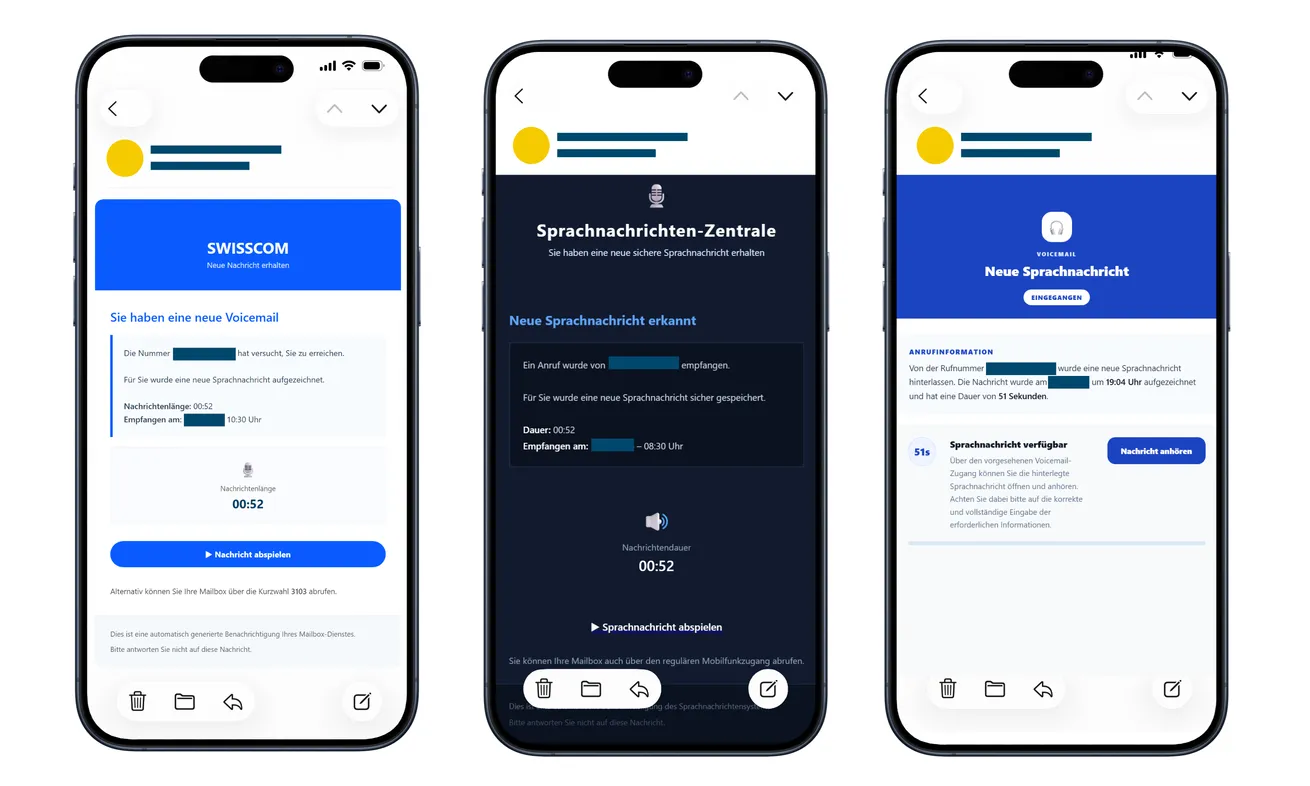
An email says a new voicemail is waiting. It shows a caller number, a message length, and a button that looks ready to play the recording.
Some versions carry Swisscom’s name; others call themselves a voicemail center. Before listening, notice what the next page wants from you.
Overview
A routine voicemail notice becomes an account-login lure
The Swisscom voicemail email scam uses the promise of an unheard message to lead recipients toward counterfeit sign-in pages.
Swiss police document the campaign, including notices impersonating Swisscom and generic mailbox services. The target can be email or another online account.
Swisscom is a real telecommunications provider whose identity is being misused. This warning concerns the counterfeit notification, not ordinary voicemail itself.
The timer and caller details are part of the presentation
The original examples above were published by police. Their designs vary, but all encourage the recipient to open or play a supposed voice message.
A duration and timestamp can make a notice feel generated by a real system. They don’t establish that the linked page holds an actual recording.
The documented phishing route requests credentials and may seek a two-factor authentication code. What looked like listening can become granting access.
Check the message through your normal service instead
Use the voicemail route you already know, or reach the provider independently. Don’t make the email’s playback button your only way to check.
- A phone number in the notice doesn’t authenticate the sender.
- A familiar logo doesn’t establish ownership of the linked form.
- Stop if a playback page unexpectedly requests another account’s password.
- Don’t relay authentication codes to the page or someone guiding you.
- Recover any exposed account through its genuine provider.
Why a Missed Message Is Such a Useful Hook
You don’t need to be expecting a parcel or shopping for a particular product. Almost anyone can imagine having missed a call.
The message leaves a simple question unanswered: who wanted to reach me? That can be enough to make the playback button interesting.
A precise duration adds apparent substance. Fifty-two seconds sounds like a real recording, but a number printed in an email isn’t the recording itself.
Call times work the same way. They give the notification the texture of a log without proving that it came from the phone service.
The hook may be especially distracting if you’re waiting for a doctor, tradesperson, customer, or family member. The email doesn’t have to know which one.
Don’t let that possibility choose the login route for you. You can check the actual voicemail service without using an unfamiliar email destination.
If there is a genuine urgent caller, the provider’s normal message system is the place to establish it. The unsolicited email doesn’t deserve control of the process.
How the Swisscom Voicemail Email Scam Works
Step 1: A notification offers a message you haven’t heard
The email announces a new voicemail and presents a playback action. Some versions use Swisscom branding, while others adopt a generic audio-mailbox identity.
The next version may look different. Recognize the move from a promised recording to a request for account access, not just one blue button.
The shared invitation is to leave your inbox and access a recording. Pause before accepting that the sender has authority over your telephone or email account.
Step 2: Familiar controls make the click feel like playback
The button resembles an ordinary media control. You’re expecting sound, not a financial transaction or a security-sensitive account change.
That expectation can reduce attention to the destination. A play icon is still a link when it takes you to a webpage controlled by someone else.
Don’t interpret a polished loading screen as evidence that audio exists. The page can display a player without providing the promised message.
Step 3: A counterfeit page asks you to sign in
Instead of delivering verified audio, the route leads to a form seeking account credentials. The explanation may make login sound like a privacy requirement.
Protecting a recording can sound sensible. But a plausible reason for authentication doesn’t establish that the form belongs to the service it represents.
Identify the account being requested. A voicemail story asking for an unrelated email password should not be treated as a routine continuation.
Use the genuine provider’s sign-in from your own route. Don’t manually copy a saved password into an unfamiliar destination because the page refuses to recognize it.
Step 4: A further code request can complete the intrusion
Police also describe attempts to capture two-factor authentication codes. The password form may therefore not be the final request.
A code reaching your phone doesn’t validate the earlier email. Someone using captured credentials may be triggering a genuine account-security challenge.
Read what the provider says the code or approval is for. If you didn’t initiate that operation through a trusted route, don’t complete it.
Stop even if the page says the recording will expire. Recovering a missed message isn’t worth granting access to a stranger’s login attempt.
Step 5: Account protection becomes more urgent than hearing the recording
After a disclosure, the priority changes. You no longer need to find out who supposedly called before securing the credentials you supplied.
Open the real account and its recovery tools independently. If you can’t sign in, use the provider’s official recovery assistance, not a link from the notice.
If the exposed account belongs to your employer, involve its support team promptly. They may have access records and controls unavailable to individual users.
Don’t wait for obvious misuse. Report what was entered or approved so the provider can assess access and advise on the next protective steps.
Swisscom Login and Bluewin Mail Aren’t Always the Same Password
Swisscom’s login guidance explains that Swisscom Login provides access to its services, including webmail.
It also distinguishes that login from the separate Bluewin email password used by mail programs. That difference matters when describing a disclosure.
If you entered a password, identify which account it actually protected. Don’t reset one password and assume that necessarily replaced another credential you supplied.
You don’t need to remember the provider’s terminology perfectly. Explain whether you normally use the secret for webmail, account management, or a mail application.
Ask verified support which credential needs replacement and whether other access requires attention. Don’t let the fake page’s account label decide the scope for you.
If you entered a password for another email provider, contact that provider instead. Swisscom branding in the lure doesn’t make Swisscom responsible for every targeted account.
Check the Sender and the Service, Not Just the Spelling
Expand the full sender address if your mail application allows it. A display name saying voicemail or Swisscom is only a label.
Compare it with communications you’ve independently verified. Be careful with a new address that borrows a familiar name while using an unrelated domain.
Then consider the destination. A recognizable brand word in a long web address doesn’t necessarily identify the operator of that website.
Don’t ask the page’s own help panel whether it is safe. An operator can copy a support button just as easily as a login box.
Good grammar isn’t a clearance test either. The decisive questions concern the service, requested credentials, and route you independently trust.
If you need help identifying the email, preserve it for the provider. Avoid forwarding it widely with the play button still inviting other people to click.
A warning to a colleague or relative can describe the supposed voicemail and unexpected password request without spreading the original link.
A Password Change May Be Only Part of Email Recovery
An email account can contain private correspondence and password-reset messages for other services. Its importance may extend beyond the voicemail story that started the incident.
Once access is restored, check account recovery details and available sign-in records. Ask the provider about unfamiliar sessions and how to end them.
Review forwarding settings and mail rules if the account offers them. An unfamiliar destination deserves attention even if incoming messages otherwise look normal.
Check sent and deleted folders for activity you don’t recognize. If messages were sent in your name, warn affected contacts through a route you control.
These are recovery checks, not claims that every victim experiences every form of misuse. Tell support what you find rather than assuming all possibilities occurred.
For a workplace account, don’t quietly fix the password and move on. Let the responsible team assess any organizational consequences and document the incident.
For a personal account, prioritize other services that reused the exposed password. Replace each through its own genuine sign-in route.
When the Exposed Inbox Is Used to Recover Other Accounts
Think about which services send password-reset messages to that address. Recovering the inbox helps protect those routes, but it doesn’t settle every separate account question.
If you find an unexpected reset message, open that service independently. Don’t follow an unfamiliar recovery instruction simply because it now appears in your own inbox.
Prioritize actual signs of misuse over changing everything at random. A financial login alert, altered recovery contact, or unwanted order deserves attention from its responsible provider.
Keep the timeline of the voicemail interaction beside those alerts. It helps distinguish something that happened before the phishing attempt from a later event.
If you’re locked out, use the official recovery process and verified support. Don’t search for someone promising secret access to a provider’s accounts.
An outsider offering instant restoration may be seeking more credentials or payment. The useful route remains the service that operates the affected account.
Once recovery is complete, ask how genuine future security contacts will arrive. That makes it easier to recognize another unsolicited voicemail or repair message.
What to Do if You Have Fallen Victim to This Scam
-
Stop trying to play the message. Close the linked page and decline any further authentication request you didn’t independently initiate.
Reading the email alone doesn’t disclose a password. Distinguish that from submitting credentials, entering a code, or accepting an approval.
-
Secure the account whose credentials you supplied. Open the genuine provider directly and change the exposed password or begin official recovery.
Use a unique replacement. If the password was reused elsewhere, change those accounts too, giving particular attention to email and financial access.
-
Tell the provider about authentication codes and approvals. Describe what the message said and whether you completed the action.
Ask about ending unfamiliar sessions and reviewing account access. Don’t assume a password change automatically answers every question about a completed login.
-
Review mail settings after recovering access. Check recovery contacts, forwarding, rules, and other available security settings for changes you didn’t make.
Keep notes of suspicious activity before removing it, where practical. Verified support can help distinguish ordinary settings from a problem.
-
Report a business-account exposure to the responsible team. Provide the original message and a short timeline rather than waiting to see whether colleagues notice anything.
Follow the organization’s incident instructions. Don’t distribute private customer mail or sensitive business screenshots while seeking informal help.
-
Use the provider’s published reporting route. Swisscom’s phishing page explains reporting and account-protection options.
It requests suspicious emails as attached .eml files at spamreport@bluewin.ch. Use the published instructions rather than replying to the fraudulent sender.
-
Preserve useful evidence safely. Keep sender details, the original email, existing screenshots, and the approximate time you entered information.
Don’t send anyone a live code or your new password as evidence. Redact private identifiers before sharing a public warning.
-
Investigate further harm only where there are signs. Report actual unauthorized messages, password-reset attempts, payments, or lost access to the service responsible.
An email password leak requires account recovery. Simply receiving a voicemail notice doesn’t establish that the device is infected.
-
Check unexpected recovery contacts independently. An email saying the account is repaired doesn’t establish that it came from the provider.
Continue through the support case you initiated. Refuse offers that require a fee, another password, or a fresh code to release the supposed recording.
Frequently Asked Questions
Is every Swisscom voicemail email fraudulent?
No. This warning concerns documented counterfeit notifications. Verify an uncertain message through the voicemail service or provider route you already know.
Does a message length prove a recording exists?
No. A duration printed in an email is easy to reproduce. It doesn’t authenticate the sender or the linked player.
Why would a voicemail notice ask for my email password?
The documented route uses playback as bait for credentials. Don’t supply another account’s password through an unfamiliar page reached from the notification.
What if I entered a code but later changed my password?
Tell the provider about the code and ask it to assess active access. Don’t assume the password change necessarily ended every session.
Which Bluewin or Swisscom password should I replace?
Replace the credential actually exposed. Swisscom Login and the separate Bluewin password used by mail programs can differ; verified support can clarify.
Do I need to report an email I only opened?
You can report and remove it without assuming takeover. Stronger recovery actions depend on credentials, codes, approvals, or other information you actually supplied.
The Bottom Line
Don’t use the play button in this Swisscom voicemail email to reach a login. Check the real message service independently and keep authentication secrets private.
If you entered credentials or a code, secure the affected account through its genuine provider. The priority is stopping unauthorized access, not hearing the promised recording.

Join the discussion
0 commentsShare your experience or ask a question about this article.
Discussion
Start the conversation
Have a question or something useful to share? Add the first comment.