

Your Ricardo listing has sold. An email confirms it, then another message arrives explaining how to collect the buyer’s payment.
The buyer is already asking whether you’ve seen it. Everything seems to be moving normally, until the payout instructions take an unexpected turn.
Overview
A genuine sale gives a second email borrowed credibility
The Ricardo payment email scam targets sellers, not people hunting for cheap goods. An apparent buyer agrees to purchase a real listing.
A legitimate sale notification can arrive first. A counterfeit payment email follows, benefiting from the seller’s expectation that the transaction is progressing.
The Swiss police warning identifies a route that impersonates Ricardo and financial institutions to collect TWINT access details.
The payout page is interested in your payment account
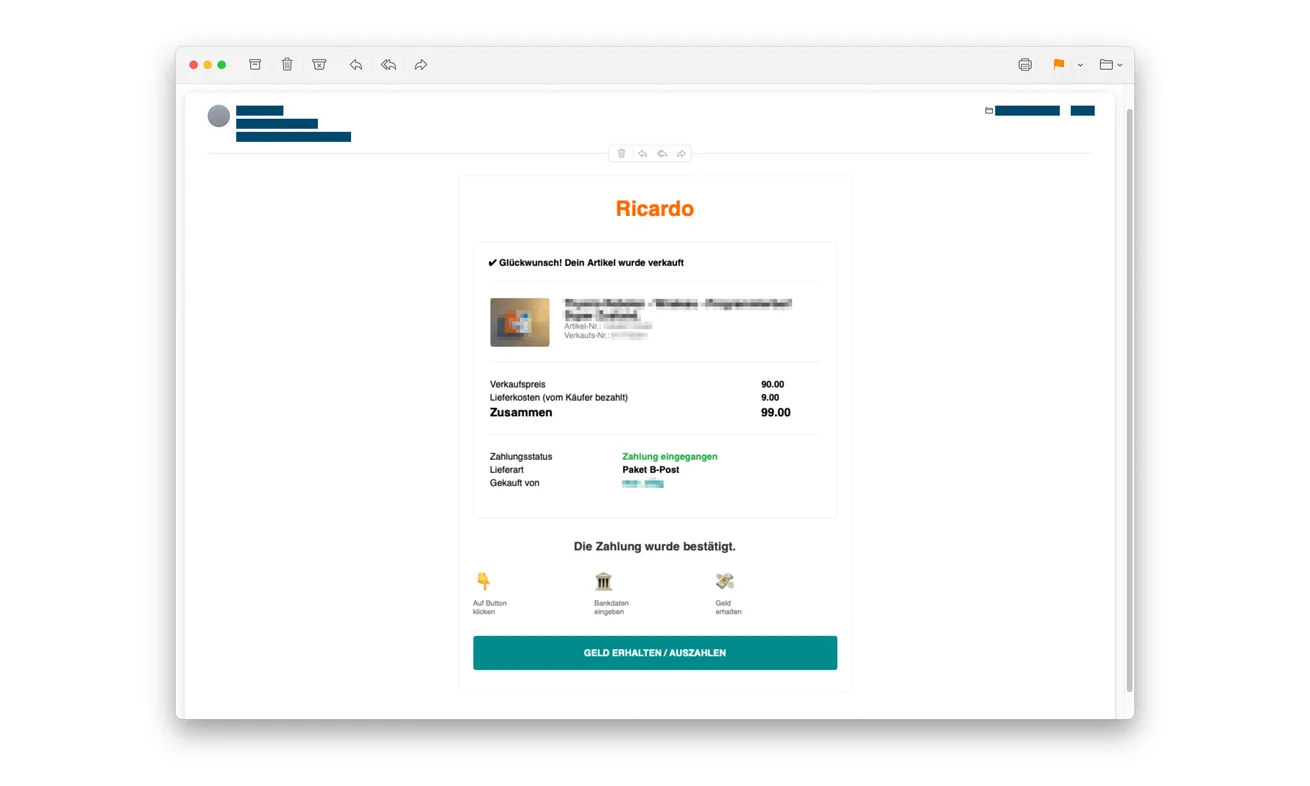
The email shown above is an original example published by police. Its receiving-money button makes the next action sound like collecting proceeds.
The documented route leads through bank selection to pages requesting a TWINT number and PIN. Those are access credentials, not proof that a buyer paid.
Ricardo, the listed banks, and TWINT are genuine services being impersonated. The scam is the fraudulent message and credential collection, not the marketplace itself.
The safe reference point is the account you open yourself
Don’t decide whether money arrived by following the message that claims it did. Check the real sale and payment records through independently opened accounts.
- A real sale notification doesn’t authenticate the next email.
- A buyer’s WhatsApp reminder isn’t a message from Ricardo support.
- A bank-selection screen can be copied just like a marketplace logo.
- Never enter a TWINT PIN on a buyer-supplied payout page.
- Report disclosed payment credentials to the provider of your actual TWINT app.
Why Sellers Can Trust the First Message and Misread the Second
Selling something gives you a reason to expect unfamiliar instructions. You may know the listing process better than the payment process, especially on your first sale.
There are also several legitimate tasks to finish: confirm the transaction, arrange delivery, find packaging, and check that the payment has reached the correct place.
A payment email slips neatly into that sequence. It doesn’t ask you to believe in a prize or an account you never opened.
The confusing part is that one surrounding event can be real. Someone did interact with your listing, and Ricardo may genuinely notify you about a sale.
Trust doesn’t transfer automatically between messages. Each new request still needs to match the platform’s actual process, particularly when it asks for financial access.
Think of it as two separate questions: has my item sold, and who is asking me to enter this information? Answering the first doesn’t settle the second.
How the Ricardo Payment Email Scam Works
Step 1: An apparent buyer responds to a real listing
Police describe attackers using false or compromised buyer accounts. Their acceptance can trigger the platform’s normal sale process.
This means the scam doesn’t require inventing a completely fictional marketplace. It can attach itself to an item, price, and conversation the seller recognizes.
A familiar buyer profile can’t confirm payment. If someone has taken over that account, its earlier trading history belongs to somebody else.
Keep your transaction records inside the marketplace. Don’t replace them with screenshots or instructions supplied by the buyer.
Step 2: A counterfeit payout email follows the genuine notification
The false message adopts Ricardo’s appearance and says the payment is ready. A prominent button invites you to receive or withdraw it.
You think you’re collecting money the buyer has already sent. The page is actually asking you to trust a new route into your payment account.
Look at the full sender address and destination, but don’t make spelling mistakes your only test. A carefully written email can still send you elsewhere.
Open Ricardo independently instead. If an instruction matters to your sale, ask verified support about it through the genuine help center.
Step 3: A messenger conversation keeps the seller moving
The supposed buyer may contact you through WhatsApp or another messaging service and ask whether the payment-confirmation email arrived.
This creates the impression of two sources agreeing. In reality, the person promoting the email may be connected to the person who sent it.
A helpful tone can be as effective as overt pressure. Someone patiently explaining where to click still isn’t an independent authority on your account.
Don’t let the conversation become a live walkthrough. You can end the chat, check the sale separately, and return only through the platform’s normal process.
Step 4: Bank branding turns a payout into a credential request
The counterfeit site offers a choice of financial institutions. The next screen resembles the selected provider and asks for TWINT information.
Selecting your own bank can feel reassuring because the choice came from you. It doesn’t change who controls the website hosting that choice.
The danger is the information requested. A number identifying your payment account, followed by its PIN, serves a different purpose from a delivery address.
Don’t continue because you already chose a bank. Earlier harmless clicks don’t commit you to completing a sensitive form.
Step 5: The seller’s account becomes the target instead of the buyer’s payment
Typing your TWINT details into that form hands them to the attackers. You’re no longer collecting a sale payment; you’re exposing the account behind it.
Once you’ve disclosed access information, stop treating this as merely a delayed sale. Ask the financial provider to assess account security and transactions.
Don’t wait for a visible loss to make that call. The provider can advise on blocking access and checking the consequences of the particular disclosure.
Tell it exactly which fields you completed. A phone number alone, a PIN, and an additional approval are different exposures requiring an accurate explanation.
What Ricardo Says About Messages and Payment Details
Ricardo’s phishing guidance warns against supplying credentials through email, SMS, or WhatsApp and distinguishes official account pages from imitations.
It also says sellers don’t need to provide card details to receive payment. A request for financial secrets should stop the process, not complete it.
That’s a more useful test than whether an email looks expensive to produce. Public logos and professionally arranged boxes are easy to reproduce.
A genuine customer-service link should be reached from the service itself. Don’t use the disputed email’s help button to check whether that same email is authentic.
Likewise, a buyer can discuss shipping preferences without becoming your payment adviser. Keep those roles separate when a conversation becomes unusually instructive.
First-Time Seller Verification Is Another Version of the Approach
A federal cybersecurity warning about first-time sellers describes related Ricardo impersonation using a supposed initial security check.
In that version, an email asks the seller to reply before a sale can proceed. A later message introduces a verification link or QR code.
Some routes move the conversation to WhatsApp, where fake support continues the request. The opening differs, but account verification becomes the excuse for phishing.
Don’t assume every verification notice is fraudulent. Instead, leave the message and check your account status through the platform you opened yourself.
A QR code doesn’t provide a safer route than a button. Both can take you to an address chosen by whoever supplied them.
If you’re new to selling, take time to learn the actual payment arrangements before accepting guidance from a stranger interested in your item.
Confirming Payment Without Giving Away Your PIN
Start with the amount and payment method agreed for the sale. Then check the corresponding genuine financial record, not the buyer’s confirmation picture.
Don’t confuse a marketplace sale event with cleared payment. Those are related records, but they answer different questions.
If the buyer claims payment went to a different app, don’t immediately register a new receiving account through their link. Ask the legitimate provider for help.
When several TWINT apps are installed, the relevant provider can explain where to look. The answer still shouldn’t require exposing your PIN to a webpage.
For shipping, retain the listing, agreement, and any independently confirmed payment record. Don’t send an item because an external page says funds are waiting.
If the transaction now looks fraudulent, report the buyer account before removing evidence. The marketplace can investigate accounts using information unavailable to individual sellers.
Keep the report factual. Include the email, listing reference, timing, and requested action rather than guessing who owns a displayed phone number.
Don’t Let a Payment Disagreement Become a Second Transaction
Once a buyer insists the money was sent, it’s tempting to solve the disagreement quickly. That is exactly when clear records become useful.
Keep the agreed payment method beside the genuine transaction history. If the buyer suddenly introduces a different collection method, ask why through the marketplace.
Don’t transfer a small amount to activate receiving, refund an unexplained excess, or purchase a voucher to unlock the supposed proceeds.
Those requests need their own verification. They don’t become legitimate because they concern an item you really listed.
If a person claims you must compensate them for a blocked payout, take that demand to verified platform support before paying anything.
You can explain the issue without adopting the buyer’s account of it: the sale appeared, an outside email arrived, and the requested credentials didn’t fit.
For a jointly managed listing, tell the other seller what happened before they respond. Otherwise, the buyer may simply continue the same instructions with them.
Agree on one trusted place to check payment and one person to coordinate support. Don’t share financial secrets between helpers to speed things up.
Keep the item and account questions separate. Resolving a listing doesn’t necessarily secure TWINT, and securing TWINT doesn’t settle whether shipment should proceed.
What to Do if You Have Fallen Victim to This Scam
-
Leave the payout page and stop the buyer’s walkthrough. Don’t retry a PIN, request another code, or move to a replacement link.
If you only read the email, that alone doesn’t mean your TWINT access was disclosed. Work out what you actually entered or approved.
-
Reach the provider responsible for your TWINT app. Bank-issued apps and TWINT Prepaid don’t all use one account-recovery channel.
TWINT’s blocking and fraud instructions explain that distinction. Use the appropriate route urgently after sharing access details.
Say that a fake Ricardo payout requested your TWINT credentials. Ask whether the account needs blocking and which access information must be replaced.
-
Check actual payments with the financial institution. Identify unfamiliar transactions using the genuine account history and preserve their references.
Ask what recovery options and reporting deadlines apply. Don’t attempt a supposed reversal by approving another request from the buyer.
-
Protect any other disclosed login. Change an exposed marketplace or email password through the real service, using a unique replacement.
If the same password protected another account, replace it there too. Don’t send the new password to someone claiming to manage the investigation.
-
Report the listing interaction to Ricardo. Provide the buyer profile, item reference, fraudulent message, and relevant conversation through verified support.
Ask how the affected sale should be handled. Avoid making a fresh payment, arranging a replacement transaction, or shipping while the dispute remains unresolved.
-
Save evidence without revisiting the trap. Preserve the original email, its sender details, existing screenshots, and the messenger conversation.
Write a brief timeline while you remember it. Keep account secrets and unredacted financial information out of public posts.
-
Contact the carrier if the item already left. Explain the suspected fraudulent transaction and ask whether an available interception or return procedure applies.
Don’t promise yourself that shipping can be stopped. The carrier’s options depend on the service and where the parcel has reached.
-
Consider a police report after loss or account misuse. Keep financial and marketplace case references together so the sequence is easy to explain.
Reject unsolicited recovery offers. Paying a new stranger to retrieve the sale proceeds can create another loss without resolving the original account exposure.
Frequently Asked Questions
Can the first Ricardo sale email be real?
Yes. The documented scam exploits a legitimate sale notification before sending counterfeit payout instructions. One genuine email doesn’t validate the next message.
Does a familiar buyer profile rule out phishing?
No. Police describe false and compromised accounts. Verify payment independently instead of relying on profile age, a conversation, or a screenshot.
Why does the payout page list my own bank?
The bank list helps the counterfeit flow feel familiar. Choosing a legitimate institution doesn’t authenticate the site displaying its name.
Should I enter a TWINT PIN to receive the proceeds?
Not on a buyer-supplied website. Leave that page and check the genuine app or contact its verified provider about any account question.
What if I shared information but no money disappeared?
Report the disclosure promptly. A clean balance doesn’t establish that access details remain private or that no further protective action is needed.
Is this the same as a normal Ricardo payment dispute?
No. This warning concerns documented impersonation and credential theft. Ordinary delivery, pricing, or refund disagreements require separate facts and procedures.
The Bottom Line
Don’t collect a Ricardo payment through an unexpected email asking for TWINT access. A real sale can be followed by fraudulent payout instructions.
If you supplied a PIN or other access details, contact your TWINT provider now. Verify payment and resolve the listing through independently opened accounts.

Join the discussion
0 commentsShare your experience or ask a question about this article.
Discussion
Start the conversation
Have a question or something useful to share? Add the first comment.