

An email says Payconiq is becoming Wero, and there’s one small task left before you can keep paying as usual: renew your certificate.
You may already have heard about the change. That’s what makes this particular message worth slowing down for, especially if someone calls about it afterward.
Overview
The Migration Is Real, but This Certificate Request Isn’t
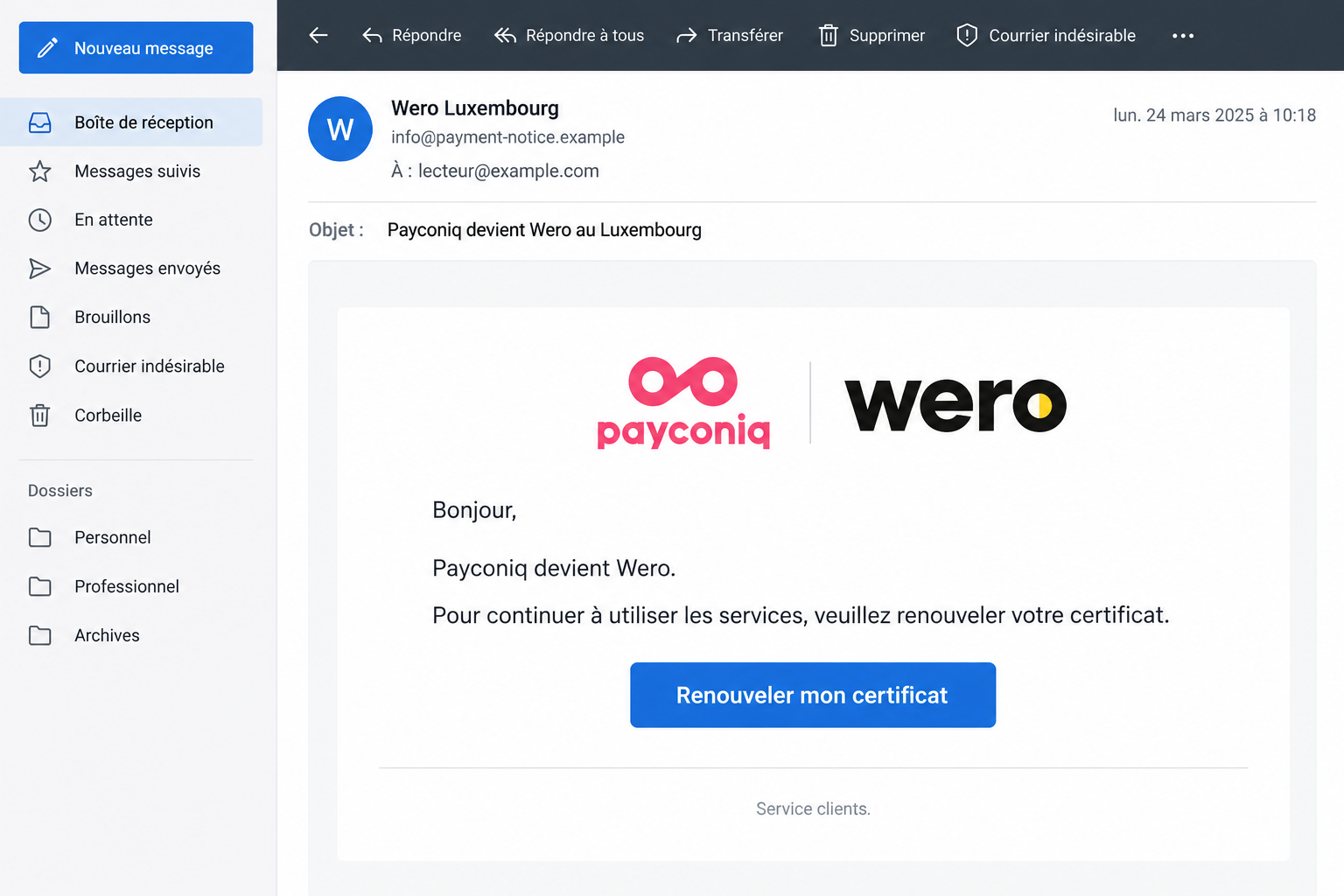
The Payconiq to Wero email scam borrows a genuine payment-service change and adds an invented requirement: renew a certificate through the sender’s link.
Wero and Payconiq are being impersonated. The warning concerns fraudulent messages and follow-up callers, not an allegation that either payment service operates the fraud.
In the Luxembourg consumer association’s documented email, the button invites certificate renewal. A professional layout makes that instruction feel like routine account maintenance.
A Later Security Call Can Be Part of the Same Attempt
Luxembourg police describe several cases involving migration messages followed by bogus bank or LuxTrust calls. The caller claims the account needs protection.
Some victims were then pressed to approve requests, scan codes, or disclose more information. In some cases, callers also announced that someone would collect their bank card.
That doesn’t happen to every recipient. It explains why closing the email may not end the attempt once you have supplied contact or financial details.
The Useful Test Is What You’re Being Asked to Authorize
A logo, local phone number, or familiar payment name cannot establish that a certificate request or security call belongs to your bank.
- Verify changes through your own bank, using a route you already know.
- Don’t approve transactions to cancel a supposed hack or complete an emailed migration.
- Keep cards, PINs, and authentication secrets out of a caller’s hands.
- Report submitted banking details promptly, even if no money appears missing yet.
Why a Real Payment Change Makes Such a Convincing Hook
Unexpected administration is easier to accept when something really is changing. You might expect a different app, new branding, or instructions from your bank.
The sender takes advantage of that reasonable expectation. Instead of persuading you that a new service exists, the email only needs to convince you about one extra task.
That task is where the trust decision happens. Knowing the news about Wero is different from knowing who controls a renewal button in your inbox.
Payconiq’s genuine transition information confirms the change. It doesn’t authenticate a separate certificate-renewal message sent under its name.
Different banks and services may provide their own instructions. Use the information intended for your actual account rather than a completion date copied into an unsolicited email.
You don’t need to settle the entire migration timeline before refusing an unfamiliar request for banking access. The bank can explain any legitimate action through its established channels.
The lead image is an illustrative email reconstruction with fictional addresses. Its display date and layout aren’t an original recipient’s evidence.
How the Payconiq to Wero Email Scam Works
Step 1: The Email Turns a Brand Change Into a Personal Obligation
The opening sounds informational: Payconiq is becoming Wero in Luxembourg. Then the message presents certificate renewal as the condition for continuing to use the service.
That changes the reader’s job from understanding an announcement to completing a form. You’re no longer just reading news about a payment provider.
Someone who uses mobile payments regularly may worry about being unable to pay at the next checkout. The request offers a convenient way to remove that worry.
But convenience doesn’t establish authority. Leave the email and check whether your own bank has actually asked you to do anything.
Don’t reply to request a safer link. A sender who supplied the original instruction isn’t an independent source for verifying its replacement.
Step 2: The Renewal Route Collects Information Under a Familiar Name
The link moves the interaction away from the inbox and toward a page claiming to handle the transition. Treat its requests as unverified.
The police warning describes people entering personal or card information after following migration links. Different versions need not use identical forms.
Don’t assume that a small amount, a neat logo, or a reassuring confirmation makes a financial request harmless. Check who is receiving the information.
An error message doesn’t mean your details stayed private. If a migration form fails, leave it instead of trying another card.
If the real banking app opens, read the actual request. Is it a payment, a device enrollment, or another permission you didn’t intend to give?
An app you genuinely use can still display an action initiated through a dishonest story. Its presence doesn’t validate the person directing you.
Step 3: A Caller Recasts the Exposure as a Banking Emergency
In reported cases, a later caller poses as bank staff or LuxTrust support and says the account has been hacked or suspicious transactions have appeared.
The timing can make the story convincing. If you just used an unfamiliar form, a call about a problem may seem connected to genuine fraud detection.
Yet that connection can work in the opposite direction: the form supplied information that makes the next approach more believable.
A caller who knows your name or describes your recent interaction hasn’t proved access to your bank’s security team. They may simply know what you submitted.
End the call before following instructions. Then contact your bank yourself, rather than using a number or transfer offered by the caller.
Step 4: The Supposed Protection Requires a Dangerous Approval
The final pressure is practical: disclose a code, scan something, confirm an app request, or hand over a card so the supposed expert can secure it.
At this point, the caller wants the emergency story to replace your own reading of the action. Don’t let that happen.
An approval is not made safe by describing it as a cancellation. A card doesn’t become safe to surrender because the caller promises to replace it.
Police have also warned about caller-ID spoofing. A Luxembourg number on the display isn’t enough to verify the organization behind the call.
Don’t stay on the line while checking. A genuine bank can handle your report when you reach it through a separately obtained contact route.
The Sender and the Caller Need Separate Checks
A Display Name Can Hide an Unrelated Address
The email described by ULC used the display name Wero Luxembourg with an address ending in sevenseventhree[.]co.za.
That mismatch is a useful clue in this example, not the entire detection rule. A later version could use another address or imitate the name more closely.
Don’t approve a message simply because it lacks that particular domain. Verify the requested financial action independently, rather than collecting a short blacklist of senders.
Likewise, a recognizable address shown on screen isn’t the same as verified message authentication. Let your provider investigate technical headers if needed.
Knowing Your Details Doesn’t Make a Call Genuine
A person who sounds informed can still be an impersonator. Separate the facts they recite from the authority they claim.
If you entered your telephone number into the first form, an unexpected call deserves particular caution. Tell your real bank about the earlier submission.
Don’t quiz the caller by offering more private details and asking them to confirm. That can give the person exactly the information they lacked.
Ask the bank to review your account after you have reached it yourself. You don’t owe an incoming caller a chance to finish their script.
A Real Refund Notice Is a Different Question
Payconiq also describes a separate process involving historical customer balances. Don’t confuse every mention of a refund or company change with this certificate-renewal fraud.
That distinction matters because sweeping warnings can make people ignore genuine communications. The safe response is verification, not treating an entire real provider as criminal.
Read official information by opening the provider’s site yourself. If a notice concerns a balance or account you recognize, ask through the published contact channel.
Don’t send identity documents in response to an unexpected migration email simply because a separate refund procedure may require identification.
A legitimate process elsewhere doesn’t grant permission to this sender. Establish the specific request and its destination before sharing anything sensitive.
Our iDEAL to Wero email warning covers a different activation lure. The Luxembourg campaign adds a specific certificate story and reported follow-up calls.
What to Do if You Have Fallen Victim to This Scam
You can stop in the middle of the process. Don’t complete another form or approval just because you already started.
-
Break contact with the supposed migration or security team. Close the suspicious page and end the call. Don’t accept a transfer to another supposed department.
If someone claims a collector is coming, refuse to hand over your card or PIN. Contact local police about an immediate safety concern.
-
Tell your bank exactly what you disclosed or approved. Use your existing banking app or a trusted number obtained independently from the message.
Distinguish card details, online-banking credentials, one-time codes, and completed approvals. Ask about blocking affected access and reviewing any unfamiliar transaction or enrollment.
If you handed over a card, report that immediately. Don’t wait for the promised replacement or assume keeping the PIN secret solves the exposure.
-
Involve LuxTrust if its credentials or approvals were exposed. Use LuxTrust’s official support to discuss suspending the affected certificate.
Certificate protection and banking protection are related, but not interchangeable. Speak to the financial institution about actual transactions as well.
-
Keep an accurate record without revisiting the phishing site. Save the original email, call times, visible sender, and bank notifications you already received.
Write down the order of events while it’s fresh. Avoid storing full passwords, PINs, or approval codes in a shared note or public screenshot.
-
Review activity with the bank rather than the caller. Ask about unfamiliar payments, cards added to wallets, new access, or other changes relevant to your interaction.
If funds moved, ask promptly about the available investigation and recovery process. A reported transaction is not a guaranteed reversal.
-
Protect any reused password and report the impersonation. Replace exposed credentials through genuine account settings. Include your email account if it shared the same secret.
File a police report when information or money was stolen. A report helps document the incident but doesn’t substitute for urgent bank protection.
-
Ignore anyone offering paid recovery through the same conversation. Don’t send another payment or approve another request to release supposedly frozen funds.
If a relative helps, let them organize the timeline and locate genuine support. They don’t need to receive or handle your authentication codes.
If You Only Opened the Message
Reading an email isn’t the same as submitting a card or approving a transaction. Match your response to what actually happened.
If you did not follow the link or disclose anything, report the message as phishing and remove it after retaining any evidence you need.
If you opened the page but entered nothing, close it. Consider whether anything else occurred, such as a download or a permission request.
The documented migration phishing doesn’t by itself establish a device infection. Wiping a phone or buying a scanner is not a substitute for identifying your real exposure.
If you cannot remember an approval, check with the bank. Don’t use the absence of an obvious charge as proof that no access changed.
For a shared household account, warn the other authorized user about the specific message. Avoid forwarding a working link as if it were an instruction.
Don’t worry about finding the perfect technical name for the incident before asking for help. Describe the screen, the requested action, and whether you agreed.
Tell support whether the email and call arrived on the same day. That timeline may help distinguish an unrelated genuine notification from the impersonator’s follow-up.
If the bank confirms there is a legitimate migration task, start it again from the bank’s own instructions. Don’t resume the interrupted email workflow.
Keep any case reference your bank provides. Use that reference through the genuine support channel if you need an update, not a new caller’s private contact details.
Once the urgent account protection is underway, let people you share payment responsibilities with know what happened. A quiet warning can prevent a second person responding.
Frequently Asked Questions
Is Payconiq Really Becoming Wero?
Yes. The genuine transition doesn’t validate an unsolicited certificate-renewal link. Check any action affecting your account directly with your bank.
Is Every Wero Email Fraudulent?
No. This warning addresses impersonation and unsafe requests, not every communication using the brand. Verify the specific sender and action through an independent route.
Why Would a Scammer Call After the Email?
Police report follow-up security impersonation in some cases. Information from an earlier form can make the next approach sound informed and convincing.
Should I Approve a Request to Cancel a Suspicious Payment?
Not on an incoming caller’s instruction. Read what the app actually authorizes and ask your bank through its established support channel.
Can LuxTrust Take My Card Away for Safekeeping?
Don’t surrender a card or PIN to someone claiming to protect the account. LuxTrust’s identity service isn’t your bank or a card-collection service.
What if Nothing Has Been Taken Yet?
Still report exposed banking secrets or approvals promptly. Your bank can assess access and pending activity before a visible loss becomes the first warning.
The Bottom Line
Don’t renew a certificate through the Payconiq to Wero email scam or follow its security callers. A genuine migration doesn’t give strangers authority over your money.
If you responded, contact your bank now and involve LuxTrust for exposed identity credentials. Keep the evidence, refuse further approvals, and retain control of your card.

Join the discussion
0 commentsShare your experience or ask a question about this article.
Discussion
Start the conversation
Have a question or something useful to share? Add the first comment.