


A PayPal email mentions a Coinbase purchase you never made. The amount is unsettling, and a support number offers a quick way to cancel it.
Before reaching for that number, work out what the message actually represents: a request for payment, an emailed claim, or a transaction in your real account.
Overview
The PayPal Coinbase scam combines a crypto charge with a support pretext
This impersonation scheme claims a cryptocurrency purchase or invoice involves PayPal and Coinbase. It pressures you to cancel an unfamiliar charge through contact details supplied in the message.
The supposed solution may be a payment, a phone conversation, or an account-verification process. The criminal wants you to act before independently checking the claim.
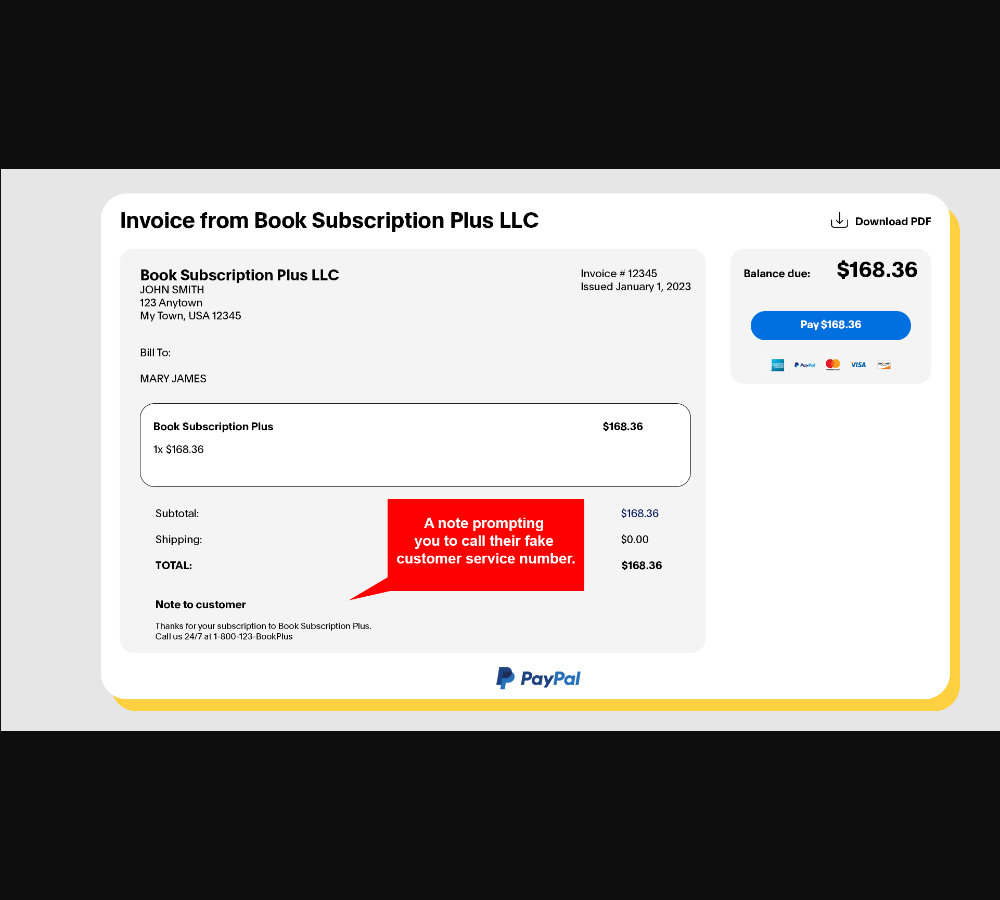
The image shows PayPal’s own example of an invoice-note scam using a book subscription. It illustrates the note abuse, not an authenticated Coinbase invoice.
A genuine invoice delivery is not a genuine purchase authorization
Some messages are ordinary imitations of PayPal emails. Others misuse an actual invoice or money-request feature to deliver a misleading customer note.
That distinction explains why checking only the visible sender can be insufficient. A service may deliver a request without endorsing the sender’s story or the telephone number inside it.
An invoice asking you to pay is also different from a completed payment. Don’t let words such as “authorized” inside a note replace the account’s actual transaction status.
Check both services without following the message’s instructions
Open PayPal independently and review the relevant activity. If you have a Coinbase account, investigate any genuine concern through that account or official support separately.
- Don’t pay an invoice for a purchase you didn’t make.
- Don’t call a telephone number inserted into the invoice’s note.
- Don’t provide passwords, security codes, or remote access to cancel the claim.
- Don’t transfer cryptocurrency to an address described as a refund or verification destination.
How the PayPal Coinbase Scam Works
Step 1: An unfamiliar crypto purchase appears in an email
The message uses a recognizable payment company and cryptocurrency brand to make the claim understandable. You don’t need to know how crypto works to worry about being charged.
The combination can be especially confusing if you’ve never used Coinbase. That confusion gives the sender an opportunity to explain a problem they invented.
A transaction number, date, amount, or named sender adds apparent detail. None establishes that you authorized a purchase or that the payment actually occurred.
You don’t need to open an unexpected attachment to investigate the charge. Check the claim in your actual account, not through an invoice or logo in the message.
Step 2: The message blurs a payment request and a completed charge
A real invoice is ordinarily asking for payment. A criminal can add wording that makes the request sound like confirmation that money has already left your account.
A forged email can make the same assertion without any genuine invoice behind it. These are different delivery methods with a similar pressure tactic.
The important question isn’t whether the document looks official. It’s what your independently opened PayPal and banking records say happened.
Don’t pay to make the invoice disappear. That would turn an unwanted request into a financial action you may otherwise never have needed to take.
Step 3: A cancellation number turns alarm into a callback
The note may direct you to contact a support desk urgently if you didn’t authorize the purchase. It feels sensible because disputing the charge is exactly what you want.
But the telephone number is supplied by the disputed message. Using it lets the author of the claim also play the person supposedly resolving it.
PayPal warns specifically about alarmist invoice notes that direct recipients to fake customer-service numbers. It advises checking the real account rather than calling those contacts.
Don’t transfer to another supposed department offered by the same operator. Independent verification begins after leaving the conversation, not after another handoff within it.
Step 4: The operator asks for information or access
A fake agent may ask for card details, account credentials, a verification code, or a remote connection, calling the request necessary to identify or cancel the transaction.
The fact that they know the invoice amount adds little. The same information was available in the message that prompted your call.
Don’t share a live account view to prove you weren’t responsible. Screens can expose balances, contact information, security prompts, and access to unrelated services.
Use official support from a channel you located yourself. Explain the suspicious request without letting its sender guide your account actions.
Step 5: A supposed cancellation introduces a real financial action
The next instruction may ask you to make a payment, move funds, or send cryptocurrency. It may be described as verification, a refund correction, or a safety procedure.
That is the point where an invented charge can create a genuine loss. The money you send is real even if the original invoice was not.
A displayed refund or account screenshot is not independent confirmation. Check actual credits and debits through the financial provider before considering any further action.
If an unexplained credit genuinely exists, ask the provider to investigate it. Don’t send a separate return payment to a destination chosen during an unverified call.
Step 6: The explanation changes when you hesitate
An operator may claim cancellation failed, a security review is incomplete, or another step is required. Those explanations keep you inside the same invented problem.
You don’t need to finish their process. Stop communicating and take the records to PayPal, your issuer, or the relevant account provider.
Keep the sequence intact when reporting. A misleading invoice, a callback, remote access, and a later transfer may be parts of one incident rather than unrelated mistakes.
Do not accept a recovery offer from another unsolicited contact. Knowledge of your loss can come from the same conversation or operation, not an official investigation.
Three Records That Shouldn’t Be Confused
The email describes a claim
An email can notify you about activity, but it is not the final authority on whether the activity occurred. Its content may be forged or supplied by an untrusted requester.
Preserve it for reporting without allowing its labels to define the situation. “Payment complete” in a document is not equivalent to a settled debit.
The PayPal account shows the request or transaction
Open the app you already use or type PayPal’s address yourself. Find the item in Activity and read its actual status and available actions.
A suspicious request appearing there doesn’t make the underlying purchase legitimate. It can instead confirm that someone used the service to send an unwanted request.
If nothing matches, the email’s claim remains unsupported. Still check financial activity if you supplied information or approved anything after receiving it.
The bank or card account shows the financial movement
A card statement helps determine whether a charge actually exists and which merchant descriptor appears. Pending and completed items may need different handling.
Ask the institution to explain anything unclear through its verified channel. Don’t let the purported refund agent interpret your statement while watching your screen.
If an unauthorized charge is real, report that charge. Canceling an unpaid invoice is not a substitute for a dispute about money already taken.
How to Remove a Suspicious PayPal Invoice Without Calling It
PayPal’s invoice-reporting instructions describe actions available inside the genuine account. Use those controls rather than the requester’s telephone number.
- Open the real PayPal website and go to Activity.
- Select the suspicious money request or invoice and check its status.
- If the displayed option is available, choose Cancel and confirm with Yes.
- To report it, choose Report this invoice or Report, then complete the displayed steps.
- In the app, use Decline for the suspicious request when that option is shown.
Controls can depend on the item and interface. If the option is missing, use official PayPal help from inside the account rather than improvising a payment or refund.
Reporting a request tells the platform about the abuse. It does not automatically secure credentials you disclosed, remove remote access, or reverse a separate transfer.
What the Coinbase Name Does and Doesn’t Prove
A business name in an invoice description can be typed by the requester. It doesn’t establish that Coinbase created the invoice or approved the contact details.
If you have a Coinbase account, access it independently. Compare genuine activity and security notifications rather than accepting an email’s assertion about a purchase.
Coinbase’s phishing guidance warns about impersonation and fraudulent requests involving credentials or cryptocurrency transfers. A familiar brand name doesn’t authorize an external payment instruction.
Don’t create a wallet, connect one, or send crypto simply to dispute a claimed purchase. Those actions introduce new financial exposure rather than authenticate the original charge.
If you disclosed a wallet recovery phrase, treat that separately from a website password. Get help through the wallet’s genuine support documentation, never a stranger offering paid recovery.
What to Do if You Have Fallen Victim to This Scam
-
Stop using the invoice’s contact route. End any call and don’t approve a further code, transfer, or remote session. Save the message before removing it.
Use PayPal’s genuine account controls to handle an unwanted invoice. A caller’s assurance that cancellation is incomplete doesn’t make another payment necessary.
-
Check which financial actions actually occurred. Review PayPal and the relevant card or bank records independently. Note amounts, status, recipients, and transaction references.
Distinguish a request you never paid from money already transferred. That difference determines whether you’re reporting invoice abuse, a payment problem, or both.
-
Tell the payment provider promptly about a loss. Describe the impersonation and ask what can still be stopped, disputed, or investigated.
If you authorized a transfer after being deceived, say so accurately. Don’t describe it as a transaction you never approved if that isn’t what happened.
-
Secure credentials and approvals you exposed. Replace affected passwords from a device the caller didn’t control. Review account recovery details, sessions, and connected applications.
Report disclosed banking codes or unexpected approvals to the bank. A new password doesn’t undo every action a criminal may already have completed.
-
Contain any remote session. Disconnect the affected computer and keep financial activity on another trusted device. Notify workplace IT if the device is managed.
Have trusted technical support assess unauthorized access and lasting changes. Closing the remote window is not a reliable determination that all access has ended.
-
If cryptocurrency was sent, preserve the transaction trail. Save the network, transaction identifier, destination, amount, and any exchange account used.
Contact the exchange through its genuine support route immediately. Don’t pay someone who promises to reverse a blockchain transfer or unlock a recovered balance for a fee.
-
Report the suspicious email and invoice. PayPal identifies
phishing@paypal.comas its reporting address for suspicious emails and websites.Report the invoice inside the actual account as well. A forwarded email and an in-account abuse report serve related but different purposes.
-
Keep a short, private incident timeline. Include the original email, phone numbers, requests made, account actions, and financial references.
For US reporting, use IC3 or the FTC as appropriate. Avoid posting full statements, identity documents, or working account links publicly.
If the Invoice Arrives in a Business Inbox
Don’t forward the message to a colleague with instructions to pay or call. An internal forward can make an outside request appear approved by someone trusted.
Ask the finance team through a known internal channel whether there is a matching authorized order. Provide the reference without turning the suspicious link into a recommended action.
If an employee already responded, involve the appropriate security and finance contacts together. They need to understand both account access and any payment, not just remove the email.
Frequently Asked Questions
Can a real PayPal email carry a fraudulent invoice?
Yes. A criminal can misuse a genuine request feature. Delivery by the service doesn’t authenticate the requester’s purchase claim or the support number in a note.
Does an invoice mean the crypto purchase was paid?
No. A request for payment is not a completed payment. Read the actual status in your independently opened account and compare it with your financial records.
Should I call the number to cancel a Coinbase charge?
Not the number supplied in a suspicious invoice. Investigate through PayPal, Coinbase, or your issuer using contact routes you established independently.
Can receiving this message take money automatically?
The message alone doesn’t establish a debit. The risks increase when you pay, disclose information, authorize account actions, or permit remote access.
What if I have never used Coinbase?
That doesn’t prevent impersonation emails. You can reject an unsolicited request without creating a crypto account or following the sender’s cancellation instructions.
Does declining the invoice fix everything?
It handles that request, not separate exposure. Payments, disclosed credentials, remote sessions, and wallet information may each require additional action through the relevant provider.
The Bottom Line
Don’t pay or call your way out of a PayPal Coinbase scam. Check whether there is a genuine transaction before treating an alarming note as a financial emergency.
Handle unwanted requests inside PayPal and investigate real charges through the provider that processed them. The invoice author’s help line isn’t an independent authority.
If you already shared access or sent money, stop contact and secure the affected accounts while reporting the actual payment trail.

Join the discussion
0 commentsShare your experience or ask a question about this article.
Discussion
Start the conversation
Have a question or something useful to share? Add the first comment.