


An invoice appears for security software, technical support, or a service plan you do not remember buying. The charge is large, the renewal is automatic, and a telephone number promises immediate cancellation.
Calling feels like the sensible way to stop the payment. In the subscription renewal scam, however, the cancellation line is not customer support. It is the entrance to the trap.
Overview
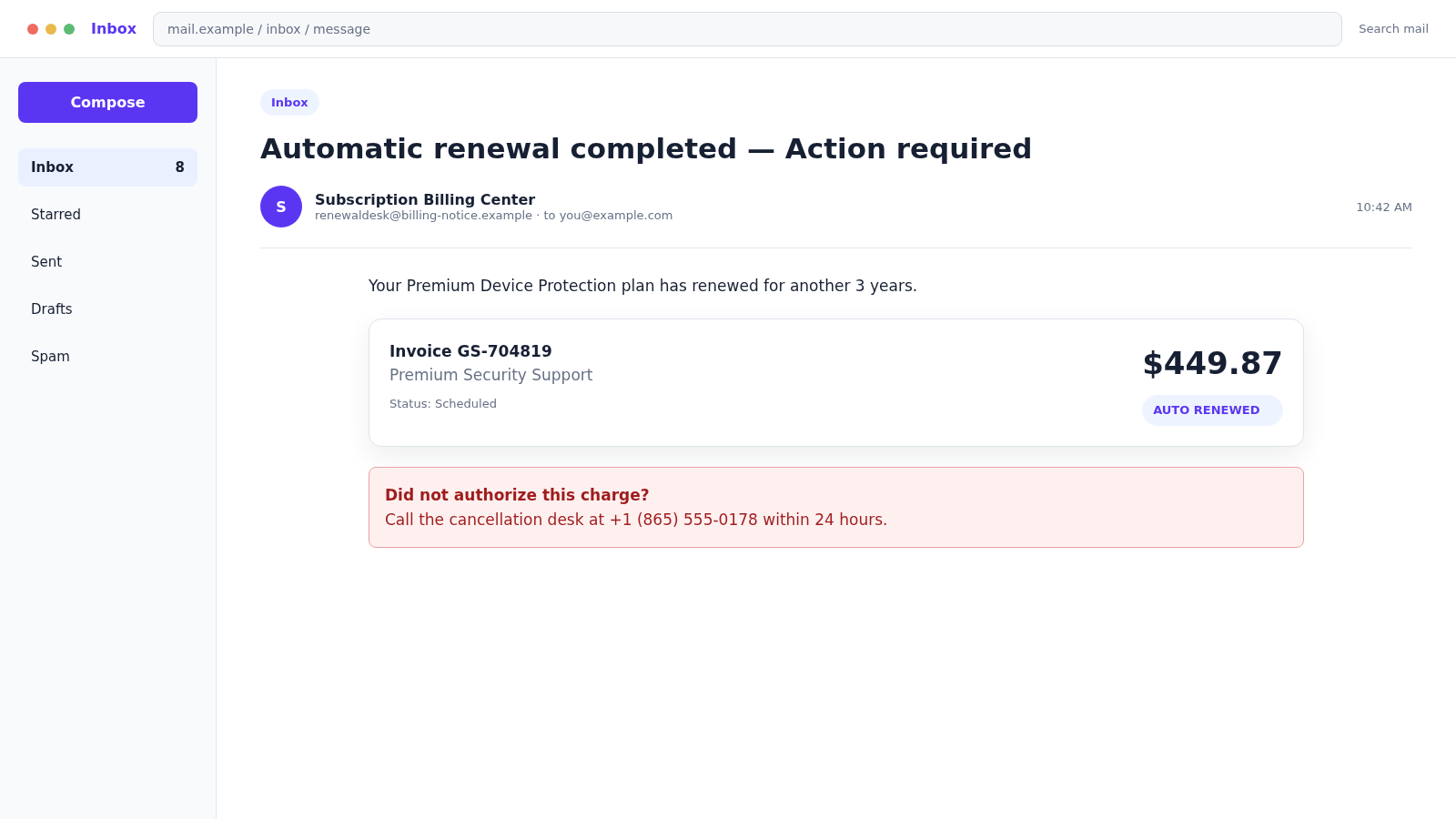
The invoice is designed to trigger a callback
The subscription renewal customer support scam begins with a fake email, text, or pop-up claiming that a familiar service has renewed. Common names include Geek Squad, Norton, McAfee, Microsoft, PayPal, and other recognizable technology or payment brands.
The message may not contain a phishing link. Its most important feature is the telephone number. The alarming charge exists only to make the recipient call before checking whether any real transaction occurred.
The fake agent turns cancellation into remote access
A caller reaches a professional-sounding billing desk. The agent asks for the invoice number, then claims the cancellation requires a secure form, banking verification, or connection to a technician.
Remote-control software lets the scammer see the computer and manipulate what appears on screen. They may hide windows, edit a page, inspect email, steal passwords, or make an account balance appear different.
The refund story creates a much larger loss
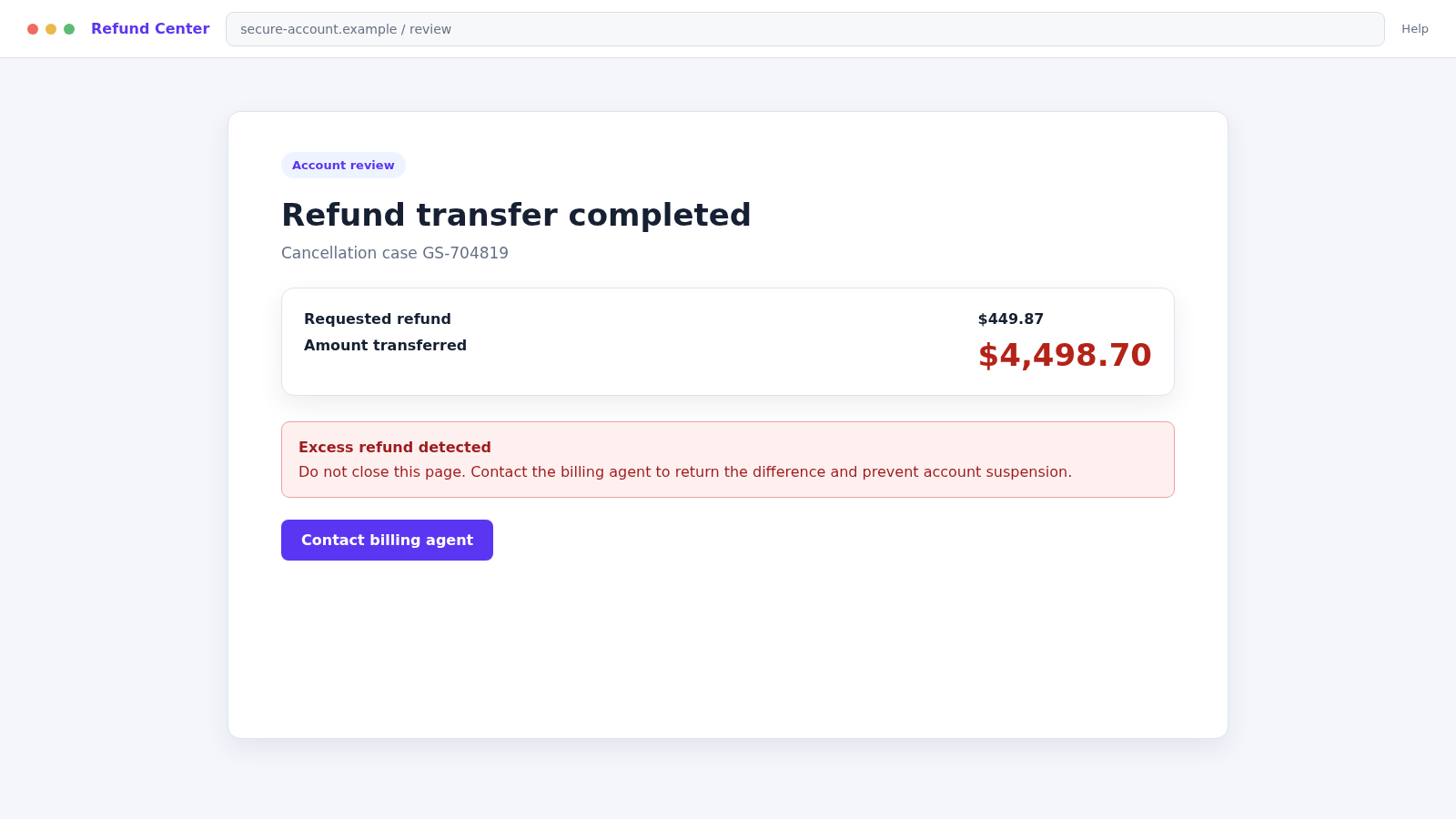
After gaining trust, the agent claims to refund too much money. The victim is blamed for entering the wrong amount and is told to return the difference through gift cards, cash, cryptocurrency, a wire, or a payment app.
No original subscription charge is needed. The entire sequence is theater built around a fabricated invoice, a controlled screen, and pressure to make a hard-to-reverse payment.
- An unexpected renewal appears for a service you do not use
- The message emphasizes one callback number
- Cancellation supposedly expires within hours
- The agent requests remote access to issue a refund
- A bank balance is used to prove an overpayment
- You are ordered to return money through an unusual method
Why the Fake Charge Works So Well
Most people have several subscriptions, and renewal dates are easy to forget. Scammers use that uncertainty. Even someone who never purchased the named product may call simply to prevent a charge from reaching their bank account.
The invoice often looks plain rather than perfect. A simple receipt with an order number, renewal date, amount, and customer-service line can resemble the automated notices people receive every day.
The wording quietly reverses the normal burden of proof. Instead of the sender proving a purchase exists, the recipient feels responsible for canceling it. The short deadline leaves little space for checking the real account or bank statement.
Once the call begins, the scammer controls the pace. Transfers between billing, security, and refund specialists create the impression of a larger company while keeping the victim engaged.
How the Subscription Renewal Scam Works
Step 1: A fake renewal notice reaches the inbox
The message claims a subscription was renewed for $349, $449, or another attention-grabbing amount. The sender may use a free mailbox, compromised account, mailing service, or spoofed display name.
Attachments can contain an invoice image or PDF. Some are harmless bait, while others may carry malicious links or files. Opening an unexpected attachment is unnecessary when the transaction can be checked elsewhere.
Step 2: Urgency directs attention to the telephone number
The notice says the charge is final unless disputed within 12 or 24 hours. A bold cancellation number appears several times, while official account links and normal purchase details are missing.
The number may change between campaigns. Searching it can reveal complaints, but a lack of reports does not make a newly activated line safe.
Step 3: The fake agent confirms the invented invoice
When the recipient calls, an agent asks for the order ID and pretends to find the account. The agent may repeat the name and email from the original message to show that the record is real.
The caller is reassured that cancellation is possible. This helpful opening lowers suspicion before more invasive requests begin.
Step 4: A cancellation form requires computer access
The agent directs the victim to install AnyDesk, TeamViewer, Quick Assist, or another remote tool. The explanation may involve a secure server, refund form, or technician who must remove the subscription.
Remote access is not required to cancel an ordinary subscription. It gives the caller control over the device and visibility into sensitive accounts.
Step 5: The victim is taken to online banking
The scammer asks the victim to sign in to confirm the refund. The screen may turn black while the agent edits HTML, moves money between the victim’s own accounts, or changes what the browser displays.
A transfer between checking and savings can look like an external deposit when the victim is watching only one balance.
Step 6: A false overpayment appears
The agent claims that $5,000 was refunded instead of $500 because the victim typed an extra zero. A fake receipt or altered balance is presented as proof.
The caller becomes emotional and says their job is at risk. The goal is to turn the victim from a suspicious customer into someone trying to correct an apparent mistake.
Step 7: The difference must be returned outside normal banking
The victim is instructed to buy gift cards, send cryptocurrency, wire money, use a payment app, or withdraw cash for a courier. These methods reduce the chance of reversal.
The scammer may stay on the phone during the entire trip and warn against speaking with bank or store employees.
Step 8: Access and pressure continue after payment
Remote software, stolen credentials, and mailbox access can support further theft. The caller may invent a second error or claim that only part of the repayment arrived.
Later, another person may offer to recover the lost money for a fee. That is a continuation of the fraud, not a rescue.
Company, Address, and Fulfillment Checks
The brand name is not the billing company
Compare the invoice with the authenticated account, original receipt, card statement, and merchant descriptor. A logo in an email does not establish that the named company created a charge.
The return address may expose the mismatch
Expand the actual sender, reply-to address, and attachment details. A free mailbox, unrelated domain, or different company name conflicts with a supposed automatic renewal from a major service.
Real support can be reached independently
Use contact information from the official account or verified company website. Do not call the invoice number. Genuine support can check a subscription without installing remote software or opening your bank account.
A real renewal leaves a complete transaction trail
An active plan should appear in the service account, purchase history, app-store subscriptions, or financial statement. If none of those records contains the charge, there is nothing for the email sender to cancel.
What the FTC Says About Fake Renewal Notices
The FTC’s tech support scam guidance describes renewal messages claiming charges of $300 or more for services associated with familiar security and retail brands.
According to the FTC, the notice directs people to call quickly. The fake support agent then seeks remote access, displays a spoofed refund page, and claims that too much money was returned.
The requested repayment often uses gift cards, wire or bank transfers, cryptocurrency, or payment apps. Those methods are chosen because recovering the money can be difficult.
The FTC recommends checking the real account and contacting the company through a number you know is genuine. If no matching transaction exists, the renewal notice was fabricated.
Warning Signs in the Invoice and Call
- You do not recognize the product, account, or renewal date
- The sender address does not match the displayed brand
- The invoice lacks normal purchase and payment details
- One telephone number dominates the message
- The cancellation deadline is unusually short
- The agent asks to install remote-control software
- You must sign in to banking while the caller watches
- A refund error leads to gift cards, crypto, cash, or a wire
Never use the suspicious message to investigate itself. Open the real service account and bank statement separately. That simple change removes the scammer’s telephone line from the verification process.
How to Check a Renewal Without Calling the Invoice Number
Start with the financial account that would supposedly be charged. Search pending and completed activity for the exact merchant and amount. An email invoice is not a transaction record, even when it includes the last digits of a card.
Next, open the named service from a bookmark, installed app, or manually typed official address. Review the plan name, billing date, payment method, renewal setting, and purchase history inside the authenticated account.
Check Apple, Google, Microsoft, PayPal, or another marketplace if subscriptions are billed through it. A service purchased through an app store should normally appear in that store’s subscription controls.
If uncertainty remains, find customer support through the verified account or company website. Explain that you received an unexpected invoice, but do not forward sensitive documents or grant remote access unless the authentic provider gives a clearly justified process.
- Search the real bank or card account for the charge
- Review subscriptions inside the official service
- Check app-store and payment-platform billing
- Compare the invoice with earlier genuine receipts
- Contact support through independently found details
- Report the sender and callback number as impersonation
Do not click “unsubscribe” in a suspicious renewal message. The link may confirm an active address or open another phishing page. Use the email provider’s spam and phishing controls instead.
Families can reduce confusion by keeping a simple list of paid services and renewal dates. The list does not need account passwords. Its purpose is to make an unexpected $449 notice easier to reject without calling a stranger.
If the notice reaches a work address, forward it to the security team through the company’s approved reporting method. Other employees may have received the same callback number, and an early warning can prevent several calls.
What to Do if You Have Fallen Victim to This Scam
- End the call immediately. Do not negotiate, return an alleged overpayment, or let the caller transfer you to another specialist.
- Disconnect remote access. Turn off the device’s internet connection. Remove remote-control software and revoke unattended-access permissions before using the device for sensitive accounts.
- Contact your bank. Use the number on your card or statement. Explain that a scammer viewed or controlled online banking and identify every transfer or internal account movement.
- Report each payment. Contact the gift-card issuer, exchange, wire service, payment app, or courier immediately. Supply receipts, destination details, and times.
- Change exposed credentials. From a clean device, reset email, banking, shopping, and password-manager credentials. Replace reused passwords and enable multi-factor authentication.
- Check the mailbox. Remove unknown forwarding rules, recovery methods, connected apps, and sessions. Review sent, deleted, archived, and trash folders.
- Scan the computer. Use Malwarebytes for a full scan that can identify malicious files or unwanted remote tools introduced during the call.
- Block further malicious pages. Report the domains and consider AdGuard to reduce access to known phishing and harmful advertising. It cannot reverse a completed payment.
- Review financial activity carefully. Look for new payees, scheduled transfers, changed alerts, linked accounts, card charges, or unfamiliar loans.
- Preserve the evidence. Save the email with full headers, attachment, telephone number, remote-session ID, bank screenshots, receipts, gift-card numbers, and chat messages.
- Report the scam. File reports with the FTC, FBI IC3 when appropriate, the impersonated company, email provider, and local police if money or identity information was stolen.
- Ignore recovery callers. A stranger who guarantees a refund for an upfront payment is attempting another scam.
Frequently Asked Questions
Was the subscription charge actually processed?
Usually there is no charge at all. Check the real service account and financial statement independently. Do not rely on the invoice, attachment, or caller’s screen.
Is it safe to call the number just to ask questions?
Calling confirms that your number is active and places you inside a practiced sales script. Contact the named company through its verified website or your existing account instead.
Why does the agent need remote access?
They do not need it for cancellation. Remote access lets a scammer manipulate the screen, inspect accounts, install software, and steal credentials.
Can a bank balance be faked on my own computer?
Yes. A remote user can alter page content, hide windows, or move money between your own accounts. Confirm every transaction directly with the bank after ending the session.
What if I already bought gift cards?
Contact the card issuer immediately and keep the cards and receipts. If the numbers were shared, report them as compromised. Recovery is not guaranteed, but speed matters.
Should I delete the invoice email?
Preserve a copy with full headers until reports and disputes are complete. Then mark it as phishing or spam so the provider can improve filtering.
The Bottom Line
The subscription renewal scam does not need a real subscription or charge. It needs only a believable invoice and a frightened recipient willing to call the number printed on it.
Check the real account, keep strangers off your computer, and never return an unexpected refund through gift cards, crypto, cash, or a transfer. The cancellation line is the trap.

Join the discussion
0 commentsShare your experience or ask a question about this article.
Discussion
Start the conversation
Have a question or something useful to share? Add the first comment.