


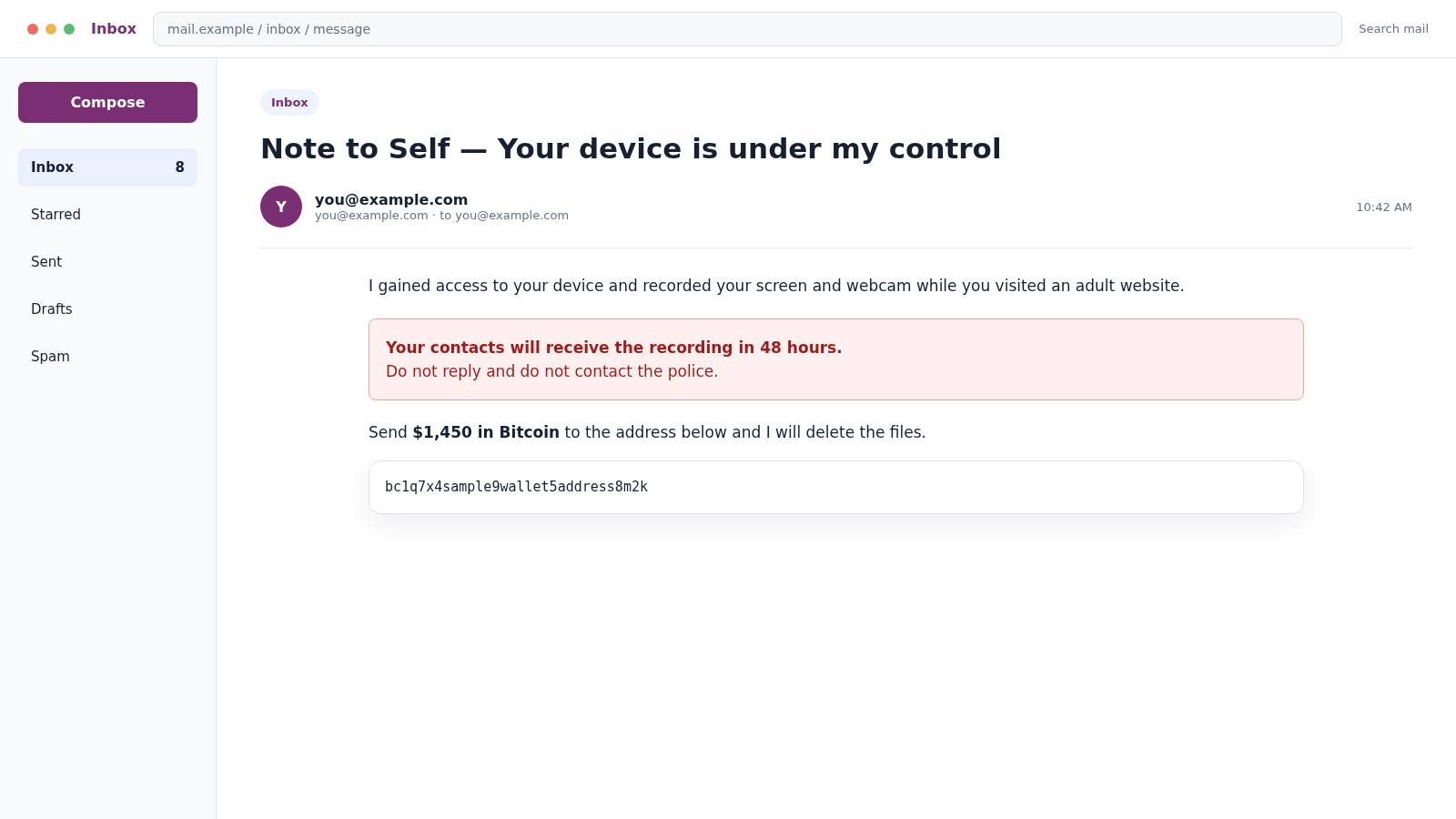
The sender and recipient appear to be the same person: you. The subject may even say “Note to Self,” as though the message came from your own mailbox after someone took control of it.
The Note to Self email scam adds a threat about a hacked webcam, stolen contacts, and a video that will supposedly be released unless Bitcoin is paid. The frightening display is not what it seems.
Overview
The matching From address is usually spoofed
The Note to Self email scam manipulates the visible sender field so a message appears to come from your own address. That can make an ordinary mass extortion email look like proof that the mailbox was hacked.
Email allows several identities to appear in a message. The display name and visible From line can be forged. Authentication results and server routing inside the full header provide better evidence than the inbox view.
The webcam story is designed to create shame and panic
The sender claims malware recorded the recipient visiting an adult website, captured both the screen and webcam, and copied every contact. A short deadline and threat of public exposure discourage calm verification.
Some versions include an old password, telephone number, or address. These details often came from an unrelated data breach. They show that information circulated, not that the writer controls the device or possesses a recording.
The Bitcoin address is the real destination
The message demands cryptocurrency because it can be transferred quickly without a normal card dispute. The amount, deadline, malware name, and claimed evidence vary, but the intended action remains the same.
Most recipients are seeing a bluff sent at scale. Paying does not erase information or secure a computer. It confirms that intimidation worked and may invite further demands.
- The message appears to come from your own address
- A webcam recording is claimed but never shown
- An old password is used as supposed proof
- The sender names powerful spyware without evidence
- A Bitcoin payment is demanded within hours
- Silence and secrecy are presented as protection
Why an Email Can Appear to Come From You
The From field in an email is similar to the return address written on an envelope. A sending system can place another person’s address there, even though the message traveled through unrelated servers.
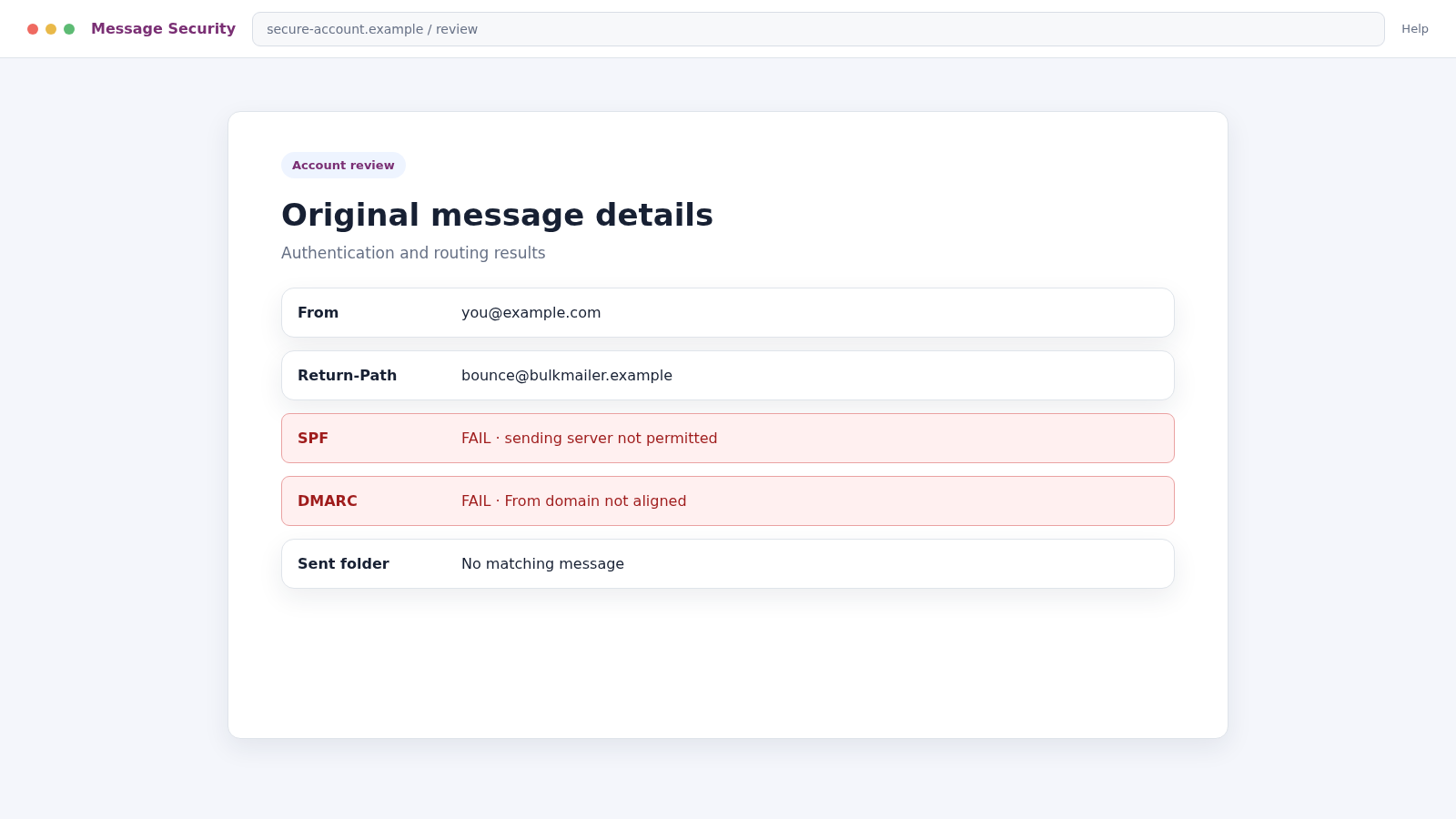
Modern providers use SPF, DKIM, and DMARC to evaluate whether a server was authorized to send mail for a domain. A spoofed message may fail those checks or show a return path unrelated to the visible sender.
The message may still reach the inbox because authentication policies, forwarding, mailing systems, and spam filtering are complicated. Its presence does not demonstrate that someone signed in to your mailbox.
Check the Sent folder and recent account activity. If the message is absent from Sent and there are no unfamiliar sessions or security changes, spoofing is more likely than a mailbox takeover.
How the Note to Self Email Scam Works
Step 1: Addresses are gathered from breaches and public lists
Criminals collect large email lists from old data breaches, scraped websites, marketing databases, and previous phishing campaigns. A breach may also include an old password or other personal details.
The campaign does not require individual research. Automated tools can insert each recipient’s address and leaked detail into the same threat.
Step 2: The From field is forged
The sender places the recipient’s own address in the visible From line or display name. Some clients then group the message as a note to self or show matching sender and recipient identities.
This visual trick is meant to replace technical evidence. The victim sees their address and assumes the criminal must be inside the account.
Step 3: A detailed hacking story establishes fear
The email claims that spyware entered through an adult site, cracked the router, or exploited the operating system. It describes screen recording, webcam access, keylogging, and contact theft with confident technical language.
The story rarely includes verifiable device details, a genuine sample image, or evidence tied to the recipient. Vague claims let the same template work against many people.
Step 4: Leaked data is presented as proof
An old password, telephone number, or address may appear in the message. The criminal hopes one accurate detail will make every other claim feel true.
If the password is current or reused, it requires immediate replacement. It still does not prove a webcam recording exists.
Step 5: Shame isolates the recipient
The message threatens to send a video to coworkers, relatives, and social media contacts. It tells the recipient not to contact police, security professionals, or anyone who might challenge the story.
Isolation is part of the mechanism. A trusted person can often recognize the mass-produced script immediately.
Step 6: A short Bitcoin deadline forces action
The victim receives 24 or 48 hours to send Bitcoin to a listed address. The sender may claim a tracking pixel will reveal when the email was opened and start the timer.
The deadline is artificial. It prevents the recipient from checking headers, account activity, breach records, or the scam template online.
Step 7: Payment marks the address as responsive
A blockchain transfer does not identify the victim by name to the recipient, but the criminal can monitor the listed address. Some campaigns assign different wallets or amounts to help connect a payment to a target.
Once payment arrives, there is no reason for the sender to stop. The threat can be repeated with a new deadline or sold to another group.
Step 8: Follow-up scams exploit the same fear
A later message may claim the first payment failed, another hacker obtained the video, or an investigator can delete it for a fee. These claims continue the original bluff.
Publicly posting the wallet address and personal contact information can also attract fake recovery agents. Preserve evidence privately and report through official channels.
Company, Address, and Fulfillment Checks
The visible sender is not the sending service
Open the full message details and compare From, Return-Path, Received lines, and authentication results. An unrelated sending domain or failed SPF, DKIM, and DMARC checks can expose spoofing.
The claimed location is usually invented
The writer may say they accessed your home, router, workplace, or camera. Without specific evidence, those location claims are part of the intimidation script, not proof of physical surveillance.
There is no real support or dispute channel
The sender provides only a cryptocurrency address and may warn against replying. A real security incident can be investigated through your email provider, device records, and trusted professionals without paying the threatening party.
The promised deletion cannot be verified
Even if a recording existed, a Bitcoin payment could not prove every copy was erased. The criminal offers no enforceable service, identity, contract, or technical way to confirm deletion.
How to Tell Spoofing From a Real Account Compromise
Start with the account’s own security page. Review successful sign-ins, active sessions, recovery methods, app passwords, forwarding rules, filters, and connected applications. An unfamiliar change deserves action even if the extortion story is false.
Look for the email in Sent, Trash, and archive folders. A sophisticated intruder could delete traces, so absence alone is not conclusive, but it is one useful piece of evidence.
If the message includes a password, identify where it was used and replace it everywhere. Password managers make it easier to create a unique password for each account, preventing one breach from unlocking several services.
The FTC warns about Bitcoin blackmail emails that claim access to a computer or webcam and threaten to release a video. Its advice is not to pay and to report the message.
Warning Signs in a Note to Self Extortion Email
- The supposed evidence consists only of your own address
- The password shown is old or reused
- The hacking description is dramatic but nonspecific
- No verifiable sample of the claimed recording is provided
- The writer demands Bitcoin or another cryptocurrency
- A countdown begins when the message is supposedly opened
- Contacting police or security experts is discouraged
- The same wording appears in reports from other recipients
Do not reply to test whether a person is watching. A response confirms that the address is active and that the message reached someone willing to engage.
What the Full Email Header Can Reveal
Every major mail service provides a way to view the original message or full header. Save that original before marking the email as spam, because it preserves routing and authentication details that a screenshot omits.
Read the Received lines from the bottom upward to understand the early route, but remember that criminals can insert misleading text. The lines added by your own provider carry more weight than claims written by the sender.
Compare the visible From address with Return-Path and any envelope-sender field. A message that displays your address while returning to an unrelated domain is consistent with spoofing.
Look for SPF, DKIM, and DMARC results. A failure or misalignment can show that the sending system was not authorized for the visible domain. A pass does not automatically make the extortion true, especially when forwarding or compromised services are involved.
- The unique Message-ID and sending domain
- The earliest trustworthy Received entry
- SPF, DKIM, and DMARC results
- The Return-Path and reply destination
- Dates, time zones, and sending infrastructure
- Spam and phishing verdicts added by the provider
If the header feels confusing, preserve it and ask the email provider or a trusted security professional to interpret it. Do not paste the entire header publicly because it may contain your address and internal routing details.
Header analysis answers whether the message likely came through your account. It does not prove or disprove every device claim, so combine it with account sessions, operating-system updates, security scans, and permission reviews.
What to Do if You Have Fallen Victim to This Scam
- Do not pay or reply. Preserve the message, then stop engaging. Payment does not guarantee silence and can produce additional demands.
- Review account security. Check recent logins, sessions, forwarding rules, recovery details, app passwords, and connected apps directly inside the email account.
- Change exposed passwords. If the email shows a current or reused password, replace it everywhere from a trusted device. Use unique credentials and enable multi-factor authentication.
- Preserve the full email. Export the original message with headers. Record the Bitcoin address, requested amount, deadline, subject, and any personal information quoted.
- Report the extortion. File a complaint with the FBI IC3, FTC, local law enforcement when appropriate, and the email provider’s abuse system.
- Contact the exchange if you paid. Provide the transaction hash and destination address immediately. A blockchain payment may not be reversible, but timely reporting can support tracing.
- Secure financial accounts. If banking or card information was disclosed elsewhere, contact the provider, review transactions, and replace compromised details.
- Scan the device if you opened a file. Use Malwarebytes to check suspicious attachments, downloads, or software. The email alone does not prove malware is present.
- Block malicious links. Report destinations and consider AdGuard to help block known phishing sites and malicious advertising. It cannot determine whether an email header was spoofed.
- Check sensitive permissions. Review browser extensions, webcam permissions, microphone access, and installed applications. Remove anything unknown.
- Talk to someone you trust. Shame and isolation give the threat power. A friend, family member, security professional, or counselor can help you respond calmly.
- Reject paid recovery promises. Anyone claiming they can erase a fictional recording or retrieve Bitcoin for an upfront fee may be targeting you again.
Frequently Asked Questions
Does the matching sender address mean my email was hacked?
No. The visible From address can be spoofed. Review full headers, Sent items, recent sessions, and security settings before concluding that the account was accessed.
Why does the scammer know one of my passwords?
It may have appeared in an earlier data breach. Replace it anywhere it is still used. Knowledge of an old password does not prove control of your webcam.
Could the sender really have a video?
Mass blackmail emails usually rely on a bluff and provide no specific evidence. If the message includes genuine private material, preserve it and contact law enforcement rather than paying.
Can opening the email activate the claimed timer?
A sender may learn that an image loaded or link was clicked, but that does not validate the threat. Do not interact further, and block external images by default when practical.
Should I cover my webcam?
A cover can provide privacy when the camera is not in use, but it does not replace software updates, permission reviews, unique passwords, and careful handling of attachments.
Can Bitcoin sent to the scammer be recovered?
Recovery is difficult and never guaranteed. Report the transaction immediately to the sending service, relevant exchange, and law enforcement. Do not pay a private recovery agent upfront.
The Bottom Line
The Note to Self email scam uses sender spoofing, leaked data, shame, and a short deadline to make a mass-produced bluff feel personal. Your own address in the From field is not proof of a breach.
Do not pay. Secure the account, replace exposed passwords, preserve the full header, and report the demand. Calm verification removes most of the power from the threat.

Join the discussion
0 commentsShare your experience or ask a question about this article.
Discussion
Start the conversation
Have a question or something useful to share? Add the first comment.