


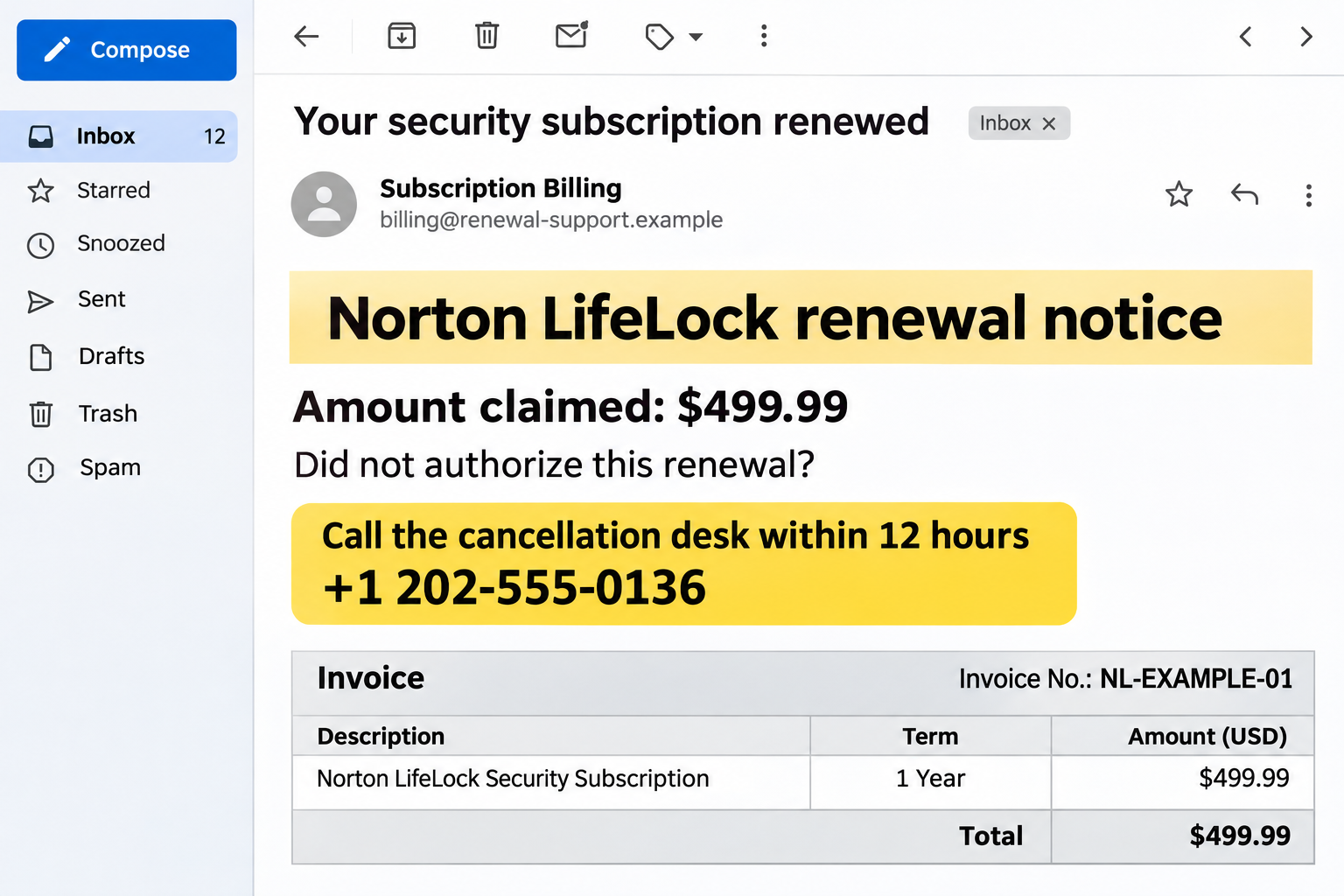
A Norton LifeLock renewal email lands in your inbox with a charge you don’t recognize. A cancellation number is printed where you’d expect the solution to be.
You may never have bought the subscription. That makes the message irritating, but it also makes its invitation to call feel strangely reasonable.
Overview
The Norton LifeLock email scam uses a disputed renewal as bait
This scam impersonates a security or identity-protection subscription notice. It claims a substantial renewal was processed, then steers the recipient toward a fraudulent cancellation desk.
The supposed charge is the conversation starter. The real danger begins when the person answering the phone asks for information, access, or money to resolve it.
The lead image is an illustrative example with fictional contact details. Its amount and invoice identifier are not a verified transaction or a genuine Norton bill.
The phone number is part of the message’s claim
A cancellation number printed in an invoice isn’t independent support. Calling it lets the same person who created the warning control the explanation and proposed remedy.
The operator may describe a refund procedure, account check, or technical issue. Those labels don’t justify remote computer access or instructions to move money.
Norton and LifeLock are legitimate services being impersonated. A criminal’s use of their names does not mean the companies sent the message or received a payment.
Check the real subscription and the real transaction separately
Use your existing account or independently located official support to investigate a subscription. Use your bank or card account to check whether money actually moved.
- Don’t call the invoice’s cancellation number to authenticate the invoice.
- Don’t install remote-control software for a stranger offering to reverse a renewal.
- Don’t treat an emailed receipt as proof your card was debited.
- Don’t send money to correct a refund error described only by the caller.
How the Norton LifeLock Email Scam Works
Step 1: An unexpected renewal creates an immediate billing concern
The email looks like a completed purchase or automatic renewal rather than an optional sales offer. Its wording encourages you to assume an unwanted charge already exists.
An invoice number, subscription term, and payment total make the claim look administrative. A document can look detailed without corresponding to any actual account.
An attachment’s invoice-like filename doesn’t authenticate its sender either. You don’t need to open an unfamiliar file to check your actual subscription.
The message works even when you have no subscription. Instead of dismissing it, you may want someone to explain why a company apparently billed you.
Pause before making contact. If the charge exists, you can investigate it through your financial institution without using the sender’s help line.
Step 2: A short cancellation window makes the callback feel urgent
The notice may say you must call quickly to cancel, dispute the renewal, or receive a refund. Waiting appears to risk losing your chance.
That deadline helps prevent a calmer account check. You’re pushed toward the most convenient route, which happens to be the route chosen by the sender.
A real billing question does not become safer because a suspicious message imposes a clock. Leave the message and find the company’s genuine account or support route.
Don’t reply with card information to reserve a refund. The sender has not established any authority over your subscription or payment.
Step 3: A fake support agent agrees that the problem can be fixed
The person answering may confirm the invoice and offer to cancel immediately. Their willingness to help can make the initial warning seem authentic.
But they aren’t a second source. They are the contact supplied by the same unverified document, repeating a story you already introduced by calling.
The conversation may collect your name, email, bank, or device details under the label of verification. Give nothing further and end the call.
For a genuine account, support can be reached independently. You don’t need the suspicious operator’s permission or transfer to leave their conversation.
Step 4: Cancellation turns into a request for device or account access
The operator may claim that a refund form, account error, or security check requires a remote session. They guide you toward software or an unfamiliar website.
Remote tools have legitimate uses. That doesn’t make a stranger’s request legitimate, particularly when the relationship began with a disputed email.
Allowing screen access may reveal financial information, account sessions, messages, or security prompts. Control can also let the operator change settings or perform actions while distracting you.
Stop before approving the connection. A subscription cancellation does not require a stranger to watch your banking activity or take control of your computer.
Step 5: The supposed refund creates another reason to pay
A possible escalation is an alleged refund mistake. The operator claims too much money was returned and pressures you to send the difference elsewhere.
Another version asks for a processing payment, account transfer, or purchase of gift cards before the cancellation can finish. The exact script can vary.
Don’t decide from a shared screen, a document, or a number the caller says appeared in your balance. Confirm actual transactions privately with your bank.
If an unexplained credit genuinely appears, let the financial institution investigate and handle any correction. Don’t create a separate payment to an account selected by the caller.
Step 6: The operator keeps you working inside the invented problem
Warnings about deadlines, employment consequences, or account restrictions can make stopping feel unfair or risky. The caller may become insistent after sounding helpful.
You aren’t responsible for solving a stranger’s alleged accounting error. Continuing because you already spent time on the call only gives the story more influence.
Hang up and verify through your bank and the genuine subscription service. Keep the two checks separate so one unverified contact doesn’t vouch for another.
If more calls follow, preserve their details without engaging. A new person who knows the incident still needs independent authentication.
How to Check a Norton or LifeLock Renewal Safely
Start with the account you already use
Open the installed product or a trusted bookmark. Review the subscription and order information available there instead of following the email’s link.
If you don’t have an account, don’t create one through the suspicious notice merely to dispute its claim. Independently located official support can explain the next step.
Keep a record of any genuine order you find. The product name, term, renewal date, and total should be compared with the disputed document, not assumed to match.
Check the payment where the payment would appear
Look at your actual card or bank activity. Distinguish an invoice claiming “paid” from a completed debit in the financial institution’s own record.
No matching charge means the emailed assertion remains unsubstantiated. A matching unauthorized charge means you should contact the issuer, not rely on the email’s refund desk.
Don’t share a live banking screen with someone to demonstrate the absence of a charge. You can describe a concern to your bank through its own secure channel.
Use sender details as clues, not the entire verdict
Norton’s legitimate-email guidance lists more sending domains than a simple two-domain rule suggests. It also recommends official support when authenticity remains uncertain.
A displayed company name is easier to imitate than a genuine account relationship. Look beyond it, but don’t assume that spelling alone settles every message.
The strongest question is whether the notice corresponds to your actual subscription and payment. A polished message can still be fraudulent, and a real notice can be brief.
Warning Signs That Matter More Than Typos
A demand to phone immediately is more important than whether the invoice has an awkward sentence. Good grammar doesn’t authorize the sender to handle your money.
So is a request to disclose a verification code. Read what the code authorizes, and don’t relay it to someone whose identity you haven’t independently established.
A remote session tied to a refund is another major boundary. Don’t let a claimed cancellation become access to unrelated banking, email, or identity documents.
Norton also warns that it doesn’t send calendar invitations for billing or payment. An event appearing on your calendar isn’t proof a renewal occurred.
If the notice arrives in a different app, apply the same account-and-payment check. Changing the notification channel doesn’t create a valid subscription obligation.
Don’t let a caller’s reassurance do the checking for you. “This is secure” means little when the only connection to the company is their own message.
What to Do if You Have Fallen Victim to This Scam
-
If you only received the invoice, don’t call its number. Check any genuine account concern independently, then report the message without using its reply or cancellation route.
Norton asks recipients to forward suspicious emails as attachments to
spam@norton.com. Preserve the original rather than pasting only its visible wording. -
If you called but shared nothing, end contact. Note what was requested and block further approaches. A conversation alone doesn’t establish that a device or account was compromised.
Don’t complete a callback verification, install a program, or provide a code because the operator claims cancellation is still pending.
-
If you gave financial information, contact the relevant institution. Use the number on your card or your bank’s trusted app.
Explain exactly which details and approvals you provided. Ask about securing the account and watching for unauthorized activity rather than assuming every account needs the same response.
-
If you permitted remote access, disconnect the affected device. Keep banking and password recovery on another trusted device until the access has been assessed.
Workplace devices should go to the IT team. For a personal computer, trusted technical help should check unauthorized software and persistence, not merely close the visible session.
-
If account credentials were exposed, replace them safely. Prioritize the account used during the call and any other account sharing its password.
Review recovery information, recent activity, and active sessions. An already approved transfer or stolen session may need separate intervention beyond changing a password.
-
If you sent money, report the transaction immediately. Give your bank or payment provider the destination, timing, amount, and reason the impersonator supplied.
For gift cards, keep the physical card and receipt. For cryptocurrency, save the transaction hash and destination. Recovery options depend on what happened and how quickly action begins.
-
Preserve a useful incident file. Include the original email, attachment name, callback numbers, remote-tool name, receipts, and a short timeline.
Don’t reopen an unfamiliar attachment simply to collect more evidence. Keep sensitive records private and share them through the reporting institution’s secure channel.
-
Report the impersonation and reject paid recovery pitches. US victims can use ReportFraud.ftc.gov and IC3; other countries have their own reporting services.
An unsolicited helper promising guaranteed reimbursement for an advance fee may be extending the loss. Return to verified institutions instead of the next persuasive caller.
What If There Is a Genuine Renewal You Don’t Want?
A real subscription dispute is different from a fabricated invoice. You can dislike an actual renewal without needing the suspicious message’s assistance.
Use official account controls or verified customer support to review cancellation and refund options. Save confirmation of any change and check the effective date.
Ask whether turning off future renewal also affects the current charge. Don’t assume those are the same action or that a promise applies to every purchase channel.
If the payment came through another legitimate retailer or app store, establish which business processed it. Follow that transaction’s documented support route.
Keep the fraudulent email separate from the genuine order. A coincidental real renewal doesn’t authenticate an unrelated callback number or remote-access demand.
Frequently Asked Questions
Does this email prove Norton charged me?
No. An emailed invoice is a claim. Compare it with your genuine subscription records and the actual card or bank transaction before taking action.
Why send a renewal notice to someone without a subscription?
The unexpected charge gives you a reason to call and demand cancellation. The scam can begin precisely because you know you never bought the service.
Is the invoice’s telephone number safe if it is toll-free?
No. A toll-free format doesn’t establish company ownership or authority. Find support independently through the real service rather than the disputed invoice.
Should I return a refund the caller says was too large?
Don’t send a separate payment. End the call and ask your bank to investigate any actual credit and handle a legitimate correction through its procedures.
Does a clean security scan reverse the damage?
No. Device checks don’t reverse payments, revoke every account session, or replace exposed credentials. Financial recovery, account protection, and technical assessment are separate tasks.
Can a real Norton email use a domain beyond norton.com?
Yes. Norton publishes a broader legitimate-domain list. Don’t replace verification with an overly narrow sender rule; confirm the account and payment independently.
The Bottom Line
Don’t call the cancellation desk in a Norton LifeLock email scam. Its apparent refund route is what gives the impersonator access to your attention and potentially your money.
Check the subscription through the real service and the charge through your financial institution. Neither check requires a stranger to control your device.
If you already cooperated, stop contact and respond to the specific exposure: payment, credentials, remote access, or a combination of them.

Join the discussion
0 commentsShare your experience or ask a question about this article.
Discussion
Start the conversation
Have a question or something useful to share? Add the first comment.