

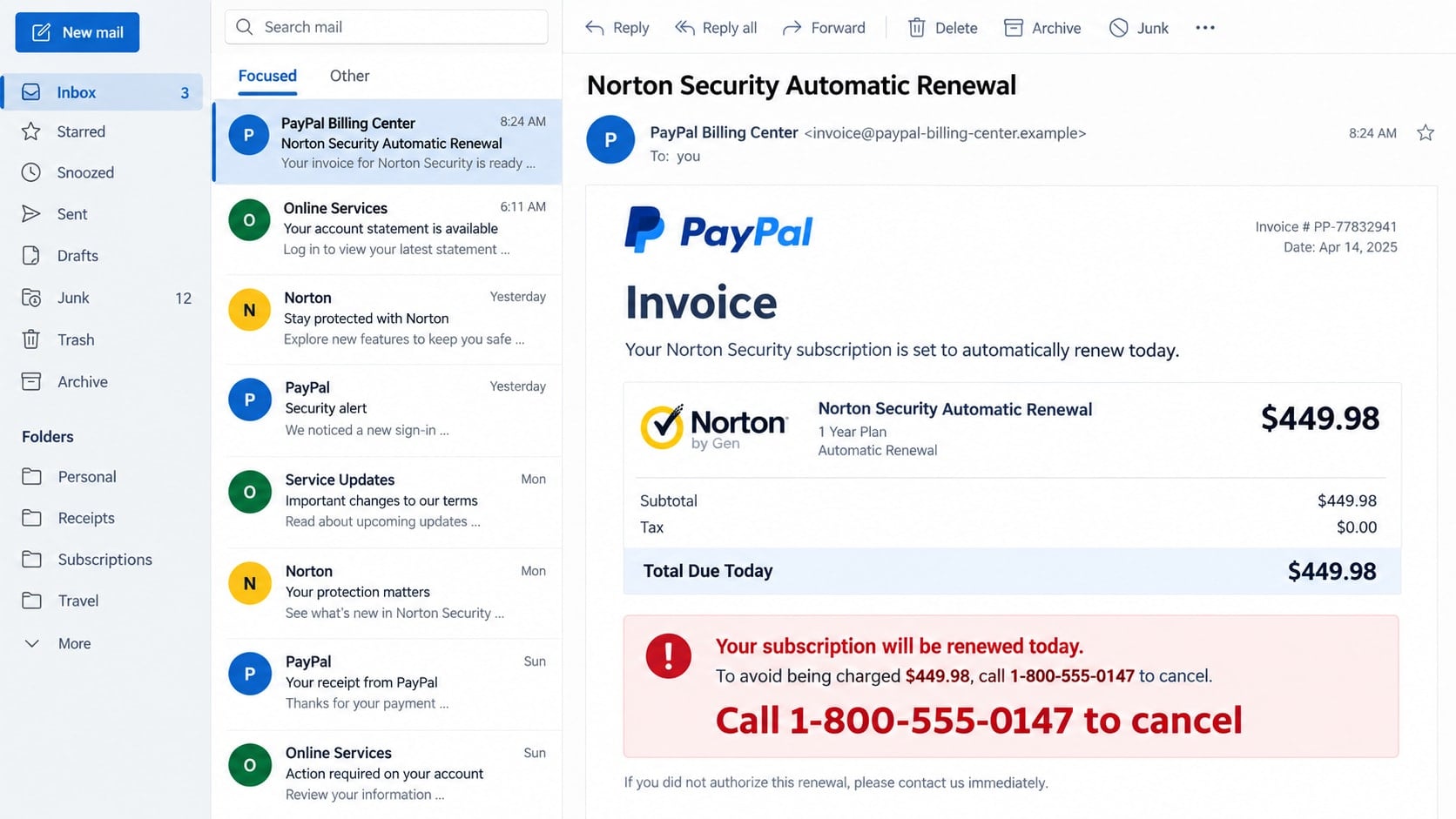
A PayPal invoice says Norton Security renewed for $449.98, even though you never bought the plan. The email offers one obvious solution: call the cancellation number before the charge becomes final.
The invoice is designed to make that call feel responsible. In reality, the phone number is the doorway into a much more expensive refund scam.
Overview
The invoice combines two trusted names with an alarming charge
The PayPal Norton invoice scam uses a fake invoice, money request, or billing email that appears to connect PayPal with a Norton subscription. The message says an annual security plan has renewed for an unusually large amount.
The brands are chosen because many recipients recognize both of them. Even someone who does not use Norton may worry that a PayPal account or card was compromised.
The cancellation number is the real trap
The message prominently displays a telephone number and urges the recipient to call immediately. That number does not lead to PayPal or Norton. It reaches a scammer trained to turn a nonexistent charge into a live support session.
The caller may request account details, card information, a verification code, gift cards, or remote access to the computer. The fake invoice only needs to cause the first call.
A real PayPal feature can still carry fraudulent content
Some campaigns send ordinary spoofed emails. Others abuse PayPal’s invoice or money-request feature, so a notification may come through genuine PayPal infrastructure even though the seller note and callback number were entered by a criminal.
- The invoice describes a Norton plan you did not purchase.
- A large renewal amount is paired with an immediate deadline.
- The message tells you to call a number printed inside the invoice.
- The support agent asks to install remote-control software.
- A refund supposedly requires access to online banking.
- The caller requests gift cards, cryptocurrency, cash, or a transfer.
Why the Charge May Not Exist at All
A convincing invoice is not the same as a completed payment. The email can be an image, a fabricated HTML template, or a payment request that has not been paid.
The safest check is the PayPal account opened independently. If the transaction is not in recent activity, the email’s claim is false. Calling the supplied number only gives the scammer a chance to create a new problem.
PayPal specifically warns that fraudsters may send invoices or money requests that look real so recipients will call them. Its guidance says to ignore an unrecognized requester, avoid numbers included in the request, and contact PayPal through official support.
Norton renewal language adds emotional pressure because security subscriptions are often billed annually. A recipient may not remember every plan purchased on an old computer, which makes the invented renewal harder to dismiss quickly.
How the PayPal Norton Invoice Scam Works
Step 1: A fake renewal invoice lands in the inbox
The subject announces an automatic renewal, payment confirmation, or completed invoice. The body lists a Norton product, an invoice number, and an amount such as $449.98.
The email may claim the payment will post today. It places the cancellation phone number next to the amount so calling feels like the fastest way to prevent a loss.
Step 2: The recipient calls the fake support line
A person answers as PayPal billing, Norton support, or a joint cancellation center. The agent asks for the invoice number and reassures the caller that a refund is available.
This simple exchange makes the operation feel organized. In reality, the agent is reading the same fabricated invoice and does not have access to a legitimate billing system.
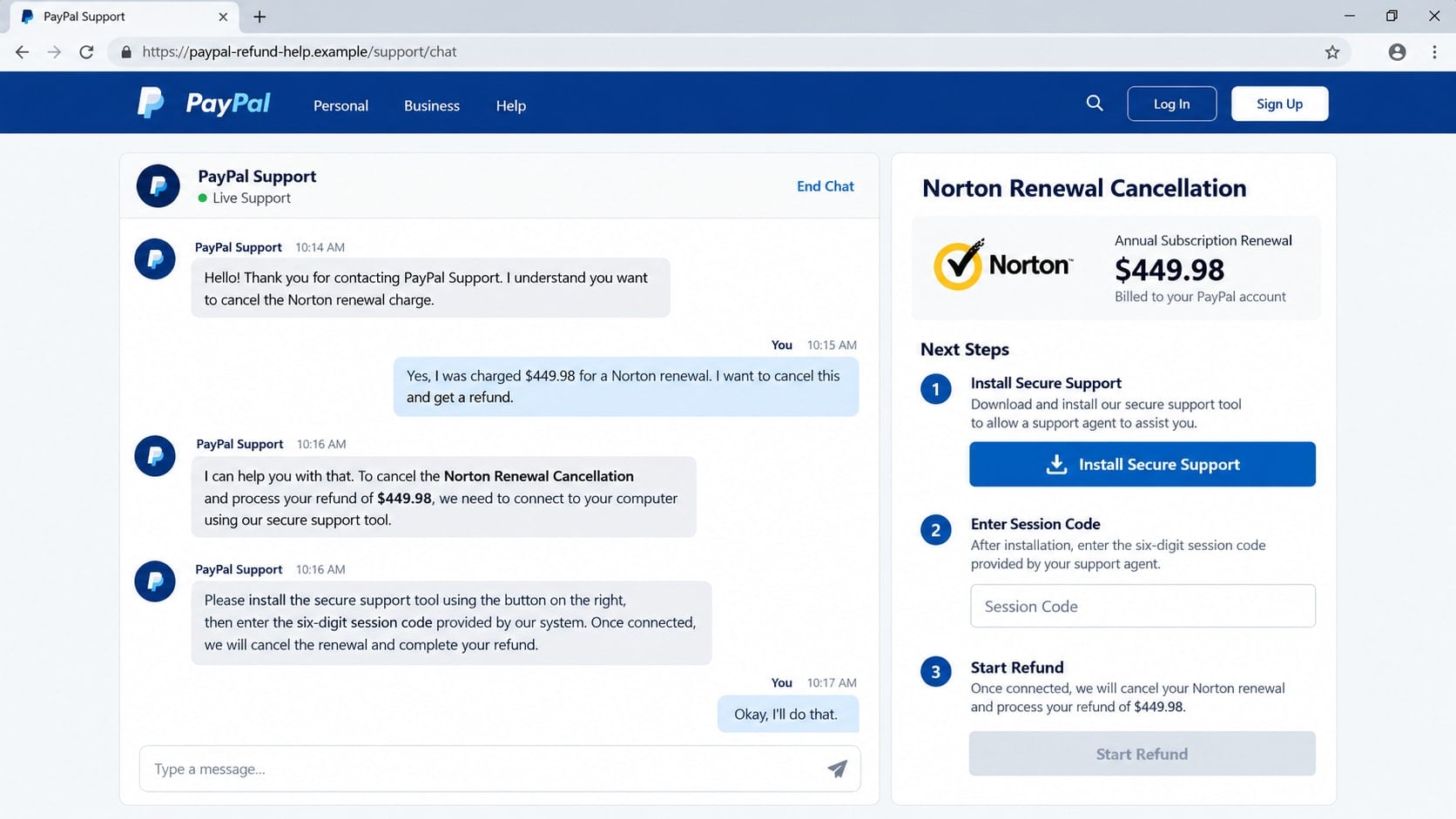
Step 3: The agent claims a secure connection is required
The scammer says the cancellation form cannot be completed by phone. The victim is directed to a website or told to install a remote-support program.
The software may be a legitimate remote administration tool used for an illegitimate purpose. Once permission is granted, the caller can view the screen, control the mouse, and watch sensitive information being entered.
Step 4: The victim is told to sign in to banking
The caller claims the refund must be matched to a bank account. The victim is instructed to open online banking while screen sharing remains active.
The scammer can hide the screen, alter what is displayed, or observe balances and account numbers. No legitimate invoice cancellation requires remote access to a customer’s bank.
Step 5: A fake refund error creates an obligation
In the classic refund variation, the scammer changes on-screen text to make it appear that too much money was returned. A $449.98 refund may seem to become $4,499.80.
The caller blames the victim for the mistake and demands immediate repayment. The supposed excess never arrived; the altered display is part of the performance.
Step 6: Real money is sent through a hard-to-reverse method
The victim is told to buy gift cards, send cryptocurrency, make a wire, mail cash, or transfer funds to correct the fake error. The caller may remain connected throughout the trip or payment.
After one payment, another fee or accounting problem can appear. The pressure continues until the victim refuses, the bank intervenes, or available funds are exhausted.
Identity, Contact, and Payment Checks
Look for the transaction inside PayPal
Open the PayPal app or type paypal.com into a new browser window. Review activity, invoices, and money requests without using the email’s links.
An email cannot prove a payment. The authenticated account is the place to determine whether an actual transaction or request exists.
Contact each company through its own official route
Do not call a number printed in the invoice. Use PayPal’s Help Center or Norton’s official support site opened independently.
Separate verification prevents one scammer from impersonating both companies. A genuine representative will not object when you end an incoming call and start a new official session.
Distinguish a request from a completed payment
A money request asks you to pay; it does not prove that money left the account. Criminals exploit the visual authority of invoice pages to make requests look like charges.
Do not pay, approve, or call simply because the request appears in a real account. Report or cancel it through official controls.
Reject remote access and unusual refund methods
PayPal and Norton do not need to control your computer or watch your bank account to cancel a subscription. A refund does not require gift cards, crypto, cash, or a payment back to an employee.
The moment those instructions appear, end the session. If access was already granted, disconnect the device and secure it before signing in again.
Fake Invoice Details That Create Panic
The amount is usually much higher than an ordinary software renewal. That is intentional. A $449.98 charge creates enough fear to overcome suspicion but remains plausible as a multi-device security package.
The invoice may use a countdown, all-capital warning, or statement that the charge cannot be reversed after 24 hours. These deadlines belong to the scam, not to a normal dispute process.
Misspelled brand names can expose some attempts, but a perfectly rendered logo does not make the seller legitimate. Focus on the unrecognized purchase and the requested action.
How to Handle an Unrecognized PayPal Invoice
- Do not call the number or reply to the sender.
- Open PayPal directly and review recent activity.
- Check whether the item is a payment, invoice, or unpaid request.
- Use official account controls to report the sender or request.
- Forward the suspicious message to PayPal’s phishing-report address.
- Contact the card issuer only if a real unauthorized charge is present.
This approach deals with the account state before the story. If no payment exists, there is nothing to cancel by telephone. If a real unauthorized transaction exists, official dispute channels can address it without remote access.
What Remote Access Makes Possible
Screen sharing allows the caller to see account balances, email addresses, saved documents, and every website opened during the session. Full control can also let the scammer move the pointer and type commands.
The agent may ask the victim to hide the screen while a secure server connects. That dark or frozen display can conceal transfers, browser changes, or edits to the page the victim is viewing.
A scammer can alter ordinary webpage text with browser tools so the balance appears higher. No bank record changes, but the visual effect supports the claim that an excessive refund was deposited.
Unattended-access settings create a longer risk. If enabled, the criminal may reconnect after the call ends, including when the owner later signs in to email or banking.
Files can be downloaded or installed during the session. Some are legitimate support utilities, while others may steal passwords, record keystrokes, or maintain hidden access.
Saved browser passwords and active sessions can expose accounts without the victim reading credentials aloud. A browser that is already signed in may reveal payment, shopping, and cloud services.
That is why simply closing the support window is not enough. Remove the software, revoke access, scan the system, change sensitive passwords from a clean device, and inspect accounts for changes.
If online banking was visible, tell the bank that a stranger had remote screen access. That context helps the fraud team assess more than the single payment mentioned in the original invoice.
Do not keep using the computer for sensitive accounts until the access path has been removed. A changed password offers limited protection if the attacker can still watch the new one being entered.
Review email sent items, forwarding rules, browser extensions, and saved downloads. The caller may have changed settings quietly while keeping attention on the fake refund.
If the scammer asked you to type a transfer description or mislead a bank employee, tell the fraud team exactly what happened. Those instructions are part of the coercion and may help explain the transaction.
Finally, do not accept technical help from someone who calls after the incident. Use a trusted local professional or official provider, since a recovery caller may be connected to the original group.
Keep the device offline until that review begins if you still see unfamiliar cursor movement, pop-ups, or new login prompts.
What to Do if You Have Fallen Victim to This Scam
- End the call and disconnect remote access. Turn off the internet connection if the caller still controls the device. Do not argue or wait for the supposed refund to finish.
- Contact PayPal and the bank independently. Use official apps, websites, or numbers on statements. Report unauthorized payments, new recipients, profile changes, and any transfer made under the caller’s instructions.
- Remove the remote-support tool. Uninstall it, disable unattended access, review startup items, and change any access code. Run a full Malwarebytes scan to check for additional malware or persistence tools.
- Change passwords from a clean device. Replace PayPal, email, banking, and reused passwords. Review recovery addresses, phone numbers, sessions, and additional verification settings for unauthorized changes.
- Secure payment cards and accounts. If card or bank data was visible or shared, ask the issuer whether replacement is needed. Review recent and pending activity, including small test charges.
- Clean up the browsing path. Remove downloads and notification permissions from scam sites. AdGuard can help block many known phishing pages and malicious ads, but it cannot remove remote software already installed.
- Preserve the full timeline. Save the invoice, email headers, phone number, remote-tool name, chat, receipts, transfer details, and screenshots. This evidence can help banks and investigators understand how the payment was induced.
- Ignore recovery callers. Stolen victim lists are often reused. Anyone promising a guaranteed refund, hacker recovery, or fund tracing for an upfront fee is likely beginning another scam.
Frequently Asked Questions
Can a fake invoice come from a real PayPal email?
Yes. A criminal can abuse legitimate invoice or money-request features. A genuine notification channel does not make the requester, seller note, or callback number trustworthy.
Was I charged just because the email says paid?
No. Check activity in the PayPal account and the funding card. A fabricated email or unpaid request can describe a charge that never occurred.
Should I call the cancellation number to ask questions?
No. The number is the center of the scam. Contact PayPal or Norton only through official channels opened separately.
Why does the scam use Norton?
Security software is familiar and commonly renews annually. That makes an unexpected renewal believable enough to create panic, even for someone unsure which subscriptions they have.
Can a real remote-support app still be dangerous?
Yes. Legitimate tools can be abused by criminals. The danger comes from giving an unverified caller permission to view and control the device.
Can PayPal reverse money sent during the scam?
Recovery depends on the payment method and timing. Report it immediately, but do not assume reversal is guaranteed. Fast contact gives the provider the best chance to act.
The Bottom Line
The PayPal Norton invoice scam is not really about antivirus software. It is a phone-driven impersonation scheme that uses a frightening bill to persuade you to contact the criminal first.
Check PayPal directly, ignore invoice callback numbers, and never give a stranger remote access for a refund. A charge that does not exist cannot be cancelled by someone watching your bank account.

Join the discussion
0 commentsShare your experience or ask a question about this article.
Discussion
Start the conversation
Have a question or something useful to share? Add the first comment.