

A message says Aave users can claim assets from a recent attack. The page looks familiar, and the claim window appears to be open now.
If you have ever used Aave, that is enough to make you pause. Before connecting anything, look closely at what the page is asking you to trust.
Overview
The offer in front of the wallet
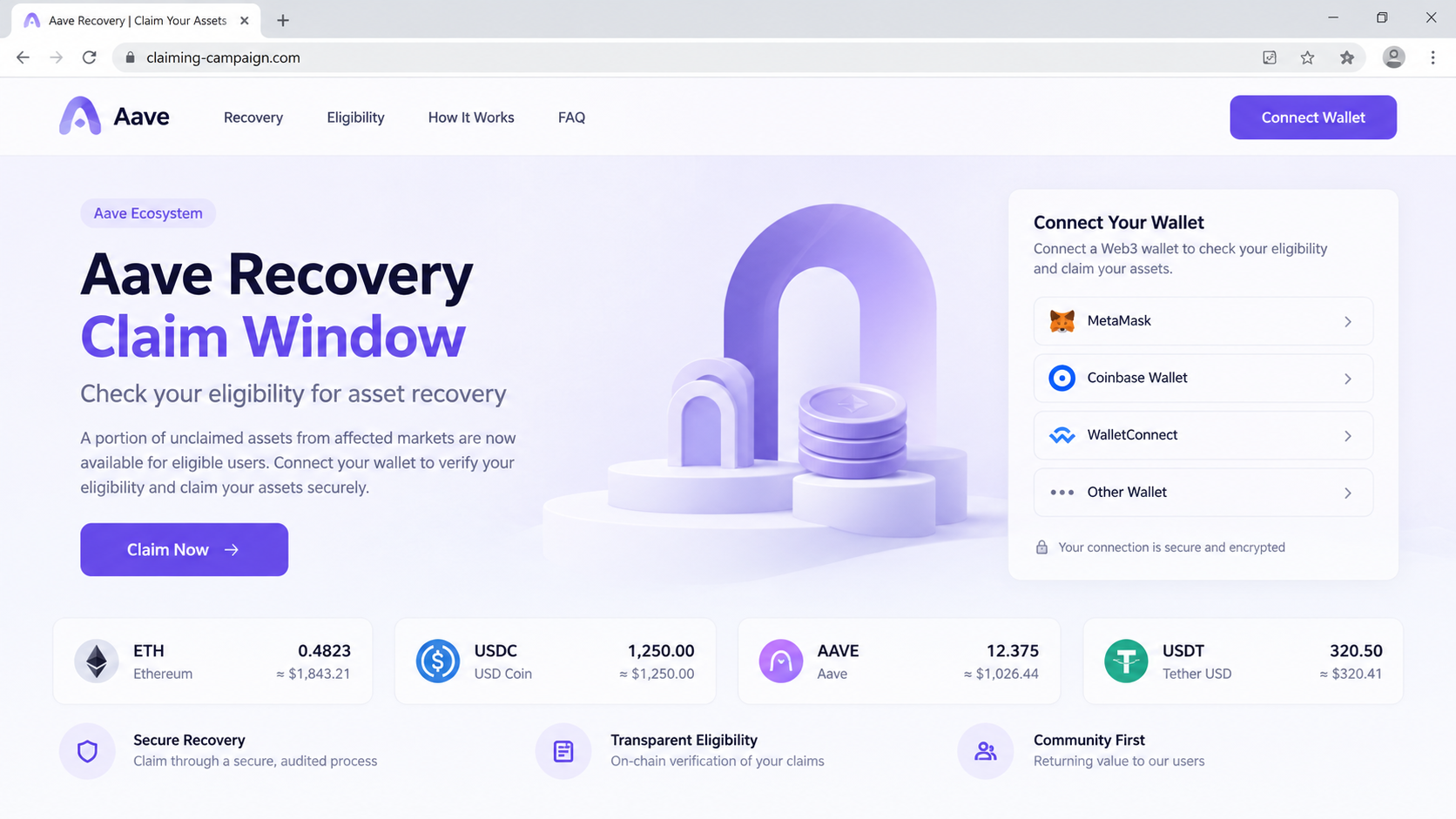
The Aave asset recovery scam presents a supposed claim window for users affected by an alleged attack. Its central action is a button that asks visitors to connect a wallet.
The page reported under claiming-campaign.com borrowed Aave’s visual language and offered an eligibility check. That domain is not the official Aave website.
A claim button can make a loss feel solvable before the visitor has seen any evidence of eligibility or a real recovery program.
The premise is attractive because a real crypto user might have lost money elsewhere. A “recovery” button suggests there is still a simple way back.
What makes the claim suspicious
The claim page does not become official because it uses Aave colors or a familiar wallet selector. The address bar and official announcements matter more.
Aave’s own FAQ directs users to its official interfaces and warns against impersonation and seed-phrase requests.
Aave’s terms also explain that the platform cannot retrieve private keys or reverse assets lost from a user’s compromised wallet.
A broad promise to restore assets after a vaguely described attack is therefore not a substitute for a specific, verifiable Aave announcement.
The immediate decision
Do not connect a wallet to claiming-campaign.com or a similar unexpected recovery page. Open Aave independently and check its official communications first.
If you already connected, the next move depends on what you approved. Merely opening a webpage is different from signing a transaction or sharing a seed phrase.
- Opened the page only: close it and do not revisit through the message.
- Connected a wallet: inspect recent requests and approvals before using it again.
- Signed a transaction: check the chain explorer and move remaining assets if needed.
- Entered a seed phrase: treat the entire wallet as compromised.
The details below explain why this distinction matters and how to act without making the problem worse.
The Real Aave Platform Versus a Recovery Impersonator
Aave is a decentralized finance protocol used for lending and borrowing crypto assets. Its real interface is reached through official Aave properties, not a surprise claim domain.
The legitimate service has its own risks and controls. None of those make an unrelated “asset recovery” page part of Aave.
Scammers exploit this gap. They do not need to compromise Aave itself if they can persuade users to sign something on a lookalike website.
That is why the scam can appear during periods of genuine market anxiety. A rumor, exploit headline, or delayed transaction gives the impostor a convincing opening.
The reported page used a recovery claim window and a “Claim Now” action. The crucial check is whether that exact event appears on Aave’s official channels.
Aave’s current terms of service say the service will not ask for a user’s private key or seed phrase.
They also warn that phishing, fake websites, fraudulent support channels, and malicious browser extensions are real risks in self-custody.
Those warnings do not prove every recovery announcement false. They explain why an unsolicited site must earn trust independently before any wallet interaction.
Why a real-looking wallet dialog is not reassurance
Wallet connection screens are easy for a website to request. Seeing MetaMask, WalletConnect, or another familiar choice says nothing about the site’s honesty.
The website can ask your wallet to display a transaction. The wallet interface may show a long contract address and technical terms that are hard to interpret quickly.
That uncertainty is the trap. A visitor who expects a refund may approve a token allowance or transfer they would reject in another context.
Some approval requests give a contract permission to move a specific token later. Others can authorize immediate movement, depending on the chain and wallet.
Do not assume every click causes the same loss. Examine the exact request presented to your wallet, and decline if the destination or permission is unclear.
The address bar tells a different story
Claiming-campaign.com is a generic campaign domain. It does not prove affiliation with Aave, however polished the page appears.
A scammer can purchase a short domain, copy a logo, and launch a convincing website in an afternoon. Domain ownership is not brand authorization.
Even HTTPS only means the browser has an encrypted connection to that site. It does not mean the page represents Aave or will protect your wallet.
If an announcement is genuine, you should be able to reach it from Aave’s own site or verified channels without following the suspicious link.
How the Aave Asset Recovery Scam Works
Step 1: A loss story meets an audience ready to believe it
A visitor sees a post, direct message, search result, or ad about an Aave recovery window. The language usually suggests an urgent opportunity to reclaim assets.
This is more powerful than a generic giveaway. It speaks to someone who may already feel frustrated, frightened, or angry about a previous loss.
The page need not describe a real Aave incident in detail. Vague references to “affected users” let more people imagine they qualify.
That vagueness matters. A legitimate claim process should identify the event, eligibility rules, official announcement, and contract addresses clearly.
Step 2: The landing page borrows Aave’s appearance
At the destination, familiar colors and interface elements make the page feel like a normal DeFi application. A large recovery button sits where a user expects an action.
The reported site at claiming-campaign.com presented an Aave recovery claim window. Its promise was not confirmed through Aave’s official website.
Lookalike design is not merely decoration. It shortens the time a visitor spends checking the actual domain and the terms of the request.
The site may also display wallet brands to suggest compatibility. Those names describe connection options, not sponsorship by the wallet makers.
Step 3: “Check eligibility” becomes a wallet request
The visitor clicks to claim or verify. Instead of showing a documented eligibility rule, the site asks for a wallet connection.
A connection alone normally reveals the wallet’s public address to the site. It does not automatically hand over the private key.
The greater danger comes from the next prompt. A malicious site can frame an approval or transaction as a harmless verification step.
Do not approve a request just because your wallet labels the connection successful. The browser page and wallet prompt are separate things.
Step 4: A signature or approval grants access
The reported campaign was designed to trigger a cryptocurrency-draining flow after the visitor connected and approved the resulting request.
A token approval can authorize a contract to spend assets. A direct transfer can move tokens immediately. A signed message can have different consequences.
Read what your wallet actually asks you to sign. If the wording is opaque, close the request and seek independent help before proceeding.
Never enter a seed phrase into a claim website. A recovery phrase is not needed to verify eligibility for a legitimate on-chain program.
Step 5: The loss is disguised as part of the process
If a harmful transaction is confirmed, assets may leave the wallet. The page can then show an error, spin indefinitely, or ask the visitor to try again.
Blockchain confirmation is usually final. Closing the tab afterward does not reverse a transfer already recorded on the chain.
This is why the response must begin with the wallet’s transaction history, not another attempt at the same claim button.
Someone who lost funds may be approached by a second “recovery specialist.” Treat that offer as a separate risk, not a continuation of legitimate support.
How to Check a Recovery Claim Before You Connect
Start from a bookmark you created previously or type aave.com yourself. Do not use a link sent by the person announcing the claim.
Look for a matching notice on Aave’s site, official governance pages, or verified support channels. Read the eligibility criteria, not just the headline.
If the claim cites a contract, compare the address with official documentation. A copied contract name can point to a different address.
Check whether the announcement explains which chain is involved and what action the wallet will display. An unexplained “unlimited approval” is not a minor formality.
A legitimate help page should not pressure you with a countdown that resets when refreshed. Time pressure is useful to the person who wants an unexamined signature.
Search results can contain paid placements and lookalike domains. A top-ranked result is not the same as an official result.
Ask a knowledgeable person to review the transaction data if you cannot understand it. The safest transaction is one you do not sign until its purpose is clear.
What a website cannot do by itself
Simply visiting a page does not give it your seed phrase or transfer your crypto automatically. The usual critical moments are approval, signing, or disclosure.
However, a page can still collect your public address, show deceptive prompts, or send you to another malicious site.
If you downloaded software or a browser extension while there, treat that as a different exposure. Scan the device and remove the untrusted program.
What an apparent balance may hide
A webpage can display any balance or eligibility number it chooses. A green checkmark beside your address does not mean a reserve exists.
Confirm actual holdings and movements in your wallet and a trustworthy block explorer. Do not rely on the claim site’s dashboard.
If the page asks for a fee to release the “recovered” amount, stop. A new payment can deepen the loss without changing an earlier transaction.
Why real losses make this lure harder to dismiss
People who have already lost assets are often looking for a second chance. That makes a plausible recovery announcement feel less surprising than a random prize.
A fraudster can quote a genuine market event and still offer a fake remedy. The truth of the headline does not validate the linked claim form.
Be especially careful when a message reaches you shortly after posting about a loss. Scammers monitor public complaints and reply as supposed helpers.
Some will ask for a transaction hash first, then use that detail to sound informed. Public blockchain data is not proof that they work for Aave.
Keep the conversation inside official support channels you found yourself. A direct message offering priority recovery is not safer because it mentions your exact wallet.
What to Do if You Have Fallen Victim to This Scam
Take a breath and work from the action you actually took. The right response differs for a page visit, an approval, a transfer, and a revealed seed phrase.
- Stop interacting with the page. Do not reconnect, retry a failed claim, or pay a supposed verification fee. Save the URL and any transaction identifiers.
- Inspect your wallet’s activity. On a trusted device, check pending and confirmed transactions. Compare the chain, asset, destination, and time with what you approved.
- Review token permissions. Use a reputable allowance checker for the relevant chain and revoke approvals you do not recognize. Revocation costs network fees and cannot undo completed transfers.
- Move assets when appropriate. If you shared a seed phrase or private key, create a new wallet on a clean device and transfer remaining assets immediately.
- Secure connected accounts. If you entered an email password or installed an extension, change that password elsewhere, remove the extension, and scan the device.
- Document the loss. Save the fake URL, wallet address, transaction hashes, messages, and screenshots. Report the page to the wallet provider and relevant authorities.
- Reject recovery-fee offers. Anyone promising a guaranteed reversal for an upfront payment is adding another claim you should not trust.
If you only opened the site and never connected or signed, a full wallet migration is usually unnecessary. Close it and watch for follow-up messages.
If you clicked an advertisement that led there, an ad blocker such as AdGuard may reduce future exposure. It cannot reverse a wallet approval.
Malwarebytes is useful if you installed a suspicious app or extension. A wallet drainer on a webpage does not, by itself, prove your Windows computer is infected.
Frequently Asked Questions
Is the Aave asset recovery page an official Aave service?
No. The reported claiming-campaign.com page was an impersonator. Verify any real Aave announcement by starting at Aave’s own website.
Did Aave announce an attack matching this claim?
The page’s vague attack story should not be accepted without a matching official notice. Do not infer an Aave breach from an impostor’s headline.
Does connecting a wallet automatically transfer funds?
Connection usually exposes a public address. The serious risk is the transaction, approval, or signature the site asks you to authorize afterward.
Can I reverse a confirmed crypto transfer?
Generally, no. A confirmed on-chain transfer cannot be canceled like a card charge. Report the transaction and secure any remaining assets.
Will revoking an approval recover stolen tokens?
No. Revocation can stop future spending under that permission, but it does not return assets already moved out of the wallet.
Should I run a malware scan after visiting the page?
A scan is sensible if you downloaded or installed something. Merely viewing the page or rejecting a wallet prompt does not establish device infection.
The Bottom Line
Do not use the Aave asset recovery claim page at claiming-campaign.com. Its recovery story leads to a wallet request on a domain outside Aave’s official service.
If you already signed or approved something, check transactions and permissions now. Protect remaining assets from a clean device, and do not pay a second party for “recovery.”

Join the discussion
0 commentsShare your experience or ask a question about this article.
Discussion
Start the conversation
Have a question or something useful to share? Add the first comment.