


If your are randomly seeing a Activate by Phone – 1-888-479-3649 pop-up within Windows then your computer is infected with an adware program. This Activate by Phone – 1-888-479-3649 pop-up displays a fake alert stating that you need to activate Windows, in an attempt to scare people into calling a remote tech support phone number (1-888-479-3649).
The Activate by Phone – 1-888-479-3649 pop-up ads are caused by an adware program, which is distributed through various monetization platforms during installation. This adware program is typically added when you install another free software (video recording, download-managers or PDF creators) that had bundled into their installation this adware program.
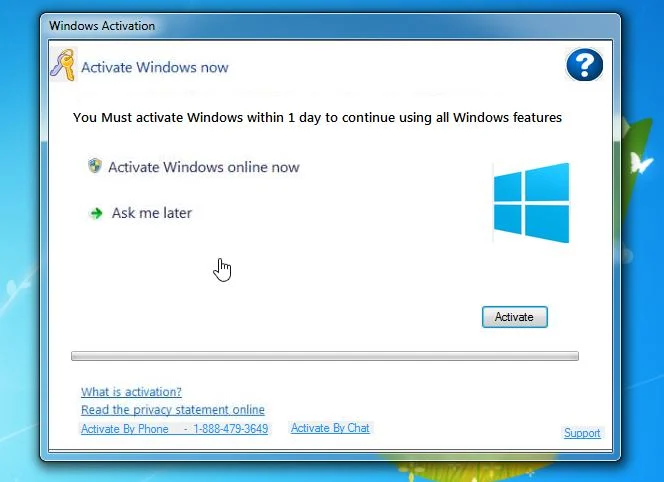
When this malicious program is installed, an ad from Activate by Phone – 1-888-479-3649 will randomly pop-up. The fake Activate by Phone – 1-888-479-3649 pop-up will have this message:
Windows Activation
Activate Windows Now
Activate by Phone – 1-888-479-3649
Activate Windows online Now / Ask me later
What is activation?
Activate by Phone – 1-888-479-3649 / Activate By Chat
These fake Activate by Phone – 1-888-479-3649 screen pretend to be alerts from Windows that state “Activate by Phone – 1-888-479-3649”.
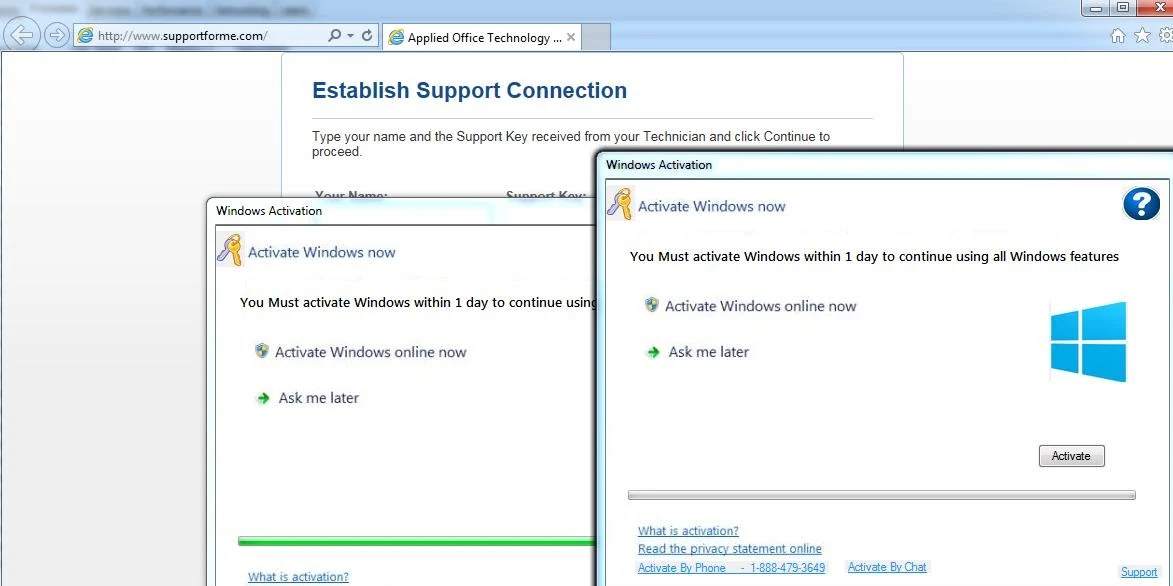
If a user clicks on the Activate button it will pretend to try to activate Windows and then give an alert that states “Windows Helper is unable To Activate Windows Contact Support To Activate“. This is done purely to trick you into calling the 888-479-3649 number so that they can use scare tactics to sell you a support license. The support link in the screen will also open a browser window to www.supportforme.com, which is used by the remote support company to remotely control your computer via GoToAssist.
You should always pay attention when installing software because often, a software installer includes optional installs, such as this Activate by Phone – 1-888-479-3649 adware. Be very careful what you agree to install.
Always opt for the custom installation and deselect anything that is not familiar, especially optional software that you never wanted to download and install in the first place. It goes without saying that you should not install software that you don’t trust.
How to remove Activate by Phone – 1-888-479-3649 pop-up ads (Virus Removal Guide)
This page is a comprehensive guide, which will remove Activate by Phone – 1-888-479-3649 pop-up ads from your computer and any other adware program that may have been installed during the setup process.
Please perform all the steps in the correct order. If you have any questions or doubt at any point, STOP and ask for our assistance.
STEP 1: Remove Activate by Phone – 1-888-479-3649 adware with AdwCleaner
STEP 2: Remove Activate by Phone – 1-888-479-3649 browser hijacker with Malwarebytes Anti-Malware
STEP 3: Double-check for Activate by Phone – 1-888-479-3649 pop-up ads with HitmanPro
OPTIONAL: Remove the Activate by Phone – 1-888-479-3649 pop-up
This step needs to be performed only if the malicious pop-ups will not allow you to close your browser.
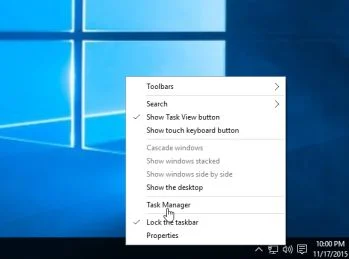
- Open Task Manager by right-clicking the taskbar, and then clicking Start Task Manager. Alternatively to start the Windows Task Manager, you can press Ctrl+Alt+Del and click on Task Manager or simply press on Ctrl+Shift+Esc.
- Scroll through the list till you see your web browser’s process and left-click on it once so it becomes highlighted. Once you have selected the browser’s process, click on the End Task button as show in the picture below.
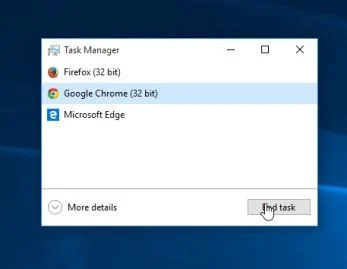
- Your browser window should now be closed. The next time you open your browser, do not allow the browser to open the last opened page.
Alternatively, if you are using Microsoft Edge or any other browser, you can disconnect your Internet, then open the web browser, navigate away from the malicious web page, then reconnect to the Internet.
STEP 1: Remove Activate by Phone – 1-888-479-3649 adware with AdwCleaner
The AdwCleaner utility will scan your computer and web browser for the adware and unwanted browser extensions, that may have been installed on your computer without your knowledge.
- You can download AdwCleaner from the below link.
Download AdwCleanerFree official download. Nothing to install. - Before starting AdwCleaner, close your web browser, then double-click on the AdwCleaner icon.
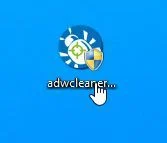
 If Windows prompts you as to whether or not you wish to run AdwCleaner, please allow it to run.
 - When the AdwCleaner program will open, click on the “Scan” button as shown below.
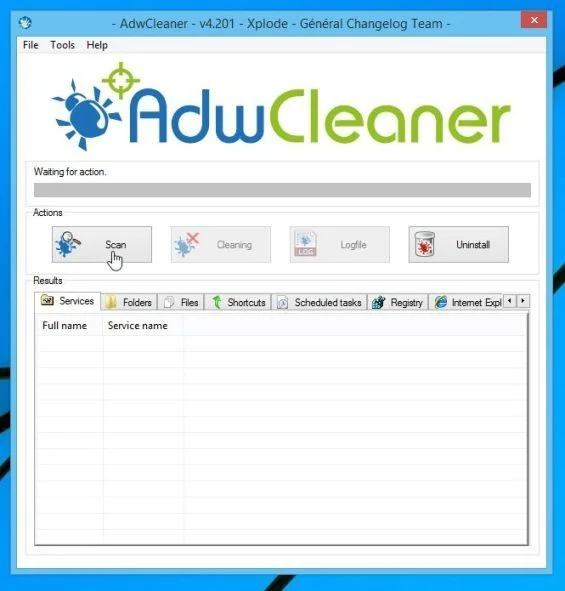
AdwCleaner will now start to search for adware and other malicious files that may be installed on your computer. - To remove the malicious files that were detected in the previous step, please click on the “Cleaning” button.
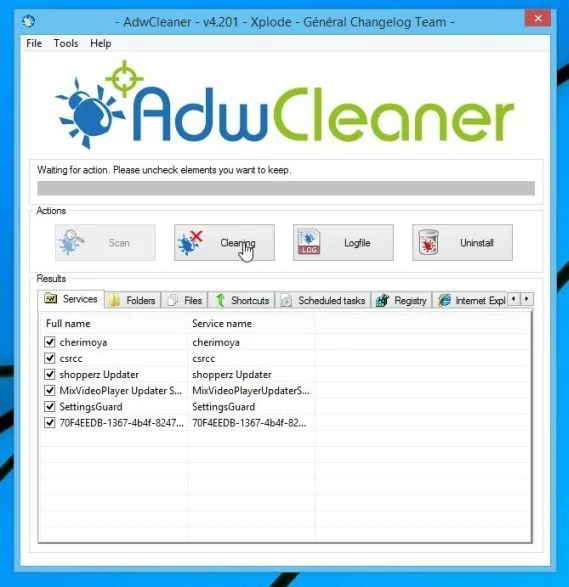
- AdwCleaner will prompt you to save any open files or documents, as the program will need to reboot the computer to complete the cleaning process. Please do so, and then click on the “OK” button.
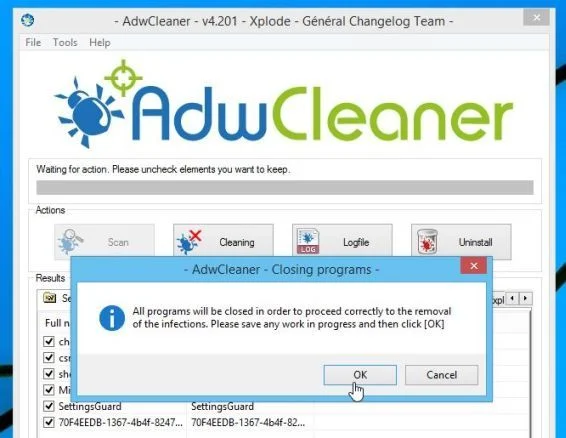
When your computer reboots and you are logged in, AdwCleaner will automatically open a log file that contains the files, registry keys, and programs that were removed from your computer.
STEP 2: Remove Activate by Phone – 1-888-479-3649 browser hijacker with Malwarebytes Anti-Malware
Malwarebytes Anti-Malware Free uses industry-leading technology to detect and remove all traces of malware, including worms, Trojans, rootkits, rogues, dialers, spyware, and more.
It is important to note that Malwarebytes Anti-Malware works well and should run alongside antivirus software without conflicts.
- You can download download Malwarebytes Anti-Malware from the below link.
Download MalwarebytesFree official installer. Your download starts right away. - Once downloaded, close all programs, then double-click on the icon on your desktop named “mbam-setup” to start the installation of Malwarebytes Anti-Malware.
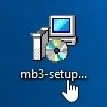
You may be presented with a User Account Control dialog asking you if you want to run this file. If this happens, you should click “Yes” to continue with the installation. - When the installation begins, you will see the Malwarebytes Anti-Malware Setup Wizard which will guide you through the installation process.
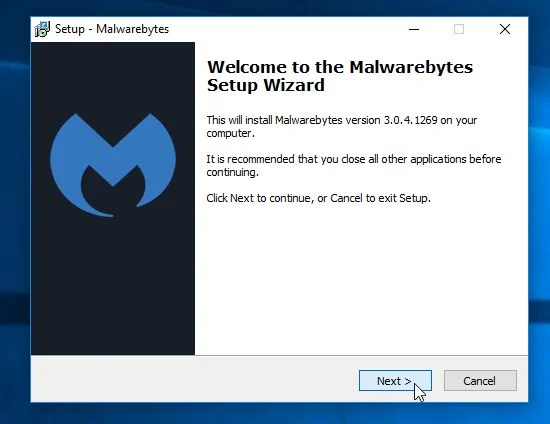
To install Malwarebytes Anti-Malware on your machine, keep following the prompts by clicking the “Next” button.
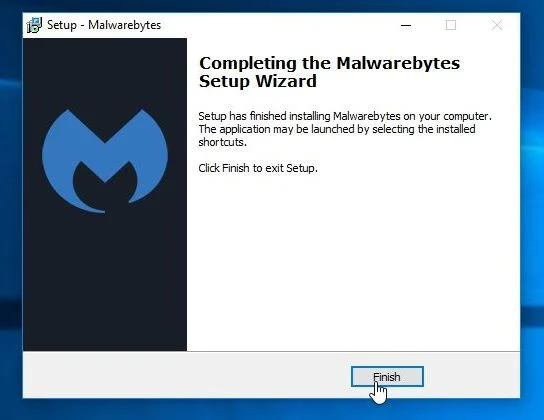
- Once installed, Malwarebytes Anti-Malware will automatically start and you will see a message stating that you should update the program, and that a scan has never been run on your system. To start a system scan you can click on the “Scan Now” button.
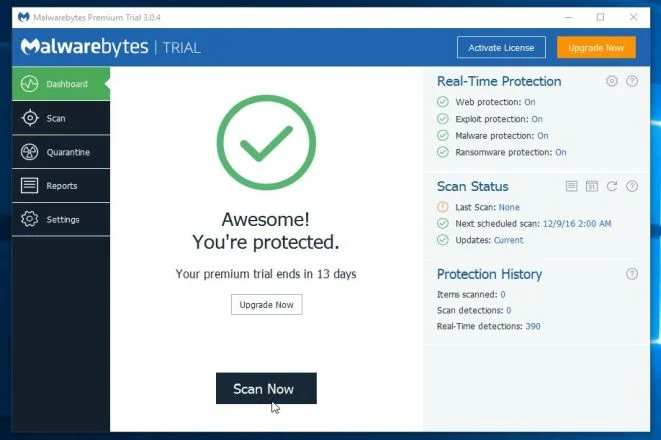
- Malwarebytes Anti-Malware will now start scanning your computer for malware. When Malwarebytes Anti-Malware is scanning it will look like the image below.
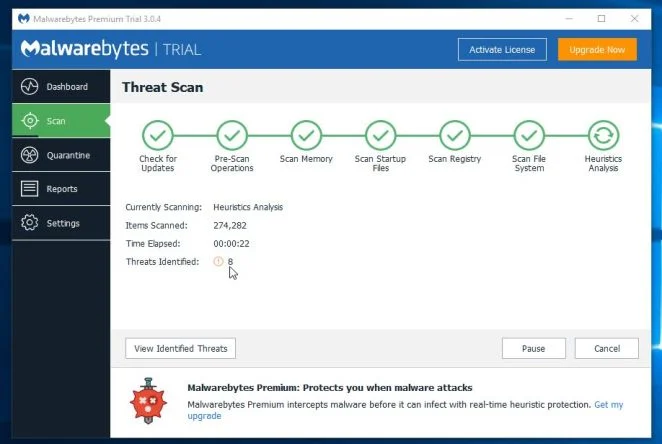
- When the scan has completed, you will be presented with a screen showing the malware infections that Malwarebytes Anti-Malware has detected. To remove the malicious programs that Malwarebytes Anti-malware has found, click on the “Remove Selected” button.
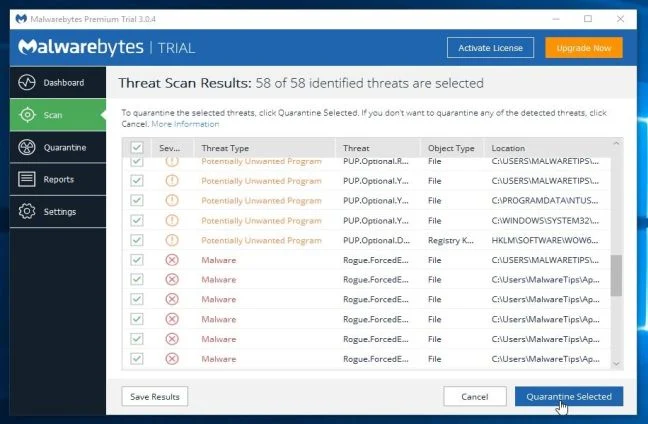
Please note that the infections found may be different than what is shown in the image. - Malwarebytes Anti-Malware will now quarantine all the malicious files and registry keys that it has found. When removing the files, Malwarebytes Anti-Malware may require a reboot in order to remove some of them. If it displays a message stating that it needs to reboot your computer, please allow it to do so.
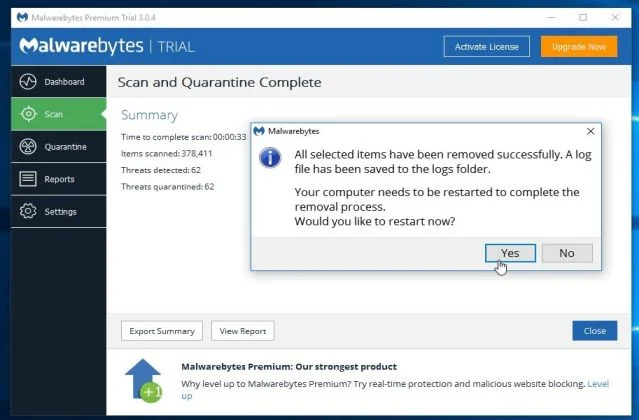
After your computer will restart, you should open Malwarebytes Anti-Malware and perform another “Threat Scan” scan to verify that there are no remaining threats
STEP 3: Double-check for the Activate by Phone – 1-888-479-3649 pop-up ads with HitmanPro
HitmanPro is a second opinion scanner, designed to rescue your computer from malware (viruses, trojans, rootkits, etc.) that have infected your computer despite all the security measures you have taken (such as anti-virus software, firewalls, etc.). HitmanPro is designed to work alongside existing security programs without any conflicts. It scans the computer quickly (less than 5 minutes) and does not slow down the computer.
- You can download HitmanPro from the below link:
Download HitmanProOfficial Sophos download. Free scan, free 30-day trial to remove threats. - Double-click on the file named “HitmanPro.exe” (for 32-bit versions of Windows) or “HitmanPro_x64.exe” (for 64-bit versions of Windows). When the program starts you will be presented with the start screen as shown below.
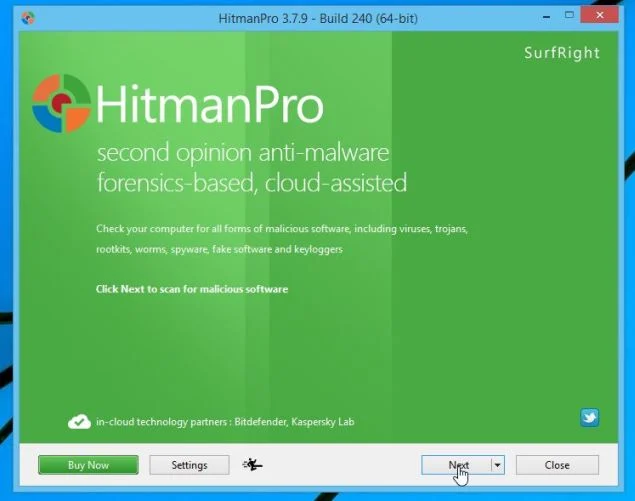
Click on the “Next” button, to install HitmanPro on your computer.
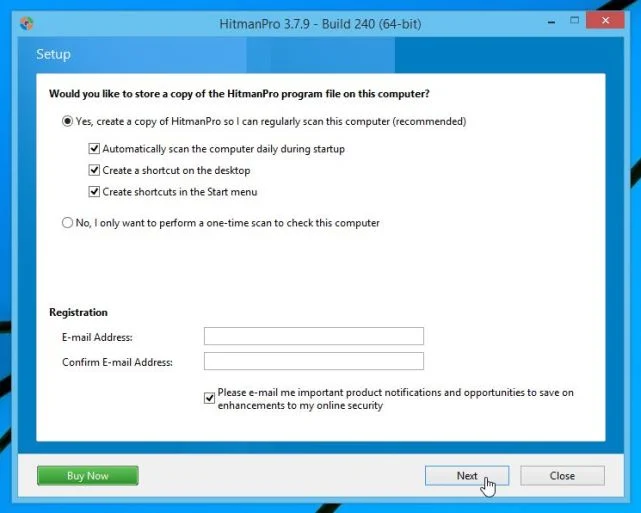
- HitmanPro will now begin to scan your computer for malicious files.
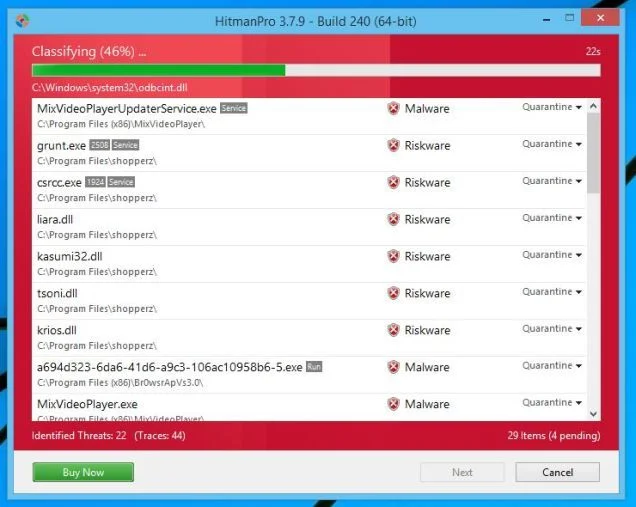
- When it has finished it will display a list of all the malware that the program found as shown in the image below. Click on the “Next” button, to remove malware.
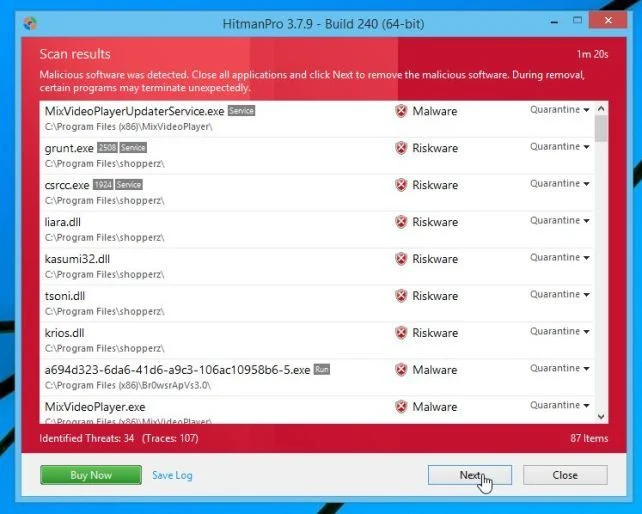
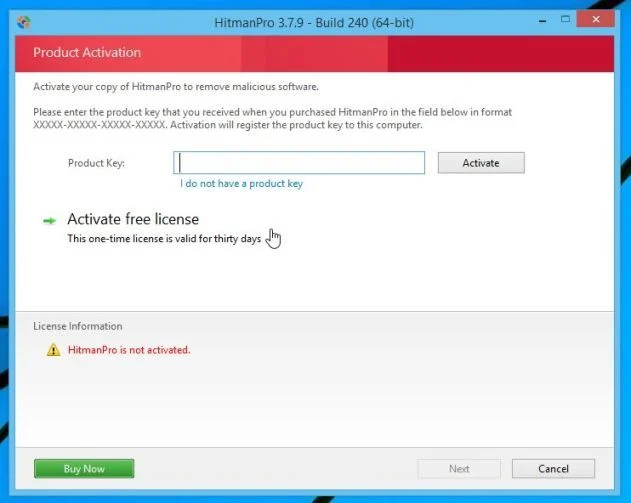
- Click on the “Activate free license” button to begin the free 30 days trial, and remove all the malicious files from your computer.
If you are still experiencing problems while trying to remove Activate by Phone – 1-888-479-3649 pop-up ads from your machine, please do one of the following:
- Run a system scan with Emsisoft Emergency Kit.
- Start a new thread in our Malware Removal Assistance forum.

Join the discussion
0 commentsShare your experience or ask a question about this article.
Your progress
Did these steps help?
Let us know how the guide worked for you.
Describe what you see and the step you reached. Keep passwords and other private information out.
Discussion
Start the conversation
Have a question or something useful to share? Add the first comment.