


An Afterpay message says a payment failed just as a major sale begins. The account may be blocked, a purchase may be waiting, and a button offers the fastest route back in.
The timing makes the warning feel plausible. Sale events create more orders, more reminders, and more reasons to expect a message from a payment service.
The Afterpay Day scam depends on what happens before a shopper opens the real app and checks the claim.
Overview
A fake payment warning turns a sale into an emergency
The message may claim that a repayment failed, suspicious activity was detected, or the account must be verified. Other versions say spending has been suspended until the customer confirms contact or payment details.
Those stories work especially well around Afterpay Day. Shoppers are already thinking about instalments and limited-time offers. A person who recently browsed a sale may assume the alert is connected to a real order.
The message is not proof of an account problem. Afterpay’s own help centre says users and non-users have received unsolicited texts that appear to come from the company. Check an unexpected message through the official app, not through its link.
The button opens a credential relay, not account support
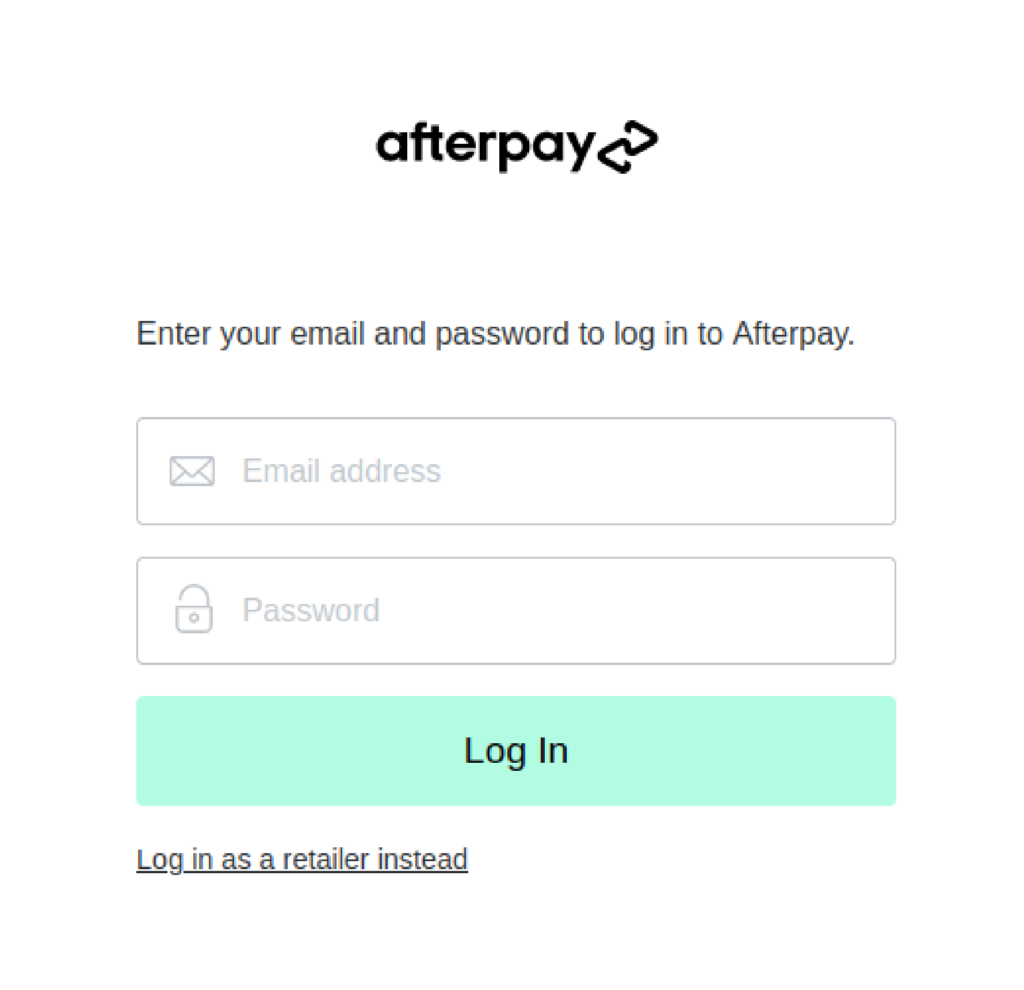
A convincing phishing page can copy the Afterpay logo, colours, login fields, and familiar wording. The page asks for an email address and password, then may request the six-digit code that arrives from the real service.
That sequence is important. The code itself may be genuine, but the person asking for it is not. Criminals can submit stolen login details to the real site and trigger a legitimate verification message while the victim remains on the imitation page.
A later screen can request a card number, expiry date, and security code under the pretext of fixing the failed payment. By the time the page redirects to the genuine Afterpay site, the operator may already have everything needed for account takeover or card misuse.
A second trap hides inside the sale advertisements
Not every Afterpay Day scam impersonates Afterpay directly. Some campaigns advertise huge discounts for a retailer that does not exist, or copy a genuine store onto a lookalike domain and display an Afterpay logo at checkout.
The payment badge does not verify the merchant. It can be copied like any other image. A fake store may collect card details directly, take payment for goods that never arrive, send a low-value substitute, or make refunds practically impossible.
The two routes share the same pressure. One says the account must be fixed now. The other says the bargain will disappear now. Both try to make speed feel safer than verification.
Warning signs include:
- An unexpected “missed payment,” “account blocked,” or “verify now” message
- A button that opens a domain other than afterpay.com or the retailer’s verified site
- A request for a password or one-time code outside the official app
- A sale ad offering a popular product at an implausible discount
- A store with no verifiable company identity, address, or working support route
- A returns policy copied from another business or contradicted at checkout
- Payment requested by bank transfer, PayID, gift card, or cryptocurrency
- A countdown that resets when the page is refreshed
How the Afterpay Day Scam Works
Step 1: The campaign waits for a believable shopping moment
Afterpay Day is promoted as a recurring sales event in Australia and New Zealand. During the event, genuine retailers advertise discounts while shoppers receive normal order confirmations, payment schedules, delivery updates, and marketing emails.
That background noise helps the scam. A generic payment warning sent to thousands of people does not need to know who bought anything. It only needs to reach some recipients while Afterpay and sale shopping are already on their minds.
The same method can appear around Black Friday, Boxing Day, tax-season sales, or an ordinary retailer promotion. The event name is interchangeable; the goal is to make an unexpected payment message feel timely.
Step 2: The subject line creates a problem that feels personal
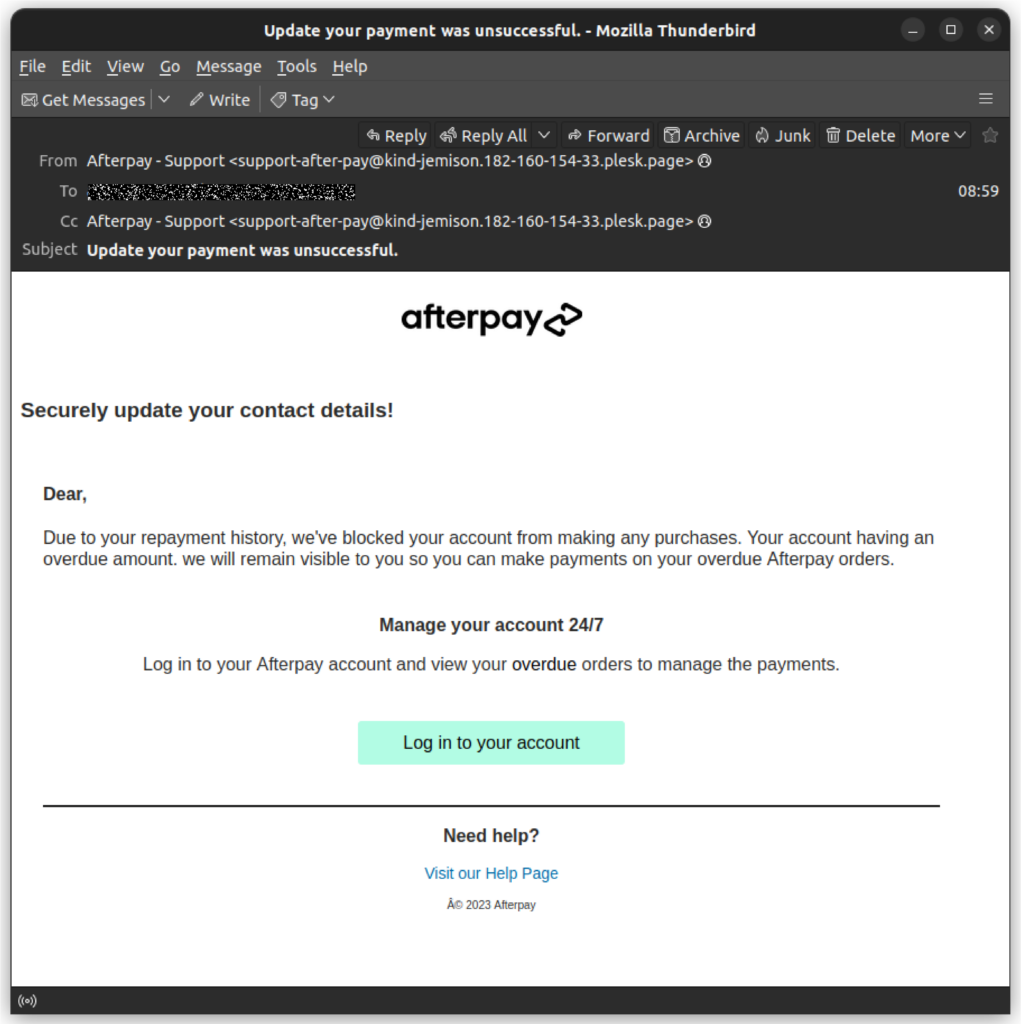
A documented example used the subject “Update your payment was unsuccessful.” The email said the customer’s account had been blocked because of repayment history and invited the recipient to log in and view overdue orders.
The story presses two buttons at once. It threatens access to future purchases and suggests that money may already be overdue. A shopper can feel compelled to investigate even if the grammar or greeting looks slightly wrong.
Other messages use “suspicious activity,” “unrecognized purchase,” or “verification required.” These variants change the emotional route, but all place the resolution inside the message instead of the official app.
Step 3: A copied login page collects the first credentials
The email button or SMS link leads to a page styled as an Afterpay login. Logos and colours are easy to reproduce, and a valid HTTPS padlock only means the browser has an encrypted connection to that domain. It does not prove Afterpay owns it.
The page asks for the same information a shopper expects to enter: an email address and password. Those details can be sent to the operator immediately, even if the victim stops before completing the rest of the form.
Reusing the same password on email, retail, or social accounts increases the damage. Criminals can test a stolen pair elsewhere, search an email inbox for order information, or use mailbox access to reset other passwords.
Step 4: The real verification code becomes part of the deception
After the credentials are submitted, the fake page may request a six-digit code. At that moment, the operator can attempt to sign in to the real account, causing Afterpay to send a genuine verification message to the customer.
The arrival of a real code can make the fake page look more trustworthy. In reality, it signals that somebody may be trying to use the credentials. A one-time code is an authorization secret, not a customer-service reference.
Afterpay says an SMS verification or email message that the customer did not trigger can be safely ignored. Do not type that code into a page opened from an unexpected message, and never read it to a caller.
Step 5: A payment form captures the card
The phishing sequence can continue with a request for a card number, expiry date, and CVV. The page may claim the existing card failed, an overdue instalment must be cleared, or the account cannot be restored without updated billing information.
This is a second theft channel. Even if account takeover fails, usable card data still has value. The operator may attempt purchases, add the card to another account, or pass the details to a different fraud group.
A small “verification” charge should not be treated as harmless. It can test whether the card is active, while an unfamiliar merchant descriptor or larger transaction may appear later.
Step 6: The victim is redirected so the theft feels like a glitch
After collecting the data, the fake page may open the real Afterpay website. The genuine page loads, the earlier form disappears, and the victim may assume the login failed or the account problem resolved itself.
That redirect is camouflage. It does not erase what was entered. It simply removes the fraudulent page from view before the victim studies the domain or takes a screenshot.
Some campaigns show an error and ask for another code first. Repeated prompts can help the operator obtain a fresh credential while making the delay look like a normal technical problem.
Step 7: The fake-store version monetizes the sale itself
A social ad may instead open a copycat retailer with a “Today Only” discount. The products, photographs, reviews, and legal text can be copied from real stores. An Afterpay badge is displayed to borrow credibility even when no genuine integration exists.
The checkout may take card details directly or push the buyer toward a bank transfer, PayID, gift card, or cryptocurrency. If the seller insists on an irreversible method, the shopper loses normal dispute protections before any product is sent.
After payment, the store may vanish, provide false tracking, deliver a cheap substitute, or reject every return request. MalwareTips has documented the same disposable-store pattern in fake UGG clearance and Fashion Nova clearance campaigns.
The Verification Code Is the Moment to Stop
A verification code is often misunderstood as evidence that a page is genuine. The opposite can be true. If a code arrives after credentials were entered on a suspicious page, it may show that the criminal is trying those credentials against the real service in real time.
Read the entire code message. Legitimate one-time-code notices often say not to share the number. No support agent needs a customer to read back a code that authorizes a login, password reset, new device, or payment.
Do not reply “NO,” call a number in the alert, or use a cancel button from the same message. Those actions keep the victim inside infrastructure chosen by the sender. Open the Afterpay app from the normal phone screen and inspect recent orders and payments there.
If the app shows nothing unusual, the message did not become safe simply because it used an accurate logo or arrived near a sale. Report it and delete it after saving any evidence needed for the report.
How to Check an Afterpay Sale Without Following the Ad
Start with the retailer, not the discount. Search for the business independently and compare the advertised domain with the address linked from the company’s verified social profile or established search listing.
Look beyond the padlock. Check the domain spelling, registration history, contact details, company name, returns address, and whether the support email uses the same domain. A .com.au address is not proof by itself, and a copied ABN can belong to an unrelated business.
Search a distinctive sentence from the product description or returns policy in quotation marks. If the same text appears across unrelated stores, the seller may be using a recycled template. Reverse-image searches can also expose photographs copied from another retailer.
Independent reviews should predate the sale and describe specific orders. A page full of five-star comments does not count as independent evidence. Fake shops commonly publish their own testimonials, hide critical comments, or copy reviews with the rest of the website.
Confirm payment options only after the store itself is verified. A genuine Afterpay button cannot rescue an untrustworthy retailer, and a picture of the logo proves nothing. If checkout leaves the official merchant flow or requests direct transfer to an individual, stop.
Finally, test the sale without paying. Refresh the page, open it in another browser, and watch the stock counter or timer. If “two items left” becomes six again or a ten-minute deadline restarts, the urgency is scripted.
Company, Domain, Phone, and Address Checks
Afterpay is real; the message sender still needs verification
Afterpay Australia Pty Ltd is a genuine business and identifies Australian Credit Licence 527911 on its official site. Scammers exploit that real identity. The presence of the name, licence text, or logo in an email does not authenticate the sender.
Official email should come from an afterpay.com domain, but the full address matters. The documented blocked-account email used a long third-party sender ending in a plesk.page domain while displaying “Afterpay – Support.”
Display names are labels chosen by the sender. Expand the sender details before trusting them, and remember that even a convincing address should not override an unexpected request for a password or code.
The official route begins with the app or afterpay.com
Afterpay’s security guidance tells customers to open the official app or independently type the site address when checking a suspicious message. The company says it will not ask customers to disclose passwords, verification codes, personal details, or financial information through an unexpected contact.
For help, use the contact options presented inside the app or on the official Afterpay help centre. Do not treat a phone number in a warning email, search advertisement, or pop-up as official until it matches the company’s own site.
A callback number can lead directly to another operator. The caller may ask for a code, remote-access software, a transfer to a “safe” account, or a payment needed to remove a block. None of those steps belongs in a legitimate account check.
A retailer must identify itself separately from Afterpay
Afterpay is a payment option, not the seller of every product shown beside its logo. A retailer remains responsible for its business identity, fulfilment, support, and returns. Verify those details before deciding whether the offer exists.
A trustworthy shop should provide a company name that can be checked, a usable contact method, a coherent returns policy, and an address connected to that business. A random residence, virtual office copied without context, or address belonging to another company is a warning.
If there is no identifiable merchant behind the checkout, there is nobody concrete to pursue when the parcel never arrives. That is a more important finding than the percentage displayed on the sale banner.
Fulfillment evidence should exist before checkout
A legitimate retailer should be able to explain where orders ship from, which carrier it uses, how long dispatch takes, and where returns go. A tracking page created after payment does not prove that the advertised product entered the parcel.
Compare the return address with the legal company and store identity. If support provides a different country, a generic warehouse, or no address until after delivery, the practical cost of returning an item may erase the promised refund.
Product traceability also matters. Search the model number, label, and product photographs outside the store. A premium-looking sale can conceal a generic item available elsewhere for a fraction of the price.
What to Do if You Have Fallen Victim to This Scam
- Leave the suspicious route. Close the message and page. Do not download files, allow notifications, call its number, or return through browser history. Use a clean browser session for every recovery step.
- Secure the Afterpay account. Open the genuine app or type afterpay.com yourself, change the password immediately, and sign out of unfamiliar sessions if that option is available. Contact Afterpay through its official help centre if a verification code was shared.
- Protect reused accounts. Change the same password anywhere else it was used, starting with the email account. Review forwarding rules, recovery addresses, saved cards, delivery addresses, recent orders, and login notifications for unauthorized changes.
- Call the card issuer or bank. If card details were entered or a fake store was paid, ask the fraud team to block or replace the card, review pending transactions, and explain the available dispute or chargeback process. Do not wait for the seller’s refund deadline.
- Try to recall a transfer quickly. If money was sent by bank transfer or PayID, ask the bank to contact the receiving institution. Recovery is not guaranteed, but fast reporting gives the banks the best chance to act before the funds move again.
- Check the device. If a file, app, extension, or remote-access tool was installed, disconnect the device and remove it. Run a Malwarebytes scan to look for malware, then change important passwords from a different clean device.
- Reduce repeat exposure. An ad blocker such as AdGuard can block many malicious ads and known scam pages before they load. It does not replace password changes, bank contact, or careful verification.
- Preserve evidence and report. Save the original message, sender, URL, receipt, merchant descriptor, order number, and support conversation. Australians can report to Scamwatch and use the official ReportCyber portal after financial or identity loss.
- Expect recovery scams. A stranger who promises to recover the money for an upfront fee is likely beginning another scam. Work only with the bank, card issuer, Afterpay, police, or an official reporting service you contacted independently.
Frequently Asked Questions
Is every Afterpay payment warning a scam?
No. Genuine payment reminders and account notices exist. The safe test is to ignore the embedded link and check the claim through the Afterpay app or a browser session you started at afterpay.com. A real issue should be visible there.
Can a scam text appear under the name “Afterpay”?
Yes. A sender label is not reliable authentication. Messages can use a familiar display name, and fraudulent texts may reach people who do not even have an Afterpay account. Judge the request and verify independently.
Why did I receive a real verification code after using the link?
The operator may have entered your stolen credentials into the real service, triggering a genuine code. Do not share it. Change the password through the official app and contact Afterpay if you did not initiate the login.
Does an Afterpay logo at checkout prove the store is legitimate?
No. Logos and payment badges can be copied. Verify the retailer’s domain, company, address, return terms, and independent history before paying. The merchant must stand up to scrutiny on its own.
Will Afterpay ask for my code over the phone?
Treat any request to read out a login or verification code as dangerous. Afterpay’s security guidance says not to disclose verification codes, passwords, personal information, or financial details in response to unexpected contacts.
Can I recover money paid to a fake sale website?
Possibly, depending on the payment method and speed of reporting. Contact the bank or card issuer immediately and ask about blocking the transaction, replacing the card, and opening a dispute. Direct transfers and cryptocurrency are harder to recover.
The Bottom Line
The Afterpay Day scam turns normal sale activity into cover for two familiar traps. A failed-payment alert sends shoppers to a copied login, while a fake retailer uses an extreme discount and a payment logo to manufacture trust.
The decisive check happens away from the message and away from the ad. Open the official Afterpay app, visit the retailer independently, and verify the claim before entering a password, code, or card number.
A real account problem will still be there after a careful check. A fake deadline only works while you believe there is no time to make one.

Join the discussion
0 commentsShare your experience or ask a question about this article.
Discussion
Start the conversation
Have a question or something useful to share? Add the first comment.