


A short social media video makes a remarkable promise: touch the camera, wait a moment, and let AI tell you what’s happening inside your body.
The demonstration looks simple enough to try during a coffee break. The page it opens, however, deserves a much closer look.
Overview
The health shortcut advertised on social media
The AI health scan ad scam uses an appealing demonstration to move viewers from Facebook or Instagram to a supposed health-app activation page.
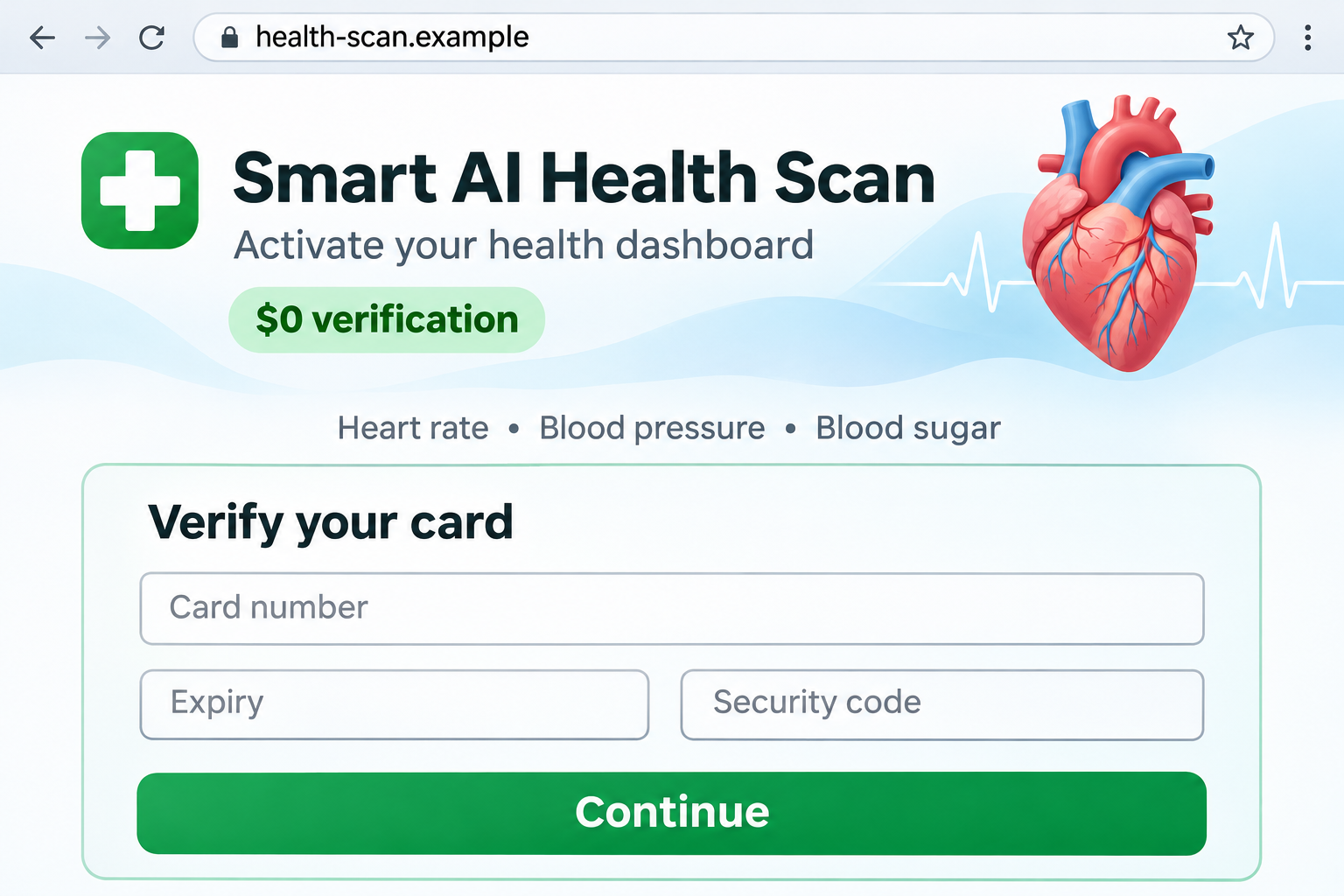
Instead of delivering the advertised tool, the deceptive funnel asks for payment details under a free or $0 verification claim.
Trend Micro documented this advertising funnel, including medical-style screens, an imitation app listing, and a card form that failed to deliver the promised app.
The warning is about the funnel, not every health app
Health apps can serve legitimate purposes, including recording measurements from separate medical devices. An app name or a medical-looking dashboard alone cannot establish fraud.
The concern here is the combination of extraordinary measurement claims, a misleading download journey, and card collection without the promised product.
The image above is an illustrative reconstruction, not an original advertisement. Its fictional address shows the kind of verification screen discussed here.
The signs that should make you stop
- A dramatic camera demonstration is offered as proof that several health measurements work accurately.
- A supposed app-store page appears inside an unrelated website instead of the actual store.
- A free download becomes a request for a complete card number and security code.
- Submitting the form produces another form, rather than a working app or a clear order confirmation.
- The company charging you and the terms of any subscription remain difficult to identify.
Why a Convincing Health Dashboard Is Not Medical Validation
A number on a screen needs a reliable measurement behind it
A colorful gauge can display anything its designer chooses. Before trusting it, you need to know what sensor produced the reading and what accuracy testing supports it.
Heart rate, blood pressure, oxygen saturation, and glucose are different measurements. Showing one plausible result does not establish that a single app measures them all.
Likewise, adding AI to a product description does not replace clinical validation. The relevant question is whether the exact function works reliably for its intended purpose.
Do not adjust medication or dismiss symptoms because an advertisement’s dashboard looks reassuring. Ask a qualified health professional about appropriate measurement equipment.
Separate measurement from displaying somebody else’s data
An app may legitimately display readings supplied by a connected device. That is different from claiming to obtain those readings directly from a camera.
The distinction is especially important with blood glucose. The FDA has warned about unauthorized glucose-measuring smartwatches and rings.
That warning is not a finding about these particular advertisements. It illustrates why an impressive noninvasive measurement promise needs more than a promotional demonstration.
If you depend on regular measurements, keep using the equipment and care plan recommended for you. A social advertisement should not become a substitute for either.
How the AI Health Scan Ad Scam Works
Step 1: A quick demonstration makes the claim feel testable
The video presents an everyday action followed by impressive results. Because the action seems easy, trying the offer can feel less consequential than buying medical equipment.
The viewer is encouraged to focus on convenience: no appointment, no complicated setup, and several readings in one place.
That leaves little time to ask whether the footage demonstrates a functioning product. A prepared animation can look much like a real result in a short clip.
You do not have to determine how the video was produced to reject an unsupported medical promise. Missing validation is enough to stop treating it as health advice.
Step 2: The click leads away from the expected download
You expect to reach a recognized app store. Instead, the advertising journey can open a separate landing page styled to look like part of that process.
A different domain is not automatically fraudulent. Legitimate campaigns also use landing pages, but the destination still needs an identifiable developer and a truthful explanation.
Check the actual address rather than the logo displayed within the page. A website can reproduce store-like buttons without being an authorized store listing.
If you want to inspect an app, open the official store independently and search for its exact developer. Do not use the advertising page as your only reference.
Step 3: Medical imagery and reviews supply borrowed confidence
Heart illustrations, health charts, star ratings, and enthusiastic comments can make the page feel familiar. They also shift attention away from the seller’s identity.
A rating drawn inside a webpage is not necessarily a rating recorded by an app store. Look for the original listing and its developer information.
Generic names resembling Smart AI Health Tracking or Blood Measure Monitor may describe the promotion without identifying a unique software publisher.
Do not accuse an unrelated developer because its app has a similar name. Match the advertisement, destination, publisher, and payment recipient before drawing that connection.
Step 4: A $0 message introduces the card request
The turning point is the request to verify a card before receiving the advertised free tool. The amount displayed encourages you to think there is nothing to lose.
But a card form can collect usable payment information even when the headline says $0. The headline does not establish what you have agreed to purchase.
Some legitimate businesses use temporary authorizations. What makes this funnel troubling is the deceptive product journey and unclear transaction, not the existence of every verification hold.
Before submitting, you should understand the merchant, immediate charge, later billing, service, and cancellation process. If those details are missing, leave the form empty.
Step 5: The promised app does not arrive
In the documented funnel, the researchers’ test reached a repeating card form instead of a usable app and ordinary confirmation.
That failure can encourage another submission. You may suspect a typo, a rejected card, or a browser problem and try different details.
Do not keep testing the page with additional cards. A failed-looking screen does not mean the information you entered was discarded.
Save the address and screenshots, then close the page. Your bank can help assess payment exposure without requiring you to finish the supposed activation.
Step 6: Payment information or unwanted billing becomes the problem
The security report describes variants associated with unauthorized recurring billing and ineffective cancellation routes. Do not assume every matching ad uses identical charges.
Look at what happened in your own account: pending authorizations, settled payments, merchant names, and any subscription confirmation you received.
A tiny initial transaction can matter because it may accompany an ongoing agreement or test exposed card details. Ask the issuer to assess it.
The absence of a charge today is not a reason to ignore a card number submitted to a deceptive page.
How to Check a Health App Without Following the Ad
Find the developer and the actual product
Start inside the official app store, not inside a search advertisement promising the same shortcut. Inspect the developer name, linked website, and privacy information.
Read what the app actually claims to do. A symptom diary, exercise tracker, connected-device companion, and diagnostic tool are not interchangeable products.
Check whether reviews discuss the advertised feature or something unrelated. A large review total cannot validate a medical function the reviewers never used.
Read the price before authorizing anything
A real subscription offer should make its price, billing interval, trial conditions, and cancellation method understandable before you authorize the purchase.
Save that information. An annual charge shown as a monthly equivalent can cost substantially more upfront than the number that first caught your attention.
Do not infer a hidden subscription merely because a page asks for a card. Instead, demand clear consent terms and reject the transaction when they are absent.
Keep health information separate from marketing
An unfamiliar advertiser should not need your medical records or insurance login to let you inspect an app description.
Health questionnaires may reveal sensitive information even if they never produce a diagnosis. Check who receives the answers and whether they become advertising data.
A useful app earns trust through clear functions, sensible permissions, and transparent handling of information, not through a dramatic promise made in seconds.
If an installation is offered outside the expected store, do not disable device protections to complete it. Ask why that route is necessary.
Review permissions against the advertised function. Access to messages, accessibility controls, or device administration deserves particular scrutiny when all you wanted was a health tracker.
These requests do not prove the same malware is present in every campaign. They tell you when the exposure has moved beyond a misleading card form.
Keep the app name and installation source for any support request. They help distinguish what you actually installed from the product shown in the ad.
What to Do if You Have Fallen Victim to This Scam
- Stop the signup and preserve its details.
Record the ad account, landing-page address, approximate time, and any confirmation or error message. Keep the original evidence before reporting the ad.
Do not revisit the form to prove that it still fails. The details already in your browser history and records may be enough.
- Contact your card issuer if you entered payment information.
Use the bank’s established app or the number printed on your card. Explain that a misleading health-app page collected the details.
Ask whether the card needs replacement, whether a merchant token exists, and how to handle any pending or settled transaction.
- Challenge charges accurately.
Identify whether you never authorized the payment, were misled about the service, or canceled a recurring agreement. Give the issuer the facts and supporting screenshots.
Keep case numbers and follow the issuer’s deadlines. A dispute is a process, not a guarantee that every transaction will be refunded.
- Cancel any identifiable unwanted subscription in writing.
If a genuine merchant or subscription record appears, request cancellation through its established channel. Save the request and confirmation.
Ask the issuer about recurring-payment controls as well. Replacing a card and canceling a subscription are not always the same action.
- Secure accounts if you reused a password.
Change the reused password on the legitimate service, starting with email. Review active sessions and add multifactor authentication where available.
Do not share a bank verification code with anyone offering to fix the app activation. Read the purpose of every authorization message.
- Check the device only when the exposure warrants it.
Visiting a card form does not automatically mean malware was installed. If you downloaded an unexpected file or app, stop using it and investigate.
A current Malwarebytes scan can help check for malicious software. It cannot reverse a card payment or authenticate a health measurement.
- Reduce repeat advertising exposure and report the promotion.
Report the ad to the social platform with the destination address. Avoid replying with personal payment details in a public comment.
AdGuard can reduce unwanted advertising and some malicious destinations. Blocking tools are an extra layer, not a substitute for checking the offer.
- Get reliable medical help if you trusted the readings.
If the advertisement changed how you managed a condition, speak to your health professional. Explain which measurements or claims influenced that decision.
For concerning symptoms, seek appropriate care rather than waiting for an app refund or trying another unverified scan.
Frequently Asked Questions
Can an AI health scan advertisement prove medical accuracy?
No. A demonstration and attractive dashboard do not show that the advertised measurements were clinically validated for that exact product and use.
Ask what the app measures directly, what external equipment it requires, and what evidence supports its accuracy.
Does every $0 card verification mean a scam?
No. Legitimate authorizations exist. This warning concerns a deceptive download funnel that collects card details without providing the promised health app.
The merchant and payment terms still need to be clear before you submit anything.
Is the app-store-style page necessarily an official listing?
No. Store-like graphics can be copied into an ordinary website. Open the official store independently and verify the exact developer and product.
A similar name does not establish that an unrelated app belongs to the advertiser.
What if the card form failed and no charge appeared?
Contact the issuer if you entered the details. An error screen does not prove that the website failed to collect them.
Do not test another card or wait for a larger payment before asking about protection.
Will removing an app stop subscription payments?
Not necessarily. Deleting software and canceling a billing agreement are separate actions. Find the actual subscription record and follow its cancellation process.
Keep written evidence and ask your payment provider about any charges you do not recognize.
Should I replace my prescribed monitoring equipment with this offer?
No. Do not replace established monitoring or alter treatment because of a social media demonstration. Discuss suitable measurement tools with your health professional.
Health decisions require reliable information, not an advertising page that redirects you into a card form.
The Bottom Line
Do not enter payment details into this AI health scan funnel. The promised health shortcut leads to a misleading activation process, not a trustworthy medical tool.
If you submitted a card, contact the issuer and address any unwanted billing. If you relied on advertised readings, return to appropriate medical guidance.

Join the discussion
0 commentsShare your experience or ask a question about this article.
Discussion
Start the conversation
Have a question or something useful to share? Add the first comment.