


A download warning can make you stop what you’re doing, especially if it appears when you haven’t downloaded anything. The message may ask you to decide whether it was you.
There is a better place to answer that question than the warning itself. Start by finding out which app put it on your screen.

Overview
A browser warning with the wrong source
Alifornexicte[.]co.in is a reported source of unwanted website notifications. One version tells visitors to allow notifications as though that would prove they aren’t robots.
The message above is a reconstruction of the reported download-warning theme, not a screenshot of a real download. It leaves out the original response buttons.
The website permission can let the site send messages outside the tab where you granted it. That is why an alert might appear while you are working somewhere else.
The browser can display the notification as designed even though the claims in it are false. The name of the app displaying it is not a guarantee about its contents.
A claimed download and a real download are different findings
The reported alert claims that an unauthorized download was detected and asks the reader to respond. It tries to make choosing either answer feel like reporting a security event.
Do not use its buttons to check for a file. The browser’s own download history shows what that browser recorded, while system security history shows what your security tool detected.
Checking those places independently also avoids reopening the website. The reported campaign doesn’t establish that any specific file appeared on your device just because you saw its notification.
Decide how far the incident went
Write down the browser or profile involved and the time the message arrived. Keep the site name as plain text rather than copying a clickable address.
- If you allowed notifications but took no other action, remove the site’s browser permission.
- If you opened the alert, check what the resulting page actually asked you to do.
- If you ran a file or gave someone access, get device-specific help.
- If you submitted account or payment information, contact the provider directly.
The exact destination behind a notification can change. Don’t infer that your device was scanned, a payment was made, or a file was installed from the alert alone.
How the Alifornexicte Notification Scam Works
Step 1: The site turns a permission into a test
The page puts instructions in front of you while the real browser draws a permission prompt. Those two parts of the screen are doing different things.
The website says you are proving you are human. The browser is asking whether the site should be allowed to send notifications.
The browser isn’t asking you to grant permission so an antivirus can check downloads. Read the permission text and choose to block or dismiss it if you don’t want alerts.
Step 2: The browser remembers the answer for that website
After a site is allowed, the decision can remain in the profile. Closing the original tab doesn’t necessarily erase it from the browser.
That is how a notification can arrive in a different context. It may appear on the desktop with other messages that came from applications you trust.
A site can vary the content it shows between visits or use different subdomains. You don’t have to identify every variation to remove a permission already listed for it.
Step 3: The notification claims a specific event happened
The warning says a download occurred and makes you choose whether it was yours. That framing can feel more convincing than a generic ad claiming there’s a problem.
Neither answer can authenticate a file. A site can control the text of its own notification without checking other downloads or scanning your drive.
You don’t need to answer to make the message go away. Dismiss it through the browser or system controls and check the permitted origin in browser settings.
Step 4: An answer can take you somewhere unrelated
Clicking the notification can take the reader to another page. In this kind of campaign, the next page may ask for credentials, advertise software, or claim to offer support.
Those are possible next steps, not a description of what every reader saw. Keep the permission problem separate from whatever happened after you followed a particular alert.
Close any site opened by the notification and record what it requested. You don’t need to follow the redirect again to help someone identify the warning.
How to Verify a Claimed Download Without Opening the Alert
Check the browser that showed the message
In Chrome or Edge on Windows, use the browser’s menu and open Downloads. Look for an entry at the time written in your notes.
If a file is listed, check its name and whether it was blocked or saved. Don’t click the filename to see which application opens it.
If you use more than one profile, start with the one that displayed the notification. The downloads list you are looking at may belong to a different profile.
If no matching item appears, the notification isn’t evidence that the browser saved it. A separate program can still create files that aren’t recorded in that list.
Check what Windows actually detected
Open Windows Security from the Start menu, then go to Virus & threat protection > Protection history. Check whether an event matches the time and filename.
If you use a different security provider, open its installed application independently. Don’t accept a notification link as the way into its dashboard.
Keep accurate observations. A blocked download, an item found in quarantine, and a file you knowingly opened call for different next steps.
Use the evidence without turning it into a test
Don’t recover a quarantined item or repeat the download to see whether you can trigger another warning. Save the recorded time and the label you already have.
If the device is managed, give that information to IT. It may have device logs that distinguish a warning in the browser from an actual endpoint alert.
On a personal computer, think about whether a new installer opened or asked for approval. That observation is more useful than trying to judge the warning by its colors.
What to Do After an Alifornexicte Download Warning
-
Dismiss the notification without answering it. Use the close control instead of the controls in the body of the message.
Don’t assume a negative answer is safe. It may still send you to a webpage run by whoever sent the notification.
-
Record the origin and revoke its permission. Search for the suspicious entry in the settings of the browser that displayed it.
If the same browser has several profiles, check the one that was in use. A different profile can keep its own list of allowed sites.
-
If the alert opened a page, stop there. Close it and inspect the relevant download history without starting any program.
If you didn’t run anything and didn’t enter information, there’s no reason to disconnect everything or erase your browser just because a notification appeared.
-
If you entered a password or card number, contact the real provider. Recover the account directly, or use the issuer’s app or published number for payment data.
Keep the details of what you shared so support can recommend the right action. The alert itself cannot tell you whether anything was stolen.
-
If you ran a program or granted remote access, isolate the device when safe. On a managed computer, contact IT and preserve the download information.
On your own device, run a trusted scan and seek help if you can’t tell what installed. Don’t use the advertised scanner or call a number behind the notification.
How to Block Alifornexicte Notifications in Chrome
Find the correct browser and profile
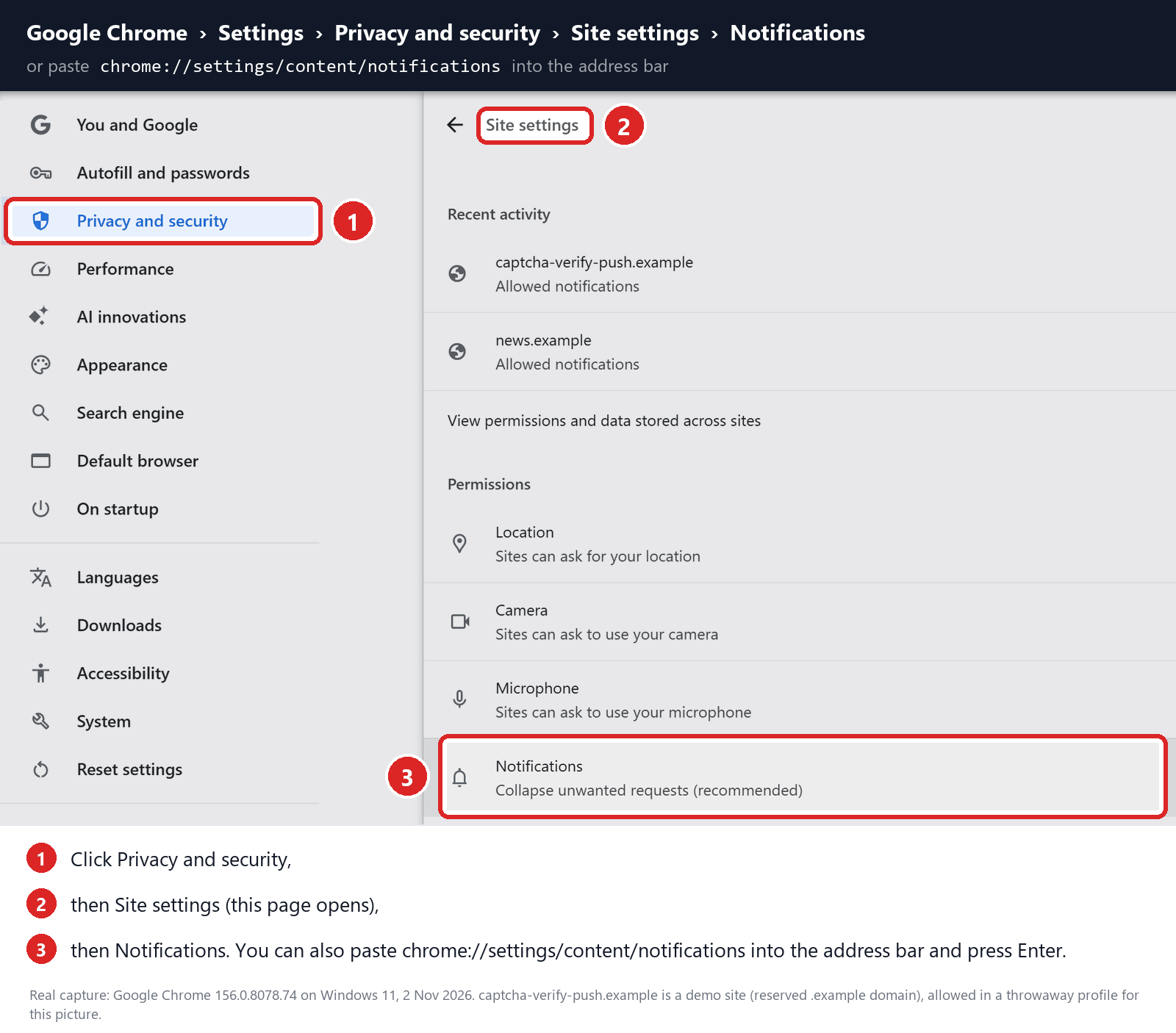
Open Chrome from its usual shortcut, not an alert. Check the profile icon before opening Menu > Settings > Privacy and security > Site settings.
Under Permissions, select Notifications to review those grants. Google’s Chrome notification guidance explains how website notifications differ from ordinary pop-ups.
You don’t need to visit the advertising site to change this setting. Use the list Chrome already has instead of typing the suspicious web address in the location bar.
Stop future notifications from the specific origin
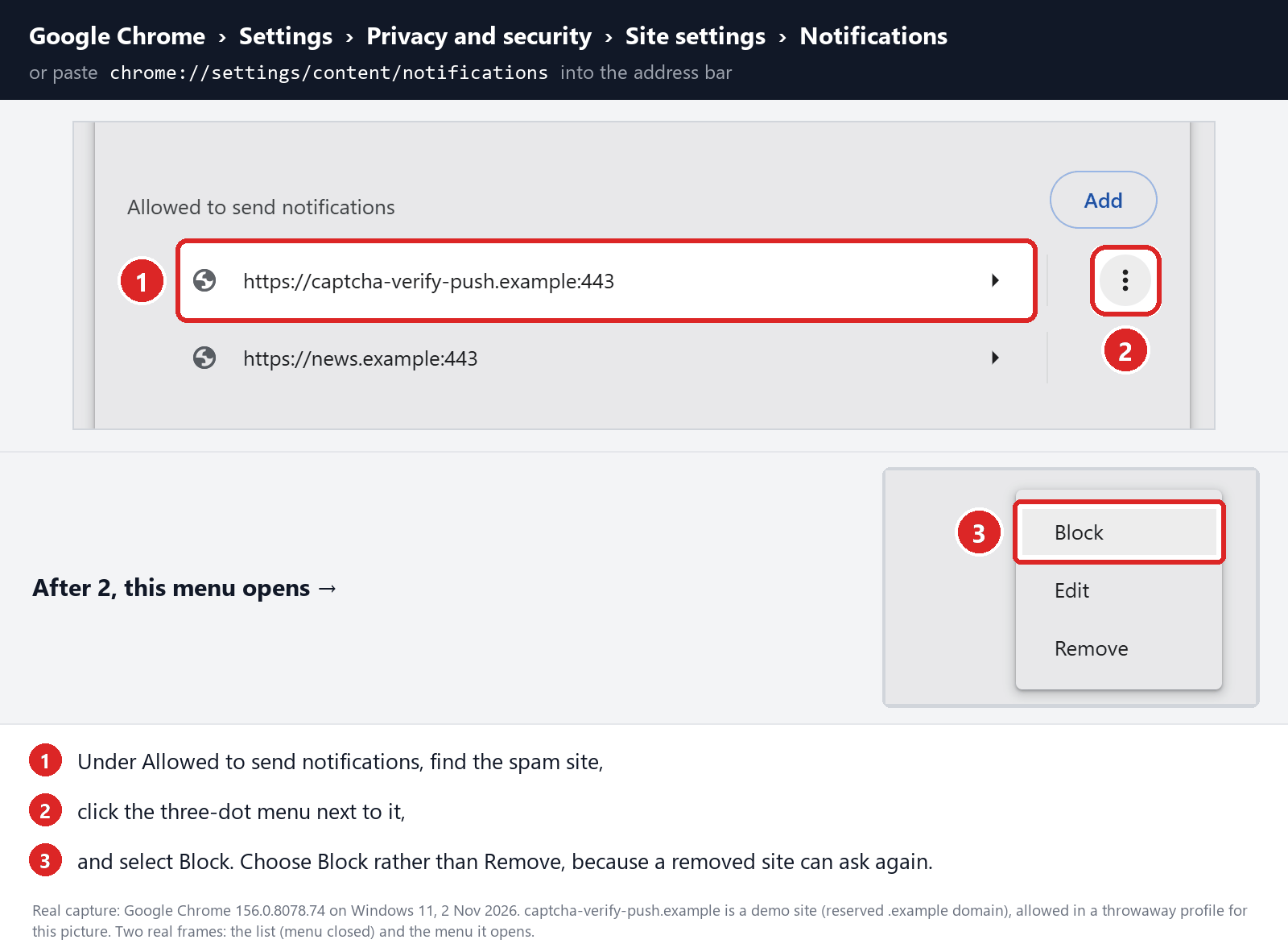
Look under sites allowed to send notifications. Find the exact unwanted host or subdomain shown by the alert, select its menu, and choose Block.
If the exact origin appears more than once with different subdomains, block each confirmed unwanted entry. Leave work tools and other notifications you deliberately allowed in place.
Once blocked, the entry should disappear from the allowed group and be listed as not allowed. An older toast already visible on the screen may still need dismissing.
Check other devices only when they show the same symptoms
On Android Chrome, open More > Settings > Site settings > Notifications, then review allowed sites and turn off the unwanted site’s permission. The labels can vary by version.
If Chrome on the phone doesn’t show that site, check what app sent the notification first. Swiping it away does not necessarily stop future messages from its sender.
If the computer still shows alerts, verify whether they come from another browser or another site. A page ad, installed app alert, and browser push message use different controls.
Consider a trusted content blocker to reduce misleading ads after you recover, but don’t confuse it with revoking a permission. The browser’s blocked-site list is the check that matters here.
Why the Download Warning Can Come Back
Check where the newest message appears
Keep track of whether you’re seeing the same saved toast or a new one with a different time. An older message can remain available after its source is blocked.
Dismiss the old messages using the notification controls. If a new one appears, read the source and compare it with the host you actually blocked.
An alert with the same words isn’t necessarily from the same origin. A browser can give two unrelated sites permission, and each needs to be checked on its own record.
Preserve evidence if the browser actually saved something
Download history is a record of browser activity, not a readout of everything on disk. Removing the record doesn’t necessarily remove the file, and clearing history may hinder a review.
On a work computer, give IT the item name and exact time while the history still exists. Don’t empty folders or uninstall the browser to make the warning disappear.
If the item is already blocked by the browser, preserve that status. A retry can complicate an otherwise clear report and expose the computer to a fresh download.
Distinguish Windows notification settings from permissions inside Chrome
You can silence Chrome at the level of the operating system, but that stops legitimate notifications too. It doesn’t identify which website had permission or remove that choice.
For a shared machine, note which Chrome profile matched the bad entry. Blocking it under your profile might leave the permission in another user’s profile unchanged.
If a managed device keeps reapplying a setting, tell the administrator exactly which profile and permission are affected. Don’t disable device management to try to clear a single notification.
Before calling the issue resolved, reopen Chrome’s settings and verify the blocked origin is still listed. You don’t have to revisit the website to check that result.
If the alert included a filename, compare it with the actual names you recorded. Don’t assume two files are related because both are described as a download.
Give support the wording and time if you can’t find a matching download. Searching unfamiliar pages for it can expose you to a new lure.
Frequently Asked Questions
Does an Alifornexicte alert prove there was a download?
No alert from that site settles the question. Check the actual browser’s Downloads list and Windows security history without selecting anything in the notification.
Will closing the tab stop the alerts?
The permission can outlast the tab where you granted it. Remove or block the origin in the browser’s notification settings to prevent new messages from it.
Can I click No if the message asks whether it was me?
Don’t use either answer to verify a file. Check the event in the real browser or security tool, and dismiss the alert through its close control.
Should I clear all browser data?
Start with the specific site’s permission. A full reset can affect other settings and isn’t the first step for an isolated web push message.
What if I launched a program after following the warning?
That action creates a separate device risk. Isolate the device if appropriate, keep an account of what ran, and contact a technician or your IT team.
How do I recognize the website’s notification on a shared PC?
Record the notification source and ask which browser and profile was active. The same computer can show messages from different apps or site permissions.
The Bottom Line
Ignore the warning’s buttons and block the site’s notification permission in the browser. Use download and security history, not the message, to check whether something really happened.
If you ran a download or handed over information, handle that exposure separately. Removing the alert stops the messages, not anything already done through the pages it opened.

Join the discussion
0 commentsShare your experience or ask a question about this article.
Your progress
Did these steps help?
Let us know how the guide worked for you.
Describe what you see and the step you reached. Keep passwords and other private information out.
Discussion
Start the conversation
Have a question or something useful to share? Add the first comment.