

If you have received a call from an unknown person – usually with an Indian accent – claiming to be from Microsoft, and stating that multiple issues have been detected on your computer, then you are the victim of a scam.
The purpose of these calls is to get an easy $199 (or whatever amount they choose) by scaring you into thinking there’s something really wrong with your computer and that they can fix it for you.
Cybercriminals often use publicly available phone directories so they might know your name and other personal information when they call you. They might even guess what operating system you’re using.
Once they’ve gained your trust, they might ask for your user name and password or ask you to go to a website to install software that will let them access your computer to fix it. Once you do this, your computer and your personal information is vulnerable.
When they have access to your computer, this scammers can do the following:
- Trick you into installing malicious software that could capture sensitive data, such as online banking user names and passwords. They might also then charge you to remove this software.
- Take control of your computer remotely and adjust settings to leave your computer vulnerable.
- Request credit card information so they can bill you for phony services.
- Direct you to fraudulent websites and ask you to enter credit card and other personal or financial information there.
- Microsoft does NOT make unsolicited phone calls (also known as cold calls) to charge you for computer security or software fixes.
In the videos below you can watch how a phone scam works, and what are the usual replies used by this cyber criminals.
If someone claiming to be from Microsoft tech support calls you:
- Do not purchase any software or services.
- Ask if there is a fee or subscription associated with the “service.” If there is, hang up.
- Never give control of your computer to a third party unless you can confirm that it is a legitimate representative of a computer support team with whom you are already a customer.
- Take the caller’s information down and immediately report it to your local authorities.
- Never provide your credit card or financial information to someone claiming to be from Microsoft tech support.
If you have not installed any kind of software or allow them to connect to your computer, then your computer should be clean. However if you have allowed them to connect through AMMYY Admin to your machine, then run the below scans to make sure your computer is clean.
If you gave someone your credit card information to pay for services, contact your credit card company and alert them to this fraudulent purchase. Also, just to be on the safe side, you should reset your computer’s password, and any other online account that might have sensitive data.
How to check if you computer is infected with malware or a pottentially unwated program
This page is a comprehensive guide, which will remove AMMYY from Internet Explorer, Firefox and Google Chrome.
Please perform all the steps in the correct order. If you have any questions or doubt at any point, STOP and ask for our assistance.
STEP 1: Uninstall any programs that might have been installed throught the AMMYY Admin program
STEP 2: Remove AMMYY adware from your computerwith AdwCleaner
STEP 3: Remove AMMYY virus with Malwarebytes Anti-Malware Free
STEP 4: Remove any other infections with HitmanPro
STEP 5: Double check for any left over infections with Emsisoft Emergency Kit
STEP 1 : Uninstall any programs that might have been installed throught the AMMYY Admin program
In this first step, we will try to identify and remove any malicious program that might be installed on your computer.
- To uninstall any program that might have been installed through AMMYY on your computer, click the Start button, then select Control Panel, and click on Uninstall a program.
If you are using Windows 8, simply drag your mouse pointer to the right edge of the screen, select Search from the list and search for “control panel“. Or you can right-click on a bottom left hot corner (formerly known as the Start button) and select Control Panel from there, then select Uninstall a program.
![[Image: Uninstall a program]](https://malwaretips.com/blogs/wp-content/uploads/mwt-media/2a/2a46a9e643eeeb764fb164177551c571817a8b4d4fe8141504dca801f8abc8cc/f2a64da5c9bbae588b1c04059e9f6a1e9a413554048666c6db3aa65196a7b99a-557.webp "Click on Uninstall a program")
- When the Add/Remove Programs or the Uninstall a Program screen is displayed, scroll through the list of currently installed programs and uninstall any recently installed or unknown programs from your computer.
![[Image: Uninstall any malicious programs from your computer]](https://malwaretips.com/blogs/wp-content/uploads/mwt-media/d3/d32995f1c8630e1ecd1f8d94f64ed00434ac8c316e432f4f2cf418ab1575cd1d/99d2ebae1820f7c7a1561b10075b03cc3fb677af2830ecca860f776871fd20ee-761.webp "Uninstall any malicious programs from your computer")
If you are having issues while trying to uninstall the AMMYY program, you can use Revo Uninstaller to completly remove this unwated program from your machine.
Depending on what program has installed through AMMYY program, the above program may have a different name or not be installed on your computer. If you cannot find any unwanted or unknown programs on your machine, then you can proceed with the next step.
STEP 2: Remove AMMYY adware from Internet Explorer, Firefox and Google Chrome with AdwCleaner
The AdwCleaner utility will scan your computer for AMMYY malicious files and registry keys, that may have been installed on your computer without your knowledge.
- You can download AdwCleaner utility from the below link.
Download AdwCleanerFree official download. Nothing to install. - Before starting AdwCleaner, close all open programs and internet browsers, then double-click on the AdwCleaner icon.
![[Image: AdwCleaner Icon]](https://malwaretips.com/blogs/wp-content/uploads/mwt-media/ae/ae54421358390681d3945c646380e19b34d03e4827a53073e49cc8cb31911a4e/99f0dd93a9d513cc4b0c7955a0c5f93786f74d9bcc472950819fe74af1d6f342-123.webp "AdwCleaner Icon")
If Windows prompts you as to whether or not you wish to run AdwCleaner, please allow it to run. - When the AdwCleaner program will open, click on the Scan button as shown below.
![[Image: Adwcleaner Scan]](https://malwaretips.com/blogs/wp-content/uploads/mwt-media/1d/1d7a61e03e9b975ca506c46364844867f265a178724d30e4ed025f8533673b08/e92584319c6274f525f060b4e0428fff8a5610ea04170027fd89556c5dc718b7-530.webp "Click on Scan button to search for AMMYY infection")
AdwCleaner will now start to search for AMMYY malicious files that may be installed on your computer. - To remove the AMMYY malicious files that were detected in the previous step, please click on the Clean button.
![[Image: AdwCleaner removing infections]](https://malwaretips.com/blogs/wp-content/uploads/mwt-media/f1/f153068da4256c4a86039c0d8bf75f9853f3e0615a05e30315dcb4e6c64f3c1f/3e94c26efa83f0b307a8ede30a8e1c2ca514d5a57523aa57e04b282a88c163e8-530.webp "Click on the Clean button to remove AMMYY virus")
AdwCleaner will now prompt you to save any open files or data as the program will need to reboot the computer. Please do so and then click on the OK button.
STEP 3: Remove AMMYY virus with Malwarebytes Anti-Malware Free
- You can download Malwarebytes Anti-Malware Free from the below link, then double-click on the icon named mbam-setup.exe to install this program.
Download MalwarebytesFree official installer. Your download starts right away. - When the installation begins, keep following the prompts in order to continue with the setup process, then at the last screen click on the Finish button.
![[Image: Malwarebytes Anti-Malware final installation screen]](https://malwaretips.com/blogs/wp-content/uploads/mwt-media/47/471448d4dd5aa1d55ea545effccf0ac9c8ccb5a29622da4e38ac677b5d8c37b5/9f473303c15a00262451cc5a56b904de929157b59e19e3cfb2c03ec88f643390-402.webp "Malwarebytes Anti-Malware installation screen")
- On the Scanner tab, select Perform quick scan, and then click on the Scan button to start searching for the AMMYY malicious files.
![[Image: Malwarebytes Anti-Malware Quick Scan]](https://malwaretips.com/blogs/wp-content/uploads/mwt-media/1e/1eb209597ca2f06e596fd060345ac7e3100355f1ec8fc8ea2d9dec7abbb05ea0/3afba9b0b97b56945ffc33817ac48f7433c799241a22e422966180b76473a906-521.webp "Run a Quick Scan with Malwarebytes Anti-Malware")
- Malwarebytes’ Anti-Malware will now start scanning your computer for AMMYY as shown below.
![[Image: Malwarebytes Anti-Malware scanning for AMMYY virus]](https://malwaretips.com/blogs/wp-content/uploads/mwt-media/f6/f6ecfba43df64204df40586070483f260cb91fa07d5cc90cb4c3a588d159ff30/5b6b2687853201a40d29fe27e142cc66b0852745bbad3900a21030a10399cb4c-521.webp "Malwarebytes Anti-Malware scanning for AMMYY")
- When the Malwarebytes Anti-Malware scan has finished, click on the Show Results button.
![[Image: Malwarebytes Anti-Malware scan results]](https://malwaretips.com/blogs/wp-content/uploads/mwt-media/84/84c62dd46289424dbc686abc53672cb0810111920c8c0bbd69e973844d0a9ab0/a4c04aa700e641f47afec9965f79ff346740668e5952955ccbe5b4c3658b5897-521.webp "Malwarebytes when the system scan has completed")
- You will now be presented with a screen showing you the computer infections that Malwarebytes Anti-Malware has detected. Make sure that everything is Checked (ticked), then click on the Remove Selected button.
![[Image: Malwarebytes Anti-Malware removing AMMYY]](https://malwaretips.com/blogs/wp-content/uploads/mwt-media/d8/d86b6a8bac0e4ece9fd2d259a83db71487943f6b04b567edb0e9adcc3200f492/4eb94651b0e34cc99689c56dc71cd0a49444498ed05c5803ea55fda1cfee1b1f-521.webp "Malwarebytes Anti-Malwar removing AMMYY")
STEP 4: Remove any other infections with HitmanPro
- You can download HitmanPro from the below link:
Download HitmanProOfficial Sophos download. Free scan, free 30-day trial to remove threats. - Double-click on the file named HitmanPro.exe (for 32-bit versions of Windows) or HitmanPro_x64.exe (for 64-bit versions of Windows). When the program starts you will be presented with the start screen as shown below.
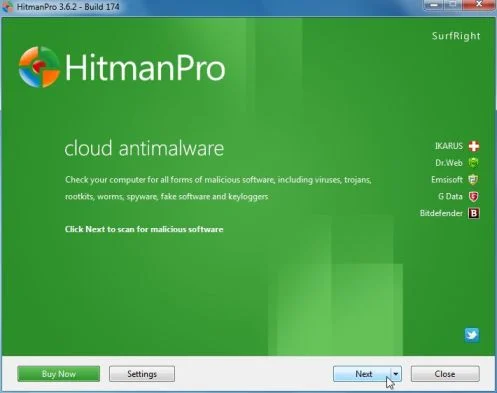
Click on the Next button, to install HitmanPro on your computer.
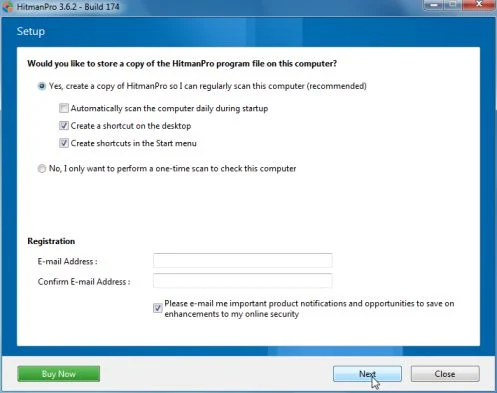
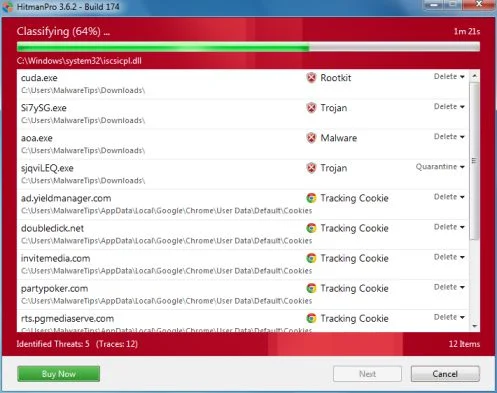
- HitmanPro will now begin to scan your computer for AMMYY malicious files.
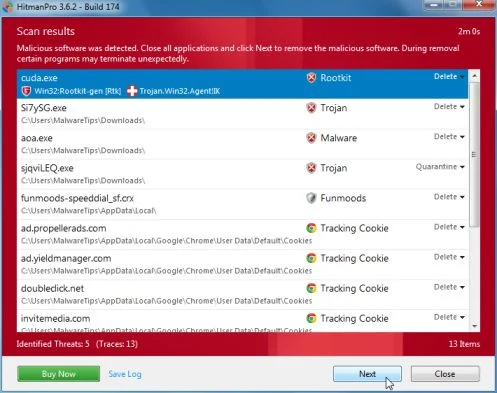
- When it has finished it will display a list of all the malware that the program found as shown in the image below. Click on the Next button, to remove AMMYY adware.
- Click on the Activate free license button to begin the free 30 days trial, and remove all the malicious files from your computer.
![[Image: HitmanPro 30 days activation button]](https://malwaretips.com/blogs/wp-content/uploads/mwt-media/7f/7f063c87fa029d8cd40df3f7faf43765ba1bb9e82c8d5a64c8a49de788018196/2a8400863f3c81fd7d6411e20166dfacdf0bc73e14522edea93a637003240dc1-497.webp "HitmanPro free 30 days trial")
STEP 5: Double-check for any left over infections with Emsisoft Emergency Kit
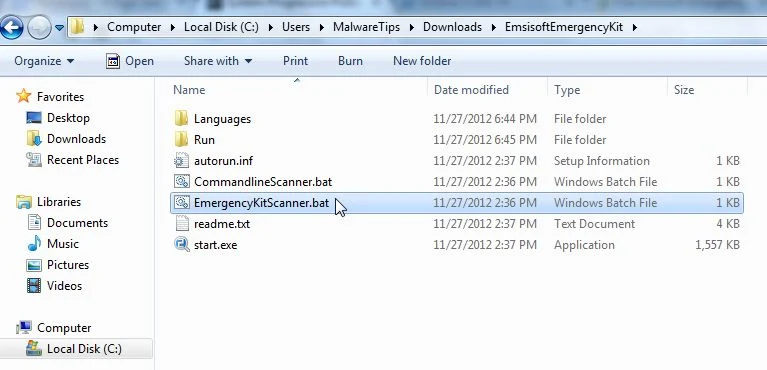
- You can download Emsisoft Emergency Kit from the below link,then extract it to a folder in a convenient location.
Download Emsisoft Emergency KitOpens the download page in a new tab. - Open the Emsisoft Emergency Kit folder and double click EmergencyKitScanner.bat, then allow this program to update itself.
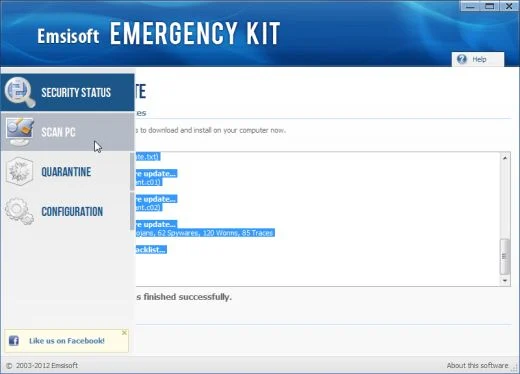
- After the Emsisoft Emergency Kit has update has completed,click on the Menu tab,then select Scan PC.
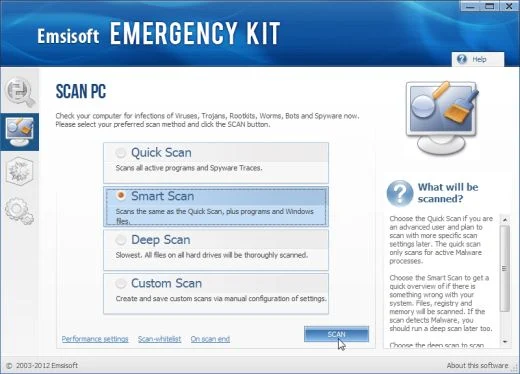
- Select Smart scan and click on the SCAN button to search for “Antivirus Security 2013” malicious files.
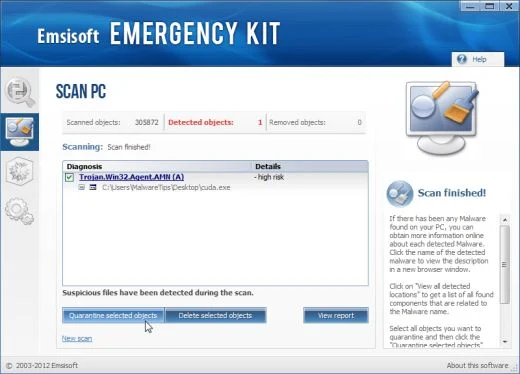
- When the scan will be completed,you will be presented with a screen reporting which malicious files has Emsisoft detected on your computer, and you’ll need to click on Quarantine selected objects to remove them.
If you are still experiencing problems while trying to remove any software installed though AMMYY from your machine, please start a new thread in our Malware Removal Assistance forum.

Join the discussion
27 commentsShare your experience or ask a question about this article.
Discussion
Yep, usually this scam claims to be from Microsoft but this time the scams “You’re getting a refund” & just need to fill out their refund form by going to the command line. Yea right, took awhile before the moron (from India) gave up & hung up on me. Figure the longer I keep a scammer busy – less time they have to keep doing it. Was asked to type http://www.aammyy.com in the command line, doing a search it pops up with 1 before the aa…. and its basically a blank page which I didn’t spend anytime poking around the any links. Turns out theres also a real website with that name (without the 1) & they’ve posted a warning page about the scammer.
Thanks for the heads up! Got a similar call too, but it was strange because the caller used a phone number that came up on my caller ID as 1234567890. I didn’t think such a phone number existed. It made me suspicious so I asked the caller a lot of questions. And while he talked, I pulled up the Callercenter app on my mobile phone and looked up the phone number there. Well, several complaints came up, all associating the phone number to the fake Microsoft scam call. I told the caller that, he hung up.
In reply to Ruth Simmons
Glad to say, he’s still at it – played along & then a quick report to the UK National Fraud Helpline on 03001232040…….