

As the most iconic name in consumer technology renowned for category-defining devices like the iPhone, iPad and MacBook series, Apple has unfortunately become the latest high-profile target of elaborate clearance sale scams promoted online. Sophisticated fake websites and social media ads falsely claiming to offer extreme Apple discounts up to 90% off popular gadgets aim to dupe shoppers. This guide will break down exactly how this scam ensnares victims plus tips to avoid exploitation.
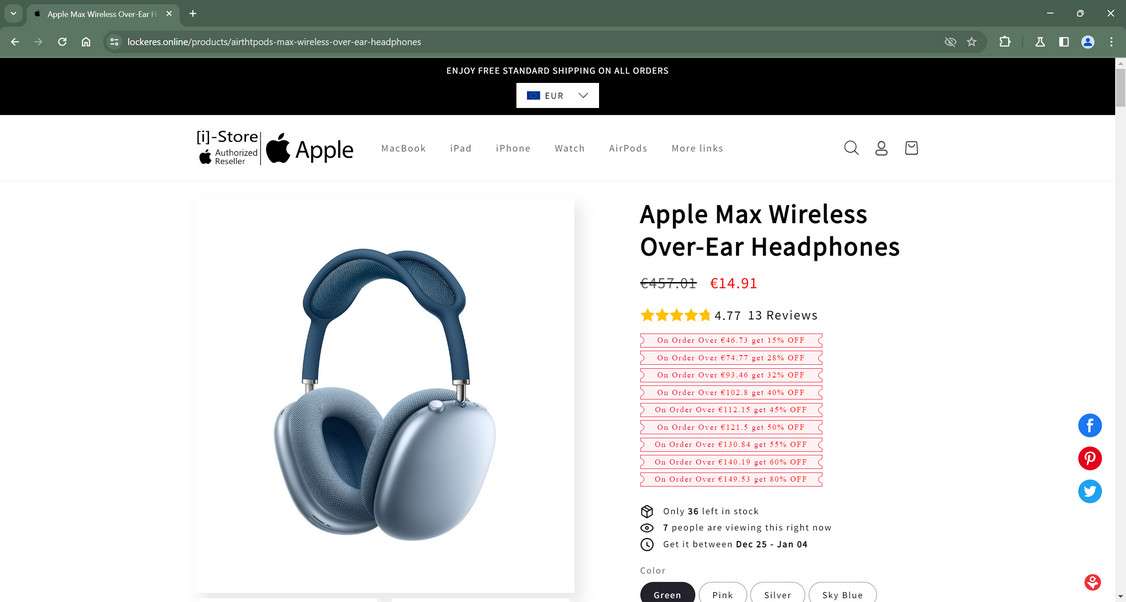
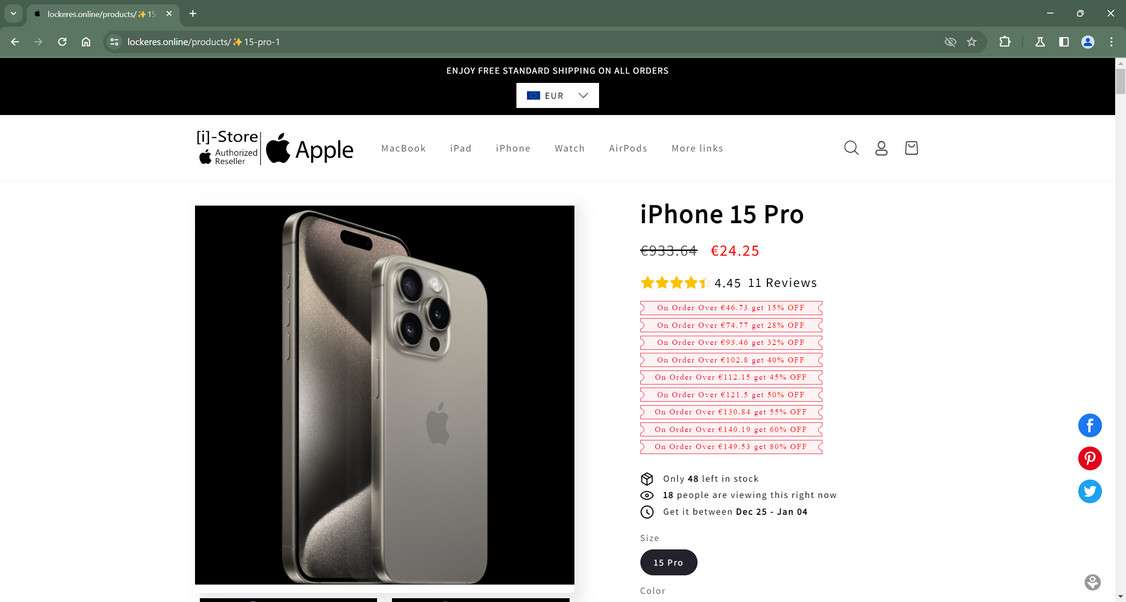
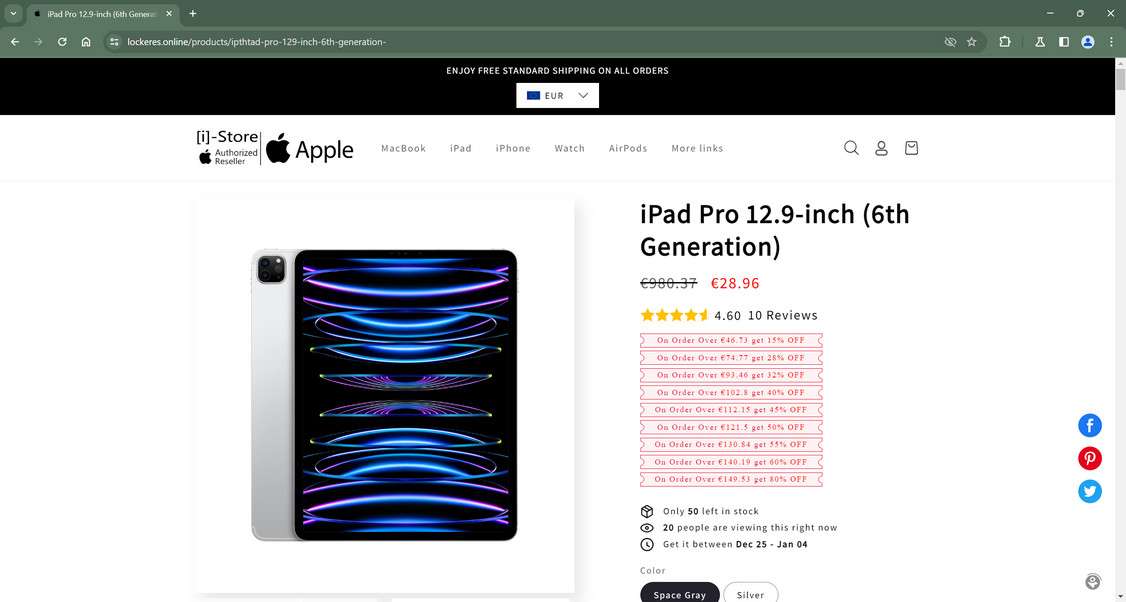
Overview of the Fake Apple Clearance Sales Conning Shoppers
The innovative Apple brand needs no introduction after having revolutionized personal electronics and mobile computing for over 40 years with its elegantly designed devices and intuitive software ecosystems. However, Apple’s sterling reputation is attracting sophisticated clearance sale scams.
Highly-convincing fake Apple websites engineered to precisely mimic Apple.com down to matching logos, product shots and web design are being heavily marketed through social media ads. They tout unrealistic limited-time blowout gadget markdowns up to 90% off to spark interest and website traffic.
Common Clearance Scam Warning Signs:
- Extreme 90%+ discounts too good to be true
- Suspicious URLs slightly differing from real sites
- Poor grammar, spelling errors and unprofessional site text
- Non-working customer service phone numbers and addresses
When lured onto these deceptive clearance domain knockoffs instead of legitimate Apple.com itself, victims who place orders overwhelmingly report profound disappointment through:
- No items shipped – Most likely outcome after payments processed
- Cheap knockoffs – Low-quality fakes that don’t match product images/descriptions
- Used or damaged goods – Showing clear signs of previous abuse
- Random wrong items – Products not even ordered by customers
And adding insult to injury, users’ personal and financial data also gets stolen during checkout on these elaborate sham websites enabling additional downstream identity theft by fraudsters.
By understanding the cunning techniques these sophisticated Apple clearance scams deploy online, shoppers can sidestep their tricks and securely shop real websites.
How Victims Get Scammed By Fake Apple Blowouts
Successfully scamming shoppers using counterfeit Apple promotions requires coordinated planning and execution. Here is exactly how innocent victims get duped:
1. Scammers Architect Fake “Apple” Online Stores
Sophisticated scam artists build intricately designed replica Apple websites made to mirror the tech giant’s real digital flagship shop.
While URL addresses appear legitimate on the surface, they actually utilize similarly named domains diverting traffic away from real Apple stores:
appleonlinestore.online
appleoutletshop.store
applewebsaleretail.shop
The elaborate fake sites similarly use Apple’s exact logo, product galleries and familiar website navigation – while barely differing enough to control mimic domains.
2. Bogus Apple Clearance Ads Promoted Via Social Platforms
Fraud ring operators then promote their network of sham Apple domains using compelling social media ads highlighting unbelievable deep discount messaging to fool users. These primarily leverage Facebook, Instagram and YouTube due to immense reach.
The ads run exaggerated headlines like “Apple discontinuation sale – up to 90% off clearance prices before inventory gone!” Links then route through obscured URL shorteners masking the scam destinations.
When social media users click on these advertisements, they get redirected to the sophisticated fake clearance stores instead of legitimate Apple websites.
3. Shoppers See Outrageous Prices Slashed Over 90% Off
Upon landing on the convincing duplicate Apple domains, visitors behold what appears as incredible clearance sales boasting extreme 90%+ reductions.
Genuine $1,000 iPhone models all show insanely marked down to just $100 or $150 bucks – making coveted devices seem virtually free compared to standard Apple premium pricing.
Such irrational price points are shown next to much higher regular rates for authenticity. This further fools visitors into assuming the blowout deals are authorized limited-time fire sales before product line discontinuations.
4. Checkout Forms Steal Users’ Financial and Personal Data
As shoppers rush to checkpoint bargain electronics deals, mandatory order forms demand harvesting extensive sensitive customer data including:
- Full legal names
- Home addresses
- Phone numbers
- Credit card numbers
- Security codes
- Expiration dates
This mined contact/payment intel flows directly to sophisticated scammers rather than legitimately securing clearance device grabs.
5. No Orders Fulfilled or Terrible Products Received Instead
The moment of truth crashes down on duped shoppers whose clearance orders never arrive. Instead purchases either:
- Entirely disappear after payments with zero fulfillment
- Extremely poor quality knockoffs get shipped instead
- Used, damaged or clearly tampered goods arrive
- Random wrong products show up unrelated to order specifics
Now victims lack real merchandise while fraudsters possess both stolen money and sensitive personal data enabling additional downstream identity theft exploits.
How to Spot Counterfeit Apple Clearance Websites
While scam sites promote unbelievable markdowns, their shifty designs reveal fraud once aware of their tactics.
Analyze Website URLs
Fake domains barely differ from the real Apple.com:
applestoreclearance.online
appleoutletshop.store
applediscountshop.site
Most are recently created in 2021/2022 based on domain age checks.
Review Contact Information
No physical addresses or phone numbers provided by sites – only dubious email addresses:
support@appletonlinestore.online
contact@appleoutletstore.shop
Non-transparency signals shady operations.
Assess Pricing Claims
Prices seem unbelievable compared to normal Apple premium rates. Top devices discounted 90% off from $1000+ prices down to just $100.
Scrutinize Branding and Slogans
Copyrighted Apple logos/fonts and slogans used liberally:
- “Massive clearance savings!”
- “Limited-time free shipping”
But branding elements appear edited when inspected closely exposing plagiarism.
Staying observant for these fake signals makes avoiding clearance sale scams achievable when bargain hunting online.
How to Catch Fake Apple Ads on Social Media
Fraudulent Apple ads on popular platforms frequently employ unbelievable “90% off” slogans and enticing phrases like “Flash sale!” to manipulate shoppers. But their repeatable patterns expose bogus natures.
Dubious Facebook Ad Discounts Are Manipulation Ploys
Watch for Facebook ads boasting:
- “Blowout clearance sale – today only deals!”
- “Hurry, store closing forever – everything 90% off!”
Other red flags include sponsored tags, odd links, disabled comments and stolen images. Cross-checking helps identify falsified Facebook ads.
Instagram Ad Messaging Preys On Bargain Shopper FOMO
Scam Instagram ads touting:
- “Last chance for rock bottom clearance steals!”
- “Going out of business forever – shop these deals ASAP!”
Be skeptical of engagement inconsistencies, off-platform redirects and urgency cues. Understanding behaviors reveals Instagram fakes.
TikTok Video Tactics Pressure Immediate Action
Counterfeit video ads demonstrate these consistent red flags:
- Fake celebrity endorsements and AI-faked content
- Graphics listing suspicious site URLs
- Brand impersonations in channel names
- Comment disabling
Despite potential high visibility, typical scam ad characteristics make real vs fake discernment achievable on TikTok.
Scammers manipulate discounts, sales events and slogans frequently. But awareness of repeatable suspicious patterns empowers avoidance of clearance cons.
What To Do If Scammed By a Fake Apple Blowout
If you unfortunately fell for a deceitful fake Apple clearance promotion online, take these steps immediately to mitigate damages:
Report Fraudulent Charges: Contact your credit card provider used on scam sites ASAP. Request they reverse any illegal purchases for undelivered goods. Provide details surrounding the sham websites and failed delivery.
Initiate Credit Reports Freeze: Freeze reports at Equifax, Experian and Transunion stopping criminals opening unauthorized new accounts under your identity with stolen information.
Monitor Financial Account Activity: Watch statements routinely for fraudulent charges indicating potential identity theft post-scam. Notify institutions immediately regarding any suspicious transactions.
Report Fake Websites: Submit details on scam websites encountered to the FBI’s IC3 Complaint Center and FTC’s reporting page to combat retail cons.
Getting exploited by online shopping scams feels terrible. But responding swiftly helps restrict damages while preventing additional buyer trickery through frozen credit and fraud reporting.
Frequently Asked Questions About Counterfeit Apple Clearance Sales
Concerned about fraudulent Apple clearance sales conning online shoppers? This FAQ addresses the top 10 questions about identifying and avoiding this tech scam.
1. Are the Apple 90% off clearance sales on Facebook legitimate?
Unfortunately most are completely fake. Scam ads route traffic to elaborate duplicate websites stealing personal/financial data instead of legitimate sales. Always verify URLs match Apple.com before engaging clearance ads.
2. What are signs of a counterfeit Apple clearance website?
Warning signs include non-Apple URLs, recent domain creation, subtle branding/logo issues, unprofessional errors in site text, mismatching images and no working customer service contacts.
3. What happens if you order from a fake Apple clearance domain?
Most likely your order disappears entirely post-payment and nothing ships. In other cases, victims received flimsy knockoffs, used goods or random products unrelated to original orders. Plus all submitted personal data gets stolen enabling future identity fraud.
4. Can you get money back if scammed by a fake website?
If you paid with a credit card, immediately file a fraud complaint requesting reversal of charges. Unfortunately debit cards provide less fraud protection through banks, making reimbursement less likely.
5. How can I avoid Apple clearance sale scams moving forward?
Carefully verify site legitimacy and URLs before checkout. Official Apple domains must match their real website address precisely. Additionally realize unbelievable discounts like 90% off are always fraudulent.
6. Will my data get stolen from ordering on counterfeit sites?
Possibly – we strongly advise placing fraud alerts on credit reports, monitoring accounts routinely and securing credentials if exploited. Stolen financial information enables various identity theft ploys by fraudsters.
7. Where should I report fake Apple websites?
To prevent ongoing victimization, report fraudulent sites and sellers to the FBI’s IC3 complaint center and FTC’s reporting page. Include all website and order details.
8. Are the iPhone deals on Facebook for $30 real?
No. Scammers are promoting fake clearance sales touting iPhones at 90%+ discounts that route traffic to phony websites stealing your information and money. No legitimate clearances would discount latest iPhones that steeply.
9. Can you tell if an Apple site is fake from the URL?
Yes. Fraudulent sites use slightly altered web addresses than official Apple.com URLs. Watch for subtle typos and added words like “ClearanceSale” or “Blowout” in domains selling deeply discounted Apple products. These signal counterfeit stores.
10. What are some example Apple clearance scam site URLs?
applestoreblowouts.online
appleoutletstore.shop
appleclearancesale.co
Scrutinize URLs closely since fraud sites mimic Apple’s real website address extremely closely.
Stay vigilant of unbelievable Apple social media and website sales. Fakers aggressively exploit the iconic tech brand’s reputation.
The Bottom Line – Verify Before Providing Data to Apple Blowout Claims
As Apple retains immense global popularity for category-defining mobile devices and computers relied on by millions daily, their iconic branding remains an alluring target for clearance sale scammers seeking to deceive eager deal searchers through elaborate fakes. But proactively verifying legitimacy remains the ultimate self-defense.
Carefully check URLs match Apple’s real domain while watching for other common scam warnings covered here before assuming authenticity. Question improbable rock bottom pricing on alleged limited-time sales not aligned with Apple’s typical premium price points.
And never submit personal/financial data without thoroughly vetting sites first, even if branding appears officially affiliated on the surface initially. Staying vigilant for common online shopping scam indicators makes avoiding clearance sale tricks much easier. Think twice when unbelievable deals arise unexpectedly.








