

It starts with a simple text. You receive what looks like an official notice from the “Arizona Ministry of Communications” warning that you have an outstanding traffic ticket. It lists threatening consequences if you don’t act immediately: suspended driving privileges, hefty fees, and even legal prosecution. At the bottom, a link appears legitimate enough—containing the term “azdot.gov.” But here’s the truth: it’s a scam.
This article breaks down exactly how this scam works, why it’s alarmingly effective, how you can protect yourself, and what steps to take if you’ve already fallen victim.
Scam Overview: The Anatomy of the Arizona Traffic Ticket Scam
Scammers have become more sophisticated, and the Arizona “Outstanding Traffic Ticket” scam is a prime example. Disguised as an urgent message from a state authority, this fraudulent SMS attempts to manipulate recipients through fear and confusion. The text claims to be a final notice and cites fake legal codes to lend authenticity. It’s expertly designed to trigger immediate compliance.
What the Message Looks Like
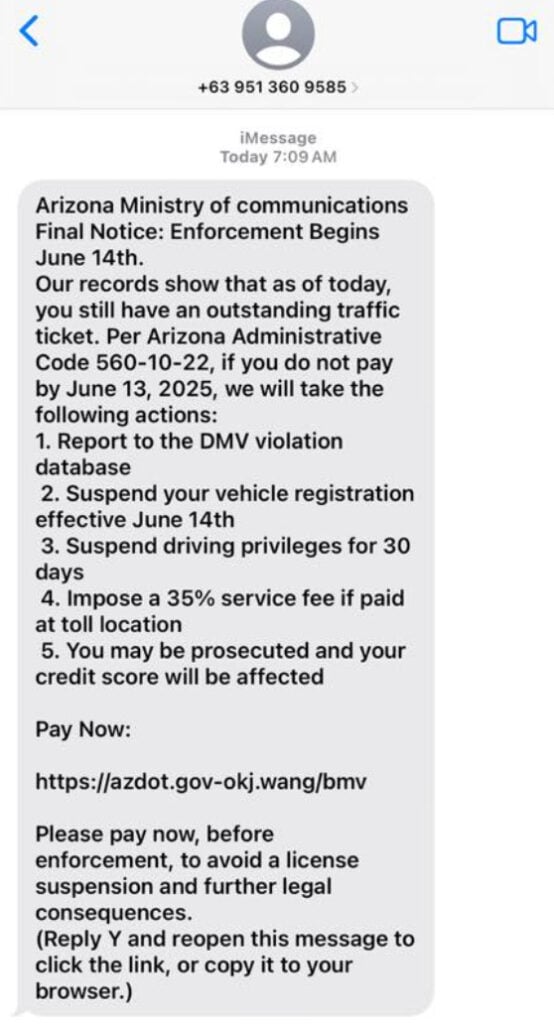
The message typically reads:
“Final Notice: Enforcement Begins June 14th. Our records show that as of today, you still have an outstanding traffic ticket. Per Arizona Administrative Code 560-10-22, if you do not pay by June 13, 2025, we will take the following actions…”
It goes on to list severe consequences:
- Reporting to the DMV violation database
- Suspension of vehicle registration
- Temporary loss of driving privileges
- A 35% service fee if paid in-person
- Legal prosecution and credit score impact
Finally, it urges the recipient to visit a seemingly official URL to make a payment—often something like https://azdot.gov-okj.wang/bmv. These links are fake government look-alike domains, designed to deceive and harvest private information.
Why It Works
This scam leverages several psychological tactics:
- Authority: By citing fake Arizona laws and mimicking official language, the message builds credibility.
- Urgency: The short timeline creates panic, pushing recipients to act quickly without thinking.
- Consequences: Listing harsh penalties increases anxiety, leading to impulsive responses.
- Legitimacy: Using terms like “Arizona Ministry of Communications” and structured formatting makes it seem more official.
These techniques work especially well when the recipient has had a recent interaction with traffic enforcement or DMV services, causing them to second-guess themselves. The scam capitalizes on this uncertainty to break down skepticism.
What They’re Really After
Clicking the link takes you to a fake payment portal. It looks like a DMV or government website, complete with state seals, official-sounding text, and familiar fonts. You’re asked to input personal details:
- Full name
- Address
- Phone number
- Credit card information
The supposed fee is often small—$5 to $10—which makes it feel less suspicious. But this is just a smokescreen. Once your data is submitted, the scammers steal your credit card details, leading to fraudulent charges, identity theft, and potential financial ruin. Victims may not notice the damage until much later, when unauthorized purchases or identity misuse surfaces.
Some victims report follow-up scams where the stolen data is used to attempt further fraud. The initial loss, while small, is often just the beginning.
How The Scam Works
Scammers use spoofed phone numbers to send messages to thousands of random recipients. These numbers often mimic local area codes or are disguised as official-looking senders. By spreading the message widely, scammers increase their odds of catching someone off guard.
Step 2: Fake Official Messaging
The content is carefully worded to resemble communication from a government body. It mimics legal phrasing, includes a sense of urgency, and references imaginary laws to create fear. Even small details, such as citing an “Arizona Administrative Code,” are designed to bypass skepticism.
Step 3: Redirection to a Phishing Website
The message includes a clickable link, often masked as a government site. URLs may contain familiar abbreviations like “azdot” or “bmv” but redirect to phishing domains like .wang, .xyz, or .top, which are commonly used in scams. These sites may even use SSL certificates to appear secure.
Step 4: Personal Information Harvesting
Once on the fake site, users are prompted to “settle their ticket” by entering personal data. Every field—name, phone, address, card details—is designed to collect sensitive information. The forms are often built to mimic official government forms in both appearance and language.
Step 5: Monetization and Identity Theft
Scammers immediately use the captured credit card data for unauthorized transactions. In some cases, stolen identities are sold on the dark web. Victims may not realize for days or weeks that their financial data has been compromised. The aftermath often includes hours of phone calls, fraud claims, and credit report disputes.
Step 6: Hard to Trace and Report
The fraudulent websites are often taken down within days, and scammers move on to new domains. Phone numbers are also spoofed, making law enforcement tracing extremely difficult. The lack of digital footprints is part of what makes these criminals so elusive.
Some operations are based overseas, further complicating the enforcement process. International networks of cybercriminals collaborate on phishing kits and databases of compromised identities, allowing these scams to operate at scale.
What to Do if You’ve Fallen Victim to This Scam
If you’ve clicked the link and submitted any information, act quickly. Every second counts when it comes to minimizing the damage. Here’s what you should do:
- Contact Your Bank or Credit Card Issuer Immediately
- Report fraudulent activity as soon as possible.
- Cancel your card and request a new one.
- Monitor transactions closely for unauthorized charges.
- Enable real-time transaction alerts if your bank offers them.
- Report the Scam to the FTC
- Visit https://reportfraud.ftc.gov.
- Provide details about the message and the fake website.
- The FTC uses these reports to identify and shut down scam networks.
- File a Complaint with the Arizona Attorney General’s Office
- Use their consumer protection portal to submit evidence.
- Include screenshots, links, and any communication you received.
- This helps build cases against scammers and protect other residents.
- Place a Fraud Alert on Your Credit Report
- Contact one of the major credit bureaus: Equifax, Experian, or TransUnion.
- A fraud alert warns creditors to take extra steps before opening new accounts in your name.
- This step is free and remains active for one year (renewable).
- Consider a Credit Freeze
- A more secure step than a fraud alert, freezing your credit blocks access to your credit report entirely.
- It prevents any new accounts from being opened in your name without your authorization.
- Run Antivirus and Malware Checks
- If you clicked the link on your phone or computer, malware may have been installed.
- Run a trusted security scan immediately and remove any suspicious files or programs.
- Consider changing passwords, especially for banking and email accounts.
- Spread Awareness
- Warn friends, family, and coworkers. Share screenshots and details to help others recognize the scam.
- Post on community forums, local Facebook groups, and neighborhood watch networks.
The Bottom Line
The Arizona “Outstanding Traffic Ticket” text scam is a sophisticated phishing attack designed to steal your personal and financial information. It preys on fear, urgency, and confusion—making even the savviest individuals vulnerable. If you receive such a message, do not click the link. Always verify traffic tickets directly through official government channels.
Cybercriminals are evolving, and so must our awareness. The best defense is knowledge. Stay vigilant, stay informed, and remember: real government agencies will never ask you to resolve legal matters via text message with suspicious links. Protect your information, trust your instincts, and report anything suspicious immediately.
Even a single moment of doubt can save you from weeks or months of frustration. Keep your eyes open and share this knowledge to protect others.
Frequently Asked Questions (FAQ) About the Arizona “Outstanding Traffic Ticket” Text Scam
Is the Arizona Ministry of Communications a real government agency?
No, it is not. There is no such agency as the “Arizona Ministry of Communications.” Scammers use fake agency names to make their messages sound more official and convincing.
How can I tell if a traffic ticket notice is a scam?
Look for these red flags:
- Text message instead of a mailed notice
- Threatening language demanding urgent payment
- Strange URLs with unusual domain names (e.g.,
.wang,.top,.xyz) - Requests for personal or financial information
- Nonexistent laws or codes cited in the message
Legitimate government agencies do not demand payment via random text messages or redirect you to suspicious domains.
What should I do if I clicked the link but didn’t enter any information?
If you clicked the link but didn’t submit any data:
- Close the website immediately
- Run a security scan on your device to check for malware
- Clear your browser history and cookies
- Stay alert for phishing follow-ups or strange messages
Can scammers actually affect my credit score?
Not directly through the message itself. However, if you provide personal information—especially Social Security or credit card numbers—they can open unauthorized accounts or rack up charges in your name. That can negatively affect your credit score.
Why do scammers only ask for $5 to $10?
Small amounts lower your suspicion. Victims are more likely to enter their payment details without questioning a minor fee. But the true goal is access to your credit card and personal data, which can be exploited or sold for larger fraud schemes.
What if I actually have a traffic ticket in Arizona?
Always check directly through official sources:
- Visit the Arizona Department of Transportation (ADOT)
- Contact the Arizona DMV or local court handling citations
Never rely on information received through unsolicited texts.
Can law enforcement trace these scammers?
It’s difficult. Scammers often use:
- Spoofed phone numbers
- Disposable domains
- Offshore hosting and encryption
These factors make them hard to track, especially if they operate internationally. Still, reporting the scam helps build evidence and improve enforcement efforts.
Will I get my money back if I entered my credit card information?
If you act quickly, most banks can reverse fraudulent charges and cancel your compromised card. Call your bank immediately, report the scam, and request a chargeback if a transaction occurred.
How can I report this scam?
You can report it through several official channels:
- FTC: reportfraud.ftc.gov
- Arizona Attorney General: azag.gov
- Better Business Bureau: bbb.org/scamtracker
How can I protect others from this scam?
- Share your experience publicly
- Post warnings in local forums or community pages
- Talk to friends and family, especially those less familiar with scams
Spreading awareness is one of the most effective tools against phishing.








