

If you are seeing a “Atención! Su navegador ha sido bloqueado” notification within Internet Explorer, Firefox, Safari or Chrome, then you have redirected to a web page that contains a malicious javascript code. The “Atención! Su navegador ha sido bloqueado” message is basically just a web page containing a malicious javascript that does not allow you to close the browser window or switch to a different web page.
![[Image: Atención! Su navegador ha sido bloqueado]](http://malwaretips.com/blogs/wp-content/uploads/2014/01/atencion-su-navegador-ha-sido-bloqueado-virus.jpg "Atención! Su navegador ha sido bloqueado")
The “Atención! Su navegador ha sido bloqueado” virus will display a bogus notification that pretends to be from Policía and Grupo de Delitos Telemáticos (Spanish Police) and states that your computer has been blocked due to it being involved with the distribution of pornographic material, spam and copyrighted content.
It goes on to say that you need to pay a ransom of 100 Euro in order to get access to your files and computer again. In order to pay this ransom you need purchase a Ukash or Paysafecard voucher and submit it in the web browser. The malware’s authors prefer these payment services because transactions made through them cannot be reversed and are hard to trace.
If your computer is infected with the “Atención! Su navegador ha sido bloqueado” browser hijacker, this infection will display a localized webpage that covers the entire web browser of the infected computer and demands payment for the supposed possession of illicit material. The message displayed by this ransomware infection can be localized depending on the user’s location, with text written in the appropriate language.
The text of the “Atención! Su navegador ha sido bloqueado” web page is:
¡ATENCIÓN! Su navegador ha sido bloqueado por razones de seguridad vistos los motivos abajo detallados.
Se han registrado todas las actividades de este equipo. Todos los archivos están cifrados.Usted está acusado de mirar/conservar y/o divulgar los materiales pornográficos del contenido prohibido (Pornografía infantil/Zoofilia/Violación etc.). Usted ha infringido la Declaración mundial de la lucha contra la divulgación de la pornografía infantil y está acusado de cometer el crimen en razón al Artículo 161 del Código Penal del Reino de España.
El artículo 161 del Código Penal del Reino de España prevé a titulo de punición la encarcelación por el plazo desde 5 hasta 11 años.
Además, usted es sospechoso de la violación de la “Ley de los derechos de autor y adyacentes” (descarga de música pirata, video, soporte lógico sin licencia) y uso y/o divulgación del contenido defendido por el derecho de autor. Con eso usted es sospechoso de la infracción del Artículo 148 del Código Penal del Reino de España.
El artículo 148 del Código Penal del Reino de España prevé a titulo de punición una multa por la cantidad desde 150 hasta 550 valores básicos o encarcelación por el plazo desde 3 hasta 7 años.
Desde su ordenador personal fue realizado un acceso no sancionado a la información cerrada para el acceso público e información de importancia estatal que se encuentra en la red de Internet.
El acceso no sancionado usted pudo organizarlo intencionadamente con motivos mercantiles o este acceso no sancionado haya podido ser realizado sin su conocimiento y aprobación, porque su ordenador pudo ser contagiado con programas nocivos. Por lo tanto usted se considera sospechoso hasta la realización de la investigación en la infracción involuntaria del Artículo 215 del Código Penal del Reino de España (“Ley del uso negligente y descuidado de la técnica de computación/ordenador personal”).
El artículo 215 del Código Penal del Reino de España prevé a titulo de punición una multa por la cantidad de hasta €100.000 euros y/o encarcelación por el plazo desde 5 hasta 8 anos.
Además, en el proceso de la investigación analítica de la información contenida en su ordenador, fue descubierto que desde su ordenador se realizan, regularmente, envíos en masa de Spam que fueron organizados por usted intencionadamente con motivos mercantiles o los que son realizados sin su conocimiento y aprobación, porque su ordenador pudo ser contagiado con programas nocivos. Dichos envíos divulgan el soporte lógico nocivo o los materiales prohibidos de carácter pornográfico. Por lo tanto usted se considera sospechado hasta la realización de la investigación por la infracción involuntaria del Artículo 301 del Código Penal del Reino de España (“Ley de la lucha contra spam y divulgación del soporte lógico nocivo (los virus)”).
El artículo 301 del Código Penal del Reino de España prevé a titulo de punición una multa por la cantidad de hasta €250.000 euros y encarcelación por el plazo de hasta 5 años.
Prestamos su atención que sus datos personales y su localización son identificados, contra usted puede ser instruida una causa criminal en el plazo de 96 horas desde el momento de la infracción de los artículos del Código Penal arriba indicados. Los expedientes sarán suministrados al tribunal.
Sin embargo, conforme a las enmiendas al Código Penal del Reino de España del 30 de septiembre de 2013 y la declaración de los derechos de la persona, sus infracciones pueden ser consideradas como de carácter no mal intencionado (a condición que son cometidos por usted por primera vez) y usted no se le atribuirá la responsabilidad de orden penal. Dicha condición puede ser cumplida en caso si usted paga una multa en favor del estado (que serán usados para el apoyo de los proyectos de defensa del ciberespacio de la red de Internet).
Usted tiene que pagar la multa en un plazo de 48 horas desde al momento de la infracción. Una vez pasadas las 48 horas, y durante las 48 horas consecutivas serán realizada una recopilación de la información complete de usted y contra usted será instruida una causa criminal.
El monto de su multa es de €100 euros. La multa puede ser pagada con PaySafeCard o Ukash vouchers.
Cyber criminals often updated the design of this lock screen, however you should always keep in mind that no law enforcement agency (eg: FBI, Department of Justice, Royal Canadian Mounted Police or Police Central e-crime Unit) will never lock down your computer or web browser.
The “Atención! Su navegador ha sido bloqueado” browser blocker is a scam, and you should ignore any alerts that this malicious software might generate.
Under no circumstance should you send a MoneyPak, Ukash or Paysafecard voucher to these cyber criminals, and if you have, you can should request a refund, stating that you are the victim of a computer virus and scam.
How to remove the “Atención! Su navegador ha sido bloqueado” virus (Removal Guide)
This page is a comprehensive guide, which will remove the “Atención! Su navegador ha sido bloqueado” infection from a Windows computer and an Apple Mac OS X machine. Please perform all the steps in the correct order. If you have any questions or doubt at any point, STOP and ask for our assistance.
How to Remove “Atención! Su navegador ha sido bloqueado” virus from a Windows PC
STEP 1: Remove “Atención! Su navegador ha sido bloqueado” browser hijacker from Internet Explorer, Firefox and Chrome
STEP 2: Remove “Atención! Su navegador ha sido bloqueado” virus with Malwarebytes Anti-Malware Free
STEP 3: Double-check for the “Atención! Su navegador ha sido bloqueado” infection with HitmanPro
STEP 1: Remove “Atención! Su navegador ha sido bloqueado” browser hijacker from Internet Explorer, Firefox and Chrome
- Open Task Manager by right-clicking the taskbar, and then clicking Start Task Manager. Alternatively to start the Windows Task Mager, you can press Ctrl+Alt+Del and click on Task Manager or simply press on Ctrl+Shift+Esc.
![[Image: Start Windows Task Manager]](//malwaretips.com/blogs/wp-content/uploads/2013/11/start-task-manager-windows-pc.jpg "Start Windows Task Manager")
- Click the Processes tab to see a list of all the processes that are currently running under your user account and a description of each process.
![[Image: Select the Process tab]](//malwaretips.com/blogs/wp-content/uploads/2013/11/show-processes-from-all-users-task-manager.jpg "Select the Process tab")
To view all of the processes currently running on the computer, click Show processes from all users. - Scroll through the list till you see your web browser’s process and left-click on it once so it becomes highlighted. Once you have selected the browser’s process, click on the End Process button as show in the picture below.
If you are using this browser: End this process: Internet Explorer iexplore.exe Chrome chrome.exe Safari Safari.exe SeaMonkey seamonkey.exe Opera opera.exe Firefox firefox.exe ![[Image: Search for iexplorer.exe, firefox.exe or chrome.exe]](//malwaretips.com/blogs/wp-content/uploads/2013/11/kill-malicious-process.jpg "Search for iexplorer.exe, firefox.exe or chrome.exe")
- When you click on the End Process button, Task Manager will ask you to confirm if you are sure you want to terminate it as shown in the image below.
![[Image: Kill the malicious process in Windows PC]](//malwaretips.com/blogs/wp-content/uploads/2013/11/end-malicious-process.jpg "Kill the malicious process in Windows PC")
At this point you should press the Yes button in order to kill the process. - Your browser window should now be closed. The next time you open your browser, do not allow the browser to open the last opened page.
![[Image: Start Windows Task Manager]](http://malwaretips.com/blogs/wp-content/uploads/2013/11/start-task-manager-windows-pc.jpg "Start Windows Task Manager")
![[Image: Select the Process tab]](http://malwaretips.com/blogs/wp-content/uploads/2013/11/show-processes-from-all-users-task-manager.jpg "Select the Process tab")
![[Image: Search for iexplorer.exe, firefox.exe or chrome.exe]](http://malwaretips.com/blogs/wp-content/uploads/2013/11/kill-malicious-process.jpg "Search for iexplorer.exe, firefox.exe or chrome.exe")
![[Image: Kill the malicious process in Windows PC]](http://malwaretips.com/blogs/wp-content/uploads/2013/11/end-malicious-process.jpg "Kill the malicious process in Windows PC")
STEP 2: Remove “Atención! Su navegador ha sido bloqueado” virus with Malwarebytes Anti-Malware Free
Malwarebytes Anti-Malware Free utilizes Malwarebytes powerful technology to detect and remove all traces of malware including worms, trojans, rootkits, rogues, dialers, spyware and more.
- You can download Malwarebytes Anti-Malware Free from the below link, then double-click on the icon named mbam-setup.exe to install this program.
Download MalwarebytesFree official installer. Your download starts right away. - When the installation begins, keep following the prompts in order to continue with the setup process, then at the last screen click on the Finish button.
![[Image: Malwarebytes Anti-Malware final installation screen]](//malwaretips.com/blogs/wp-content/uploads/2013/01/malwarebytes-installation.jpg "Malwarebytes Anti-Malware installation screen")
- On the Scanner tab, select Perform quick scan, and then click on the Scan button to start searching for “Atención! Su navegador ha sido bloqueado” malicious files.
![[Image: Malwarebytes Anti-Malware Quick Scan]](//malwaretips.com/blogs/wp-content/uploads/2013/01/malwarebytes-quick-scan.jpg "Run a Quick Scan with Malwarebytes Anti-Malware")
- Malwarebytes’ Anti-Malware will now start scanning your computer for “Atención! Su navegador ha sido bloqueado” virus as shown below.
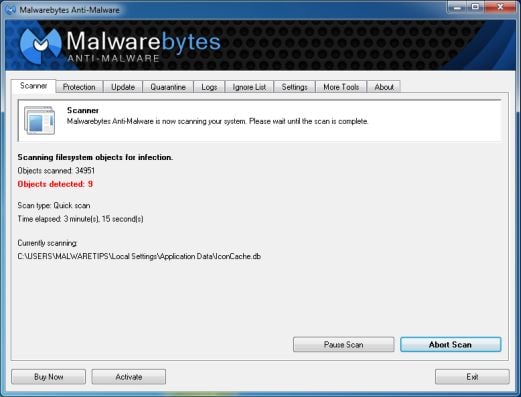
- When the Malwarebytes Anti-Malware scan has finished, click on the Show Results button.
![[Image: Malwarebytes Anti-Malware scan results]](//malwaretips.com/blogs/wp-content/uploads/2013/01/malwarebytes-scan-results.jpg "Malwarebytes when the system scan has completed")
- You will now be presented with a screen showing you the computer infections that Malwarebytes Anti-Malware has detected. Make sure that everything is Checked (ticked), then click on the Remove Selected button.
![[Image: Malwarebytes Anti-Malwar removing Atención! Su navegador ha sido bloqueado virus]](//malwaretips.com/blogs/wp-content/uploads/2013/01/malwarebytes-virus-removal.jpg "Malwarebytes Anti-Malwar removing Atención! Su navegador ha sido bloqueado virus")
![[Image: Malwarebytes Anti-Malware final installation screen]](http://malwaretips.com/blogs/wp-content/uploads/2013/01/malwarebytes-installation.jpg "Malwarebytes Anti-Malware installation screen")
![[Image: Malwarebytes Anti-Malware Quick Scan]](http://malwaretips.com/blogs/wp-content/uploads/2013/01/malwarebytes-quick-scan.jpg "Run a Quick Scan with Malwarebytes Anti-Malware")
![[Image: Malwarebytes Anti-Malware scan results]](http://malwaretips.com/blogs/wp-content/uploads/2013/01/malwarebytes-scan-results.jpg "Malwarebytes when the system scan has completed")
![[Image: Malwarebytes Anti-Malwar removing Atención! Su navegador ha sido bloqueado virus]](http://malwaretips.com/blogs/wp-content/uploads/2013/01/malwarebytes-virus-removal.jpg "Malwarebytes Anti-Malwar removing Atención! Su navegador ha sido bloqueado virus")
STEP 3: Double-check for the “Atención! Su navegador ha sido bloqueado” infection with HitmanPro
HitmanPro is a second opinion scanner, designed to rescue your computer from malware (viruses, trojans, rootkits, etc.) that have infected your computer despite all the security measures you have taken (such as anti virus software, firewalls, etc.).
- You can download HitmanPro from the below link:
Download HitmanProOfficial Sophos download. Free scan, free 30-day trial to remove threats. - Double-click on the file named HitmanPro.exe (for 32-bit versions of Windows) or HitmanPro_x64.exe (for 64-bit versions of Windows). When the program starts you will be presented with the start screen as shown below.
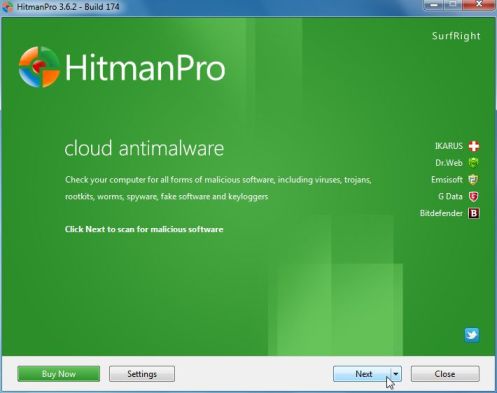 Click on the Next button, to install HitmanPro on your computer.
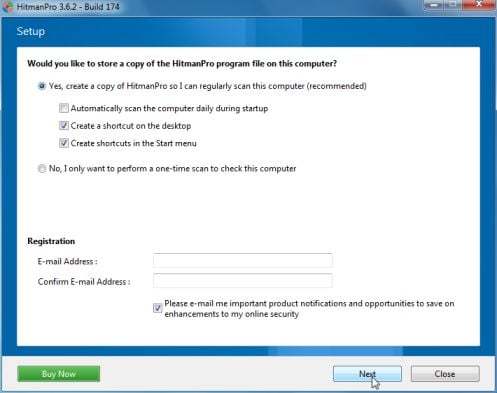
- HitmanPro will now begin to scan your computer for “Atención! Su navegador ha sido bloqueado” malicious files.
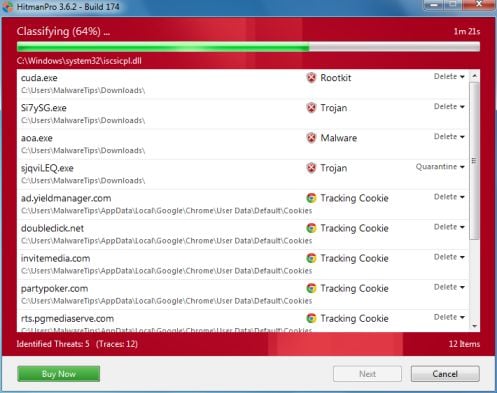
- When it has finished it will display a list of all the malware that the program found as shown in the image below. Click on the Next button, to remove the “Atención! Su navegador ha sido bloqueado” virus.
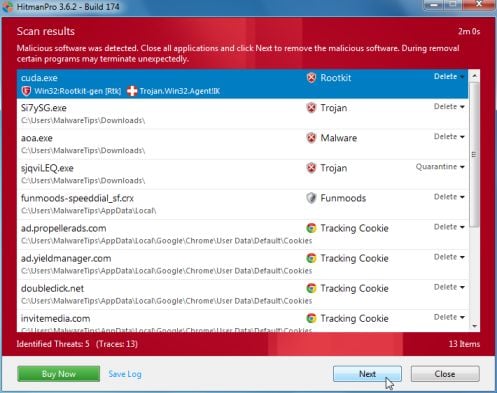
- Click on the Activate free license button to begin the free 30 days trial, and remove all the malicious files from your computer.
![[Image: HitmanPro 30 days activation button]](//malwaretips.com/blogs/wp-content/uploads/2012/11/hitmanpro-activation.jpg "HitmanPro free 30 days trial")
 Click on the Next button, to install HitmanPro on your computer.
![[Image: HitmanPro 30 days activation button]](http://malwaretips.com/blogs/wp-content/uploads/2012/11/hitmanpro-activation.jpg "HitmanPro free 30 days trial")
Your computer should now be free of “Atención! Su navegador ha sido bloqueado” infection. If your current anti-virus solution let this infection through, you may want to consider purchasing the PRO version of Malwarebytes Anti-Malware to protect against these types of threats in the future, and perform regular computer scans with HitmanPro.
How to Remove “Atención! Su navegador ha sido bloqueado” virus from an Apple Mac OS X
For years, Windows users have been plagued by ransomware demanding several hundred dollars to unlock their computers.
The bad guys know there is a growing market of Apple consumers who, for the most part, feel pretty safe about browsing the Internet on a Mac without the need for any security product.
Cyber-criminals, well known for not re-inventing the wheel, have ‘ported’ the latest ransomware to OS X, not by using some complicated exploit but rather leveraging the browser and its ‘restore from crash’ feature. The “Atención! Su navegador ha sido bloqueado” ransomware page is being pushed onto unsuspecting users browsing regular sites but in particular when searching for popular keywords.
To remove “Atención! Su navegador ha sido bloqueado” from your Apple MAC OS X browser you can follow any of below options.
OPTION 1: Remove “Atención! Su navegador ha sido bloqueado” malicious web page from Apple Mac OS X by resetting Safari to its default settings
OPTION 2: Remove “Atención! Su navegador ha sido bloqueado” browser hijacker Apple Mac OS X virus using Force Quit for your browser
OPTION 1: Remove “Atención! Su navegador ha sido bloqueado” malicious web page from Apple Mac OS X by resetting Safari to its default settings
To remove the “Atención! Su navegador ha sido bloqueado” browser hijacker from Safari, we will need to reset your browser to its default settings.
- Click on the Safari menu and then choose Reset Safari
![[Image: Select Reset Safari from the menu]](//malwaretips.com/blogs/wp-content/uploads/2013/07/Reset-Safari.png "Select Reset Safari from the menu")
- In the new windows, make sure all items are marked and click on the Reset button.
![[Image: Reset Safari to default settings]](//malwaretips.com/blogs/wp-content/uploads/2013/07/Reset-Safari-to-default-settings.png "Reset Safari to default settings")
![[Image: Select Reset Safari from the menu]](http://malwaretips.com/blogs/wp-content/uploads/2013/07/Reset-Safari.png "Select Reset Safari from the menu")
![[Image: Reset Safari to default settings]](http://malwaretips.com/blogs/wp-content/uploads/2013/07/Reset-Safari-to-default-settings.png "Reset Safari to default settings")
You can also watch this video on how to reset Safari to its default settings:
OPTION 2: Remove “Atención! Su navegador ha sido bloqueado” browser hijacker Apple Mac OS X virus using Force Quit for your browser
- Press Command + Option + Escape simultaneously. This will open the open the Force Quit Applications window.
![[Image: Press Command + Option + Escape to start Force Quit menu]](//malwaretips.com/blogs/wp-content/uploads/2013/07/Force-Quit-an-Application-in-Mac-OS-X-Step-1.jpg "Press Command + Option + Escape to start Force Quit menu")
- Select Safari, Chrome, Firefox or any other browser in which your are seeing the “Atención! Su navegador ha sido bloqueado” ransomware notification.
![[Image: Select Firefox, Chrome or Safari from Force Quit menu]](//malwaretips.com/blogs/wp-content/uploads/2013/07/Force-Quit-an-Application-in-Mac-OS-X-Step-2.jpg "Select Firefox, Chrome or Safari from Force Quit menu")
- Click the button that says “Force Quit“. This will forcefully end your browser program, thus removing the “Atención! Su navegador ha sido bloqueado” browser hijacker.
![[Image: Click on the Force Quit button to remove Atención! Su navegador ha sido bloqueado virus]](//malwaretips.com/blogs/wp-content/uploads/2013/07/Force-Quit-an-Application-in-Mac-OS-X-Step-3.jpg "Remove \"Atención! Su navegador ha sido bloqueado\" virus 1")
If you cannot switch from the unresponsive app, press Command + Option + Shift + Esc for three seconds to force it to quit. This key combination tells OS X to force quit the frontmost app.
![[Image: Press Command + Option + Escape to start Force Quit menu]](http://malwaretips.com/blogs/wp-content/uploads/2013/07/Force-Quit-an-Application-in-Mac-OS-X-Step-1.jpg "Press Command + Option + Escape to start Force Quit menu")
![[Image: Select Firefox, Chrome or Safari from Force Quit menu]](http://malwaretips.com/blogs/wp-content/uploads/2013/07/Force-Quit-an-Application-in-Mac-OS-X-Step-2.jpg "Select Firefox, Chrome or Safari from Force Quit menu")
![[Image: Click on the Force Quit button to remove Atención! Su navegador ha sido bloqueado virus]](http://malwaretips.com/blogs/wp-content/uploads/2013/07/Force-Quit-an-Application-in-Mac-OS-X-Step-3.jpg "Remove \"Atención! Su navegador ha sido bloqueado\" virus 1")
You can also watch this video on how to Force Quit a program on an Apple Mac OS X:
If you are still experiencing problems while trying to remove “Atención! Su navegador ha sido bloqueado” virus from your Windows or Apple MAC OS X machine, please start a new thread in our Malware Removal Assistance forum.









Thank you. This redirect bizarrely came up on my Android browser, but only when I connected to the wifi in my dentist’s surgery. I disconnected and it no longer came up. What’s the explanation for this? IS it still on my device? Thanks.
Helli Warren,
The router was infected with malware, you can tell your dentist that he needs to restore the router settings to its defaut. As for your device, it’s clean!
Thanks very much!