

You receive a text claiming you have a court enforcement notice tied to a traffic violation. It includes a case number, a court name, and is signed by Judge Michael Rodriguez.
It looks official. It feels serious. It is a scam.
Scam Overview
The Judge Michael Rodriguez Court Notice scam is part of a widespread phishing campaign where scammers impersonate courts and legal authorities to trick people into paying fake fines or revealing personal and financial information.
These messages often appear as:
- Text messages with attached “court documents”
- Links to fake case portals
- QR codes labeled as payment options
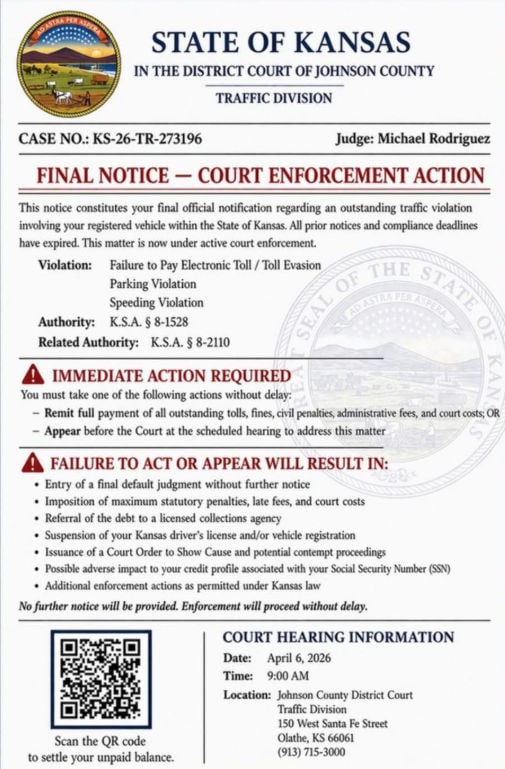
The notice is usually formatted like a real legal document and may include:
- A state name such as Kansas, Indiana, or Georgia
- A court name like “District Court” or “Traffic Division”
- A case number such as KS-26-TR-273196
- A judge name, often Michael Rodriguez
- A violation like toll evasion, parking, or speeding
- A hearing date and location
- A QR code or link to “pay immediately”
The key deception
This scam works by mixing real-looking structure with fake details.
- The courts may be real
- The formatting looks official
- The language sounds legal
But the notice itself is fake.
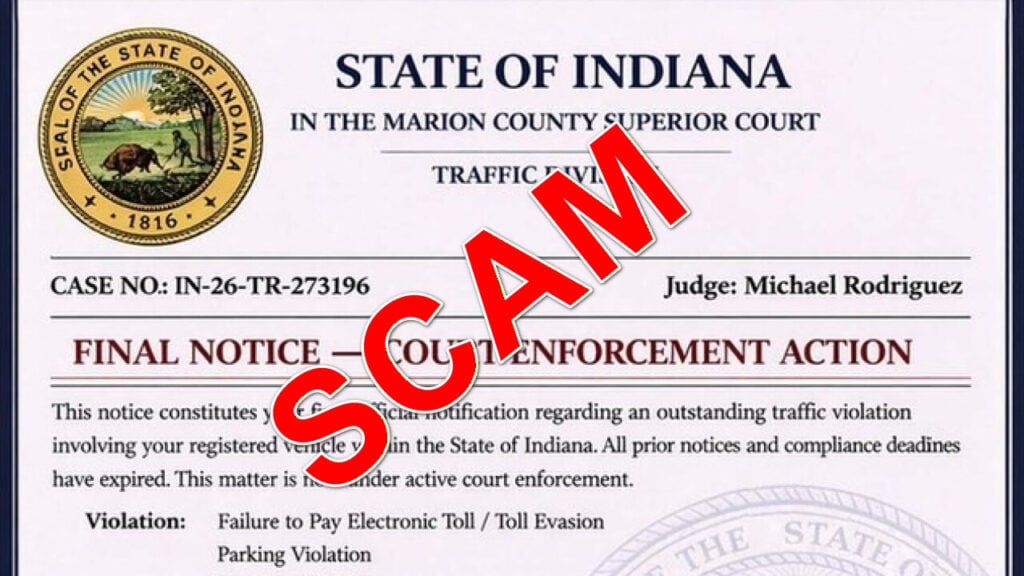
One major red flag is the repeated use of the same judge name across different states. The same “Judge Michael Rodriguez” appears in multiple scam versions, which is not how real court systems operate.
Why this scam is effective
This scam relies on three psychological triggers:
Authority
Using a judge’s name and court formatting makes the message feel legitimate.
Urgency
The message often includes phrases like:
- “Final notice”
- “Immediate action required”
- “Enforcement action initiated”
Fear
It threatens consequences such as:
- License suspension
- Court action
- Additional fines
- Collections
These elements push people to act quickly without verifying.
Common red flags
Watch for these warning signs:
- Unexpected court notice by text
- QR code or link for payment
- Pressure to act immediately
- Generic or vague violation details
- Reused case numbers across different states
- The same judge name appearing in multiple locations
Real courts do not operate this way.
How The Scam Works
Step 1: Mass texting campaign
Scammers send thousands of messages at once.
They do not know if you:
- have a violation
- live in that state
- owe any money
They rely on volume.
Step 2: The message builds credibility
The scam includes:
- Court names
- Case numbers
- Legal language
- Judge names
This creates instant trust.
Step 3: Urgency is introduced
The message quickly escalates with threats like:
- “Final notice”
- “Failure to act will result in penalties”
- “Immediate enforcement”
This creates pressure.
Here is how the text looks:
STATE OF KANSAS
IN THE DISTRICT COURT OF JOHNSON COUNTY
TRAFFIC DIVISIONCASE NO.: KS-26-TR-273196
Judge: Michael RodriguezFINAL NOTICE — COURT ENFORCEMENT ACTION
This notice constitutes your final official notification regarding an outstanding traffic violation involving your registered vehicle within the State of Kansas. All prior notices and compliance deadlines have expired. This matter is now under active court enforcement.
Violation:
Failure to Pay Electronic Toll / Toll Evasion
Parking Violation
Speeding ViolationAuthority:
K.S.A. § 8-1528Related Authority:
K.S.A. § 8-2110IMMEDIATE ACTION REQUIRED
You must take one of the following actions without delay:
- Remit full payment of all outstanding tolls, fines, civil penalties, administrative fees, and court costs; OR
- Appear before the Court at the scheduled hearing to address this matter
FAILURE TO ACT OR APPEAR WILL RESULT IN:
- Entry of a final default judgment without further notice
- Imposition of maximum statutory penalties, late fees, and court costs
- Referral of the debt to a licensed collections agency
- Suspension of your Kansas driver’s license and/or vehicle registration
- Issuance of a Court Order to Show Cause and potential contempt proceedings
- Possible adverse impact to your credit profile associated with your Social Security Number (SSN)
- Additional enforcement actions as permitted under Kansas law
No further notice will be provided. Enforcement will proceed without delay.
Scan the QR code
to settle your unpaid balance.COURT HEARING INFORMATION
Date: April 6, 2026
Time: 9:00 AM
Location: Johnson County District Court
Traffic Division
150 West Santa Fe Street
Olathe, KS 66061
(913) 715-3000
Step 4: You are pushed to act
The message gives a solution:
- Scan a QR code
- Click a link
- Pay now
This is the trap.
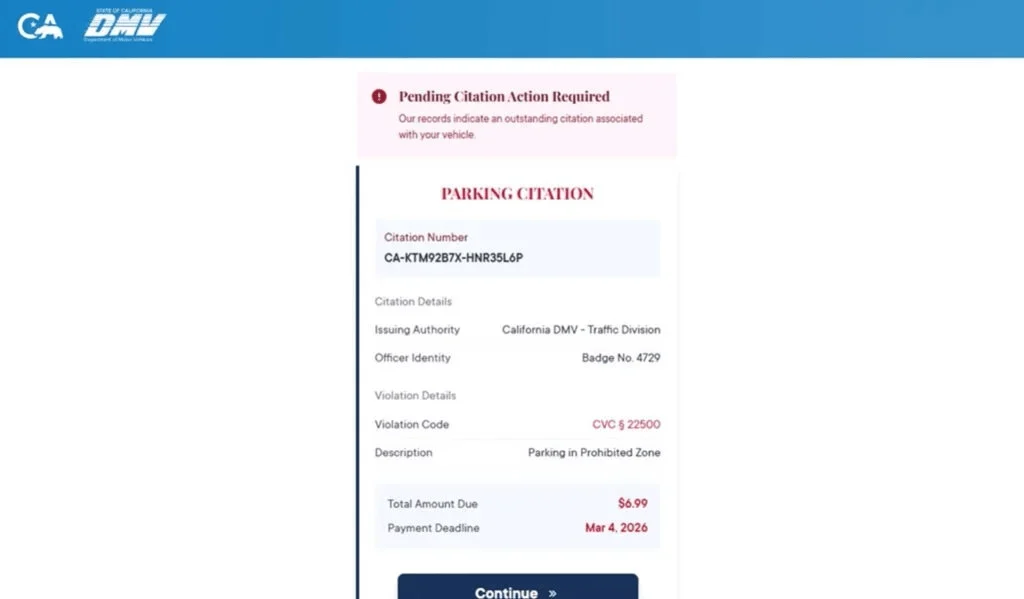
Step 5: You are redirected to a fake website
The site may look official and include:
- Case details
- Payment options
- Government-style design
But it is controlled by scammers.
Step 6: Your data is collected
The site asks for:
- Name
- Address
- Phone number
- Credit card details
This is the real objective.
Step 7: Fraud follows
After entering your information:
- Your card may be used for unauthorized charges
- Your data may be sold
- You may receive more scam attempts
The impact can continue long after the initial interaction.
What To Do If You Have Fallen Victim
1. Contact your bank immediately
- Report your card as compromised
- Request a replacement
- Block suspicious transactions
2. Review your transactions
Look for:
- Unknown charges
- Small test payments
- Recurring subscriptions
Report anything suspicious.
3. Enable alerts
Turn on notifications for all transactions.
4. Stop interacting
- Do not reply
- Do not click again
- Do not scan the QR code
5. Save evidence
Take screenshots of:
- The message
- The link or QR code
- The website
6. Verify through official channels
If you are concerned:
- Go directly to official court or DMV websites
- Do not use links from the message
7. Report the scam
- Mark the message as spam
- Block the sender
- Forward it to 7726 (SPAM)
The Bottom Line
The Judge Michael Rodriguez Court Notice scam texts are not real legal notices.
They are phishing attempts designed to:
- create fear
- force quick action
- steal your personal and financial information
If you receive one of these messages:
- Do not click
- Do not pay
- Do not panic
Always verify directly through official government sources. That one habit can protect you from scams like this.
FAQ
Is this Kansas court notice real?
No. This type of message is part of a scam campaign that uses fake court notices, QR codes, and pressure tactics to trick people into paying fake fines or giving up personal and card information.
Why does the message look so official?
Scammers copy court-style formatting, legal wording, case numbers, and judge names to make the notice feel legitimate. The professional appearance is part of the scam.
Is “Judge Michael Rodriguez” real in these texts?
The same judge name appears across multiple scam versions in different states, which is a major red flag. That pattern strongly suggests the notices are fake.
What is the goal of the scam?
The goal is to make you scan the QR code or click a link, then enter personal details and credit card information on a fake payment site.
Why does it mention real laws like K.S.A. sections?
Scammers often include real legal citations to make the notice look more believable. A real statute number does not make the notice legitimate.
What happens if I scan the QR code?
You may be taken to a fake payment website that asks for your name, address, phone number, email, and card details.
Why is the payment amount usually small in these scams?
Small amounts make people less suspicious and more likely to pay quickly. The real target is your financial and personal information.
I scanned the code but did not enter anything. Am I still at risk?
Your risk is much lower if you did not submit any information. Close the page, do not return, and watch for follow-up scam texts or calls.
I entered my card details. What should I do right away?
- Call your card issuer immediately
- Report that your card details were entered on a fraudulent site
- Freeze or replace the card
- Review recent transactions and dispute anything suspicious
- Turn on real-time transaction alerts
Should I replace my card even if I do not see fraud yet?
Yes. Stolen card details are often used later or sold to other criminals. Replacing the card quickly is the safest move.
Can a real court demand payment by QR code in a random text?
A surprise text with a QR code demanding immediate payment is a major red flag. Court matters should be verified through official court websites or phone numbers you look up yourself.
How do I verify whether I really owe anything?
Do not use the QR code, link, or phone number from the message. Go directly to the official court or DMV website by typing it yourself, then verify through official contact information.
How do I report the scam?
- Mark the message as spam or junk in your messaging app
- Block the sender
- Forward it to 7726 (SPAM) if your carrier supports it
- Keep screenshots as evidence









Very helpful. Especially since courts do Not answer or even provide working phone numbers in NH
Thank you – and the difficulty you are describing with reaching courts in New Hampshire is a real problem rather than an impression, so a couple of things that may help.
The state judicial branch publishes direct contact details and a general information line at courts.nh.gov, and the Circuit Court Clerk’s office for your county is usually more responsive than the main switchboard. New Hampshire also runs a centralised electronic filing system, so case information and filings can often be checked online without ringing anyone at all. For small claims specifically, the judicial branch has a self-help section with forms and the process explained.
The reason this matters for scam cases: an unanswered phone at a courthouse is sometimes exploited by scammers who publish their own “court” numbers in search results and answer as officials, then demand payment over a supposed case or warrant. So if you ever need to verify something about a case, use the number from courts.nh.gov rather than one from a search advert or a letter, and remember that no court ever collects a fine by phone, gift card or transfer.
If the underlying issue is a scam rather than a court matter, the New Hampshire Attorney General’s Consumer Protection Bureau takes complaints and is generally quicker to respond than the courts – and reportfraud.ftc.gov takes a few minutes.