

A deceptive Facebook scam promoting magnetic car anti-snow covers is making the rounds, luring unsuspecting auto owners with enticing ads and fake discounts. But it’s just a fraudulent scheme to steal credit card information. This article will take an inside look at how this viral scam works and provide tips to avoid becoming a victim.
Scam Overview
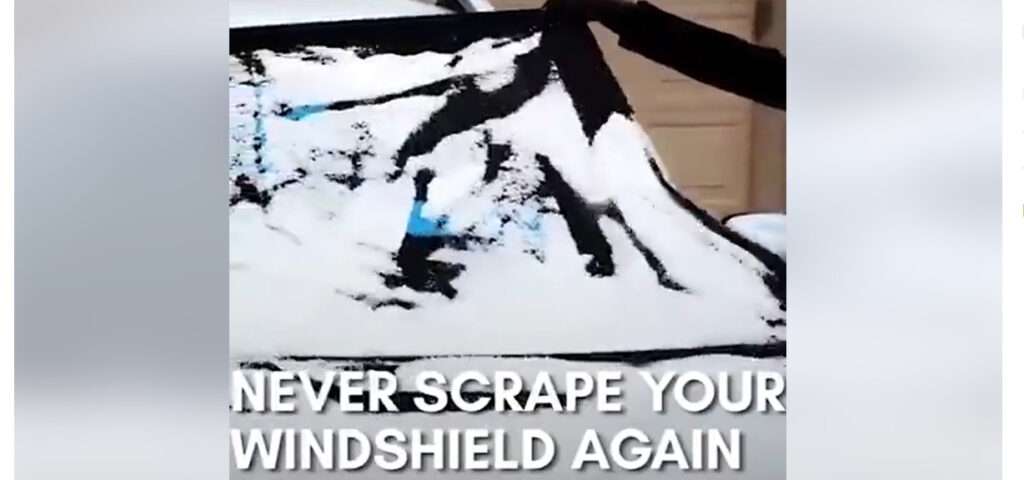
This prevalent Facebook scam uses sponsored ads and videos to promote magnetic anti-snow covers for vehicles. The ads tout these covers as an easy way to remove snow and ice from windshields and windows.
The magnetic covers are advertised at unbelievably low prices – sometimes as low as $9.99. The ads direct users to elaborate fake ecommerce websites that mimic real online shops. These sites encourage entering credit card info to purchase the deeply discounted magnetic covers.
However, it’s simply a scam to harvest users’ financial details. The websites are not associated with any actual company. Victims either receive nothing after placing their order or low-quality, ineffective magnetic covers. The amazing deals promoted in the Facebook ads simply don’t exist.
The magnetic car anti-snow cover scam exhibits all the classic red flags of an online fraud:
- Prices that seem too good to be true – covers selling for $10-$20 instead of the usual $50-$100.
- Exaggerated claims about the covers’ magnetic strength and ability to instantly clear snow.
- Bad grammar, styling errors, and other signs of amateur scam sites.
- High-pressure tactics urging immediate purchases before supposed sales expire.
- No proof of an actual business behind the website outside of photos and claims.
By recognizing these and other warning signs, consumers can hopefully avoid this common seasonal scam on Facebook. Caution and awareness are your best defenses when evaluating deals online that seem a little too amazing.
How the Scam Works
This magnetic anti-snow cover scam ensnares victims using persuasive social media ads and convincing fake websites. Here’s an inside look at how they operate:
Bait: Enticing Facebook Ads
The scam typically begins with sponsored video or image ads on Facebook showing magnetic covers easily removing snow from vehicles. For example:
“❄️ Don’t you always want to remove the snow from your favorite car windshield in the cold winter? 🔥This all-season, suitable for all kinds of cars 🚗 magnetic car snow blanket is your best choice! ⚡💥HOT SALE-Magnetic Car Anti-snow Cover [scam site]”
The ads demonstrate the covers quickly clearing off windshields with their supposed magnetic power. Buzzwords like “hot sale” and animated graphics capture attention. The incredible convenience and low prices spark interest in the products.
Of course, these ads are completely fabricated. But the high quality and persuasive language lend an air of legitimacy that deceives targets.
Hook: Elaborate Fake Websites
Clicking on the Facebook ads leads users to sophisticated fake ecommerce websites that sell the magnetic anti-snow covers. These sites use names like AutoWinterSupply.com, SnowOffCars.com, or CoolCarAccessories.net.
The websites feature photos, videos, customer reviews, shipping policies, and other standard online store elements that build trust. The amazing prices and claims about the covers’ magnetic strength continue enticing potential victims.
In reality, these sites are completely fraudulent and unconnected to any real warehouse or company. But the polish and detail fools unsuspecting visitors.
Reel-In: Requesting Credit Card Information
After luring victims in with social media bait and elaborate fake sites, it’s time to reel them in.
The sites prompt users to purchase the magnetic covers quickly before supposed flash sales expire. Those who attempt to buy are led to checkout pages asking them to enter credit card and billing information to process orders.
The websites claim this is to finalize the amazing discounted purchases. But in reality, it’s just a scheme to steal financial data. Victims are unwittingly handing over their details to scammers.
The Catch: No Product and Stolen Data
After inputting payment info, victims never receive the advertised magnetic anti-snow covers in the mail. The fake websites are not connected to any actual warehouse or fulfillment center that can ship products.
However, users’ credit card information is now in scammers’ hands. At minimum, this data gets sold on dark web black markets. But often, victims see fraudulent charges rack up or have their identities stolen.
Some may eventually receive flimsy magnetic covers weeks later that don’t perform as advertised. This helps scammers claim they did send products if complaints arise. But the reality is – the amazing magnetic car cover deals only exist to pilfer credit card details from unsuspecting auto owners.
What to Do If You Are a Victim
Falling for online shopping scams can have serious financial impacts. Here are important actions to take if you suspect your information was stolen by a magnetic anti-snow cover scheme:
Contact Your Credit Card Company Immediately
Call your credit card provider right away to report the incident as fraud. Alert them that your card details were entered on a deceptive website posing as an ecommerce store. Ask to cancel your current card and have a new one issued.
Request that the provider block any pending charges from the scam website. Also have them reverse any recent fraudulent purchases. Acting quickly can limit damages.
Review Statements for Suspicious Charges
Carefully examine your credit card statements each billing cycle for unusual activity. Even small charges could be fraudsters testing your card before larger purchases.
Report any questionable transactions to your provider immediately and ask them to investigate. Give as many details as possible like the merchant name, amount, and date.
Check Your Credit Reports
Check your credit reports frequently after being scammed to detect any new accounts or loans opened in your name. Scammers who gain your card information sometimes use it to open fraudulent lines of credit.
Look for credit checks from unfamiliar companies or accounts/addresses you don’t recognize. Dispute any suspicious, unauthorized finds.
Reset Online Account Passwords
As a precaution, change the passwords on your online accounts in case the scam website also collected login information. Use strong unique passwords and enable two-factor authentication when possible.
Learn from This Experience
Being scammed can be disheartening. But try to view it as a lesson to learn from. Reflect on what drew you to the ad originally and signs you overlooked. Let this motivate you to be even more discerning and vigilant when shopping online.
Research common cons circulating presently so you can recognize them immediately. Only enter payment details on the verified sites of reputable businesses. And remember – if an offer looks too good to be true, it almost always is.
Frequently Asked Questions about the Magnetic Car Anti-Snow Cover Scam
What is this magnetic car anti-snow cover scam on Facebook?
This is a fraudulent scheme promoted through Facebook ads and fake websites. Scammers create ads showing magnetic covers clearing snow off cars easily. The ads link to fake shopping sites that steal credit card information from victims attempting to buy the discounted covers.
What are some red flags that indicate it’s a scam?
Warning signs include absurdly low prices like $10 magnetic covers, exaggerated claims about the covers’ strength and effectiveness, poor grammar/spelling, no proof of an actual business, and pressure to purchase quickly before supposed sales end.
How are consumers tricked by this scam?
The scam video ads seem realistic and lead to polished fake sites mimicking real online stores. Victims enter their card information thinking they’re making a purchase, when the sites are simply stealing their data.
What happens after someone enters their payment information?
Victims never receive any magnetic anti-snow covers after entering their details. Instead, their card info is used fraudulently to either rack up charges or get sold on the dark web. Or scammers steal their identity.
What should you do if you already entered your information?
Immediately call your credit card company to report fraudulent charges, cancel your current card, and have new one issued. Carefully monitor bank statements for suspicious activity and check your credit reports for any unauthorized accounts opened in your name.
How can this scam be avoided?
Beware of too-good-to-be-true discounts, thoroughly vet unfamiliar sellers, look for scam red flags, and avoid entering payment info on sites you don’t fully trust. Only purchase from secure sites of reputable, verified retailers.
Can these scam ads be reported to Facebook?
Yes, you should report suspicious ads by clicking the three dots icon in the top corner of the ad. Choose “Report Ad” and select the reason. This helps Facebook identify and remove scams from circulating.
Conclusion
This viral Facebook scam for magnetic anti-snow covers serves as an important reminder to use caution when evaluating amazing deals online. Although the ads and websites look quite convincing, unrealistic prices and exaggerated claims are clear red flags.
Always thoroughly research unfamiliar sellers before providing any personal information. And never enter payment details unless you are on the verified website of a known, legitimate retailer. Checking for signs of security like “https” URLs can also help identify scams.
It’s wise to trust your instincts – if an offer gives you pause or just seems “off,” close the page. Report suspicious ads so Facebook can remove them and protect others from being targeted. Stay vigilant this winter season and don’t let scammers steal your hard-earned money.

Join the discussion
0 commentsShare your experience or ask a question about this article.
Discussion
Start the conversation
Have a question or something useful to share? Add the first comment.