

Have you received an urgent text message claiming you have unpaid tolls owed to North Carolina Tolls Services? Don’t race to pay just yet – it’s likely a scam designed to steal your personal and financial information.
Scammers are blanketing North Carolina drivers with phony unpaid toll invoice text messages directing recipients to fraudulent websites in order to harvest sensitive data and even identities. But with awareness of how this scam unfolds, you can protect yourself from being victimized.
This article provides an in-depth expose on the anatomy of the NcQuickPassTollServices.com text message scam hitting North Carolinians. Learn to recognize the signs it’s a phishing attempt, understand scammer techniques, and safeguard your data. Don’t let urgency pressure you into compromising your accounts and identity.
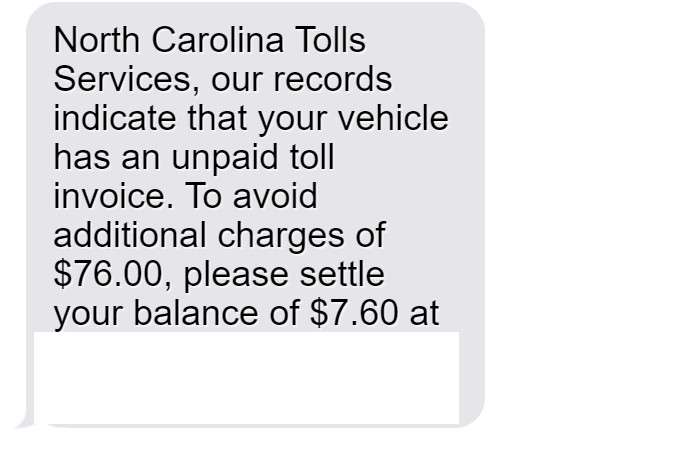
Overview of the NcQuickPassTollServices Scam
A new text phishing scam has emerged targeting North Carolina drivers with claims of unpaid toll invoices owed to “North Carolina Tolls Services.” The text specifies a low balance, typically around $7.60, that must be paid immediately through the provided link to avoid additional fees.
However, NcQuickPassTollServices.com is a fake domain name made to appear affiliated with legitimate state toll agencies. The site is operated by scammers whose sole purpose is stealing entered personal and financial details.
The North Carolina Turnpike Authority has confirmed these texts are completely fraudulent and no state toll agency is associated with the domains linked in the messages. Unfortunately, many phishing victims input their sensitive information before realizing it’s a scam.
Hallmarks of the Scam Texts and Websites
While made to look official, various red flags indicate these texts and sites are phishing scams:
- Sense of urgency – Threatening immediate $76 fees pressures urgency to pay without verifying.
- Out-of-state numbers – Texts come from 10-digit numbers with distant area codes.
- Grammatical errors – Messages have typos, mistakes and disjointed wording.
- Misleading domain – Site names like NcQuickPassTollServices.com are made to sound official.
- Poor design – The scam website templates are amateurish.
- Requests for information – No official agency would request SSNs and financial data via online forms.
Who the Scammers Target
North Carolina drivers who routinely use toll roads and transponders are prime targets. But anyone is at risk, as scammers cast wide nets using reams of stolen data.
Their tactics make determining specific target demographics difficult. Though toll road drivers may be most susceptible to the phony unpaid invoice ploys, all residents should be on alert.
Potential Damage from Compromised Data
Providing the requested personal and financial information equips scammers to:
- Commit identity theft using names, addresses, SSNs, and birthdays.
- Make fraudulent purchases and clone payment cards.
- Access and drain bank accounts.
- Take over online accounts using compromised credentials.
- Commit a wide range of financial fraud, from opening new credit cards to taking over existing accounts.
The effects can be severe, from devastated credit scores to emptied accounts to having entire identities stolen.
Avoiding This Toll Invoice Scam
Exercising caution around text toll notices, verifying balance claims, and practicing general cybersecurity hygiene can help avoid becoming ensnared:
- Carefully scrutinize urgent payment demands via text before providing info.
- Check account status directly through official toll agency websites or calls.
- Only enter payment details on secured sites confirmed as legitimate.
- Use antivirus protections and avoid public WiFi when accessing sensitive accounts.
- Enable multifactor authentication across financial accounts whenever possible.
With increased vigilance, North Carolina drivers can protect themselves from having accounts compromised and identities stolen by toll invoice scammers.
How the NcQuickPassTollServices.com Scam Unfolds
Sophisticated phishing techniques make these text scams appear credible on the surface. Here is an in-depth look at how the toll invoice scam plays out:
1. Victims Receive Unsolicited Text
The scam begins when a North Carolina resident unexpectedly receives a text out of the blue about an unpaid toll invoice. The surprising message induces panic and a sense of urgency.
2. Text Claims Unpaid Tolls Owed
The message states “North Carolina Tolls Services” records show the recipient’s vehicle has an unpaid toll invoice. A toll balance around $7.60 is cited that must be paid immediately.
3. Threat of Additional Fees if Not Paid Quickly
To create urgency, the text threatens hefty additional fees around $76 if the toll balance is not settled right away through the provided link.
4. Link Given to Fake Toll Payment Website
The text includes a URL linking to NcQuickPassTollServices.com or a similarly dubious toll-related domain name. The website is made to appear like a legitimate online state toll payment portal.
5. Website Requests Personal and Financial Information
On the phishing site, victims are prompted to enter personal details like name, birth date, phone, email, and home address. They are then directed to a payment page asking for full credit/debit card details including CVV codes.
6. Scammers Harvest Entered Victim Data
When victims input their sensitive personal and financial information, the scammers harvest it from the fraudulent website’s backend database.
7. Scammers Disappear Without Providing Services
After stealing victims’ details, the scammers go dark. The fraudulent websites are taken offline, and victims receive no services in return for their exposed sensitive data.
8. Criminals Misuse Stolen Identities and Payment Info
With the stolen information, the scammers can commit identity theft, payment card fraud, and account takeovers. Victims’ exposed data enables a wide range of financial crimes.
This demonstrates why it is critical never to enter information on unverified websites without confirming legitimacy, especially when pressured with threats of penalties and fees.
What to Do If You Receive a Suspicious Toll Text
If a text message about unpaid North Carolina tolls arrives from an unknown number, exercise extreme caution before providing any personal or financial details. Here are the steps to take:
- Avoid clicking any links or calling numbers – This could compromise your device or enable tracking.
- Check your account status directly – Log into your official toll account online or call legitimate customer service numbers instead of the text.
- Forward scam texts to 7726 – This free messaging service reports spam texts to carriers.
- Watch for unauthorized charges – Monitor financial statements closely for any signs of misuse of your accounts or data.
- Change passwords – Update passwords on any accounts using the same credentials that may now be compromised. Enable two-factor authentication when possible.
- Run antivirus scans – Check your devices for any malware installed by clicking scam links and remove it. Avoid using public WiFi when accessing sensitive accounts.
- Place fraud alerts – Contact credit bureaus to place free 90-day fraud alerts on all three credit reports for extra protection.
- Report scam texts – File complaints with the FCC, FTC, and North Carolina Attorney General. Provide phone numbers, website screenshots, and text contents to aid investigations.
With prompt action, you can minimize damage from potential data compromises and prevent toll invoice scammers from gaining enough information to commit identity theft or payment fraud.
Protecting Yourself from Toll Invoice Scams
Beyond steps to take after receiving a suspicious text, here are proactive measures to safeguard your data:
- Avoid texts from unknown numbers – Don’t click links, call back numbers, or provide information to suspicious texts. Report scam texts to your wireless carrier.
- Never disclose data without verification – Independently confirm through official channels, not unsolicited texts.
- Strengthen account security – Use randomly generated strong unique passwords on all accounts and enable multifactor authentication when available.
- Review account settings – Limit any unnecessary personal data exposure from accounts and payment apps. Opt out of marketing communications.
- Check credit reports – Periodically check credit reports from Equifax, Experian and TransUnion for any unauthorized opened accounts or inquiries.
- Install comprehensive identity theft protection – Proactive monitoring can detect fraud in progress, allowing quick intervention to minimize damage.
With increased awareness and security precautions, North Carolina drivers can frustrate toll invoice scammers and avoid having their personal details stolen through phishing texts and sites.
FAQs: How to Avoid the NcQuickPassTollServices.com Toll Invoice Scam
1. What is the NcQuickPassTollServices scam?
The NcQuickPassTollServices scam involves fraudulent text messages claiming your vehicle has unpaid North Carolina tolls. The texts threaten fees and provide a link to steal your personal and payment information. NcQuickPassTollServices.com is a fake domain not associated with any state agency.
2. How can I recognize a NcQuickPassTollServices scam text?
Watch for these red flags:
- Claims you owe around $7.60 in unpaid tolls to avoid $76 in fees.
- Says it’s from “North Carolina Tolls Services,” a non-existent agency.
- Has a suspicious link to NcQuickPassTollServices.com or a similar dubious domain.
- Comes from an unknown 10-digit number with an out-of-state area code.
- Contains typos, grammar errors, and other phishing indicators.
3. What information do the scammers ask for?
The NcQuickPassTollServices sites ask for:
- Personal details like your full name, birthdate, contact information.
- Full payment card data including card number, expiration date, and CVV code.
- Potentially other sensitive information like SSN, driver’s license details, or bank account numbers.
4. What do scammers do with my information?
Scammers can use your details to:
- Steal your identity and commit fraud.
- Make unauthorized purchases with your credit/debit cards.
- Access and drain your bank and financial accounts.
- Take over your online accounts using compromised credentials.
5. Should I click links or call numbers in suspicious toll texts?
Never click links or call phone numbers in unsolicited toll fee texts, even if they threaten penalties or fees. Doing so can expose you to fraud, malware, and theft.
6. How can I check if I really owe tolls?
To verify unpaid tolls, contact the North Carolina Turnpike Authority directly through official channels either online at www.ncquickpass.com or by phone at 1-877-NC-QUICK.
7. What should I do if I got a NcQuickPassTollServices text?
If you receive a suspicious toll text:
- Do not click any links or provide information.
- Forward the text to 7726 (SPAM) to report it.
- Contact your bank and check your accounts for unauthorized activity.
- Place fraud alerts and order credit reports to check for opened accounts.
- Reset account passwords and enable multifactor authentication.
8. How can I avoid NcQuickPassTollServices scams?
To protect yourself:
- Never click links or give information in unsolicited texts/emails.
- Independently verify toll notices through official toll agency channels.
- Use strong unique passwords and multifactor authentication.
- Limit account data sharing and opt-out of marketing communications.
- Check your credit reports regularly for signs of identity theft.
9. Who should I contact if I was scammed?
If your information was compromised:
- Immediately contact your bank/credit card issuer to freeze accounts.
- Report identity theft to the FTC and file a police report.
- Contact credit bureaus to place fraud alerts and dispute unauthorized accounts.
- Continue monitoring your credit reports and financial accounts.
10. How can I avoid other toll and traffic scams?
Use caution with any call, text, email or notice related to tolls, traffic tickets, registrations. Independently verify through official channels rather than third-party communications. Sign up for account alerts and monitor your statements.
The Bottom Line
The NcQuickPassTollServices.com scam text messages aim to induce panic and trick North Carolina drivers into divulging sensitive personal and financial details under the guise of settling fake unpaid toll invoices.
Always carefully verify any toll balance claims through official agency websites or calls before providing payment information. Texts out of the blue demanding payment

Join the discussion
0 commentsShare your experience or ask a question about this article.
Discussion
Start the conversation
Have a question or something useful to share? Add the first comment.