

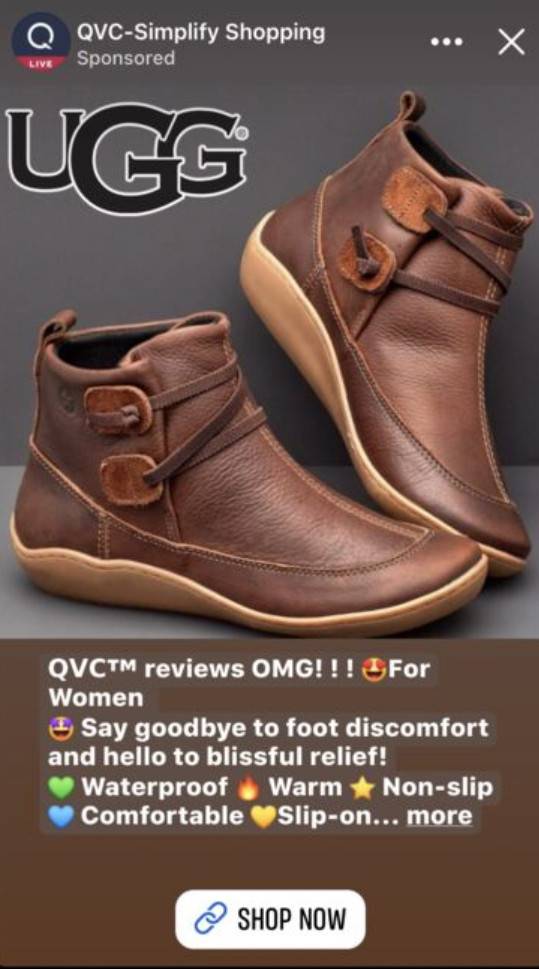
Online shopping scams are nothing new, but recently Facebook users have reported an influx of questionable ads promoting steep discounts on popular shoe brands. These ads, prefixed with “QVC reviews OMG”, direct unsuspecting shoppers to shady websites masquerading as legitimate retailers. This article will provide an in-depth examination of how this scam operates, tips on how to recognize these fraudulent ads, guidance for victims, and measures to protect yourself moving forward.
Overview of the Scam
The ads in question generally begin with some variation of “QVC reviews OMG” and tout impressive sales – often 60% off or more – on coveted shoe brands like UGG, Skechers, Clarks, and others. They are crafted to create a sense of urgency and excitement with emphatic phrases and emotional triggers.
Once clicked, the ads redirect shoppers away from Facebook to outside retail websites that have no verifiable association with QVC or the promoted brands. These scam storefronts feature stolen product imagery and descriptions, little or no company information, dubious contact details, and an overall lack of legitimacy.
Unsuspecting buyers lured in by the fraudulent discounts end up providing their personal and payment data to these sham operations. However, instead of receiving the deeply discounted designer shoes as advertised, victims report never getting the products they ordered and purchased. Even worse, many later discover unauthorized charges and compromised financial accounts.
This scam brilliantly exploits the reputation and popularity of the QVC brand along with the demand for top shoe labels. The bait and switch lands consumers on scam websites designed expressly to steal money and sensitive information. Awareness is key to avoiding this deceptive trap.
How the Scam Works
The operators behind this con know exactly how to reel in their targets. Let’s break down the tactics they employ at each stage:
Building Trust Through Brand Association
The ads explicitly use “QVC” in conjunction with reviews and enthusiastic phrases like “OMG” to establish legitimacy and build excitement. QVC is a long-standing, well-known home shopping network with a strong online retail presence.
Associating the ads with such an established brand helps scamsters gain viewer trust quickly. It lends credibility to the deals being touted and implies that QVC has vetted and endorses the retailers. Of course, the reality is these scammers have no relationship whatsoever with QVC.
FOMO Tactics Pressure Shoppers
FOMO, or “fear of missing out”, is a powerful motivator the scam ads harness to create urgency. The emphasis on deep discounts paired with OMG-laden copy stokes worries that these deals won’t last.
Phrases like “Hurry, selling fast!” reinforce the notion that indecision could mean missing out on once-in-a-lifetime savings on coveted UGGs, Skechers, etc. This pressures consumers to jump at the promotions without deeper scrutiny.
Clickbait Headlines Draw Viewers In
Curiosity is piqued by the ads’ unique phrasing – “QVC reviews OMG” – which acts as clickbait. Shoppers want to find out what exactly QVC is reviewing and what’s got them so excited.
The uncommon headline structure serves the scam well by enticing people to click through to the outside retail sites to satisfy their curiosity. At this point, they are already highly engaged potential targets.
Fake Website Adds Final Layer of Deception
After luring shoppers away from Facebook with their bait-and-switch tactics, the scam hinges on fooling visitors once more on the retail sites themselves. These fraudulent storefronts continue the charade with:
- Brand logos and imaging stolen from legitimate sites
- Limited business details like address, contact info, management names
- Generic descriptions and sizing info – no unique product copy
- Reviews and testimonials using stock images and names
- Too-good-to-be-true discounts on coveted items
Together, these elements complete the deception that shoppers have landed on a real retailer. In reality, it is a false storefront expressly designed to collect payment and personal data.
What to Do if You Are Scammed
If you provided any sensitive information or purchased through one of these fraudulent websites, take the following steps right away:
Report the Ad and Website
- Report the Facebook ad as a scam directly to Facebook. This helps get the post taken down quickly before others are duped.
- Google’s Safe Browsing tool also allows you to report dangerous sites involved in phishing, malware, etc. Reporting the scam site here helps protect other users.
Contact Your Bank
If you paid via credit or debit card, call your bank immediately. Alert them to the fraudulent charge so they can start monitoring your account for further suspicious activity.
Depending on the timing, your bank may be able to stop a pending transaction before it clears. Report all unauthorized charges so your bank can dispute them.
Change Online Account Passwords
Even if you did not directly provide your passwords, change the passwords on all your online accounts as a precaution. Prioritize accounts tied to finances, retail sites, and email.
Using a password manager makes this process a lot simpler while also strengthening all your passwords going forward.
Place Fraud Alert on Credit Reports
Contact one of the three major credit bureaus – Equifax, Experian, Transunion – to place a fraud alert on your credit file. This signals creditors to verify your identity before opening new accounts.
Updating one bureau is sufficient since they are required to notify each other. An initial fraud alert lasts one year and can be renewed.
File an Identity Theft Report
Identity theft reports filed with the Federal Trade Commission (FTC) support additional recovery protections. Reports can be completed easily on the FTC website or by calling 1-877-438-4338.
Consider an identity theft report if your financial accounts were compromised. It entitles you to free credit reports and stops further fraudulent account openings.
Monitor Accounts Closely
Carefully review statements on all your financial accounts and credit reports for any signs of further suspicious activity. Unrecognized transactions could be a sign of continued identity theft. Dispute any fraudulent charges promptly.
Enrolling in credit monitoring services can provide extra security. These services alert you to any new accounts opened in your name or significant changes to your credit file.
Avoiding Scams: Protection Tips
While scams are growing increasingly sophisticated, there are ways to detect and avoid these traps and protect your information:
Research Unfamiliar Websites Thoroughly
Never provide personal or payment information to a retailer without fully verifying their legitimacy first. Search for reviews and complaints, look up listed business addresses, and confirm contact details.
Domain age, page quality, and an established online footprint help confirm real businesses. Avoid stores lacking an adequate web presence.
Beware of Scam Tactics Like Phony Discounts
Massive price cuts and time-limited deals are go-to scam techniques for pressuring shoppers. Verified reviews and reasonable prices indicate honest businesses. Remember, if it seems too good to be true, it probably is.
Look for Verified Payment Options
Secure online retailers offer a range of mainstream payment methods, like established merchant gateways and credit card processors. Many scammers stick to wire transfers, gift cards, etc. – untraceable forms of payment.
Install Shopping Protection Browser Extensions
Extensions like Facebook Ad Analyzer and Web of Trust can provide valuable insight into unfamiliar sites right in your browser. They use crowdsourced reporting and threat intelligence to flag risky retailers.
Stick to Trusted Online Retailers
Limit online purchases to well-established retailers you are familiar with. Bookmark their actual websites and access them directly rather than clicking promotional links, even from social media.
Use a Credit Card for Online Purchases
Credit cards deliver stronger fraud protections and limit liability compared to debit cards. You also avoid putting your bank account information at risk.
Never Re-Use Passwords
Having unique passwords across all accounts restricts exposure if your data is compromised. Rely on password managers to securely generate and store complex passwords.
Review Privacy and Security Settings
Check your privacy configurations on all social media and online accounts. The stricter the settings, the less data is open to potential abuse by scammers.
Frequently Asked Questions
What is the “QVC Reviews OMG” scam?
This scam uses Facebook ads prefixed with “QVC reviews OMG” to lure shoppers to fake websites selling deeply discounted shoes. The goal is to steal money and personal information.
How do I recognize these scam ads?
Watch for too-good-to-be-true discounts, urgent phrases like “Hurry, selling fast!”, and being redirected to an unfamiliar website after clicking.
What happens if I order from one of these scam websites?
You will likely have your payment and personal information stolen. Products are rarely, if ever, delivered. Expect unauthorized charges and potential identity theft.
How can I get my money back if I was scammed?
Contact your bank immediately to block charges and dispute fraudulent ones. File reports with the FTC and credit bureaus to facilitate recovering lost funds and protecting your identity.
What steps can I take to avoid these scams in the future?
Research unfamiliar sites thoroughly, avoid massive discounts that seem fake, use credit cards for purchases, install shopping browser extensions, and only buy directly from trusted retailers.
The Bottom Line on the QVC Reviews OMG Scam
In summary, illicit Facebook ads touting unbelievable discounts on popular shoe brands are bilking consumers through elaborate bait-and-switch scams. To avoid falling prey, be wary of too-good-to-be-true promotions, thoroughly validate unfamiliar websites, and watch for other scam warning signs.
If you were victimized, act swiftly to halt fraudulent activity, report the scam, and implement heightened monitoring. With greater awareness and proper precautions, shoppers can protect themselves from online retail cons trying to hook victims using the reputations of brands like QVC.

Join the discussion
0 commentsShare your experience or ask a question about this article.
Discussion
Start the conversation
Have a question or something useful to share? Add the first comment.