

The rise of meme coins and viral cryptocurrency projects has opened the floodgates for not only genuine innovation, but also elaborate scams. One such scheme currently sweeping the crypto space is the Bitcoin Pepe presale scam. Masked behind flashy websites and fake endorsements, these fraudulent platforms are preying on unsuspecting investors eager to get in early on the “next big thing.”
This article exposes the depths of the Bitcoin Pepe scam, walks you through how it works step-by-step, and most importantly, explains what you should do if you’ve fallen victim.
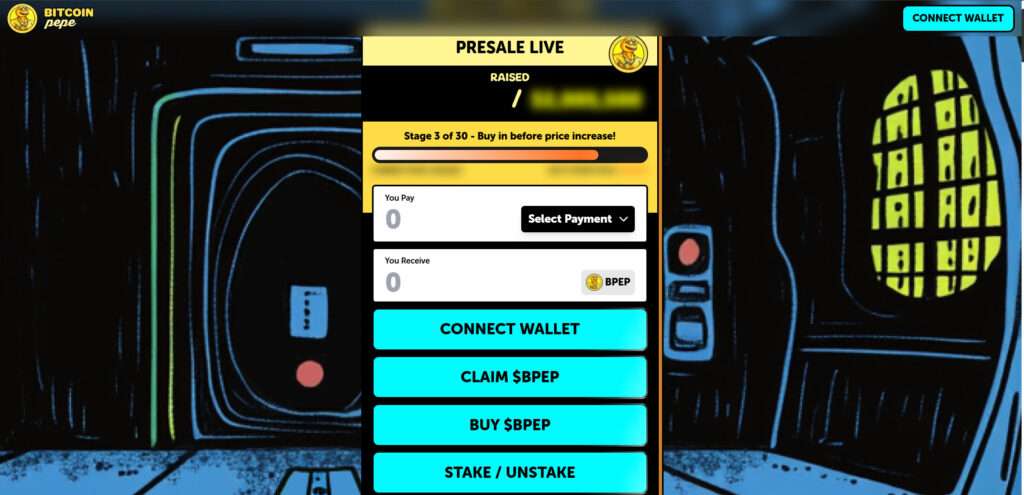
Scam Overview
The rise of meme coins has created fertile ground for both innovation and deception in the crypto space. Among the latest schemes targeting unsuspecting investors is the Bitcoin Pepe presale scam—a sophisticated operation that mimics a legitimate project to exploit trust and extract crypto assets.
The real project, Bitcoin Pepe, hosted at https://bitcoinpepe.xyz, promotes itself as the “world’s only Bitcoin meme ICO,” with a humorous yet structured roadmap, tokenomics, and staking features. The site boasts a unique brand identity, complete with cartoonish artwork, playful copy, and a gamified presale model. Unfortunately, scammers have cloned this exact aesthetic, site structure, and wording to create multiple phishing websites, all masquerading as legitimate entry points into the same project.
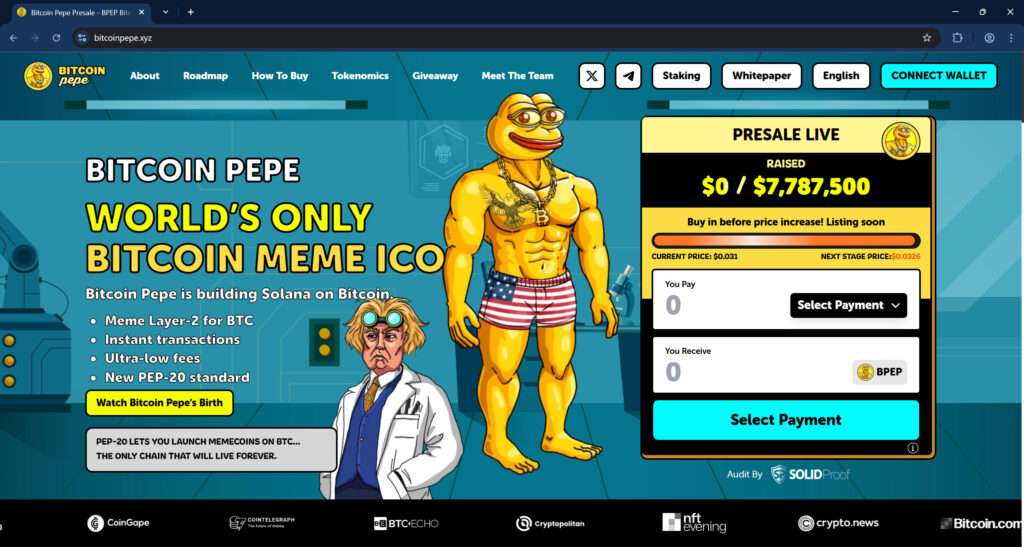
Copycat Sites with Malicious Intent
The scam sites—such as bitcoinpepe-presale.xyz, bitcoinpepe-io.xyz, bitcoinpepe-en.xyz, bitcoins-pepe.xyz, and several others—appear nearly identical to the original. They use the same:
- Color scheme and layout
- “Presale Live” ticker with fabricated token prices
- Wallet connect buttons
- Roadmap and tokenomics breakdown
- Character art and promotional copy
On first glance, these sites seem legitimate. That’s what makes them dangerous.
Instead of offering genuine access to a presale, these fake sites lure users into connecting their wallets through MetaMask, Trust Wallet, Trezor, or WalletConnect. Once a user authorizes a transaction—or worse, submits their seed phrase—these scammers can drain the wallet of all assets in seconds.
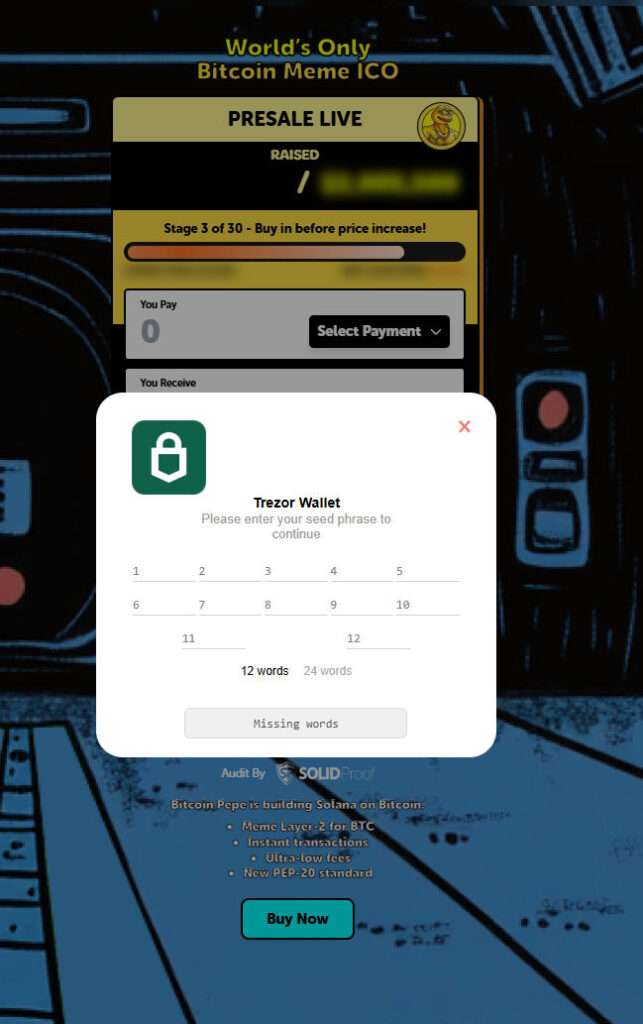
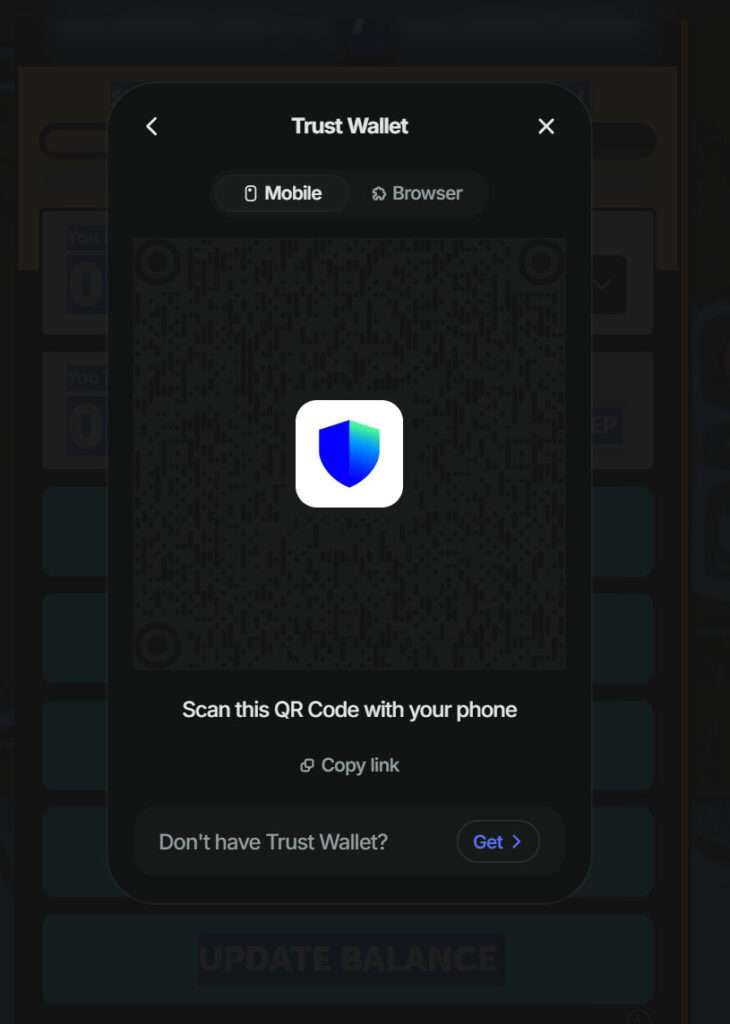
QR Code Scams and Seed Phrase Thefts
Scammers go beyond wallet connect prompts. Many of these fraudulent pages use malicious QR codes posing as Trust Wallet or WalletConnect portals. These codes are embedded with harmful protocols (irn, symKey, etc.) that reroute private wallet data or initiate stealth approvals. Even more concerning is the Trezor-style popup asking users to enter their 12- or 24-word seed phrases. These requests are designed to harvest full wallet control, allowing attackers to access everything, even cold wallets.
Phony Community and Branding
The fake sites also imitate legitimacy by listing audits from “SolidProof,” showcasing fake press mentions (Cointelegraph, Bitcoinist, Crypto News), and even presenting team bios and profile images lifted from the real project. The scammers have done everything possible to simulate trust while manipulating users into actions that compromise their funds.
There’s even a fake giveaway offering “1,000,000 $BPEP weekly” to entice users to engage more deeply with the ecosystem, reinforcing the illusion of authenticity and urgency.
Fabricated Stats and FOMO Tactics
To push users to act fast, the scam sites display manipulated fundraising data like:
- “$1,658,537.2 raised / $2,005,500 goal”
- “Stage 3 of 30 – Buy in before price increase!”
- Countdown timers and price stages that increment automatically
These figures are not live data. They are static scripts meant to simulate momentum, tapping into FOMO (Fear of Missing Out) psychology. By convincing users that others are investing, scammers create a sense of urgency and validation.
Domain Obfuscation and Multiplication
Rather than using just one site, the perpetrators have launched dozens of domains—all slight variations of the real brand—to maximize exposure and evade takedowns. Some examples include:
bitcoinpepe-presale.xyzbitcoinpepe-io.xyzbitcoinlithium-en.xyzbitmetnt.combitmetnt.info
By operating across multiple cloned websites, they increase their chances of capturing victims across search engines, social media ads, and even direct messages in crypto communities.
How the Scam Works
Let’s break down the method these fraudsters use, from the initial trap to the final theft of your crypto assets:
Step 1: Luring the Victim
Victims usually encounter the scam through:
- Social media ads (Twitter, Telegram, TikTok)
- Paid influencer endorsements
- YouTube promo videos
- Crypto forums or fake Reddit threads
- SEO-optimized search results
The links point users to professional-looking fake presale websites.
Step 2: Encouraging Wallet Connection
Once on the site, users are prompted to connect their crypto wallet (Trust Wallet, MetaMask, Trezor, etc.) to “buy $BPEP.” There is no functional token—the connection itself is the attack vector.
Two methods are used:
- Web3 Wallet Drainers: Malicious scripts initiate unauthorized approvals or transactions once the wallet is connected.
- Phishing Seed Phrase Requests: If users try to use hardware wallets like Trezor, the site asks for a full 12- or 24-word seed phrase under the guise of “authentication.”
Step 3: Executing Drainer Scripts
For browser wallets:
- The scam site prompts a signature request disguised as a “buy” confirmation.
- When signed, this grants access to spend your funds via
approve()smart contract functions. - Drainer software then automatically moves your tokens or native coins (ETH, BNB, SOL, etc.) to a hacker’s wallet.
Step 4: Stealing Funds
Within seconds, your wallet balance is emptied. These transactions are irreversible on blockchain networks.
For those who entered a seed phrase, the attackers immediately import the wallet and sweep all assets.
Step 5: Vanishing Act
These scammers cycle domains frequently. If one site is reported or blocked, another pops up. Domains like bitcoinpepe-io.xyz are replaced with minor variations to evade detection.
What To Do If You’ve Fallen Victim to the Bitcoin Pepe Scam
If you’ve interacted with one of these sites or suspect your wallet has been compromised, act fast:
1. Disconnect Your Wallet Immediately
- Use wallet security settings or tools like Revoke.cash to revoke smart contract permissions.
- Disconnect from all dApps and websites.
2. Move Remaining Funds
- Transfer all remaining tokens and crypto to a new wallet not connected to the scam site.
- Don’t reuse the same private keys or seed phrases.
3. Check Wallet Permissions
- Use Etherscan (for Ethereum), BscScan (for BNB Chain), or Solscan (for Solana) to inspect token approvals.
- Remove suspicious smart contract approvals.
4. Do Not Enter Seed Phrases Anywhere Else
- If you shared your seed phrase, consider that wallet compromised forever.
- Create a new wallet and transfer assets ASAP.
5. Report the Scam
- File complaints with:
- FTC Complaint Assistant
- IC3.gov (for US victims)
- The website host (e.g., Namecheap, GoDaddy)
- Anti-phishing communities (e.g., Chainabuse, ScamSniffer)
6. Warn Others
- Post warnings in Reddit communities, Telegram groups, and X (Twitter).
- Share verified screenshots and transaction hashes to raise awareness.
7. Contact Wallet Support (if applicable)
- If you used a custodial wallet (e.g., Coinbase Wallet), reach out to their security team.
8. Monitor for Further Activity
- Use wallet monitoring tools like Etherscan’s watchlist or Zapper to track your addresses.
- If more suspicious activity occurs, move to a fresh wallet again.
Frequently Asked Questions (FAQ) About the Bitcoin Pepe Presale Scam
What is the Bitcoin Pepe presale scam?
The Bitcoin Pepe presale scam is a coordinated phishing operation using fake websites that imitate the real Bitcoin Pepe project hosted at https://bitcoinpepe.xyz. These scam sites ask users to connect their crypto wallets or enter their seed phrases, then use malicious scripts to drain their funds.
How can I tell if a Bitcoin Pepe site is fake?
Fake sites often use domain names like bitcoinpepe-presale.xyz, bitcoinpepe-io.xyz, or other similar variations. These sites mimic the design of the real Bitcoin Pepe platform but include dangerous wallet connect buttons, fake QR codes, and requests for sensitive information like seed phrases. Always double-check the official URL: https://bitcoinpepe.xyz.
What happens if I connect my wallet to a scam site?
Once you connect your wallet, the site may prompt you to sign a transaction or give token approval. This can grant the scammers permission to move your tokens or native currency without further interaction. Some sites also initiate wallet drainer scripts immediately upon connection.
Can scammers steal from my wallet without my seed phrase?
Yes. If you sign a malicious transaction or approve a smart contract on a scam site, scammers can move funds using that approval. You do not need to share your seed phrase for this to happen.
What if I entered my seed phrase?
If you entered your seed phrase on a fake site, your wallet is fully compromised. Scammers now have full access and can take any current or future funds. You must immediately transfer any remaining assets to a new wallet and stop using the compromised one.
Are there any real Bitcoin Pepe tokens?
Yes, the real Bitcoin Pepe project does exist at https://bitcoinpepe.xyz. However, you should be extremely cautious and verify you are on the correct domain before engaging with any presale or token offer. Scammers are leveraging the real project’s branding to confuse users.
How do I report a fake Bitcoin Pepe scam site?
You can report fraudulent websites to:\n- Google Safe Browsing\n- Your browser (Chrome, Firefox, etc.)\n- Domain registrars like Namecheap or GoDaddy\n- Anti-phishing platforms such as Chainabuse or ScamSniffer
How do I remove wallet permissions after visiting a scam site?
Use tools like Revoke.cash or Etherscan’s Token Approvals to revoke any permissions you granted. Do this immediately after connecting to a suspicious site.
Can I recover lost crypto from a scam?
Unfortunately, crypto transactions are irreversible. Once funds are stolen, they are extremely difficult to recover. You may report the theft to local authorities, blockchain analytics firms, or legal services, but recovery is not guaranteed.
How can I stay safe from similar scams?
- Only use verified URLs\n- Bookmark the real project page\n- Never share your seed phrase\n- Use a hardware wallet with a non-reusable seed phrase\n- Follow updates from the official Bitcoin Pepe social channels
The Bottom Line
The Bitcoin Pepe presale scam is a textbook example of how professional-looking websites and hype marketing can mask dangerous phishing schemes. What appears to be a fun, meme-driven crypto opportunity is actually a sophisticated trap designed to steal your assets through wallet drainers and seed phrase phishing.
Stay skeptical, verify all URLs, and never enter your seed phrase into any site. If you’ve connected your wallet to one of these scam platforms, act immediately to minimize losses.
As always in crypto: if it sounds too good to be true, it probably is.

Join the discussion
0 commentsShare your experience or ask a question about this article.
Discussion
Start the conversation
Have a question or something useful to share? Add the first comment.