

If you’ve scrolled social media lately, you’ve likely seen ads for the Boltz Retro Stick. With promises of over 20,000 classic games, plug-and-play simplicity, and nostalgic fun for all ages, it sounds like a dream come true for retro gaming fans. But is it too good to be true?
This deep dive investigates the Boltz Retro Stick in detail from bold marketing claims to shady fulfillment tactics to help you figure out if it’s a bargain or a well-disguised scam.
Overview: What Is the Boltz Retro Stick?
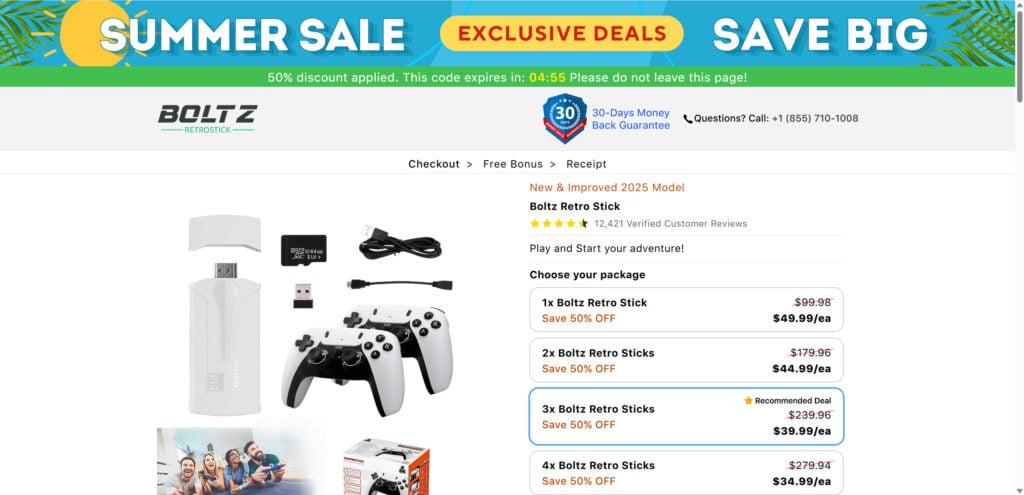
The Boltz Retro Stick markets itself as the ultimate retro gaming console. It’s a plug-and-play HDMI device about the size of a thumb drive, claiming to offer:
- Over 20,000 built-in games
- 9 different emulators
- Compatibility with any TV with an HDMI port
- Wireless controllers
- Instant play with no Wi-Fi or internet required
- 4K HDMI video output
- Multiplayer support for casual and competitive sessions
The Pitch
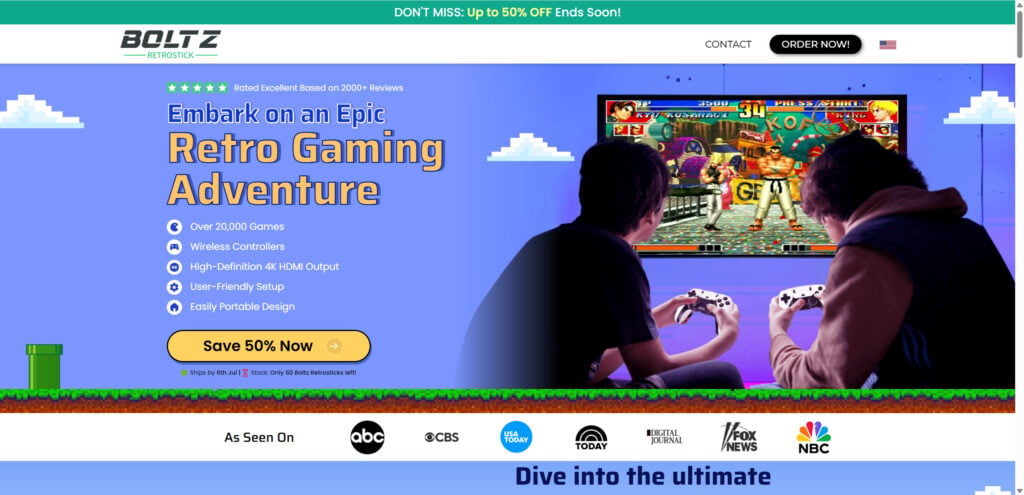
The product’s landing page is loaded with nostalgic language. Headlines like “The Best Thing to Happen to Gaming Since the ‘90s” immediately pull at the heartstrings of older gamers. It promises instant gratification: no downloads, no subscriptions, no tech headaches.
Marketing copy emphasizes:
- “Just plug in and play your favorite childhood games”
- “No complicated setups, subscriptions, or discs”
- “Play 20,000+ games instantly on any TV”
It’s designed to sound irresistible to casual consumers and parents looking for a low-effort gift for kids.
Price Point
Most ads push a “50% discount today only” angle, reducing the supposed $119 retail price to around $49.99. But this countdown timer resets every day. In reality, the “discount” is just a psychological sales tactic, and the stick’s wholesale value is likely closer to $5–$10 when sourced from sites like AliExpress.
Marketing Claims vs. Reality
Let’s break down the major promises and how they hold up:
- Claim: 20,000 games built-in
Reality: Most units contain thousands of duplicates, poorly translated menu titles, and broken or unplayable ROMs. The number of actually playable, well-known titles is much lower, typically around 40–100. - Claim: 9 emulator systems
Reality: Emulators are often open-source projects bundled without proper licensing. Compatibility is hit or miss, and performance varies widely. - Claim: Works on any TV
Reality: While technically true, video quality is questionable. Many reviews cite blurry graphics, laggy frame rates, or resolution issues, especially on larger TVs. - Claim: Wireless controllers
Reality: Included controllers are usually cheap infrared or 2.4GHz knockoffs, notorious for lag and poor build quality. Multiple reviews report controller ports not working at all or buttons sticking out of the box.
Customer Reviews Are Mixed
Some customers leave glowing reviews praising ease of use and fun throwback experiences. But these are often general and lack detail. When you dig deeper, on Amazon, Reddit, or scam forums, a much clearer pattern emerges:
- Positive:
- Easy to set up
- Kids enjoy it
- Cheap gift
- Negative:
- Missing parts
- Duplicate games
- No save feature
- Unplayable games
- Poor video quality
- Laggy or unresponsive controls
The average Amazon rating as of July 2025 is 3.1 out of 5 stars, with more than 35% of buyers rating it 2 stars or lower.
Red Flags on the Website
The Boltz Retro Stick is often promoted through a standalone product website that features:
- “Advertorial-style” fake blog posts written by made-up authors
- Trust badges like “As Seen On” (ABC, NBC, Fox) with no real media coverage
- Stock photos of “reviewers” and video game clips with no proper licensing
- Countdown timers, flashing “Limited Stock” notices, and pop-up discounts
- A fake sense of urgency to push impulse purchases
These tactics are classic indicators of dropshipping operations that prioritize conversions over product quality.
How the Boltz Retro Stick Operation Works
To understand how the Boltz Retro Stick operation functions behind the scenes, it’s important to examine it as part of a common business model known as dropshipping. In this model, sellers don’t actually manufacture or stock the products themselves. Instead, they create attractive branding and marketing to sell a generic item, then forward the order to a supplier who ships it directly to the customer.
This is how the Boltz Retro Stick model works, step by step:
1. Sourcing a Generic Emulator Stick
The device sold as the “Boltz Retro Stick” is almost identical to a variety of unbranded emulator sticks available for purchase on AliExpress, DHGate, Alibaba, and similar marketplaces. These devices usually cost $5 to $10 depending on configuration.
Most of these units:
- Contain open-source emulators (e.g., RetroArch, FCEUX, MAME, etc.)
- Come preloaded with thousands of ROM files, many of which are:
- Copyrighted and unlicensed
- Low-quality or broken
- Filled with redundant duplicates
- Include basic plastic controllers (infrared or 2.4GHz), sometimes without batteries
- Are packaged in simple boxes with no branding or cheap foam inserts
The only real difference between these and the Boltz-branded version is the logo and the price.
2. Building the “Brand” Website
Dropshippers then create a slick, high-conversion website around the device. The Boltz Retro Stick site includes:
- High-resolution photos (often lifted from supplier catalogs or AI-generated)
- Graphics showing kids and families having fun
- Fake “review” quotes with stock photos
- Urgent messaging like:
- “Only 6 units left!”
- “50% OFF ends tonight!”
- “Featured on Fox, NBC, CBS!”
The website is built with sales tactics in mind, not transparency. Contact details are vague, refund policies are restrictive, and domain registration is often new, typically less than 12 months old.
3. Running Aggressive Ads on Social Media
Once the site is live, paid Facebook, Instagram, YouTube, and TikTok ads are launched with aggressive messaging:
- “The best thing to happen to gaming since the ‘90s”
- “Over 20,000 retro games in your pocket”
- “Perfect gift for kids and nostalgic adults”
- “50% off today only!”
These ads often use stolen gameplay footage, faked reviews, and limited-time countdowns to drive quick purchases. Some even use videos from influencers who aren’t actually affiliated with the product.
The goal is to create impulse buys before the shopper thinks to do research.
4. Orders Are Forwarded to a Third-Party Supplier
When someone places an order on the Boltz site, the company does not ship the product themselves. Instead, they forward the details to a third-party fulfillment company, usually based in China or Southeast Asia.
This supplier then:
- Pulls a generic emulator stick from bulk inventory
- Slaps on minimal packaging
- Ships it directly to the customer (often taking 7–20 days)
Tracking numbers are vague or untraceable, and there’s no quality control. Many customers report receiving:
- The wrong item
- Missing controllers
- No instructions
- Products that don’t work at all
5. Handling Complaints Is Deliberately Difficult
Once the product arrives and customers start having problems, the support system breaks down:
- Emails go unanswered or receive generic replies
- Refunds are delayed or denied due to “terms of service”
- The return address is overseas, and shipping costs more than the product itself
- Many sites enforce “no return on opened products” clauses
This frustrates victims and prevents successful chargebacks in some cases.
6. Harvesting Reviews to Build Social Proof
To appear legitimate, these businesses:
- Publish fake 5-star reviews on their site
- Encourage positive reviews via email (offering discounts or gifts)
- Delete or bury negative reviews on their social pages
- Rarely if ever, respond to criticism on Reddit, Trustpilot, or forums
At the same time, they avoid using platforms like Trustpilot or Google Business, where negative feedback would accumulate quickly.
7. Rinse and Repeat Under a New Name
Once the scam receives too much negative attention or returns spike, the owners often:
- Shut down the site
- Rebrand the product under a new name (e.g., “RetroPlay Max,” “GamerVault 4K,” “FunStick Pro”)
- Launch a new site and repeat the process with updated graphics
This is what allows them to evade accountability and continue profiting.
What to Do If You Have Fallen Victim to the Boltz Retro Stick Scam
If you purchased a Boltz Retro Stick and realized afterward that the product didn’t live up to its promises, you’re not alone. Thousands of people fall into similar dropshipping traps every year. Fortunately, there are steps you can take to try to recover your money, report the operation, and protect others from becoming victims.
Here’s a clear, step-by-step guide on what to do:
1. Document Everything
Before taking any action, gather and save all proof of your transaction and interaction. This may include:
- Order confirmation email and receipt
- Screenshots of the product listing
- Photos of the item received (especially if it’s different or defective)
- Email correspondence with the seller
- Website URL and social media ads you saw
- Date of purchase and shipping delays
This documentation will be critical when disputing the transaction or filing reports.
2. Request a Refund Directly
Start by contacting the Boltz Retro Stick seller using any official communication method listed on the site:
- Look for a support email (commonly found in the footer or FAQ)
- Submit a contact form if available
- Use any live chat support they offer (if functional)
When reaching out:
- Be firm but polite
- Clearly explain the issue (e.g., faulty product, misleading claims, missing items)
- Ask for a full refund, and request confirmation of return instructions (including who pays for shipping)
In many cases, you’ll receive vague responses, stalling tactics, or denial. If so, proceed to the next step.
3. Initiate a Chargeback Through Your Bank or Card Provider
If the seller refuses to refund you, your best shot at recovering your money is filing a chargeback through your credit card provider or bank. Here’s how:
Credit Card Chargeback (Visa, Mastercard, Amex)
- Call the number on the back of your card
- Ask to dispute a charge
- Give them all the details:
- Date of purchase
- Name of the merchant (Boltz Retro Stick or similar)
- Description of the problem (misleading product, item not as described, no response from seller)
- Documentation (email chains, product photos, screenshots)
- Mention if the seller is based in China or if the website seemed deceptive
Time limit: Most chargeback policies allow disputes within 60–120 days of purchase. Act quickly.
PayPal Dispute
- Go to PayPal Resolution Center
- Click “Report a Problem” and choose the transaction
- File a dispute as ‘Item Not As Described’
- Escalate it to a claim if needed
PayPal generally sides with buyers when the product is misrepresented or doesn’t arrive.
Buy Now, Pay Later Apps (e.g., Klarna, Afterpay, Sezzle)
- Contact the platform directly and request a dispute
- Provide your proof and reason for challenging the charge
- Most of these services have buyer protection policies in place
4. Report the Scam to Consumer Watchdogs
To help prevent others from falling into the same trap, report the site and product to relevant authorities. These reports can also add pressure on payment processors to shut down the seller’s merchant accounts.
For U.S. Residents:
- FTC (Federal Trade Commission)
ReportFraud.ftc.gov - Better Business Bureau (BBB)
www.bbb.org - Internet Crime Complaint Center (IC3)
www.ic3.gov
For U.K. Residents:
- Action Fraud
www.actionfraud.police.uk
For Canada:
- Canadian Anti-Fraud Centre
www.antifraudcentre-centreantifraude.ca
For Europe:
- Your national consumer protection authority via
www.econsumer.gov
5. Leave Honest Reviews on Major Platforms
To warn others, share your experience where it matters:
- Trustpilot (even if they aren’t officially listed)
- Reddit (e.g., r/Scams, r/retrogaming)
- Amazon reviews (if you purchased from there)
- YouTube comment sections of influencer videos that promote it
- Quora or gaming forums
Be factual and include images when possible. Your review might prevent dozens of other users from falling for it.
6. Warn Friends and Family
Scams like these often spread through social media ads or word of mouth. If you were targeted, it’s likely someone you know could be too. Let them know:
- The product is not what it claims to be
- There are better, safer alternatives on Amazon or local retailers
- To never buy based on ads alone, especially those offering “too good to be true” discounts
7. Install Scam-Blocking Tools
To avoid being targeted again in the future:
- Use browser extensions like uBlock Origin, AdGuard, or Privacy Badger to block shady ads
- Use a password manager with phishing protection
- Enable Google Safe Browsing in your browser settings
- Avoid entering payment info on newly created sites with no reputation
The Bottom Line: Is the Boltz Retro Stick a Scam or Legit?
After analyzing every angle, from the product’s marketing tactics to customer experiences and delivery performance, it becomes clear that the Boltz Retro Stick is not the retro gaming revolution it claims to be.
While it’s technically a real product and does arrive in most cases, calling it “legit” would be generous. Here’s a final breakdown:
What It Gets Right
- Plug-and-play simplicity that appeals to casual users
- Some playable games, especially 8-bit classics
- Available on Amazon, meaning it passed minimum safety regulations
- Low entry price compared to modern consoles
- Good for light nostalgia, especially for people not sensitive to performance or graphics
Where It Fails
- Exaggerated claims of “20,000+ games” when only a fraction work or are worth playing
- Poor performance, frequent lags, and outdated emulation software
- Copyright issues surrounding preloaded ROMs with no licenses
- Manipulative marketing, including countdown timers, fake testimonials, and urgency tactics
- Low-quality construction, especially in the controllers
- No real support, refunds, or warranty transparency
- Dropshipping from China, often with 20–45 day delays
In essence, the Boltz Retro Stick is another example of a flashy, overhyped gadget that rides on nostalgia while delivering a cheap, mass-produced product with limited value. It’s not quite a total scam in the sense that it doesn’t exist, but it’s deeply deceptive, over-marketed, and rarely satisfies its promises.
Final Verdict:
The Boltz Retro Stick is more scam than solution. It may work for a few minutes of fun, but don’t expect anything close to the polished, reliable gaming experience it advertises.
If you want to relive your childhood gaming days, you’re far better off exploring trusted emulators, retro mini consoles like the NES Classic or SNES Mini, or modern all-in-one handhelds with transparent specs, legal games, and community support.
Don’t let a slick ad trick you into paying for disappointment.
Frequently Asked Questions About the Boltz Retro Stick
What is the Boltz Retro Stick?
The Boltz Retro Stick is a plug-and-play HDMI gaming device that claims to include over 20,000 retro games across multiple classic consoles. It comes with built-in emulators and wireless controllers and is marketed as a simple way to enjoy nostalgic games on any TV. However, it is often sold with exaggerated claims and questionable quality.
Is the Boltz Retro Stick legit?
While the product does physically exist and may function in a basic sense, it is not as advertised. Many users report receiving a low-quality device filled with duplicate games, laggy emulators, and controllers that barely work. The marketing materials are misleading, and the game count is often inflated with unplayable or repeated titles.
How many games are actually playable on the Boltz Retro Stick?
Despite claims of “20,000+ games,” only a small percentage are playable. Many of the games are duplicated, unlicensed ROMs, or non-functional. Based on customer reviews, only around 30 to 100 titles provide a playable experience, and most are obscure or poorly emulated.
Is it legal to sell a gaming device with thousands of ROMs?
No. Most of the pre-installed ROMs on devices like the Boltz Retro Stick are distributed without the proper licenses or permission from original copyright holders. Selling or distributing these games is a violation of intellectual property laws, making the product legally questionable in many regions.
Why is the Boltz Retro Stick so heavily advertised?
The product is part of a common dropshipping model, where sellers create branded websites and aggressive ad campaigns to sell cheap, generic products at inflated prices. Marketing often includes fake countdowns, false endorsements, and AI-generated testimonials to drive impulse purchases.
Are the reviews on the Boltz Retro Stick website real?
Most reviews on the product’s website are fake or heavily curated. Many use stock images, generic praise, and scripted feedback. There are few to no verified third-party reviews on platforms like Trustpilot. Independent reviews on Amazon and Reddit reveal a much less favorable reality.
What are the most common problems with the Boltz Retro Stick?
Customers frequently report:
- Blurry graphics and poor video resolution
- Controllers that don’t connect or lag
- Games that crash or never load
- Missing parts in the box
- Duplicate or broken game files
- Limited customer service and no working refund policy
Can I get a refund if I’m not satisfied?
While the product may advertise a refund policy, customers often report that refund requests are denied or ignored. The return process typically requires shipping the device back overseas, which is expensive and unreliable. Many users end up giving up after failed attempts to get support.
Where is the Boltz Retro Stick shipped from?
Most units are shipped from third-party suppliers based in China. This is a key indicator of a dropshipping operation. Shipping may take anywhere from 2 to 6 weeks, and tracking information is often delayed or inaccurate.
Are there better alternatives to the Boltz Retro Stick?
Yes. If you’re looking for a retro gaming solution, consider official options like the NES Classic Edition, SNES Classic, or handheld devices from reputable brands. You can also explore open-source emulators on your computer, paired with legally sourced ROMs. These alternatives offer better performance, support, and legal security.
Should I buy the Boltz Retro Stick?
If you’re looking for a reliable, high-quality gaming experience, the Boltz Retro Stick is not recommended. It may serve as a novelty item for casual use, but the majority of users report disappointment. Consider alternatives from trusted brands or official emulation devices with transparent specs and support.








