


A stranger asks to borrow an unlocked phone for one quick call. The request feels ordinary, the person stays nearby, and the device is returned within minutes.
Nothing on the home screen looks different. The call appears to have happened, and the encounter ends before there is a reason to check a bank or payment account.
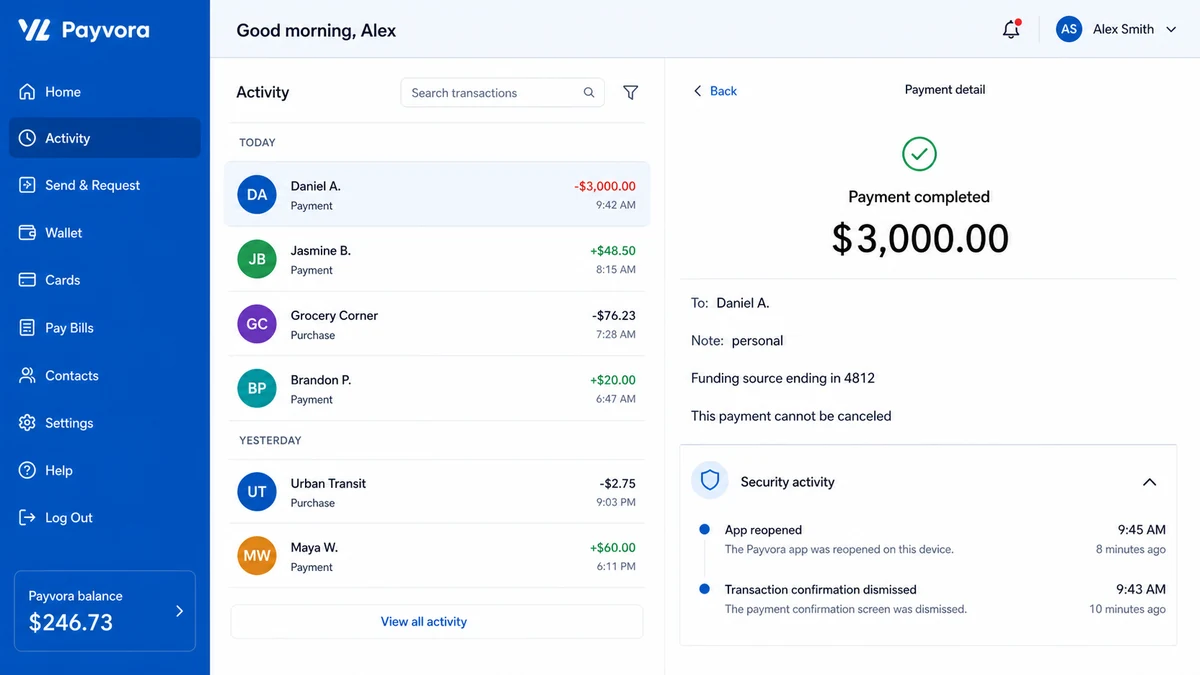
A completed $3,000 transfer discovered later tells a very different story about those few minutes.
Overview
The borrowed phone Venmo scam is a hands-on account theft in which a stranger gains temporary access to an unlocked device, opens a payment app, sends money to an account they control, and hides what happened before returning the phone.
In one recent account, a stranger near a San Francisco viewpoint asked to make a call. During that access, a $3,000 Venmo payment was allegedly sent and the app was deleted. The victim discovered the transfer roughly 80 minutes later and contacted Venmo, the bank, and police.
The request is small, but the access is not
Handing over an unlocked phone does not provide access to only the dialer. Email, payment apps, saved cards, text messages, photos of documents, password resets, and authentication codes may all be reachable from the same screen.
The scammer needs only one valuable route. A payment app that opens without a separate PIN can turn a short favor into an immediate transfer.
The phone can look normal after the transfer
The criminal may delete the payment app, dismiss its notification, remove it from the recent-app view, clear a message, or return to the call screen. Those actions do not cancel a completed payment.
Deleting an app removes the local icon and software. The Venmo account, linked funding source, and transaction record remain on the service.
Speed matters because person-to-person payments move quickly
Venmo states that money is sent to the recipient right away and a completed payment generally cannot be canceled inside the app. That does not mean an unauthorized transfer should be accepted. It means the victim should contact Venmo and the funding institution immediately.
The legal and dispute treatment can depend on whether someone tricked the account holder into sending money or physically used the device without permission. Describe exactly what happened and avoid guessing when speaking with fraud teams.
Warning signs and risk factors include:
- A stranger insists on holding the phone instead of letting you place a call on speaker.
- The person turns away, walks a short distance, or keeps the device longer than expected.
- The phone is returned on a different screen.
- A payment app no longer appears where it was installed.
- Transaction or security notifications have been dismissed.
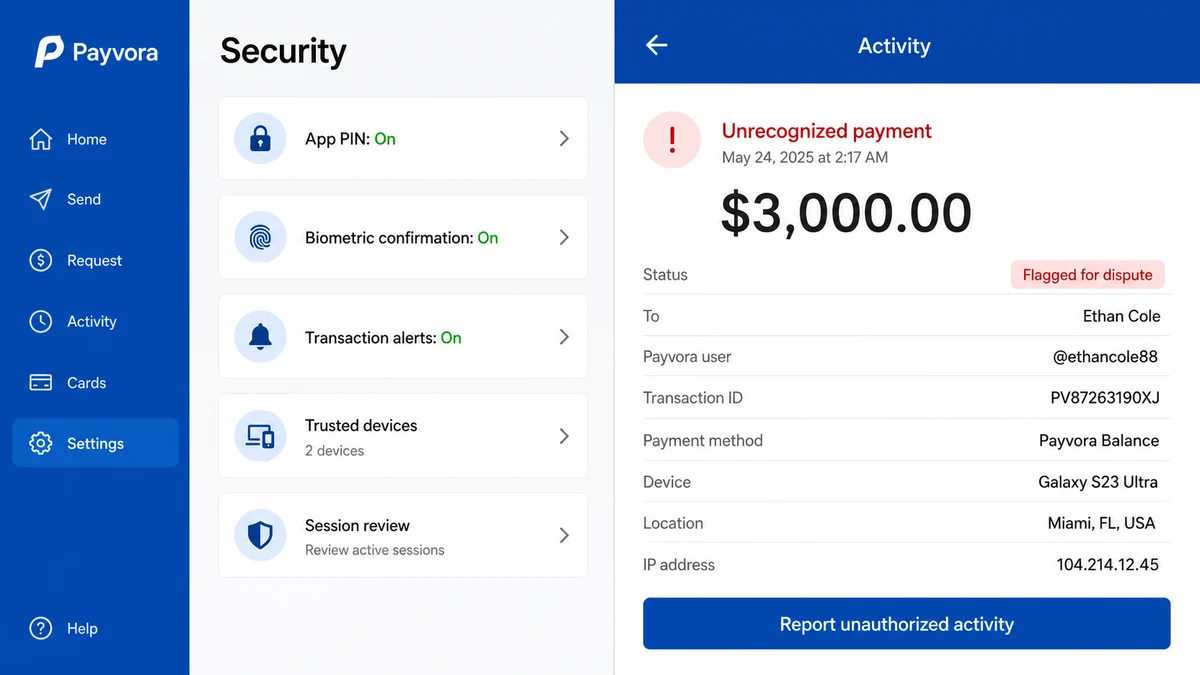
- The device has no app lock, payment PIN, or biometric confirmation.
- The payment app can draw directly from a linked bank account or debit card.
- A large transfer appears to a recipient you do not recognize.
- The stranger watched you unlock the device before asking to use it.
How the Borrowed Phone Venmo Scam Works
Step 1: The stranger chooses a believable reason for urgency
A dead battery, lost friend, ride problem, emergency, or poor signal creates a request most people recognize. Public viewpoints, transit areas, nightlife districts, events, and tourist locations can provide crowds and an easy exit.
The person may appear calm rather than threatening. The goal is voluntary access to an already unlocked device without attracting attention.
Step 2: The victim unlocks the phone and hands it over
The criminal may watch the passcode first or simply wait for the owner to unlock it. Once the device changes hands, the visible call screen becomes cover for activity elsewhere.
A phone can switch between apps quickly. Pretending to dial or hold a conversation helps explain why the screen is pointed away.
Step 3: The scammer opens Venmo or another payment app
The app may already have an active session. If no separate PIN or biometric check protects payments, the stranger can search a username, scan a code, or select a prepared recipient.
Text messages and email on the same device can supply one-time codes or password resets if the app requires another step. A compromised phone combines the login channel and the verification channel in one place.
Step 4: A large payment is sent to a controlled account
The thief chooses a funding source and confirms the transfer. Money may come from the Venmo balance, a linked bank account, a debit card, or another available source.
The recipient can be the thief, a money mule, or a compromised account. A casual note such as personal, dinner, rent, or thanks can make the transaction look ordinary in an automated review.
Step 5: Evidence on the home screen is hidden
The scammer can dismiss the confirmation and notification, delete Venmo, clear the recent-app list, or return to the dialer. None of that requires erasing the transaction from Venmo’s servers.
The phone is handed back with a simple explanation that the call failed or the person reached someone. The victim sees no obvious warning and continues with the day.
Step 6: The recipient moves the money before discovery
Payment-app transfers are attractive because they can complete quickly. The receiving account may forward funds, cash out, purchase cryptocurrency, or distribute the amount across other accounts.
Each additional move can make recovery harder. That is why even a short delay matters after an unfamiliar transfer is found.
Step 7: The victim discovers the app or bank change later
The first clue may be a bank alert, email receipt, low balance, missing app, or transaction entry after Venmo is reinstalled. Unlike the fake Venmo payment email, this transfer appears inside the real account because the thief used the real app.
Reinstalling through the official app store and signing in can reveal the history. Contact support before changing or deleting details that may help document the incident.
What a Thief Can Reach in Two Minutes
The payment app may be the immediate target, but an unlocked phone is a collection of authenticated sessions. The criminal does not need to know every password if email, messages, banking, and cloud accounts are already open.
Email can be used to reset another account, search for financial statements, or discover which services the owner uses. A deleted security message may prevent the owner from seeing the reset until access has changed.
Text messages can reveal one-time codes and bank alerts. The thief may request a code from a service, read it on the same device, complete the action, and remove the message before returning the phone.
Saved photos can contain a driver license, passport, tax form, insurance card, check, prescription, or recovery code. Even when no transfer succeeds, those images can support later identity theft.
Banking and wallet apps may show balances and available funding sources. That information helps the criminal choose an amount large enough to matter but small enough to fit the account.
Device settings can also create persistence. A stranger may add a fingerprint, change notification previews, connect a recovery address, enable forwarding, or pair another device. Review security settings, not only financial transactions.
Look for changes beyond the missing Venmo icon:
- New trusted devices or active sessions appear in important accounts.
- A password-reset or verification message is in the trash.
- Email forwarding or recovery information has changed.
- An unfamiliar fingerprint, face profile, or accessibility service appears.
- A payment recipient was added to a banking or wallet app.
- Notification previews or transaction alerts are disabled.
- Another payment app was opened or moved on the home screen.
- The carrier account shows a new SIM or forwarding setting.
A quick inspection should not become endless self-investigation. If a high-value transfer occurred, report it first. Venmo, the bank, and police can begin time-sensitive work while the owner secures the rest of the device.
Do not use the possibly observed passcode as the new app PIN. Replace both with different values, then confirm that biometric entries and recovery contacts belong only to the owner.
If the stranger installed software or opened a suspicious link, the incident moves beyond physical account access. Disconnect the device and use a clean system for password changes until malware risk has been addressed.
Check the trash and archive folders in email and messages. A thief trying to hide an action may remove the obvious alert without permanently deleting it. Preserve anything recovered before changing account settings.
Write a timeline while the encounter is fresh. Include when the phone was unlocked, how long it was out of hand, which screen was visible when returned, and when each bank or app alert arrived.
Ask nearby businesses promptly about camera retention. Some systems overwrite footage quickly. Police may need to request the recording, but identifying the likely camera and time window can prevent useful evidence from disappearing.
The Safest Way to Help Someone Who Needs a Call
You can help without surrendering the device. Ask for the number, place the call yourself, turn on speaker, and keep the phone in your hand. Do not open a texted link, share a verification code, or let the caller leave your sight.
If privacy is genuinely needed, direct the person to venue staff, police, a hotel desk, transit employee, store counter, or public emergency service. In an immediate emergency, call the local emergency number yourself.
A person who refuses speakerphone and insists on holding an unlocked device is changing a request for communication into a request for account access.
How to Lock Down Payment Apps Before This Happens
- Enable a Venmo PIN or biometric lock in the app’s security settings.
- Use a strong device passcode that is not visible to people nearby.
- Set the screen to lock quickly when it leaves your hand.
- Hide sensitive notification previews on the lock screen.
- Enable bank and payment alerts for every transaction.
- Review linked bank accounts, cards, transfer limits, and remembered devices.
- Keep the email account protected with a separate password and strong multifactor authentication.
- Never let a stranger take an unlocked phone, even for a short call.
Biometric protection is not perfect, but an app-specific check forces the thief to cross another barrier after the device is unlocked. That can be enough to make a quick-access plan fail.
Consider which accounts remain open on the device throughout the day. Convenience settings that feel harmless at home can create a different risk in a crowded place. Payment, banking, email, cloud storage, and password tools deserve stronger protection than ordinary entertainment apps.
Transaction alerts should reach a channel the thief cannot quietly clear. Email plus push notifications may provide two records. Bank alerts can reveal a linked-account debit even if the payment-app notification was dismissed.
Do not store identity documents, recovery codes, or unencrypted password notes in an easily opened photo album. Temporary control of the device can expose more than money and can support later account recovery attempts.
A separate payment PIN is most useful when it is not the same as the device passcode. If a stranger watches the phone unlock, reusing that number inside the app defeats the additional barrier.
Company, Address, and Fulfillment Checks
Venmo is the payment service, not the stranger
The legitimate Venmo platform can be abused through an unlocked account. The existence of a real transaction page does not mean the account holder approved the payment or knows the recipient.
The recipient name may belong to a mule or stolen account
A display name and profile image are clues, not verified identification. Preserve the username, transaction ID, note, amount, time, and funding source so Venmo and law enforcement can trace the receiving account.
The encounter location can supply physical evidence
Nearby businesses, transit systems, buildings, vehicles, or public cameras may have footage. Write down the exact place, time, direction of travel, description, companions, and conversation while memory is fresh.
The $3,000 transfer is not a fulfilled purchase
No goods or service were exchanged. If the phone was used without permission, state that clearly. Do not describe the transaction as a mistaken purchase or voluntary payment merely because the app recorded it as completed.
What to Do if You Have Fallen Victim to This Scam
- Contact Venmo immediately. Use support inside the official app or the contact details on help.venmo.com. Report an unrecognized payment and explain that another person used the unlocked phone.
- Contact the linked bank or card issuer. Report the transaction accurately as unauthorized device use and ask about a dispute, account protection, card replacement, or bank-account change.
- Do not send a second payment. Ignore anyone who says a matching transfer, verification payment, or fee is needed before the first payment can be returned.
- File a police report. Include the location, time, physical description, conversation, payment recipient, transaction ID, and possible camera locations.
- Preserve account evidence. Save screenshots of the transfer, funding source, recipient profile, emails, bank entries, security alerts, and support case numbers.
- Change the device passcode. Assume it may have been observed. Remove unknown fingerprints or face profiles and review trusted devices.
- Secure Venmo and email. Change unique passwords, enable app PIN or biometrics, turn on multifactor authentication, and revoke unfamiliar sessions.
- Review every app the stranger could reach. Check Cash App, PayPal, Zelle-connected banking, wallets, saved cards, password managers, photos of documents, and account-recovery settings.
- Call the mobile carrier if account data changed. Confirm that no SIM, forwarding, port-out PIN, or account authorization was added.
- Run a complete Malwarebytes scan if anything was installed. A simple transfer does not automatically mean malware was added, but scan if the person downloaded an app, opened a link, or changed device settings.
- Use AdGuard as a supporting layer. It can reduce access to known phishing pages, but it cannot stop someone who is physically operating an unlocked payment app.
- Report the fraud to the FTC. The FTC advises reporting unauthorized mobile-payment activity to the app and filing at ReportFraud.ftc.gov.
- Watch for recovery impersonators. A caller claiming to be Venmo, a detective, or a hacker who can retrieve the $3,000 for a fee should be verified independently. Review how fake Venmo fraud calls use account panic.
Venmo’s general cancellation guidance says completed payments cannot be canceled by the sender inside the app. Still contact support immediately. Unauthorized activity has a dispute path, and the bank or card issuer may have separate procedures.
Frequently Asked Questions
Can someone send Venmo money from my unlocked phone?
Yes, if the app is already signed in and does not require a separate PIN or biometric confirmation. Email and text access on the same phone may also help a thief pass additional checks.
Does deleting Venmo cancel a completed payment?
No. Deleting the application removes it from the device. It does not delete the Venmo account or reverse a transfer stored on Venmo’s systems.
Can Venmo reverse the $3,000 transfer?
Recovery is not guaranteed, and completed payments generally cannot be canceled in the app. Report unauthorized activity immediately so Venmo and the funding institution can review the facts and available dispute options.
Should I dispute the payment with my bank first?
Contact both Venmo and the bank promptly and describe the event consistently. Do not characterize an unauthorized device transaction as a voluntary payment to a scammer if that is not what happened.
Is it safe to place the call for a stranger myself?
Keeping the phone in your hand and using speaker is safer than handing it over, but do not open links or share codes. For emergencies, call official services or involve nearby staff.
What other accounts should I check?
Review email, banking, Cash App, PayPal, saved cards, password managers, cloud photos, carrier settings, and any service with an active session. Also check whether new recovery contacts or trusted devices were added.
The Bottom Line
The borrowed phone Venmo scam does not require a fake website or convincing caller. It uses a real payment account on a real unlocked device during a favor that feels harmless.
Help by placing the call yourself and keeping control of the phone. Protect payment apps with a separate PIN or biometric check, and turn on transaction alerts that surface activity quickly.
If an unauthorized transfer appears, contact Venmo, the funding institution, and police without delay. Preserve the digital transaction and the physical encounter as one incident.

Join the discussion
0 commentsShare your experience or ask a question about this article.
Discussion
Start the conversation
Have a question or something useful to share? Add the first comment.