

BunnyBand.com presents itself as an easy online earning platform where users can make money by completing simple tasks and inviting friends. The offer looks simple: sign up, receive a bonus, complete tasks, refer people, and withdraw once your balance reaches the payout threshold.
But based on the site’s own claims, public trust scores, and a growing number of user complaints, BunnyBand.com shows multiple red flags commonly seen in fake “get paid online” platforms.
What Is BunnyBand.com?
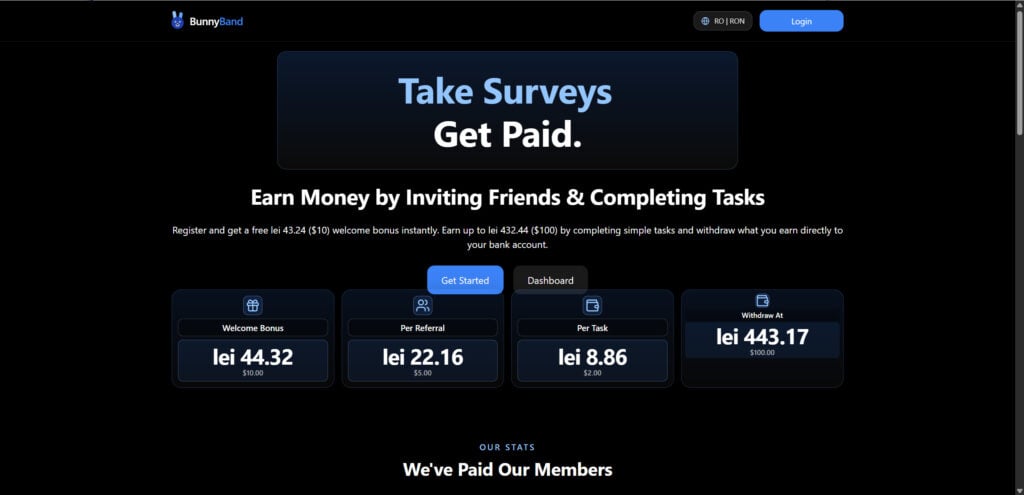
BunnyBand.com claims users can earn money by completing basic tasks and inviting other people to join. On its homepage, the site advertises a $10 welcome bonus, $5 per referral, $2 per task, and a $100 withdrawal threshold. It also claims users can withdraw earnings directly to their bank account once they reach the minimum amount.
At first glance, this may sound like a normal rewards platform. Many legitimate apps do pay small amounts for surveys, app testing, cashback, or referrals. The problem is that BunnyBand’s promise is unusually generous, especially for simple online tasks that require no clear skill, purchase, or verified work.
Even more concerning, BunnyBand’s own homepage displays “0” monthly active users, “0M” paid out to users, and “0” payments sent out every day while also claiming that thousands of users worldwide are earning and withdrawing daily. That contradiction is a major credibility issues.
Overview
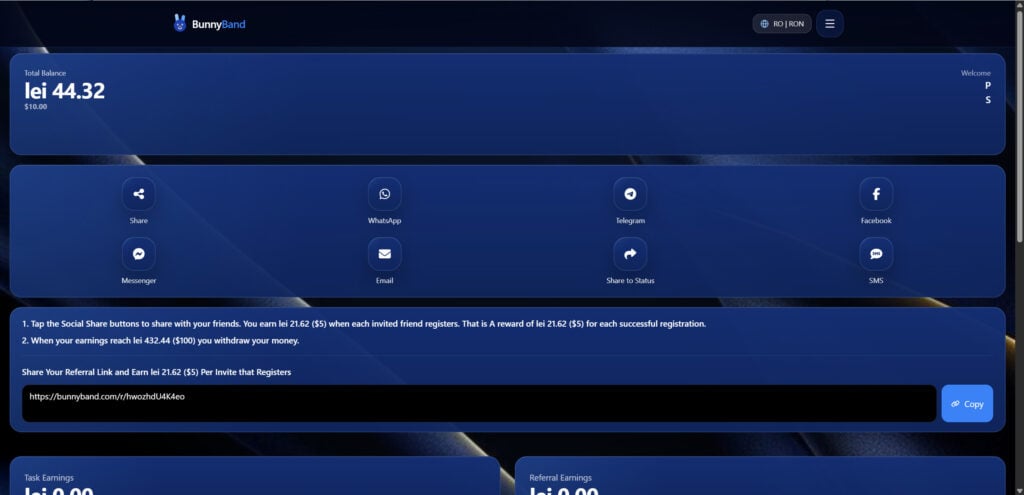
BunnyBand appears to follow a familiar “fake earnings dashboard” model. The platform shows users a growing balance, encourages them to complete more tasks, pushes them to invite friends, and then blocks or delays withdrawals once users reach the payout threshold.
The central problem is simple: many users say they can earn inside the dashboard, but they cannot actually receive the money.
On Trustpilot, BunnyBand.com currently has a “Bad” rating of 1.7, with 266 reviews and 76% of reviews rated one star. Many reviewers complain about pending withdrawals, failed payouts, and completing tasks without receiving money.
Some users say they reached the withdrawal amount, submitted a payout request, and then saw the withdrawal stay pending. Others say they completed tasks, invited friends, or accumulated large balances, but BunnyBand did not release the money. Several reviewers openly describe the platform as a scam because they were unable to cash out.
This is the key warning sign. A rewards website can show any number it wants on a screen. That number only matters if users can reliably withdraw real money.
How The BunnyBand.com Operation Works
1. The Site Uses a Free Bonus to Pull Users In
The first hook is the instant welcome bonus. BunnyBand advertises a $10 signup bonus, which makes the platform feel low-risk. A new user may think, “I already have $10, so I only need to do a little more to cash out.”
That is the psychological trap.
A fake balance creates motivation. It makes users feel like they have already earned something, even though no real payout has been proven.
2. The Withdrawal Threshold Keeps Users Working
BunnyBand lists the withdrawal threshold at $100. That means users cannot immediately test whether the platform actually pays. Instead, they must keep completing tasks, inviting people, and interacting with the site until they reach the required amount. (BunnyBand)
This structure benefits the platform, not the user. If BunnyBand does not pay, the threshold simply delays the moment when users discover the problem.
3. Referrals Turn Users Into Promoters
The site advertises $5 per referral. That is a large amount for a simple referral on an unknown rewards platform.
This kind of referral model can spread quickly because users believe they are sharing a money-making opportunity. But if withdrawals do not work, then every referral simply brings another person into the same problem.
Several complaints mention users inviting friends or completing referral requirements, only to find that they still could not withdraw.
4. The Dashboard Makes Earnings Look Real
Fake earning platforms often rely on a simple trick: they show a balance that increases.
That balance may look official. It may update after a task. It may show referral bonuses. It may even display a withdrawal button. But none of that proves the company has money, a payment processor, or any intention of paying users.
The only proof that matters is successful, repeatable withdrawals from real users.
5. Withdrawals Get Stuck
This is where the scam becomes visible. According to many public complaints, BunnyBand users are able to reach the payout stage, but withdrawals remain pending or never arrive.
Trustpilot reviews repeatedly mention pending withdrawals, failed payouts, and users not receiving money after completing tasks.
That pattern is consistent with many fake task/reward websites: the platform looks functional until the user tries to cash out.
Red Flags Found On BunnyBand.com
Unrealistic Earnings for Simple Tasks
A $10 welcome bonus, $5 referral payment, and $2 per task are unusually high for an unknown rewards site. Legitimate survey and task platforms usually pay much smaller amounts because advertisers do not pay large sums for low-value actions.
When a website promises easy money with little effort, the offer deserves serious skepticism.
Poor Public Reputation
BunnyBand’s Trustpilot page shows a poor score, with most reviews being one-star complaints. The repeated theme is not just bad customer service. The repeated theme is that users cannot withdraw money.
That matters because payout failure is not a minor issue for an earning platform. It is the entire product.
New Domain With Hidden Ownership
BunnyBand.com was created on March 6, 2026, and that the domain owner is hidden in WHOIS records.
A new website is not automatically a scam. But a very new site promising easy online income, showing limited transparency, and receiving many payout complaints is a high-risk combination.
Contradictory Website Claims
BunnyBand’s homepage claims “Real Users. Real Withdrawals” and says thousands of users are earning and withdrawing daily. But the same homepage also displays statistics showing zero monthly active users, zero paid out, and zero payments sent.
That contradiction makes the site look rushed, unreliable, or intentionally deceptive.
No Strong Evidence of Real Payments
The strongest sign of a legitimate earning platform is verifiable payment history. For BunnyBand, public complaints strongly suggest the opposite: users are shown balances, but withdrawals do not arrive.
Screenshots, testimonials, and dashboard numbers are not enough. A platform must show real, consistent payments to real users.
Is BunnyBand.com Legit?
Based on the available evidence, BunnyBand.com should be treated as high-risk and likely unsafe.
The site makes attractive earning claims, but public reviews show a pattern of users being unable to withdraw.
The safest conclusion is this: do not rely on BunnyBand.com as a real earning opportunity, and do not provide sensitive personal, banking, or payment information to the platform.
What To Do If You Already Signed Up
1. Stop Referring Friends
Do not invite more people until you have personally received a real withdrawal. If the site does not pay, referrals only spread the problem to others.
2. Do Not Submit More Personal Information
Avoid giving BunnyBand your bank details, ID documents, payment wallet information, phone number, or additional personal data. If a platform already shows warning signs, giving it more information increases your risk.
3. Change Reused Passwords
If you used the same password on BunnyBand that you use elsewhere, change it immediately on other accounts. Use a unique password for each important account.
4. Watch for Phishing Messages
Fake earning platforms may expose users to follow-up scams. Be careful with emails, WhatsApp messages, Telegram groups, or SMS messages claiming to help you “unlock” your BunnyBand withdrawal.
Do not pay an “activation fee,” “tax,” “verification fee,” or “withdrawal release fee.” Legitimate platforms do not require victims to pay more money to receive earnings.
5. Warn People You Invited
If you shared your BunnyBand referral link, send a simple warning to anyone who joined through you. Tell them not to submit sensitive information and not to rely on the payout.
6. Screenshot Everything
Save screenshots of your balance, completed tasks, referral count, withdrawal request, pending status, messages, and account details. These may be useful if you report the site.
7. Report the Website
You can report suspicious websites to consumer protection agencies, your browser’s safe browsing reporting tools, and scam-reporting platforms. If you gave bank information, contact your bank and ask what monitoring or protective steps are available.
The Bottom Line
BunnyBand.com looks like another fake online earning platform built around bonuses, referrals, and a dashboard balance that users may never be able to withdraw.
The red flags are serious: unrealistic rewards, a very new domain, hidden ownership, contradictory homepage claims, poor trust scores, and a large number of complaints about pending or failed withdrawals.
Avoid BunnyBand.com. Do not refer friends, do not submit sensitive information, and do not trust dashboard earnings until real withdrawals are proven.

Join the discussion
0 commentsShare your experience or ask a question about this article.
Discussion
Start the conversation
Have a question or something useful to share? Add the first comment.