

Buybuy BABY is a well-known and trusted retailer of baby products, such as clothing, furniture, toys, and more. The company operates over 100 stores across the United States and Canada, as well as an online store that offers a wide range of products and services. However, some scammers have been using the Buybuy BABY name to create fake websites that claim that all stores are closing and offer huge discounts on products. These websites are part of a phishing scam that aims to steal personal and financial information from unsuspecting customers. In this blog post, we will explain what the Buybuy BABY All Stores Closing Scam is, how it works, how to avoid it, and what to do if you have fallen victim to it. We will also provide some tips and resources to help you identify and avoid such scams in the future.
What is the Buybuy BABY All Stores Closing Scam?
The Buybuy BABY All Stores Closing Scam is a type of phishing scam that uses fake websites to lure customers into providing their personal and financial information. Phishing is a common cybercrime technique that involves sending fraudulent emails or messages that appear to come from legitimate sources, such as banks, companies, or government agencies. The goal of phishing is to trick recipients into clicking on links or attachments that lead to malicious websites or software that can infect their devices or steal their data.
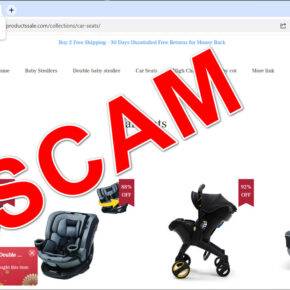
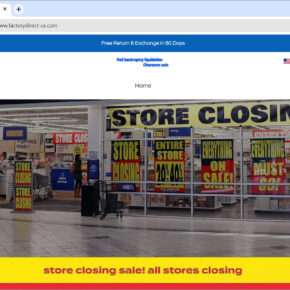
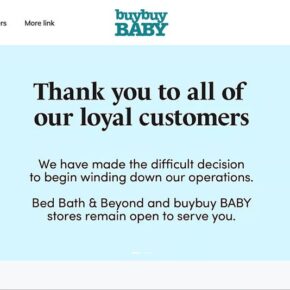
The scammers behind the Buybuy BABY All Stores Closing Scam create websites that look very similar to the official Buybuy BABY website, but have a different domain name, such as buybuybaby-clearance.com or buybuybaby-storeclosing.com. These websites claim that all Buybuy BABY stores are closing due to financial difficulties and offer discounts of up to 90% on various products. The websites also display fake reviews, testimonials, and ratings to make them seem more credible and trustworthy.
However, these websites are not affiliated with Buybuy BABY in any way and are designed to trick customers into entering their credit card details, billing address, shipping address, and other information. The scammers then use this information to make fraudulent charges on the customers’ accounts or sell it to other criminals. The customers never receive the products they ordered and may also face identity theft or other consequences.
How does the scam work?
The scam works by exploiting the trust and loyalty that customers have for Buybuy BABY and its products. The scammers use various methods to promote their fake websites and attract customers. Some of the common methods are:
- Sending spam emails or text messages that claim that Buybuy BABY is going out of business and urge customers to visit their website and take advantage of the clearance sale. The emails or messages may contain logos, images, or signatures that mimic those of Buybuy BABY or its partners.
- Creating fake social media accounts or pages that impersonate Buybuy BABY or its employees and post links to their website or share them with other users. The accounts or pages may have names, photos, or bios that resemble those of Buybuy BABY or its staff.
- Buying online ads or sponsored posts that appear on search engines or other websites and direct customers to their website. The ads or posts may use keywords, phrases, or images that relate to Buybuy BABY or its products.
- Using fake coupons or vouchers that claim to offer additional discounts or free shipping on their website. The coupons or vouchers may be sent via email, text message, social media, or other channels.
The scammers may also use other tactics, such as creating fake customer service numbers or email addresses, using fake logos or seals of approval, or using domain names that contain typos or misspellings of Buybuy BABY.
Once the customers visit the fake website, they are presented with a variety of products that appear to be genuine and discounted. The website may also display a countdown timer or a limited stock indicator to create a sense of urgency and pressure the customers to buy quickly. The website may also ask the customers to sign up for an account or a newsletter before they can proceed to checkout.
When the customers enter their personal and financial information on the fake website, they are unknowingly giving it away to the scammers who can use it for fraudulent purposes. The customers may also receive a confirmation email or message that looks like it came from Buybuy BABY but is actually from the scammers. The email or message may contain a tracking number or a delivery date for the products they ordered.
However, the customers never receive the products they ordered because they do not exist. The scammers may also continue to charge the customers’ accounts for recurring fees or subscriptions that they did not sign up for. The customers may also notice unauthorized transactions on their accounts from other sources that bought their information from the scammers. The customers may also face identity theft or other problems if the scammers use their information to open new accounts, apply for loans, or commit other crimes in their name.
How to avoid the scam?
The best way to avoid the Buybuy BABY All Stores Closing Scam is to be aware and vigilant of the signs and methods of phishing. Some of the tips and precautions that customers can take are:
- Always verify the authenticity of the website they are visiting, especially if they are redirected from an email, message, social media, or ad. They can check the domain name, the spelling, the grammar, the design, and the security features of the website. They can also look for reviews or ratings from other customers or sources. They can also contact Buybuy BABY directly to confirm if they are running any clearance sales or promotions.
- Never provide any personal or financial information without doing proper research and verification. They should also avoid clicking on links or attachments that they do not recognize or trust. They should also be wary of offers that seem too good to be true or that ask for urgent action or payment.
- Use a secure and updated device and browser when shopping online. They should also use a strong and unique password for each of their online accounts and change it regularly. They should also enable two-factor authentication if possible.
- Monitor their credit reports and bank statements for any suspicious activity or errors. They can get a free credit report from each of the three major credit bureaus once a year at annualcreditreport.com. They should also consider placing a fraud alert or a credit freeze on their credit reports to prevent unauthorized access.
What to do if you have fallen victim?
If you have visited one of the Buybuy BABY All Stores Closing Scam websites and entered your personal or financial information, you should take immediate action to protect yourself from further harm. Some of the steps you should take are:
- Contact your bank or credit card company and report the fraudulent charges. You may also need to cancel your card and request a new one. You should also ask them to monitor your account for any unusual activity.
- Change your passwords and security questions for your online accounts, especially those related to your email, banking, or shopping. You should also enable two-factor authentication if possible.
- Monitor your credit reports and bank statements for any suspicious activity or errors. You can get a free credit report from each of the three major credit bureaus once a year at annualcreditreport.com. You should also consider placing a fraud alert or a credit freeze on your credit reports to prevent unauthorized access.
- Report the scam website to the Federal Trade Commission (FTC), the Better Business Bureau (BBB), or your local consumer protection agency. You can also file a complaint with the Internet Crime Complaint Center (IC3), which is a partnership between the FBI and the National White Collar Crime Center. You should provide as much information as possible, such as the website address, the email or message you received, and any screenshots or receipts you have.
- Warn your friends and family about the scam and advise them not to visit the website or provide any information. You can also share this blog post or other reliable sources of information to raise awareness and prevent others from falling victim.
- If you suspect your device is infected with malware, you should run a scan with Malwarebytes Anti-Malware Free.
Conclusion
The Buybuy BABY All Stores Closing Scam is a phishing scam that uses fake websites to steal personal and financial information from customers. The scammers use various methods to promote their website and make it look legitimate, but they are not associated with Buybuy BABY in any way. Customers who visit the website and enter their information may face fraudulent charges, identity theft, or other problems. To avoid falling victim to this scam, customers should always verify the authenticity of the website they are visiting, look for signs of fraud, and never provide any information without doing proper research. Customers who have fallen victim to this scam should contact their bank or credit card company, change their passwords, monitor their accounts, report the scam, and warn others.








