

With news that Buybuy BABY is closing all its physical retail locations due to parent company Bed Bath & Beyond’s bankruptcy, fraudulent websites have proliferated impersonating the brand and falsely claiming to offer liquidation sales. However, these sites are complete scams aiming to steal money and information from shoppers. This article will break down exactly how the “Buybuy BABY All Stores Closing” scam works, tips for avoiding it, and what to do if you were unfortunately deceived.
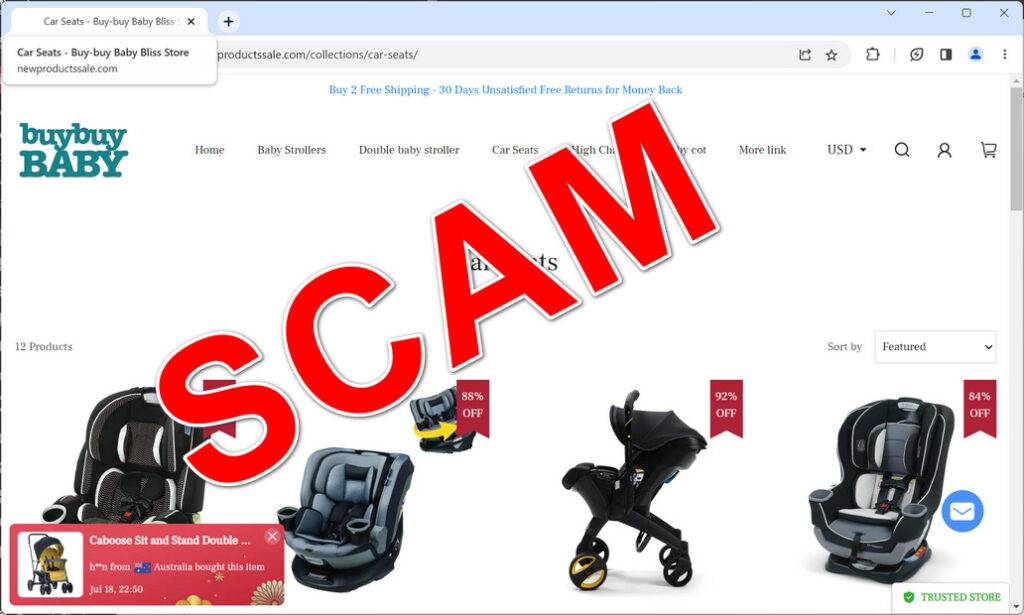
What is the “Buybuy BABY All Stores Closing” Scam?
The “Buybuy BABY All Stores Closing” scam refers to fraudulent websites that have been proliferating online and impersonating major retailer Buybuy BABY.
These scam sites falsely claim that due to bankruptcy, Buybuy BABY will soon be shutting down all retail store locations permanently and liquidating all remaining merchandise at huge discounts of 40% to 90% off.
The main purpose of these “Buybuy BABY closing” phishing scams is to deceive customers into providing their personal and payment information during checkout on the fake sites.
Scammers operating the fraudulent sites then steal identities, commit payment fraud, or resell the harvested information illegally. No real products are ever shipped to victims who place orders despite confirmation emails with fake tracking numbers.
Any claims of total Buybuy BABY closings and liquidation sales from unfamiliar, unverified third-party websites should be considered a scam attempt unless confirmed officially by the company on BuybuyBABY.com. These prevalent phishing scams prey on shopper tendencies to act quickly for deep savings from a believed retail closure.
How the ‘Buybuy BABY All Stores Closing’ Scam Works
The fraudulent ‘Buybuy BABY All Stores Closing’ websites operate by deceiving shoppers in a few key ways:
- The scam sites are designed using Buybuy BABY’s official logos, images, and messaging to appear as the real ecommerce store. Some even use the Buybuy BABY name in their domain.
- They claim that due to going bankrupt, Buybuy BABY is permanently closing all retail locations and liquidating all merchandise at deep discounts of 40-90% off.
- Prices are shown at huge reductions compared to normal rates, and countdown timers create false urgency about limited supply.
- When customers purchase something, their personal and payment data is harvested during checkout by the scammers operating the site.
- After checkout, victims receive an order confirmation email with a fake tracking number, but no order is fulfilled and the “tracking” never updates.
- Any attempt to contact the site about the delayed order results in ignored messages or disconnected phone numbers. No refunds are issued.
The scam capitalizes on Buybuy BABY’s brand recognition to fool shoppers into believing they are getting an unbelievable liquidation deal when in reality they are handing money and information directly over to scammers.
Warning Signs of ‘Buybuy BABY All Stores Closing’ Scam Sites
Although the ‘Buybuy BABY All Stores Closing’ scam websites promote convincing closing sales, they generally exhibit these red flags:
- Claims of store closings and liquidations with no evidence confirming a connection to the real company.
- Advertising prices far below reasonable liquidation sale discounts, like 90% off.
- Use of countdown timers, limited quantities, or other scarcity pressures to deter scrutiny and create urgency.
- URLs that differ slightly from the real BuybuyBABY.com, often with extra words.
- Complete lack of legitimate contact information like working phone numbers.
- No established social media ties predating the supposed liquidation announcements.
- Offering an overly broad product selection unlikely for a closing retailer.
- No order shipping confirmation from real carriers after checkout is completed.
Carefully looking for these signs of a scam can help you avoid being deceived before making a purchase.
Avoiding ‘Buybuy BABY All Stores Closing’ Scam Website Risks
You can protect yourself from the ‘Buybuy BABY All Stores Closing’ scam sites by taking the following measures:
- Only use the official BuybuyBABY.com website or verified mobile app for purchases. Avoid any other domains.
- Verify any liquidation sales by calling local stores to confirm legitimacy before acting.
- Analyze sites for the red flags outlined above to identify fraudulent websites impersonating the brand.
- Never pay using insecure methods like wire transfer, gift cards, cryptocurrency. Always use credit cards.
- Search for online reviews to gauge experiences from other shoppers before buying from unfamiliar sites.
- Trust your instincts – if an offer seems fake, or a website looks questionable, avoid the risk.
Sticking to trusted channels and being wary of unbelievable deals prevents you from being scammed.
What to Do If You Already Shared Information With a Scam Site
If you unfortunately already provided personal or payment details to a Buybuy BABY scam website, promptly take these steps:
- Contact your bank/credit card provider to flag the charges as fraudulent so they can be contested. Cancel any compromised cards.
- Place an initial 90-day fraud alert on your credit file with one of the three credit bureaus.
- Monitor your credit reports closely for any signs of new accounts opened fraudulently in your name.
- Change the passwords on your Buybuy BABY account, email account, and any others that may have reused the same credentials.
- Report the scam to the FTC and IC3 to aid law enforcement in fraud investigations.
- Use the incident as a lesson to be more vigilant against online shopping scams going forward.
Acting quickly helps limit any potential damages from stolen personal and financial information. Do not let embarrassment prevent you from taking steps to protect yourself after the fact.
Why Buybuy BABY Scams Are So Deceptive
Some reasons these phishing scams successfully dupe many shoppers include:
- Buybuy BABY is a well-known and trusted baby product brand, making the premise believable.
- Huge liquidation discounts of 40-90% excite bargain hunters into urgent purchases.
- Countdown timers and limited stock claims produce false scarcity and urgency.
- Official logos and images are stolen to initially appear as the real site.
- Shoppers do not expect liquidations to require formal announcements if a retailer is failing.
- Parental motivation to take advantage of deals for expensive baby items.
- If you suspect your device is infected with malware, you should run a scan with Malwarebytes Anti-Malware Free.
Recognizing these psychological tricks and manipulation tactics makes identifying scams faster. Verify real sales on the official company website before trusting third-party claims.
FAQs About the ‘Buybuy BABY All Stores Closing’ Scam
Is Buybuy BABY really closing all its stores permanently?
Yes, Buybuy BABY announced all retail locations are closing due to parent company Bed Bath & Beyond’s bankruptcy.
How can I confirm a website is the real Buybuy BABY site?
The real Buybuy BABY domain is BuybuyBABY.com. Fake sites use slight spelling changes or extra words added. Double check the URL matches exactly.
Is it illegal to buy counterfeit goods from the scam websites?
Yes, knowingly purchasing counterfeit trademarked items is illegal and helps fund more scam sites that harm other innocent victims.
What should I do if I already provided my information to a scam site?
Contact your bank/credit card company immediately about fraudulent charges. Place fraud alerts on your credit, change account passwords, monitor your credit reports closely, and file complaints with the FTC and IC3.
How can I safely shop the real Buybuy BABY liquidation deals?
Only shop sales advertised directly on the official BuybuyBABY.com website. Verify any in-store liquidation events by calling local stores before trusting third-party sites.
The Bottom Line
Websites promoting Buybuy BABY liquidation sales, huge discounts, or store closings without verifiable proof of authorization are always fraudulent. They intend only to scam shoppers out of money and steal personal data illegally. Avoid falling victim by carefully analyzing site details and verifying sales on the real BuybuyBABY.com website before making purchases. Never provide payment or sensitive information to unfamiliar third-party sites exhibiting warning signs of a scam. Exercise caution to steer clear of these prevalent scams during the Buybuy BABY bankruptcy and store closure process.








