

Have you received a suspicious text message claiming you have unpaid toll fees that must be paid immediately? You’re not alone. This text message scam has been targeting drivers across California, tricking them into providing personal information and credit card details on fake websites.
This insightful article will uncover everything you need to know about the CA Toll Services scam, including how it works, how to protect yourself, and what to do if you’ve fallen victim.
An Overview of the CA Toll Services Scam
The CA Toll Services scam involves unsuspecting drivers across California receiving text messages stating they have unpaid toll invoices that must be paid immediately. However, it is a fraudulent phishing scam designed to trick recipients into providing their personal and financial information.
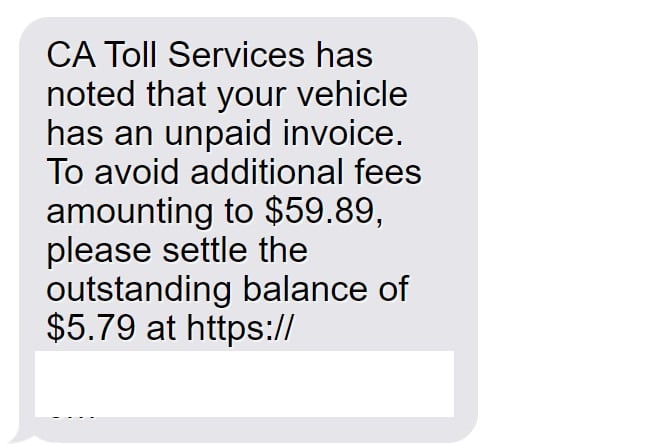
This scam text will say something like:
“CA Toll Services has noted that your vehicle has an unpaid invoice. To avoid additional fees amounting to $59.89, please settle the outstanding balance of $5.79 at https://bayareafastrakinvoices.com.”
While the message is made to look official and urgent, it is completely fake and created by scammers, not any real toll provider. Here are key things to know about why this text is a scam:
- CA Toll Services is not a real company – There is no such legitimate entity. The scammers fabricated this name to sound like an official toll services provider. Other scam texts use similarly fake names.
- The unpaid toll fee claims are false – The scammers have no record of any unpaid invoices linked to recipients. They send these texts randomly hoping people believe them.
- The website is a scam – The domain bayareafastrakinvoices.com goes to a sophisticated fake website designed by scammers to steal personal data.
- Scammers want your information – By prompting for personal details to “pay the toll invoice”, scammers can commit identity theft. They want credit card data for fraud.
- Text creates false urgency – The threats of additional fees being added soon pressures recipients to act now, before they have time to realize it’s a scam.
Toll invoice phishing scams like this have recently spiked in California, with residents across cities like San Francisco, Oakland, San Jose, Los Angeles and San Diego reporting receiving them. Any driver in the state could be targeted.
Once on the scam website, users are asked to enter information like:
- Full legal name
- Date of birth
- Phone number
- Email address
- Home address
- Credit card details
All this data goes straight to scammers, not any toll company. The FTC has warned about fake texts and websites mimicking businesses to steal identities. California DMV also put out a warning on this toll invoice scam.
With the stolen information, scammers can commit financial fraud, open fake accounts, take over existing accounts and more. Victims often don’t detect the fraud until they notice unauthorized charges or accounts opened in their name.
This scam has already cost Californians thousands in stolen funds, damaged credit, and lengthy account recovery efforts. But awareness of how this toll invoice scam works allows drivers to protect themselves and avoid becoming victims. Never click, provide information, or pay anything based on random texts about unpaid tolls.
How the CA Toll Services Scam Works
Here is a step-by-step breakdown of how the toll invoice text message scam operates:
Step 1: Victims Receive a Scam Text
The scam begins with victims receiving a text message claiming their vehicle has an unpaid toll invoice that must be settled immediately. The message is timed to create urgency,Warning that additional fees of $59.89 will be added if the $5.79 balance isn’t paid right away.
Of course, there is no such unpaid invoice or fees, but this threat pressures recipients to take action before thinking it through.
Step 2: The Text Directs Victims to a Fake Website
If recipients click the link in the text message, they are taken to a scam website designed to look like a legitimate toll payment portal. The site has an official-looking logo and domain name (bayareafastrakinvoices.com).
But it’s just a detailed fake site crafted by scammers to deceive victims.
Step 3: Scammers Prompt for Personal and Financial Information
On the scam website, victims are prompted to enter personal details like:
- Full name
- Date of birth
- Phone number
- Email address
- Home address
They are then directed to a payment page asking for credit card information such as:
- Card number
- Expiration date
- CVV code
The site claims this info is needed to process the toll fee payment. But in reality, the scammers steal this data for nefarious purposes.
Step 4: Scammers Use the Stolen Information for Fraud
With the stolen personal and financial information, scammers can then commit:
- Identity theft – They open fraudulent accounts in the victim’s name using their personal details.
- Credit card fraud – They make unauthorized charges to the victim’s credit card.
- Account takeover – They can potentially access and take over the victim’s existing accounts using credentials harvested from the scam site.
Victims often don’t realize what happened until the damage is done and their accounts have been compromised.
What to Do If You Get the CA Toll Services Text
If you receive a suspicious text message about unpaid toll fees from CA Toll Services (or any unknown sender), here are important tips:
1. Don’t click any links
Links in scam texts often direct victims to fake websites to steal personal data. Never click on links from unknown senders.
2. Don’t provide any information
Whether via text or scam websites, don’t provide any personal or financial information to unknown parties. Even confirming details like your name or address can enable scams.
3. Report the scam text
Forward scam texts to 7726 (SPAM) to report it to your mobile provider. You can also report SMS scams to the FCC at consumercomplaints.fcc.gov.
4. Block the sender
Block the phone number that sent the scam message so you don’t get additional texts from the same scammers. Don’t engage with them at all.
5. Watch for fraud
Keep a close eye on your financial accounts and credit reports for signs of misuse of your information. Report any fraudulent activity immediately. Sign up for transaction alerts.
6. Educate others
Share information about this scam text to help friends and family avoid falling for it. Scams are always evolving, so spread awareness.
What to Do If You Shared Information on a Scam Site
If you entered any sensitive personal or financial data on one of the toll invoice scam websites before realizing it was fraudulent, take these steps right away:
- Call your credit card company – Report any credit card details that were compromised to your card issuer so they can freeze the card and monitor for fraud. Get a new card number.
- Contact your bank – For any debit card or banking information given to scammers, notify your bank immediately to protect your accounts.
- Place a fraud alert – Contact one of the three credit bureaus to place a free 90-day fraud alert on your credit file so you’re alerted to any suspicious activity.
- Monitor your credit reports – Order free credit reports from Equifax, Experian and TransUnion to check for accounts opened fraudulently in your name. Review all activity closely.
- Reset account passwords – If you entered credentials for any of your existing accounts, reset the passwords right away.
- Consider an identity theft protection service – Proactive monitoring from a reputable ID theft service can alert you to scammer attacks.
- File an FTC complaint – Report the scam to the Federal Trade Commission so they can investigate the criminals behind it.
By taking quick action, you can mitigate the potential damage from sharing details on fake toll invoice websites. Don’t let scammers exploit your information further.
Frequently Asked Questions About the CA Toll Services Scam
1. What is the CA Toll Services scam?
The CA Toll Services scam involves drivers receiving text messages claiming their vehicle has unpaid toll invoices that must be paid immediately. The texts threaten additional fees if the balance isn’t settled. However, CA Toll Services is not a real company, and these are fraudulent messages sent by scammers to steal personal and financial information. The scam directs victims to fake websites that harvest data for identity theft and credit card fraud.
2. How do I recognize the scam text messages?
The scam texts often say: “CA Toll Services has noted your vehicle has an unpaid invoice. To avoid fees of $59.89, pay the balance of $5.79 at [fake website link].” Any text claiming you owe toll fees out of the blue, especially from an unknown sender, is a red flag. CA Toll Services is a fabricated name, not a real toll company.
3. What information do the scammers want?
If you click the link, you are taken to a fake website that prompts you to enter personal details like full legal name, DOB, address, phone number, and credit card information, supposedly to pay the outstanding toll invoice. In reality, the scammers steal this info for identity theft and financial fraud.
4. What do the scammers do with my information?
Scammers use stolen personal information like names, birthdates and addresses to open fraudulent accounts and commit identity theft. They use credit cards on file to make unauthorized purchases and drain bank accounts. Signs of misuse include accounts opened in your name, charges you didn’t make, and suspicious activity on current accounts.
5. How can I avoid becoming a victim?
Do not click on links, provide information, or pay anything based on suspicious texts claiming you owe unpaid tolls. CA Toll Services is fake. Report scam texts, block the sender, and monitor accounts closely for fraud if you shared details. Legitimate toll companies don’t demand payment via text.
6. What if I already provided information to the scammers?
Immediately call your credit card company to freeze your card if the number was compromised. Contact your bank about any compromised bank accounts. Place fraud alerts with credit bureaus, order credit reports to check for fraud, reset account passwords, and consider signing up for identity theft protection services. File an FTC complaint.
7. Can I get my money back if I paid the scammers?
If you paid the scammers with a credit or debit card, you can contest the charges with your card issuer as fraudulent. Provide evidence the texts are scams. Banks and card companies have fraud divisions to investigate suspicious charges. If the charge is proven fake, you won’t be liable and your money will be refunded.
8. How do I report the scam texts and websites?
Forward scam texts to 7726 (SPAM). Report them to the FCC at consumercomplaints.fcc.gov and FTC at reportfraud.ftc.gov. Contact DMV about fake toll sites. This helps get scam phone numbers and sites shut down faster.
9. How can I avoid text message scams?
Be wary of suspicious texts demanding payment or requiring urgent action, especially from unknown numbers. Don’t click links or provide information to random texts. Block suspicious senders. Confirm legitimacy of payment requests directly before providing payment details. Enable two-factor authentication as an extra layer of security.
10. How can I stay updated on new text scams?
Bookmark FTC and FCC scam alerts pages. Follow your state attorney general and consumer protection office for local scam warnings. Read news sites and scam reporting blogs. Being aware of the latest scam tactics can help you recognize and avoid new text message cons as they emerge.
The Bottom Line on the Toll Invoice Scam
This scam starts with urgent-sounding texts about unpaid toll fees, directs victims to realistic but fraudulent websites, and tricks users into handing over valuable personal and financial information.
Thousands have had their identities stolen, credit card details compromised, and accounts emptied because of this prevalent toll invoice phishing scam.
But by recognizing these scam text messages, refraining from clicking on links or providing data, and knowing what to do if you shared information, you can keep yourself protected.
Don’t become another victim of the CA Toll Services scam text messages. Be vigilant about texts requesting personal details, monitor your accounts routinely, and avoid entering information on unfamiliar sites you’re directed to.
Stay informed about the latest scam tactics so you can spot fraudulent texts and websites. Share this information with family and friends to prevent them from falling for toll invoice phishing scams trying to steal their identities and money.
Our mobile devices provide great convenience in managing life and business on the go. Unfortunately, scammers capitalize on this reliance to rip people off. Maintaining awareness of common mobile cons like toll invoice scam texts allows us to keep that convenience without compromising critical personal data that can destroy lives and finances when it lands in the hands of fraudsters.

Join the discussion
0 commentsShare your experience or ask a question about this article.
Discussion
Start the conversation
Have a question or something useful to share? Add the first comment.