


If you’ve recently seen ads or social media posts claiming you can claim a free $750 ALDI gift card just by filling out a quick survey or downloading a few apps, you’re not alone. These promotions are everywhere — bright colors, bold fonts, and promises of instant rewards that seem too good to ignore. But behind that cheerful message is a sophisticated affiliate scam designed to harvest your personal data and make money from your clicks.
The website at the center of this operation, Cart700.com, is not affiliated with ALDI or any legitimate rewards program. Instead, it uses deceptive marketing to draw people into completing “offers” that generate income for the scammers but deliver no real prize.
In this article, we’ll break down exactly how the Cart700.com $750 ALDI gift card scam works, why it’s spreading so fast, and what you can do to protect yourself. We’ll also explain what to do if you’ve already submitted your information or participated in the scam.
Let’s dive deep into how this fake gift card offer operates, who’s behind it, and why you should avoid it at all costs.
Scam Overview
The Cart700.com $750 ALDI Gift Card Scam is one of many “fake reward” schemes circulating online. These scams follow a familiar pattern: a website promises an unusually high-value gift card or cash reward in exchange for completing simple tasks. However, the real purpose is to collect user data, generate affiliate income, and push people into signing up for unwanted subscriptions or trials.
The First Impression: A Minimal but Misleading Website
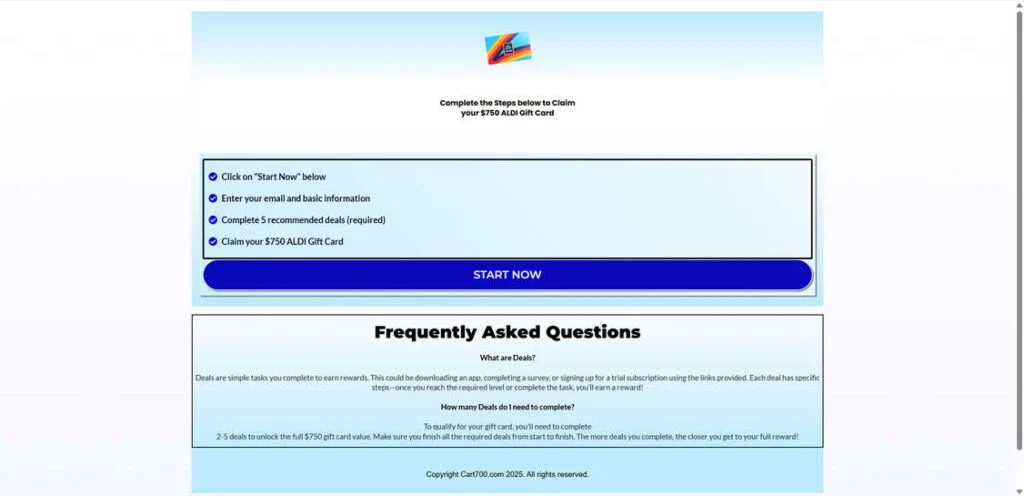
When you first land on Cart700.com, it looks simple and straightforward. You’ll likely see an ALDI logo, a blue-toned background, and a few easy-to-follow steps:
- Click on “Start Now”
- Enter your email and basic information
- Complete 5 recommended deals
- Claim your $750 ALDI gift card
At a glance, this process appears harmless. But if you look closely, there are multiple red flags. The page lacks basic hallmarks of legitimacy — there’s no clear privacy policy, no terms of service, and no official contact details. The design is generic, suggesting it’s a template used repeatedly for similar scams.
The text copy is vague, relying on emotional triggers instead of verifiable details. You’ll see bold claims about instant rewards but zero mention of how the site is affiliated with ALDI. The small print, if any, usually contains confusing legal jargon or redirects to unrelated pages.
Unauthorized Use of the ALDI Brand
One of the most misleading aspects of this scam is its unauthorized use of the ALDI logo and brand name. ALDI has confirmed through official channels that they are not affiliated with Cart700.com or any website offering gift cards through similar means.
Scammers rely on brand familiarity to gain trust. By displaying a recognizable retailer’s logo, they can instantly lower a person’s suspicion. To the average user, the page looks official enough to seem believable. That trust is then exploited to collect personal information.
The URL and Affiliate Redirection
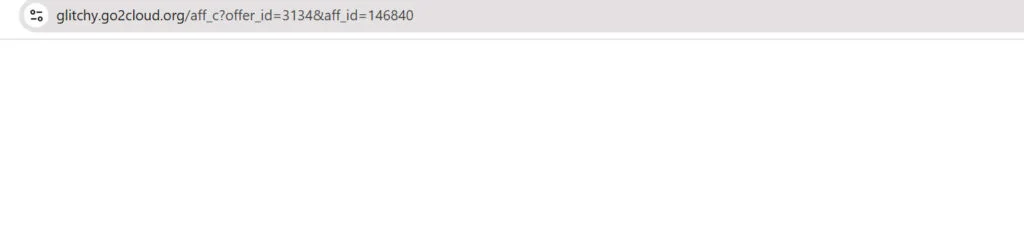
The scam uses redirect links like “glitchy.go2cloud.org/aff_c?…” — a clear sign of an affiliate network link. Affiliate programs pay a small commission whenever someone signs up for an offer, installs an app, or completes a form.
In this case, Cart700.com acts as a middleman site. It drives traffic to affiliate offers under the pretense of giving away a gift card. The scammers profit when users complete these offers, while users receive nothing in return.
Each redirect generates a small payment, but when multiplied across thousands of visitors, it can become extremely lucrative.
Social Media Advertising and Fake Testimonials
To attract victims, scammers behind Cart700.com often use social media ads or spammy pop-ups. These ads appear on Facebook, Instagram, and sometimes within mobile apps. They usually feature messages like:
- “Congratulations! You’ve been selected to receive a $750 ALDI gift card!”
- “Hurry! Only 3 gift cards left today!”
- “John from Texas just claimed his card!”
These tactics are designed to create urgency and FOMO (fear of missing out). Fake countdown timers and fabricated testimonials reinforce the illusion that others are winning rewards quickly, making it harder for people to pause and question the legitimacy.
The Hidden Goal: Data Collection
Beyond generating revenue through affiliate links, these scams have another purpose — harvesting personal data. When you enter your name, email, phone number, and sometimes even your address, that information doesn’t stay private.
It’s typically sold or shared with third-party marketers who flood your inbox and phone with promotional messages, survey invitations, and sometimes malicious links. Victims often report receiving spam emails within hours of engaging with the site.
Lack of Security and Transparency
A genuine promotion from a major retailer like ALDI would always include:
- Detailed terms and eligibility requirements
- A verifiable contact address
- Official branding consistent with ALDI’s corporate design
Cart700.com lacks all these elements. Its plain layout, generic text, and external redirects scream unprofessionalism. There’s no encryption notice, and no sign of any real company behind the site.
Recent Domain Registration
Domain records show that Cart700.com was recently registered, often just weeks or months before the scam appeared. Newly created domains are a classic hallmark of fraudulent operations. Scammers use them briefly, make quick profits, and then abandon them once flagged by users or authorities.
Victim Reports
Online discussions and scam-reporting websites have documented numerous complaints from users who interacted with Cart700.com. Common issues include:
- Never receiving a gift card after completing multiple offers
- Being charged for subscription services they never intended to buy
- Receiving spam calls and emails from unknown companies
- Realizing that personal data was sold to advertisers
Victims describe frustration at wasting time on “deals” that only benefit the scam operators. Some even report being signed up for costly recurring trials without their consent.
The Cart700.com $750 ALDI Gift Card Scam is a multi-layered deception that blends fake branding, misleading incentives, and aggressive affiliate marketing tactics. Its simplicity hides its sophistication. The ultimate goal is to generate revenue and harvest user data, not to distribute any real rewards.
Now that we understand what this scam is, let’s break down how it actually works — step by step.
How the Scam Works
Understanding how the Cart700.com scam operates helps reveal why so many people fall for it and how the fraudsters profit at every stage. Below is a detailed walkthrough of the process.
Step 1: The Lure – Social Media Ads and Clickbait Offers
The scam begins on social platforms, where users encounter an enticing ad or post claiming that ALDI is giving away $750 gift cards to celebrate an anniversary or promotional event.
These posts often feature bright graphics, fake testimonials, or countdowns urging you to act fast. For example:
“Only 2 left! Don’t miss your chance to get a $750 ALDI card today!”
Such language is crafted to bypass critical thinking by creating a sense of urgency. Many users, curious or hopeful, click on the link without verifying the source.
Step 2: Redirection Through Affiliate Links
Once clicked, the ad redirects the user through one or more affiliate tracking URLs. A common example is something like:
glitchy.go2cloud.org/aff_c?offer_id=3134&aff_id=146840
Each redirect serves a purpose. It tracks the user’s click activity and ties it to the scammer’s affiliate ID. This way, when someone completes a “deal” or “offer,” the scammer earns a commission from the affiliate network hosting those offers.
Step 3: Arrival on Cart700.com
After a few redirects, the user lands on Cart700.com, which looks like a simple rewards claim page. It displays a set of instructions, such as:
- Click “Start Now”
- Enter your information
- Complete 5 recommended deals
- Claim your $750 ALDI gift card
The site design mimics legitimate survey sites. It uses official-looking fonts, blue color schemes, and sometimes even adds an ALDI image to appear genuine.
However, there’s no SSL encryption, and no trace of real corporate branding or customer support.
Step 4: Data Collection
Before starting, the site asks for personal details — typically your name, email address, and sometimes phone number or ZIP code. This information is immediately stored and potentially shared with marketing partners.
From this point, the scammers can:
- Add you to spam mailing lists
- Sell your information to data brokers
- Use your email to send phishing messages
This initial step alone gives the fraudsters what they want most: your personal data.
Step 5: The “Deals” Trap
Once your details are entered, you’re prompted to complete several “deals” or “offers.” These often include tasks like:
- Downloading specific mobile apps
- Signing up for trial subscriptions (e.g., streaming or credit services)
- Filling out additional surveys
- Purchasing low-cost products or subscriptions
Each completed task generates a small affiliate commission for the scammers. You might be told to complete 5 or more offers before being eligible for the gift card.
But here’s the catch:
Even after completing the required number of deals, the site will not issue a gift card. Instead, it may display more tasks or say your “submission is under review.” Eventually, communication stops altogether.
Step 6: Endless Loops and False Promises
Victims report being stuck in an endless cycle of offers. After completing one set, they’re told they haven’t met the criteria yet. Some are directed to new websites repeating the same pattern.
This system ensures maximum affiliate revenue for the scam’s operators while keeping victims busy with false hope.
Step 7: Hidden Costs and Subscriptions
Some “offers” involve signing up for trial memberships that automatically renew into paid subscriptions if not canceled. Victims who provide credit card details for these trials often face unexpected charges later.
For example:
- A “$1 trial” for a diet app turns into a $39.99 monthly charge.
- A streaming trial begins billing after a week with no clear cancellation instructions.
Because these offers come from third-party networks, users can’t easily trace or dispute them.
Step 8: Aftermath – Spam, Charges, and No Gift Card
After completing several offers and waiting for the promised card, victims realize nothing arrives. They start receiving marketing emails, promotional texts, and even scam calls.
The scammers have achieved their goals:
- They’ve earned affiliate commissions.
- They’ve collected valuable personal data.
- They’ve increased traffic to their partner sites.
Meanwhile, the victim is left with no reward and potentially new financial risks.
Step 9: Disappearing Act
Once enough people report the scam, the domain (Cart700.com) may be shut down or blacklisted. But the scammers rarely stop there. They simply create a new domain — like Cart750.com, Shop800.com, or RewardSpot.net — and start the cycle again using the same template.
Step 10: The Broader Affiliate Scam Network
This scam is part of a larger affiliate fraud ecosystem that thrives on fake reward promotions. The operators often manage dozens of similar sites, all connected through shared affiliate tracking IDs and hosting servers.
In essence, Cart700.com is just one face of a much larger network exploiting users through fake promotions.
What to Do if You Have Fallen Victim to the Cart700.com Scam
If you’ve already entered your information, downloaded apps, or signed up for offers through Cart700.com, don’t panic. You can still take several steps to protect your data and minimize damage.
Here’s what you should do immediately:
1. Stop Interacting With the Website
Close the page and do not click any more links, complete offers, or download apps from Cart700.com or any redirects.
2. Change Your Passwords
If you used the same email and password combination anywhere else, change your passwords immediately. Use strong, unique passwords for each account and enable two-factor authentication wherever possible.
3. Monitor Your Email and Bank Accounts
Keep a close eye on your inbox and financial statements. Watch for suspicious emails, subscription confirmations, or unexpected charges. If you see unauthorized transactions, report them to your bank or credit card issuer right away.
4. Unsubscribe from Unwanted Emails
If you start receiving spam messages, don’t click links inside them. Instead, use your email provider’s “mark as spam” or “unsubscribe” options to limit future emails.
5. Run a Security Scan
Use a reputable antivirus or anti-malware program to scan your device. Some of the offers promoted through Cart700.com may lead to unsafe downloads.
6. Cancel Trial Subscriptions
If you signed up for any free trials during the scam, locate the services and cancel them immediately. Check your credit card statement for the merchant name and search for their cancellation instructions.
7. Report the Scam
You can help stop others from falling victim by reporting Cart700.com and related domains to:
- The Federal Trade Commission (FTC) at reportfraud.ftc.gov
- The Internet Crime Complaint Center (IC3) at ic3.gov
- Your local consumer protection agency
- ALDI’s official support team, to inform them of brand misuse
8. Remove Installed Apps
If you downloaded apps or software from the scam’s “deal” pages, uninstall them right away. Some may contain adware or request excessive permissions.
9. Consider Identity Protection
If you entered sensitive information (like your address or birth date), consider enrolling in an identity theft protection service. These services can monitor for signs of your information being misused online.
10. Educate Others
Scammers rely on public ignorance. Share your experience with friends and family to prevent them from falling into the same trap.
Is Your Device Infected? Run a Free Malware Scan
Slow performance, constant pop-ups, or strange behavior? These are classic signs of a malware infection. A quick way to check is to scan your device with Malwarebytes Free, one of the most trusted malware removal tools available. If you only visited a scam page and didn’t download or install anything, this scan is optional.
The free version detects and removes the most common threats, including:
- Adware — the cause of those annoying pop-ups
- Browser hijackers — unwanted redirects and changed homepages
- Trojans and spyware — hidden programs stealing your data
- Potentially unwanted programs (PUPs) — software you never asked for
👉 Select your device below — Windows, Mac, or Android — then follow the simple steps to download Malwarebytes, scan your system, and remove any threats it finds. The scan usually takes 5 to 20 minutes.
Run a Malware Scan with Malwarebytes for Windows
Malwarebytes is one of the most popular and trusted anti-malware tools for Windows — and it’s completely free for removing infections. It catches threats that many antivirus programs miss, including adware, browser hijackers, and trojans. Follow the steps below to scan your PC and remove what Malwarebytes finds.
Download Malwarebytes
Click the button below to download the latest version of Malwarebytes for Windows from the official source. The free version is all you need — it will scan your computer and remove adware, browser hijackers, and other malicious software at no cost.
Download MalwarebytesOfficial installer for Windows 11 and 10. Your download starts right away.Want real-time protection? See Malwarebytes Premium Malwarebytes Free for WindowsScans and removes malware at no cost
-
Install Malwarebytes
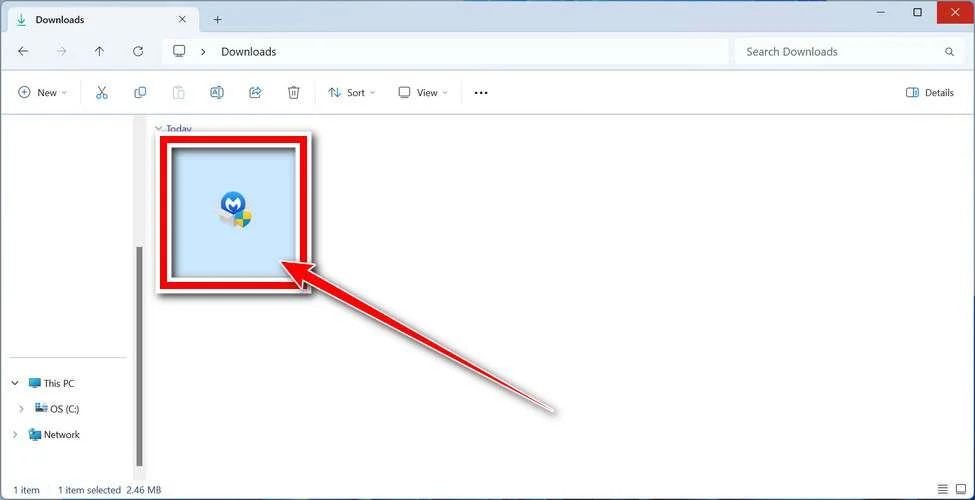
When the download finishes, open your Downloads folder and double-click the MBSetup file. If Windows shows a User Account Control pop-up, click “Yes” to allow the installation.
Follow the On-Screen Prompts to Install Malwarebytes
The setup wizard will walk you through a few quick screens:
-
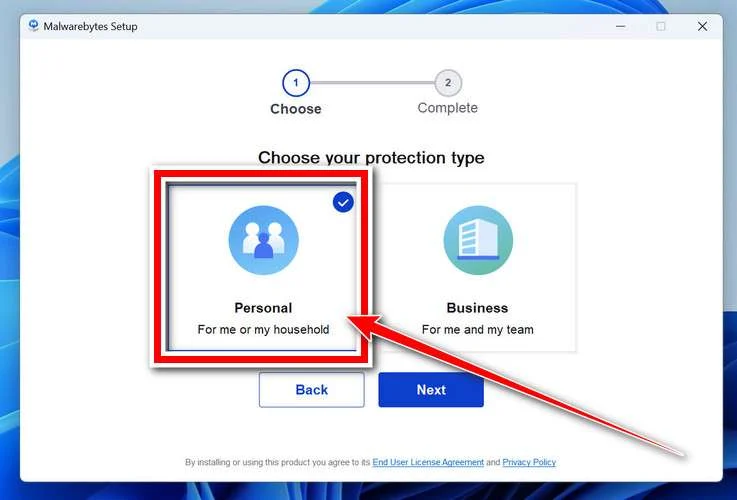
Choose where you’re installing the program — “Personal Computer” or “Work Computer” — then click Next.
-
Malwarebytes will now install on your device. This usually takes under a minute.
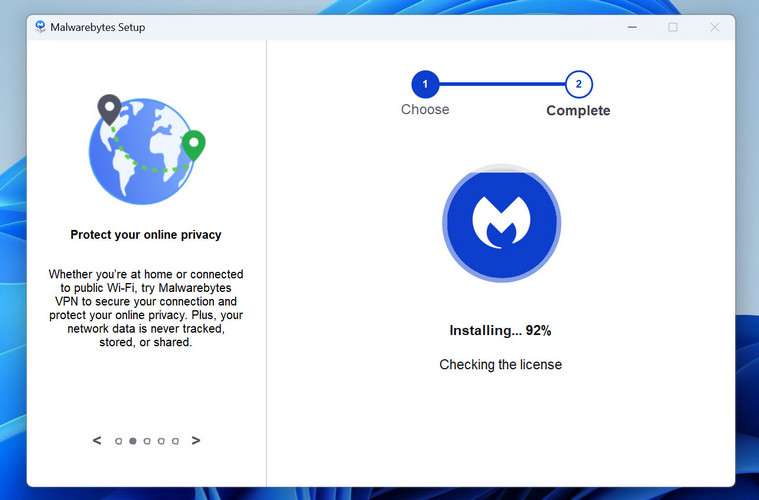
-
When installation is complete, the “Welcome to Malwarebytes” screen will open automatically.
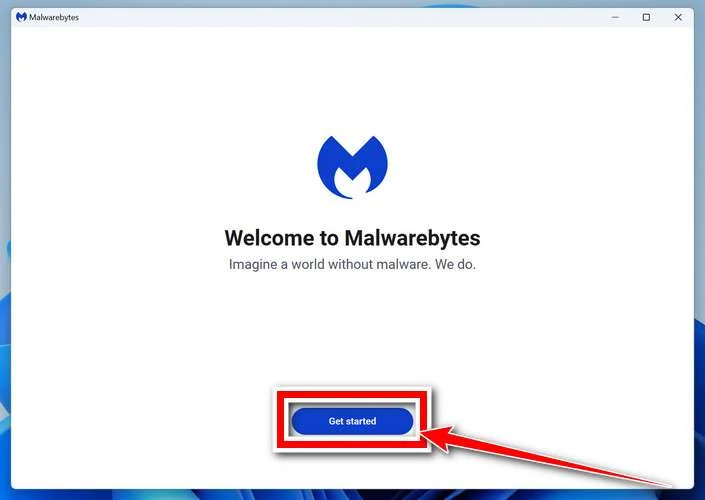
-
On the final screen, click Open Malwarebytes to launch the program.
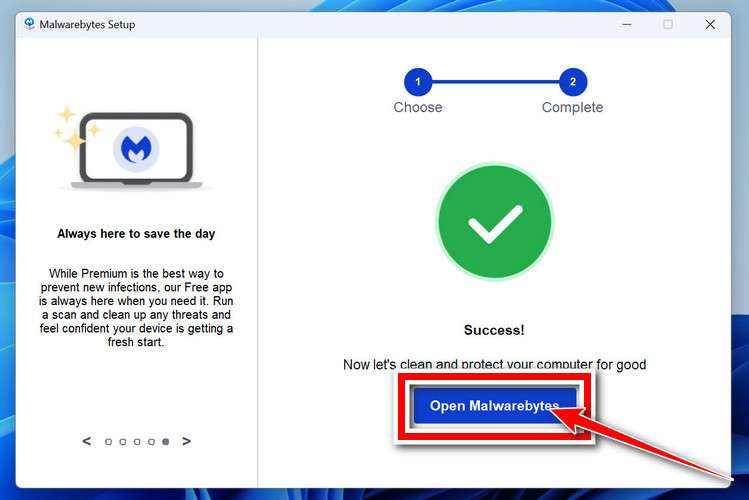
-
Optional: Check for rootkits with a Custom Scan
You don’t need to change any settings for a normal scan. The standard Threat Scan in the next step is enough for most problems, so you can go straight to it.
If you also want to check for rootkits, use a Custom Scan. In current versions of Malwarebytes, rootkit scanning is only available there:
- On the Scanner tile, click the three-dot menu and select Advanced Scan.
- Choose Custom Scan. In its options, check Scan for rootkits.
- Select your system drive (usually C:\) as the location to scan, then start the scan. It takes longer than a Threat Scan.
- When it finishes, review and quarantine the results as described in the steps below.
Rootkit scanning isn’t available on Windows devices with ARM processors.
Start the Scan
Click the blue Scan button. Malwarebytes will automatically update its virus database and start checking your computer for malware.
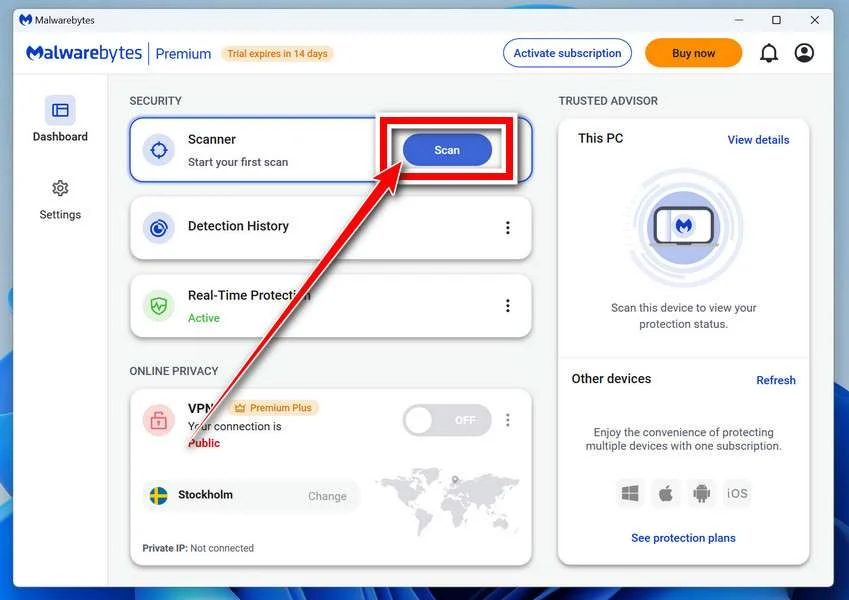
-
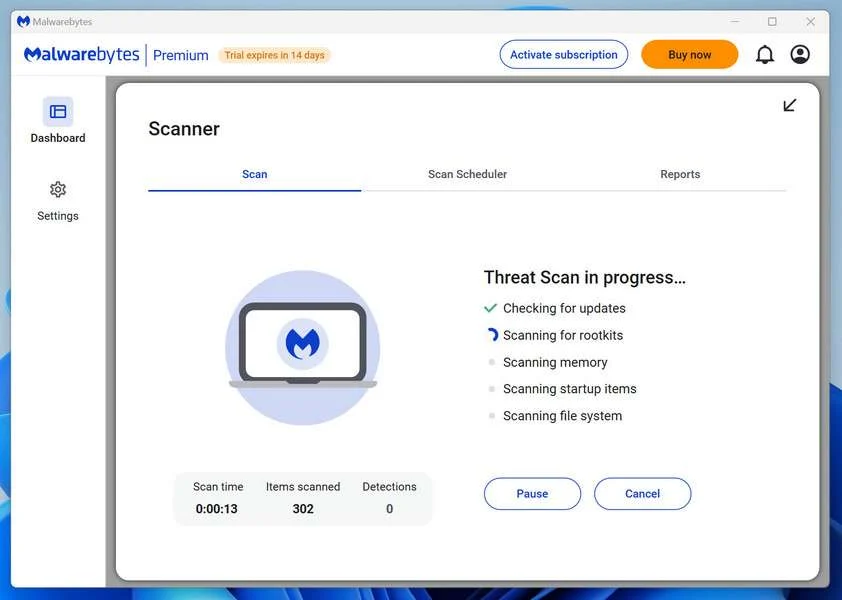
Wait for the Scan to Finish
The scan checks your entire system for browser hijackers and other malicious programs, so it can take 5 to 20 minutes depending on your computer. Feel free to do something else — just check back occasionally to see the progress.
-
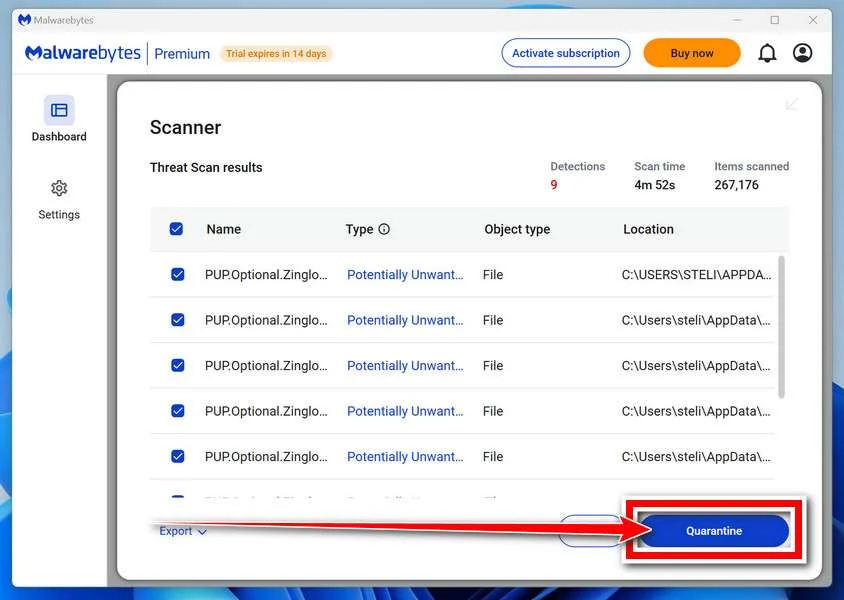
Quarantine the Detected Threats
When the scan is done, you’ll see a list of everything Malwarebytes found — malware, adware, and potentially unwanted programs. Click the “Quarantine” button to remove all of them at once.
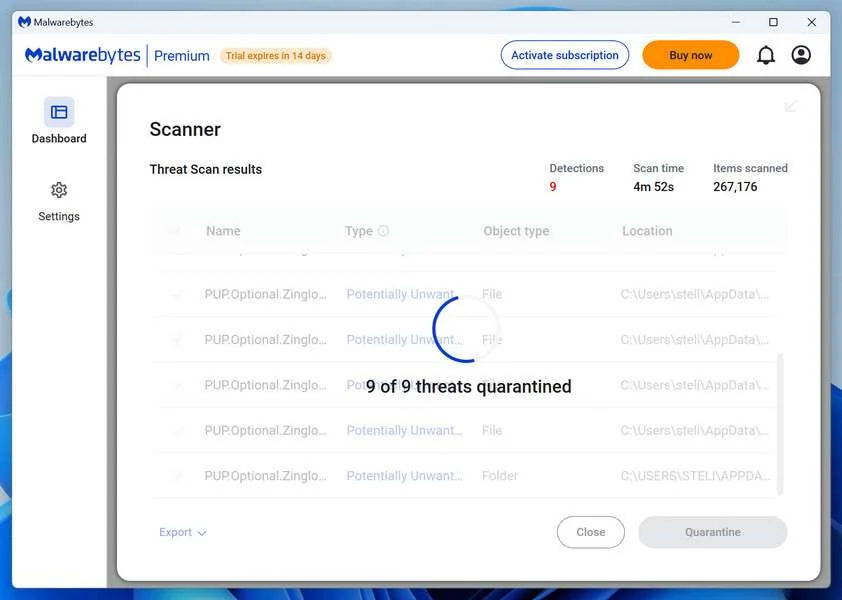
Malwarebytes will now remove the malicious files and registry entries and move them safely into quarantine.
-
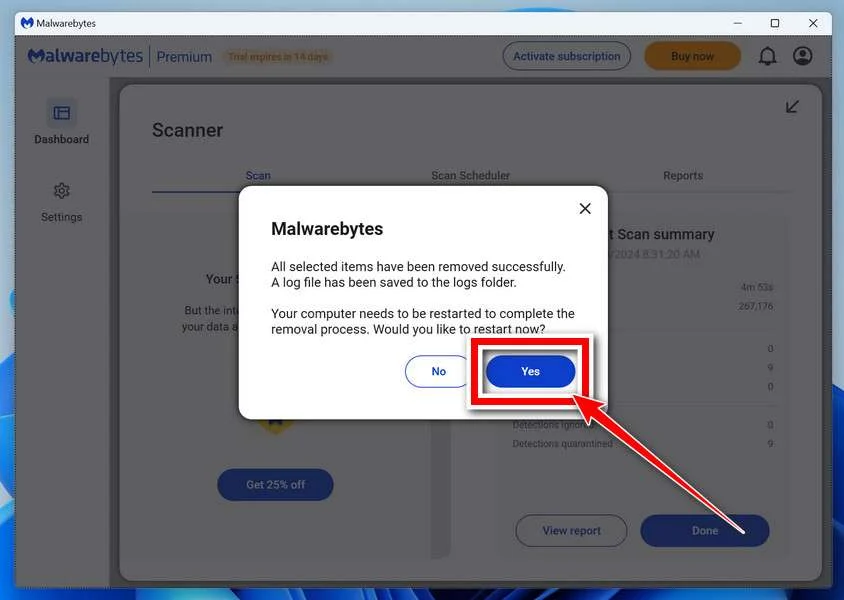
Restart Your Computer
Some threats can only be fully removed after a reboot. If Malwarebytes asks you to restart, click Yes. Once you’re logged back in, Malwarebytes has finished removing the threats it found.
When the scan is done, check whether the problems you noticed have stopped. If they continue, see the options below.
If you are still having problems with your computer after completing these instructions, then please follow one of the steps:
- Run a computer scan with ESET Online Scanner
- Ask for help in our Windows Malware Removal Help & Support forum.
Run a Malware Scan with Malwarebytes for Mac
Malwarebytes for Mac is a free on-demand scanner that removes the malware other security software tends to miss — adware, browser hijackers, and unwanted programs included. Cleaning an infected Mac with Malwarebytes has always been completely free, and it’s our go-to recommendation. Follow the steps below to scan your Mac and remove what Malwarebytes finds.
-
Download Malwarebytes for Mac
Click the button below to download the latest version of Malwarebytes for Mac.
Download MalwarebytesOfficial installer for macOS. Your download starts right away.Want real-time protection? See Malwarebytes PremiumMalwarebytes Free for MacScans and removes malware at no cost -
Open the Malwarebytes setup file
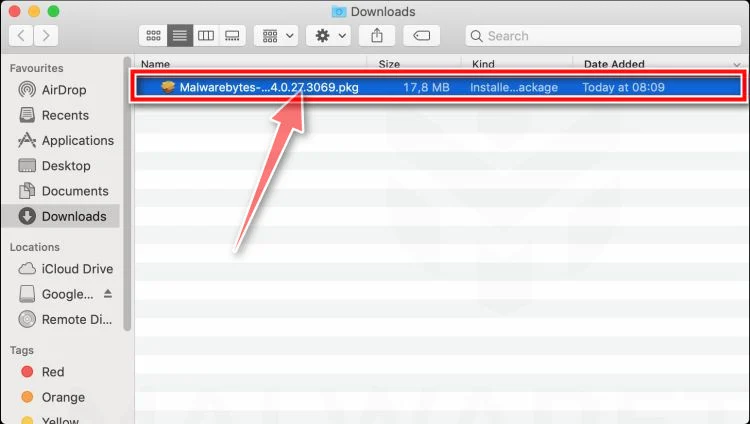
When the download finishes, open your Downloads folder and double-click the setup file to begin the installation.
-
Follow the On-Screen Prompts to Install Malwarebytes
The Malwarebytes for Mac Installer will guide you through a few quick screens. Click “Continue” and keep following the prompts until the installation completes.
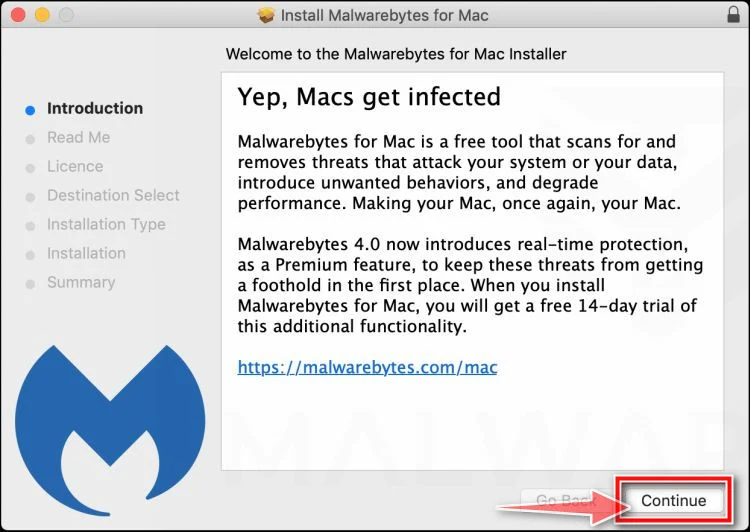
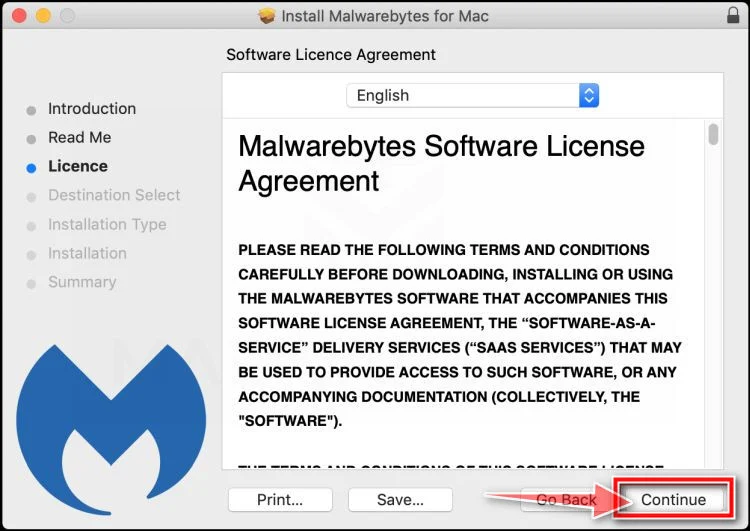
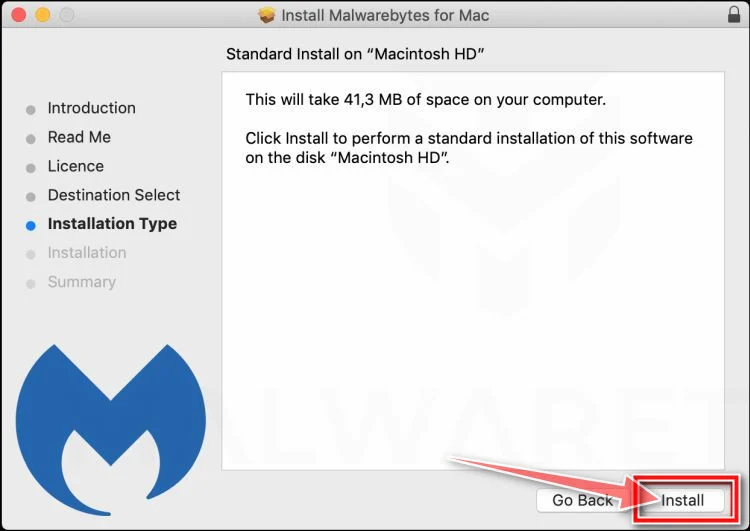
When the installation is complete, Malwarebytes opens to the Welcome to Malwarebytes screen. Click “Get started“.
Malwarebytes needs Full Disk Access to check your whole Mac. When it asks, open System Settings > Privacy & Security > Full Disk Access, turn on Malwarebytes (it may be listed as Malwarebytes Protection), and confirm with your password or Touch ID. Then return to Malwarebytes. On macOS Monterey and earlier, this setting is in System Preferences > Security & Privacy > Privacy.
-
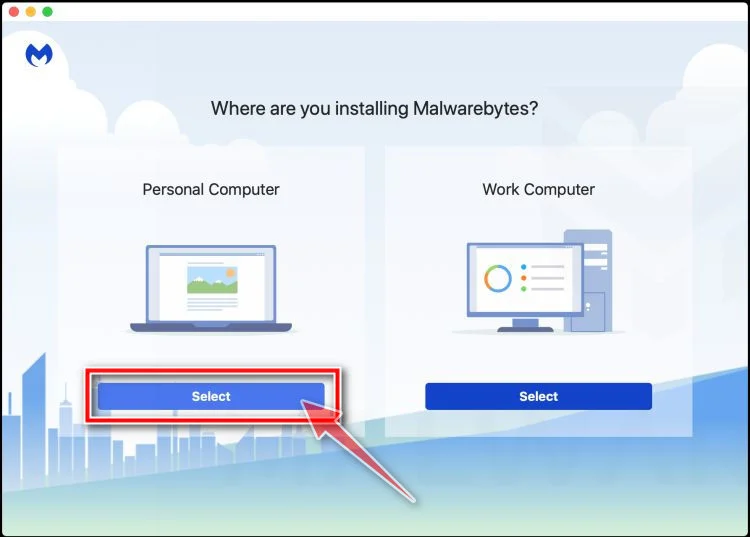
Select “Personal Computer” or “Work Computer”
Malwarebytes will ask what type of computer you’re installing it on. Click either Personal Computer or Work Computer, whichever applies.
-
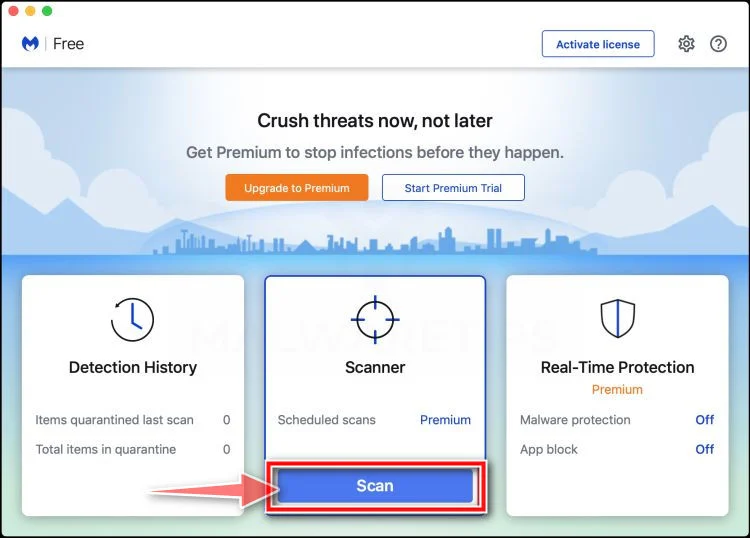
Start the Scan
Click the “Scan” button. Malwarebytes will automatically update its detection database and begin checking your Mac for malware.
-
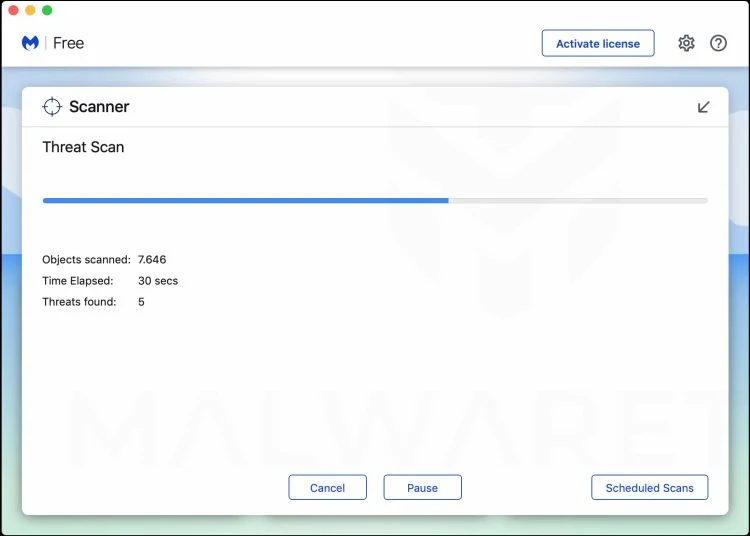
Wait for the Scan to Finish
Malwarebytes will scan your Mac for adware, browser hijackers, and other malicious programs. This can take a few minutes, so feel free to do something else — just check back occasionally to see the progress.
-
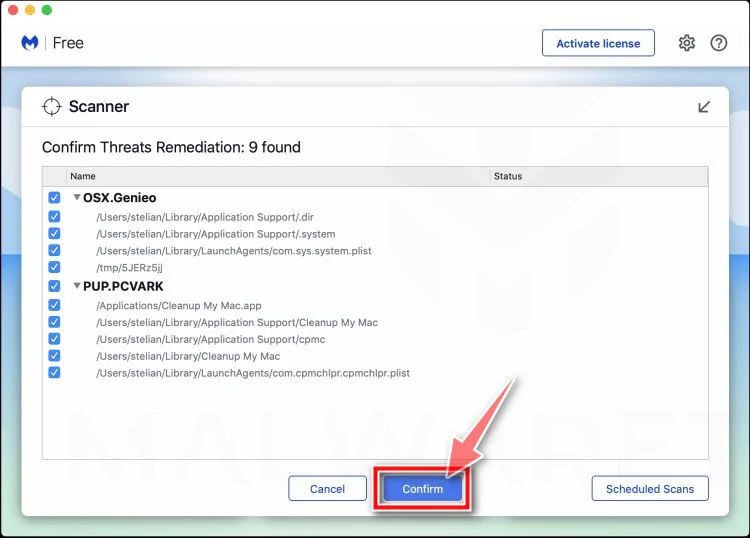
Quarantine the Detected Threats
When the scan is done, you’ll see a list of everything Malwarebytes found. Click the “Quarantine” button to remove all the threats at once.
-
Restart Your Mac
Malwarebytes will now remove all the malicious files it found. Some threats can only be fully removed after a reboot — if Malwarebytes asks you to restart, allow it. Once you’re logged back in, check whether the problems you noticed have stopped. If they come back, save the scan report and ask for help in our forum.
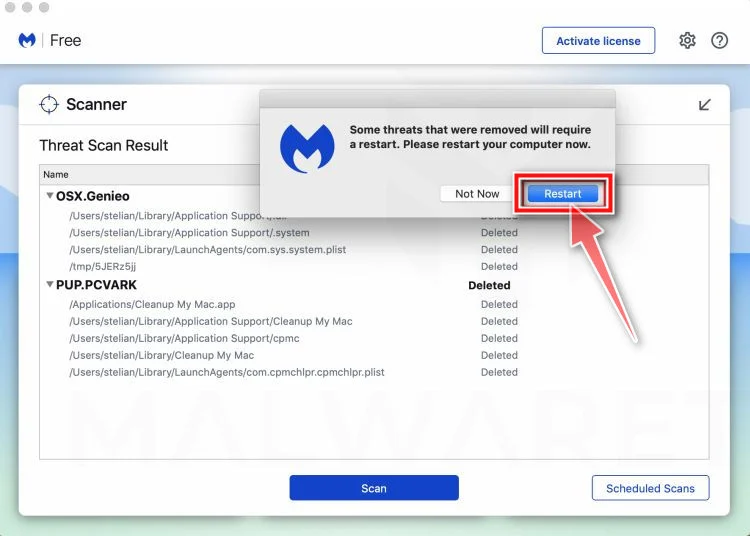
If the problems you noticed continue after the scan, see the options below.
If you are still experiencing problems while trying to remove a malicious program from your computer, please ask for help in our Mac Malware Removal Help & Support forum.
Run a Malware Scan with Malwarebytes for Android
Malwarebytes for Android scans your phone or tablet for malware, adware, and potentially unwanted apps. The free version scans only when you start a scan. Real-time protection, which checks apps automatically, is part of the paid Premium version.
-
Download Malwarebytes for Android.
You can download Malwarebytes for Android by clicking the link below.
Get Malwarebytes for AndroidOpens Google Play in a new tab.Want real-time protection? See Malwarebytes Premium for AndroidMalwarebytes for AndroidScans your phone and removes malware at no cost -
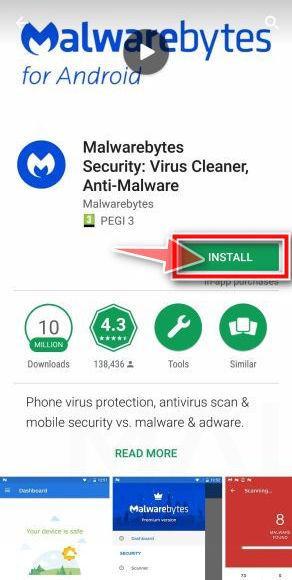
Install Malwarebytes for Android on your phone.
In the Google Play Store, tap “Install” to install Malwarebytes for Android on your device.
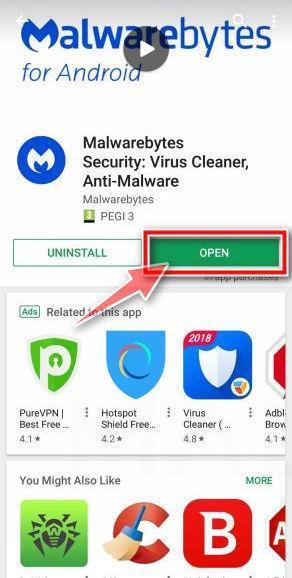
When the installation process has finished, tap “Open” to begin using Malwarebytes for Android. You can also open Malwarebytes by tapping on its icon in your phone menu or home screen.
-
Follow the on-screen prompts to complete the setup process
When Malwarebytes opens, it walks you through a short setup. Tap Get started and follow the prompts. If you see an offer for a trial or a paid plan, read it before you accept. You can skip it and keep using the free scanner.
Malwarebytes will ask for permission to access the files on your phone so it can scan them. Tap Allow, or turn on the permission in the Android screen that opens, then return to Malwarebytes.
-
Run a scan with Malwarebytes for Android
On the main screen, tap Scan now. In some versions, you open the menu, tap Scanner, and then tap Run a scan.
-
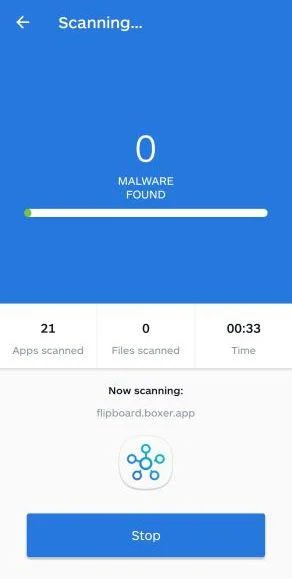
Wait for the Malwarebytes scan to complete.
Malwarebytes will now start scanning your phone for adware and other malicious apps. This process can take a few minutes, so we suggest you do something else and periodically check on the status of the scan to see when it is finished.
-
Remove the detected apps.
When the scan has been completed, you will see a list of the threats that Malwarebytes for Android has detected. Next to each detected item, tap the menu icon (three dots), then choose to uninstall the app or delete the file. Android then asks you to confirm. Tap OK or Uninstall to remove the app.
-
Restart your phone.
When the detected apps are removed, restart your phone if Malwarebytes asks you to. Then check whether the problems you noticed have stopped.
If the problems you noticed continue after the scan, see the options below.
If you are still having problems with your phone after completing these instructions, then please follow one of the steps:
- Ask for help in our Mobile Malware Removal Help & Support forum.
- Only as a last resort, reset your phone to factory settings. Read the warning below first.
- Back up your photos, videos, files, and messages, for example to your Google account or a computer.
- Make sure you know your Google account email and password. The phone asks for them after the reset. If you changed the password recently, Google recommends waiting 24 hours before you reset.
- On a Samsung phone, also make sure you know your Samsung account password.
- If you use an authenticator app for two-step verification, move your accounts to another device or save your backup codes first.
Stay Protected: Block Ads and Malicious Sites
No scan can prove a device is completely clean, so it helps to block threats before they reach you. Most infections start with a malicious ad or a fake download button — so blocking them at the source is your best defense.
We recommend AdGuard, which blocks malicious ads, phishing pages, and dangerous redirects before they can reach you.
👉 Download AdGuard and browse safely
The Bottom Line
The Cart700.com $750 ALDI Gift Card Scam is a textbook example of how modern online scams evolve to exploit curiosity and greed. By using familiar brand names, urgent messaging, and simple promises, scammers can lure unsuspecting users into a system designed to harvest data and generate profit through affiliate fraud.
No legitimate company will ever ask you to complete “offers” or download apps to claim a reward. If something seems too good to be true — especially a $750 gift card for minimal effort — it almost always is.
Protect yourself by staying skeptical, verifying URLs, and never entering personal details on unfamiliar sites. The best defense against scams like Cart700.com is awareness. The more people understand how these schemes work, the fewer victims they can claim.
Always remember: real rewards don’t come with strings attached, and no genuine company hides behind fake countdowns and redirect chains.
Frequently Asked Questions
What is the Cart700.com $750 ALDI Gift Card Scam?
The Cart700.com $750 ALDI Gift Card Scam is a deceptive online scheme that promises users a free $750 ALDI gift card in exchange for completing surveys, downloading apps, or signing up for promotional offers. The website appears to be an official ALDI giveaway but is not affiliated with ALDI in any way. Instead, it is an affiliate scam that generates income for the operators every time a victim completes one of the so-called “deals.”
Users never receive the promised gift card. Instead, they are redirected through a series of affiliate tracking links designed to make money for the scammers. The site collects personal information like email addresses and phone numbers, which are often shared or sold to third-party marketers.
Is Cart700.com affiliated with ALDI?
No, Cart700.com has no connection to ALDI. The company ALDI has officially stated that they are not running or sponsoring any giveaway involving Cart700.com or similar websites. The scammers use the ALDI logo and brand name without permission to gain credibility and make the site appear legitimate. This unauthorized use of a trusted retailer’s branding is one of the biggest red flags indicating that Cart700.com is a scam.
How does the Cart700.com scam work?
The scam follows a predictable and highly manipulative process designed to lure victims and make money from affiliate marketing. Here’s how it typically unfolds:
- Attraction through ads: Users see a social media post, pop-up, or online ad claiming they can get a $750 ALDI gift card by completing a few simple steps.
- Clickbait redirect: Clicking the link leads through an affiliate tracking URL, often something like “glitchy.go2cloud.org.”
- Landing page trap: The user lands on Cart700.com, which asks for personal details and displays fake instructions to “claim” the reward.
- Offer completion: The site demands that users complete 5 or more “recommended deals,” which involve signing up for trials or downloading apps.
- Data collection: The scammers harvest the personal information entered on the site and share it with advertisers or other scam networks.
- No reward: Even after completing all the steps, users never receive a gift card.
The entire process is engineered to collect user data and earn affiliate commissions, not to distribute real rewards.
Why do scammers create websites like Cart700.com?
Websites like Cart700.com are created for one simple reason: profit. Scammers use fake giveaways to attract large numbers of visitors who can be monetized in multiple ways. Every completed “deal” generates a commission from an affiliate marketing network. Additionally, user data collected on these sites can be sold to marketers or used in future scams.
The low cost of setting up these websites and running ads makes them easy to replicate. Once a site like Cart700.com is flagged or blocked, scammers often launch a new domain with a similar design, such as Cart750.com or GiftReward700.com, and continue the scheme.
What kind of information does Cart700.com collect?
Cart700.com typically asks users to provide:
- Full name
- Email address
- Phone number
- ZIP code
- Sometimes billing information for “trial offers”
Once entered, this data is not used to send a legitimate gift card. Instead, it’s stored and likely sold to advertising companies or other third parties. Victims often start receiving spam emails, unsolicited calls, or even hidden charges after interacting with the site.
How can you tell Cart700.com is a scam?
There are several clear signs that Cart700.com is not a legitimate rewards program:
- Unrealistic promise: A $750 ALDI gift card for filling out short surveys is far too generous to be real.
- No official verification: ALDI’s official website or social media channels never mention this promotion.
- Affiliate tracking links: URLs like “go2cloud.org” indicate redirection through an affiliate network.
- Missing privacy policy and contact info: Legitimate sites always include verifiable company details and terms of service.
- Generic design and content: The site uses the same format as many other fake reward scams.
- Recently registered domain: Fraudulent sites often have very recent domain registration dates, showing they were created only for short-term use.
By recognizing these warning signs, users can avoid being tricked into providing personal data or completing offers that lead nowhere.
What happens if you complete the “recommended deals” on Cart700.com?
If you follow through and complete the “recommended deals,” you’re essentially helping the scammers earn affiliate commissions. Each “deal” is connected to a third-party service — such as a paid app download or subscription trial — that rewards the scammers when you sign up.
However, you will never receive the $750 ALDI gift card, no matter how many offers you complete. Some victims have even reported being charged for ongoing subscriptions after signing up for free trials during the process.
Can completing offers on Cart700.com lead to hidden charges?
Yes. Many of the “recommended deals” require signing up for free trials that later convert into paid subscriptions. These subscriptions can start charging your card automatically after a short period, often without a clear cancellation notice.
Always read the fine print before entering payment details anywhere. If you signed up for any trials through Cart700.com, check your bank statements immediately and cancel any unwanted services.
What should I do if I entered my information on Cart700.com?
If you’ve already submitted personal details on Cart700.com, take the following steps right away:
- Stop using the site and do not complete more offers.
- Change your passwords, especially if you used the same email-password combination elsewhere.
- Monitor your email and bank accounts for suspicious activity.
- Unsubscribe or block spam emails and report them as spam.
- Cancel any free trials you might have signed up for.
- Run a malware or antivirus scan if you downloaded any apps from the site.
- Report the scam to the FTC, IC3, and ALDI’s official support team.
These steps can help minimize risks and prevent further misuse of your personal data.

Reviews & discussion
0 commentsShare a firsthand experience, or ask a question.
Community reviews
cart700.com
Moderated reader experiences, not an editorial verdict.
Start the conversation
Have a question or something useful to share? Add the first comment.