

A colorful social media post says Cash App is celebrating its anniversary by giving loyal customers a $500 balance bonus. The offer looks cheerful, simple, and generous, especially when it appears to have been shared by someone you know.
Before completing the survey or sharing the link, look past the confetti and examine where the promotion is actually taking you. A few seconds of verification can protect your account, personal information, and contacts.
Overview
The Cash App Anniversary $500 Survey Scam is a fake giveaway circulating through social media posts, messages, and shared links. It claims that Cash App is celebrating an anniversary by giving every user, or selected loyal customers, a $500 balance bonus.
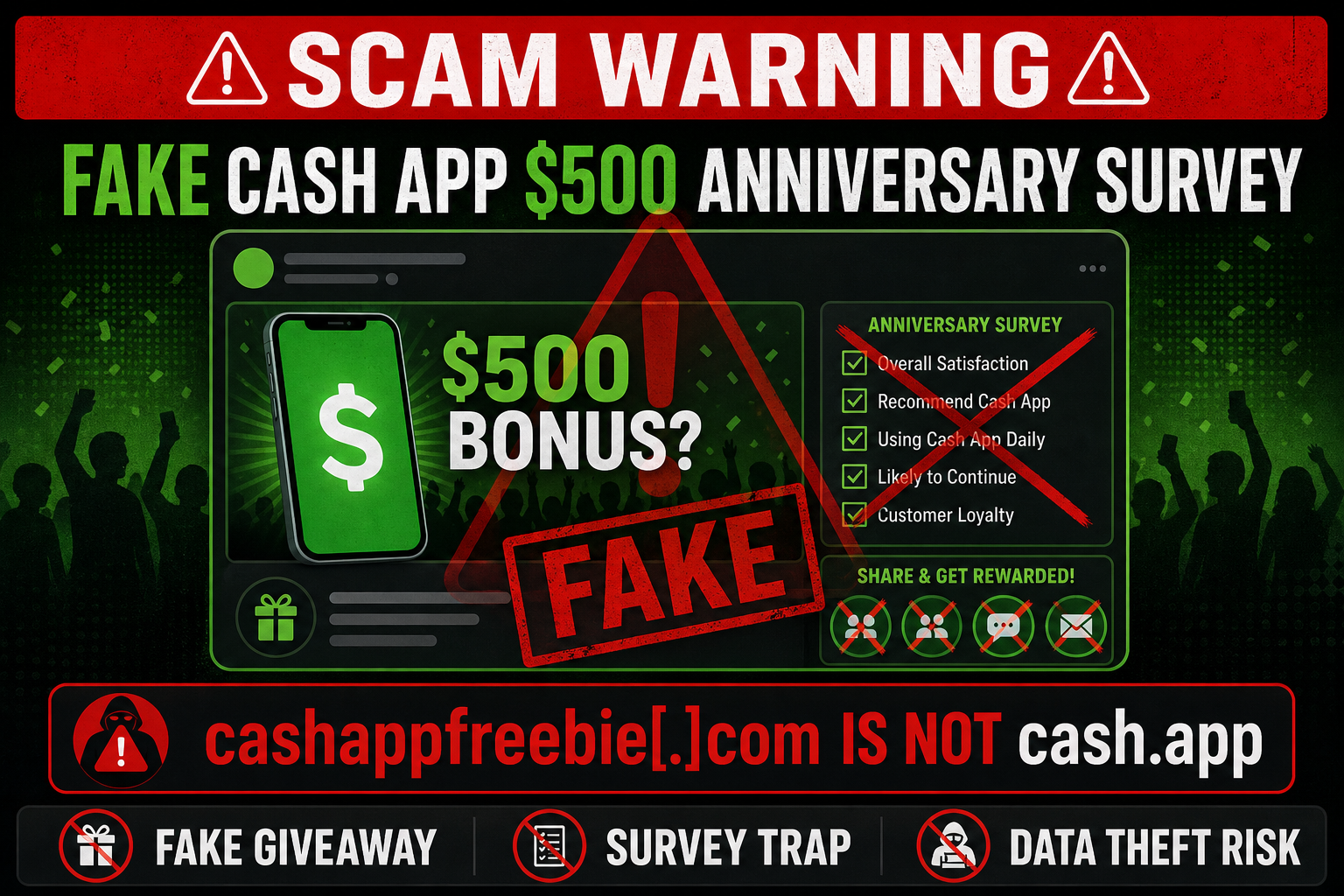
The advertisement may say users need to join the event, complete a short survey, share the promotion on social media, or invite friends to earn the reward. It uses Cash App’s familiar green-and-black color scheme, a smartphone showing $500, excited people, confetti, and language such as “anniversary celebration” to look official.
The promotion shown in the circulating image points to cashappfreebie.com. That is not Cash App’s official website. The legitimate domain is cash.app, and there is no credible announcement from Cash App confirming a blanket $500 anniversary balance bonus for all users.
Cash App’s own guide to spotting fake giveaways says genuine promotions are announced through cash.app or the company’s verified social media accounts. It also warns that real giveaways do not require sensitive details such as passwords, PINs, login codes, Social Security numbers, or driver’s license information.
This is not just a harmless online quiz. The $500 promise is used to pull visitors into a survey funnel that may collect personal information, generate advertising revenue, request account credentials, demand a small payment, or redirect users to additional questionable offers.
What the fake anniversary post claims
The wording varies as the campaign is copied across accounts and websites. One widely shared version uses the title “Cash App Anniversary Celebration: Giving all users a $500 balance bonus” and thanks users for supposedly being part of the Cash App community.
The graphic presents several easy-looking tasks:
- Join the anniversary event.
- Complete a short survey.
- Receive $500 in a Cash App balance.
- Share the event on social media.
- Invite friends and earn additional rewards.
Each instruction is designed to feel low risk. A short survey appears easier than sending money, and sharing a post can seem like a routine part of a social giveaway. Together, however, these steps help the campaign gather data and spread without paying for legitimate advertising.
Why cashappfreebie.com is a critical warning sign
A domain name is not a decorative detail. It tells you which organization controls the page receiving your information. Scammers often combine a trusted brand with words such as “freebie,” “bonus,” “reward,” “survey,” or “anniversary” to create an address that feels relevant.
The important part is the registered domain immediately before the final ending such as .com. In cashappfreebie.com, the registered domain is cashappfreebie, not cash.app. Including the words “cash” and “app” does not make the website part of Cash App.
A real Cash App promotion should be discoverable by opening the official app or typing cash.app yourself. Do not use the link inside the suspicious post to verify the post, because that only sends you back into the scammer’s controlled funnel.
The survey may have several hidden purposes
Not every visitor will see the same final page. Survey scams often route people differently based on their answers, device, location, browser, and advertising profile. One person may see endless product offers while another may be shown a Cash App login imitation.
Common objectives include:
- Collecting personal data: Names, email addresses, phone numbers, birth dates, home addresses, and other details can be packaged into marketing leads or used in later scams.
- Stealing account access: A fake verification page may request a Cash App PIN, email login, one-time security code, or other information that could help an attacker take over an account.
- Capturing card details: The page may claim the reward needs a card for identity verification, a small shipping charge, or a processing fee.
- Generating affiliate revenue: Visitors may be required to complete offers, install apps, start trials, request quotes, or sign up for subscriptions before the fictional $500 reward can be released.
- Obtaining browser permissions: Some sites ask to send notifications, which can later be used to deliver more scam alerts, fake virus warnings, and deceptive advertisements.
- Spreading the campaign: Requiring users to share the link recruits friends and family through a trusted personal connection.
Completing one page rarely brings the visitor closer to a real reward. The funnel can simply add another requirement, another sponsor offer, or another form because the promised balance bonus does not exist.
Why a familiar share can still be dangerous
Many people receive these posts from friends, relatives, community groups, or accounts they recognize. That does not mean the sender verified the promotion. They may have shared it because the page told them doing so was necessary to unlock the $500.
This creates a powerful chain of borrowed trust. Recipients are more likely to click when the message arrives from someone familiar, and each new participant can expose another circle of contacts.
The Federal Trade Commission has described similar survey funnels that promise free money, ask for personal information, and require users to forward the offer. The visible brand or occasion changes, but the information-harvesting and sharing pattern remains the same.
How to verify a genuine Cash App giveaway
Do not judge legitimacy by the logo, color palette, number of shares, or enthusiasm in the comments. Those elements can be copied, fabricated, or generated automatically.
Instead, verify the promotion through an independent route:
- Open the Cash App directly and check for an announcement inside the app.
- Type
cash.appinto the browser rather than following the promotional link. - Check the verified
@CashAppsocial media account on the platform where the offer supposedly originated. - Look for official rules hosted on a URL beginning with
cash.app. - Confirm the entry period, eligibility requirements, sponsor, prize details, and winner-selection process.
- Walk away if participation requires payment or sensitive account credentials.
Cash App states that giveaway-related emails come from addresses ending in @square.com, @squareup.com, or @cash.app. A display name that says “Cash App Support” is not enough because the visible name can be forged.
Quick warning signs
The Cash App anniversary survey offer becomes much easier to recognize when its signals are viewed together:
- Every user is supposedly receiving the same large $500 bonus.
- The post uses an unofficial website instead of
cash.app. - A survey is presented as the path to free money.
- Users must share the link or invite friends before receiving the reward.
- The page does not provide verifiable official sweepstakes rules.
- A progress bar or congratulatory message appears before eligibility has been established.
- The final requirement changes after each step is completed.
- The site asks for login codes, a Cash App PIN, card details, or identity documents.
- A small fee is required to release, activate, verify, or process the $500.
- The offer creates urgency by claiming the bonus expires soon or only a few rewards remain.
How The Scam Works
The campaign works as a sequence rather than a single obvious request. Each page asks for a little more attention, information, or commitment, making it harder for the visitor to stop after investing time in the previous steps.
1. A celebratory post appears in a social feed
The first contact is usually a Facebook post, Instagram story, Reddit submission, group message, text, or direct message. Bright Cash App-style colors, a $500 phone balance, confetti, and smiling participants make the content look like a branded campaign.
The headline says the reward is for “all users” or “loyalty customers.” This broad eligibility removes the natural question of why one particular person was selected.
2. The $500 amount creates curiosity and urgency
The amount is large enough to attract attention but small enough to sound plausible as a corporate anniversary promotion. The victim is encouraged to imagine an immediate balance credit before considering how much a genuine $500 payment to every user would cost.
Words such as “celebration,” “thank you,” and “loyalty” frame the payment as something the recipient has already earned. This reduces skepticism and creates a sense that ignoring the post means leaving free money unclaimed.
3. Brand imitation transfers trust to the link
The advertisement borrows Cash App’s name, green palette, dollar symbol, smartphone imagery, and friendly marketing tone. A casual viewer may assume the linked website is official because the graphic looks professionally made.
Visual quality does not establish ownership. A scammer can copy a logo or generate a polished advertisement in minutes, while the domain still reveals that the destination is unrelated to Cash App.
4. The unofficial site starts with easy questions
The first survey questions may ask how often you use Cash App, whether you are satisfied, or which features you prefer. These harmless questions create the appearance of customer research and keep the visitor clicking.
Some answers may not affect the result at all. The page can declare nearly every visitor eligible because its goal is not to select a genuine winner. It is to move the person to the next stage.
5. A fake eligibility result creates commitment
After a few questions, the page may display an animated check, progress bar, or “Congratulations” screen. This makes the visitor feel they passed an official review and that the $500 is now close.
The site may also show a timer, recent-winner notification, or limited number of bonuses. These elements can be generated locally in the browser and do not prove that a real prize or live inventory exists.
6. Personal information is requested
The next form may ask for a full name, email address, phone number, age, ZIP code, or home address. The stated reason might be winner notification, account matching, delivery, or reward verification.
Each data point increases the value of the lead. It can also help a scammer craft convincing follow-up messages that mention the victim’s name, location, Cash App interest, or expectation of a $500 payment.
7. Sharing becomes a condition of payment
The visitor may be told to share the post on several social networks or send it to a set number of friends. A visual progress indicator can pretend to count shares and suggest that the reward will unlock when the requirement is met.
This is how the scam turns victims into distributors. Friends see the link coming from a trusted account and may not realize the sender was following instructions from an unofficial site.
8. The visitor is sent through sponsor offers
Instead of receiving $500, the user may reach a list of “deals” or “required offers.” These can include insurance quotes, app installations, product trials, subscription sign-ups, sweepstakes, or other surveys.
The operators may earn money for leads, installations, and completed offers. The victim can spend considerable time and money while the site continues to describe the Cash App bonus as pending.
9. A phishing page may request Cash App access
A more dangerous version claims that the $500 must be deposited into a verified Cash App account. The page may ask for an email address, phone number, PIN, password, or one-time code.
Never give a one-time security code to a survey, caller, or direct-message account. A code is often the final key an attacker needs to enter an account. Cash App says legitimate giveaways do not require sensitive login information.
10. A small fee can become the final trap
After the visitor has completed several steps, the site may request card details for a small processing, activation, verification, or delivery charge. Paying may produce unauthorized charges, enroll the card in an unclear subscription, or simply send money to the operator.
A genuine prize should not require a payment to be released. The FTC’s guidance on free-money social media scams is direct: do not pay to receive a prize.
11. Browser notifications and downloads extend the campaign
Some landing pages ask visitors to press “Allow” to prove they are not robots or to continue the survey. That browser prompt may actually grant permission to send notifications.
Afterward, fake security warnings, prize alerts, and misleading advertisements can appear even when the original site is closed. Other versions may promote an app, browser extension, or file that should not be installed.
12. Collected data powers follow-up scams
Someone who completed the survey has shown interest in Cash App and free-money offers. The details they submitted can be used in later calls, emails, and messages posing as Cash App support, prize administrators, banks, delivery companies, or fraud investigators.
A follow-up scammer may know enough personal information to sound convincing. Knowledge of the survey or promised $500 does not prove the caller is legitimate. It may simply mean the original data was shared or sold.
What To Do If You Have Fallen Victim
First, do not blame yourself. The promotion is built to borrow trust from a familiar financial brand and from friends who share it. Your next steps depend on what you entered, installed, shared, or paid.
- Close the survey and stop completing offers. Do not continue because a progress bar says you are one step away from $500. Do not pay a fee, install another app, or provide more information in an attempt to recover the time already spent.
- If you only opened the page, stay calm. Opening a website does not automatically mean your Cash App account was taken over. Close it, avoid any downloaded files, and check whether you granted notification, camera, microphone, location, or download permissions. Remove permissions you did not intend to grant.
- Secure any account whose credentials you entered. If you submitted an email password, social media password, or reused password, change it from the service’s official app or website. Start with your email account because it can be used to reset other accounts. Use unique passwords and enable two-factor authentication.
- Protect your Cash App account through the official app. Open Cash App directly, review recent activity, enable Security Lock, turn on notifications, and lock your Cash App Card if card information may be exposed. Contact Cash App Support through the app or
cash.app, not through a number or link provided by the survey. - Act immediately if you shared a login or verification code. Tell official Cash App Support exactly what information was entered and when. Also secure the email account and mobile number connected to Cash App. Ask your mobile carrier about an account PIN if you are concerned about unauthorized number transfers.
- Report any suspicious Cash App payment. Cash App says a suspected scam payment can be reported in the app within 30 days. Open the payment in Activity, use the available reporting or support option, and select the description that indicates you were scammed. Completed peer-to-peer payments can be difficult to recover, so report quickly.
- Contact your bank or card issuer. If you entered a debit or credit card number, use the number printed on the card or the bank’s official app. Ask whether the card should be locked or replaced and how to dispute unauthorized charges. Continue checking statements for unfamiliar merchant names and small test transactions.
- Respond to identity-data exposure. If you provided a Social Security number, driver’s license, bank account number, or detailed identity information, visit IdentityTheft.gov for a personalized recovery plan. Consider fraud alerts or credit freezes with the major credit bureaus.
- Remove unwanted notifications and software. Check the notification permissions in every browser you used and remove the suspicious site. Uninstall apps or browser extensions promoted by the survey, then run a trusted security scan. Do not install a cleanup program recommended by a pop-up from the same campaign.
- Cancel questionable trials or subscriptions. Review confirmation emails, text messages, app-store subscriptions, and card statements for offers completed during the funnel. Cancel through the official merchant or app-store controls, save the confirmation, and ask the issuer about any charge you did not knowingly authorize.
- Preserve evidence. Save the original post, account name, complete URL, screenshots, survey pages, emails, text messages, payment receipts, and dates. Defang the link by changing the dot to
[.]when documenting or warning others so nobody clicks it accidentally. - Report the campaign. Report the post and account to the social platform as fraud, impersonation, or phishing. Report the website and any financial loss to the FTC at ReportFraud.ftc.gov. You can also report suspicious accounts directly inside Cash App.
- Warn contacts without forwarding the live promotion. If you shared the link, tell the same people it is a scam. Send a plain warning or screenshot, not the clickable offer. Ask anyone who clicked to review what information they submitted.
- Watch for follow-up contact. Be suspicious of anyone who says they can release the $500, recover money, close a fraud case, or secure your account for a fee. Real support agents do not need your PIN or one-time login code.
The Bottom Line
The Cash App Anniversary $500 Survey Scam is not an official loyalty reward. It uses Cash App branding, an unofficial domain such as cashappfreebie.com, a short survey, and a sharing requirement to collect data and push visitors deeper into a deceptive offer funnel.
Verify every giveaway inside the official Cash App or on cash.app, never submit login codes to a third-party page, and never pay to receive free money. If you already interacted with the survey, secure the specific accounts and payment methods you exposed, report the campaign, and warn the people who received it from you.

Join the discussion
0 commentsShare your experience or ask a question about this article.
Discussion
Start the conversation
Have a question or something useful to share? Add the first comment.