

Have you received an alarming text message stating you owe the City Department of Transportation money and face court summons if unpaid? While worded to create urgency, it’s actually a sneaky scam with serious risks.
This comprehensive guide breaks down how the City Department of Transportation text scam works, red flags to recognize it, and most importantly, how to avoid falling victim yourself.
Overview of the City Department of Transportation Text Scam
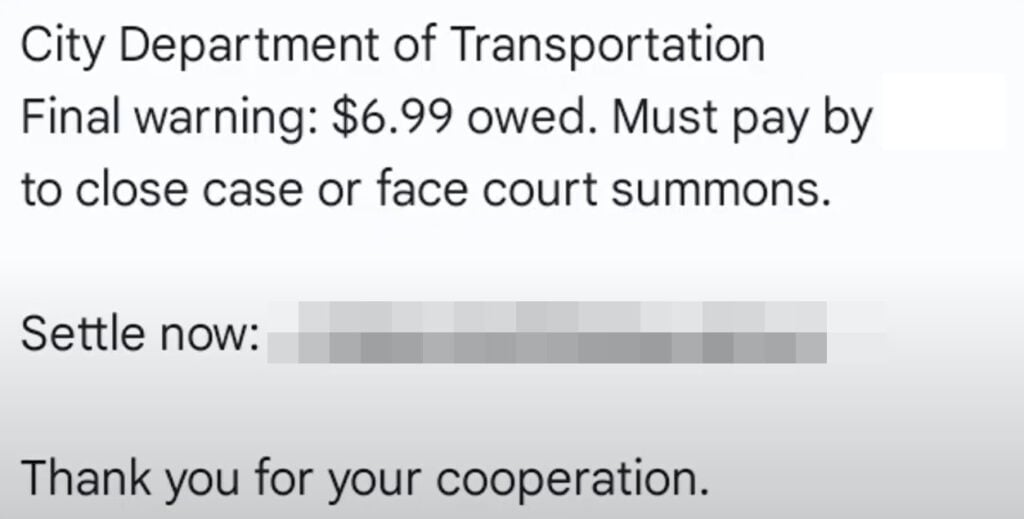
A new phishing scam has emerged involving text messages that appear to come from a City Department of Transportation. The texts claim you owe a small unpaid fee, typically around $6.99, that must be paid immediately through the provided link or you may face court summons or other legal action.
This is simply a scam orchestrated to steal personal information and credit card details from recipients who click the link and enter their information on the fake payment portal. By creating a sense of urgency and threatening consequences, the texts trigger an emotional response that pressures people to act before thinking it through clearly.
The messages are structured to seem credible and alarming. They use an authoritative tone stating “Final Warning” and mention court summons if the supposed debt is not settled right away. This makes recipients feel they need to urgently click the link and enter their information to avoid severe penalties over what seems to be a small, overlooked payment.
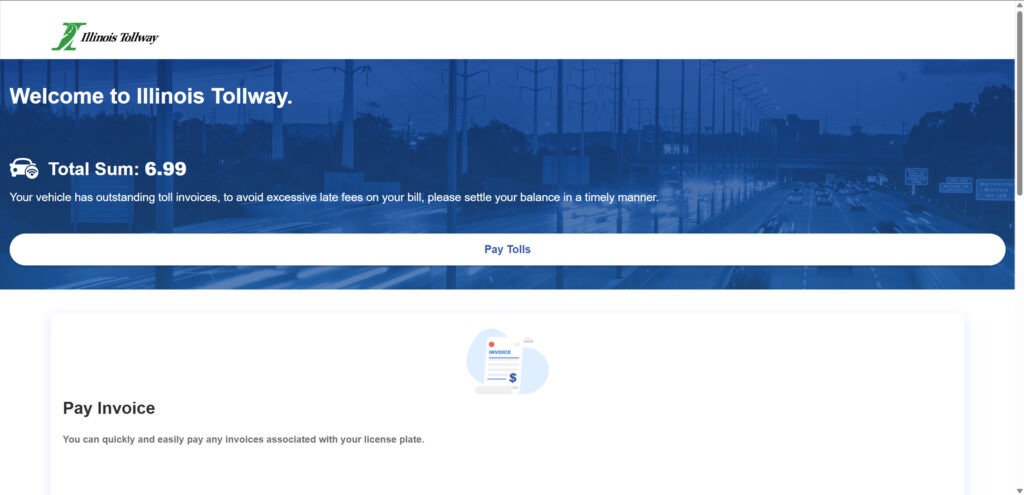
However, the texts are complete frauds. They do not actually come from any real City Department of Transportation. The messages are sent en masse to random phone numbers nationwide using automated technology. The links go to sham websites dressed up to mimic legitimate city DOT payment portals.
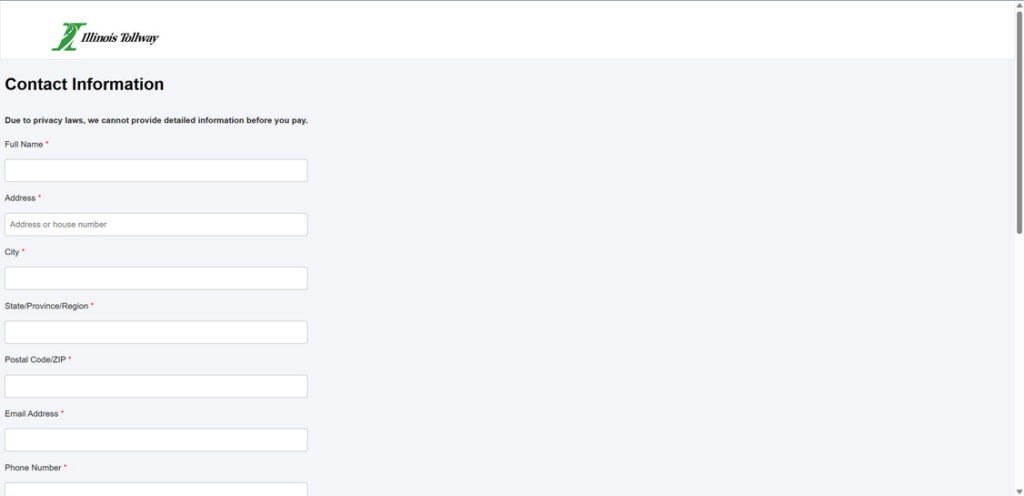
If recipients click the deceitful link, they are taken to a convincing but fraudulent site and prompted to enter personal details such as full name, home address, phone number, and email address. There is also a payment processing section asking for credit or debit card information, security codes, and billing details to supposedly settle the unpaid fee.
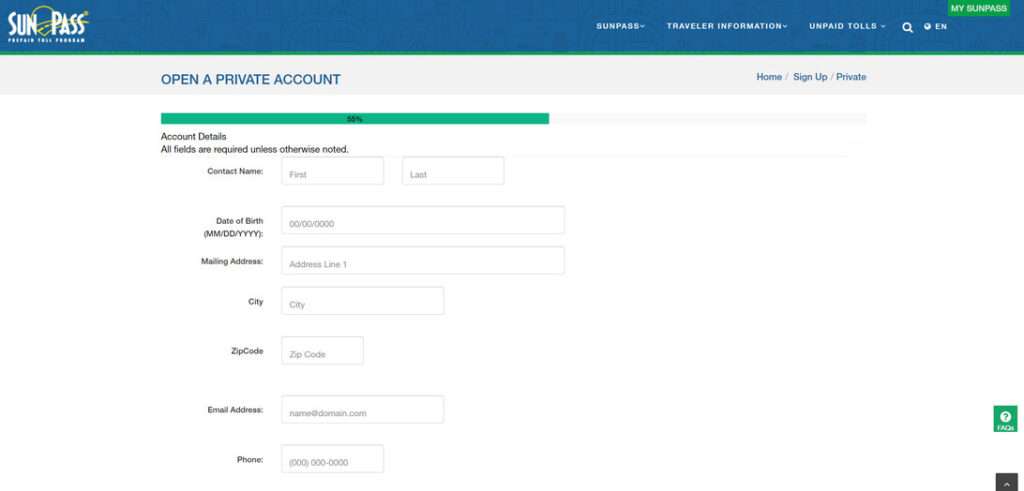
Unfortunately, any information entered is sent directly to scammers who set up the sham sites. They can then use the stolen payment card data to make unauthorized purchases or commit financial fraud in the victim’s name. Sensitive personal details obtained can also be used to steal identities or be sold on the dark web.
Meanwhile, the supposed outstanding payment still remains unpaid since no real connection exists between the scammers and any City Department of Transportation. Essentially, innocent citizens are tricked into handing over valuable information and money while getting nothing in return.
How the City Department of Transportation Text Scam Works
While simple in concept, the execution displays calculated psychological manipulation tactics to ensnare victims. Here’s a step-by-step breakdown:
1. You Receive an Urgent Text Demanding Payment
The initial text states:
“City Department of Transportation – Final warning: $6.99 owed. Must pay by [date] to close case or face court summons. Settle now: [malicious link]”
The content aims to panic recipients into thinking they must pay immediately to avoid legal issues. But every element is intentionally fabricated.
2. The Message Appears Tailored to You
No matter your location, the text claims to be from your local City Department of Transportation. This adds perceived legitimacy versus a random agency name.
3. They Provide a Link to “Settle” the Unpaid Fee
The link in the message leads to a fake payment portal impersonating a real City Department of Transportation site. This is where victims get hooked.
4. You Enter Personal and Payment Details on the Phishing Site
If you click the link, an authentic-looking payment page loads asking for your credit card, name, phone number, and other sensitive info to “settle” the fee.
5. Scammers Steal Your Details for Financial Fraud & Identity Theft
Unfortunately, any data you enter goes straight to scammers who set up the phishing site. They can now commit financial fraud using your payment info or steal your identity.
Meanwhile, your supposed outstanding DOT fee remains unpaid – because it was all a scam.
Top Signs a Text is the City Department of Transportation Scam
Here are key red flags to recognize these City Department of Transportation texts as fraudulent:
- Generic, non-specific agency name – City Department of Transportation is purposefully vague. Real agencies have distinct, specific names.
- Urgent threats – Language stating “final warning” and mentioning court summons aims to create panic. Legitimate agencies generally don’t threaten legal action through random texts.
- Suspicious link – The URL uses an odd .vip domain instead of .gov or .org used by official sites.
- Contact method – City Department of Transportations don’t contact citizens for payments via personal text. Mailed notices or secure online portal messages are standard procedures.
- Multiple recipients – The same text is blasted to countless people nationwide. Targeted collection notices wouldn’t be mass texted randomly.
- Small unpaid amount – DOTs wouldn’t summon you to court over a miniscule unpaid toll or fine. This aims to seem plausible you overlooked it.
What to Do if You Get the Fake City Department of Transportation Text
If you receive a suspicious text claiming to be from the City Department of Transportation:
- Do NOT click the link or call any number in the message – this could download malware or expose your number as active.
- Report the scam text to your cell provider – Forward it to SPAM (7726) so they can block the sender and warn other customers.
- Contact your actual City Department of Transportation – Look up the official website and call to validate if you have any outstanding balance or issues.
- Ignore threats of legal action – These texts have no real relation to any DOT. The urgent language is fabricated to scared recipients.
- Block the scam number – Block the sender’s number on your phone and delete the text to remove the phishing attempt.
- Monitor accounts closely – Keep vigilant eye out for any fraudulent charges or suspicious activity just in case.
What to Do if You Already Paid the Scammers
If you submitted payment information or personal details through the phishing site, take these steps ASAP:
- Contact your bank – Report any charges as fraudulent to cancel the compromised card and have a new one reissued.
- Place fraud alert – Have fraud alerts placed on your credit files to flag any suspicious new activity.
- Monitor credit reports – Order your free annual credit reports to check for accounts opened in your name without authorization.
- Change passwords – Update passwords on all financial, email, and other online accounts to protect from further misuse of your details.
- Freeze Credit – Placing a credit freeze restricts access to your credit report which can prevent scammers from opening new fraudulent accounts.
- File police report – File a report about the phishing scam with local law enforcement to aid investigation efforts.
- Report it to the FTC – Submit a complaint with the FTC about the City Department of Transportation phishing scam at ReportFraud.ftc.gov.
Fast action can help limit the damages and prevent additional fraud if your information was compromised.
How to Avoid Falling for City Department of Transportation Payment Scams
Here are smart tips to protect yourself from phishing scams involving City Department of Transportation:
- Maintain accurate records on any traffic fines or toll fees owed to avoid unpaid issues.
- Beware urgent texts regarding unpaid debts – verify independently via official channels.
- Never click links or call numbers in suspicious texts – type the official website in your browser or call the published agency number.
- Use strong unique passwords and enable two-factor authentication on accounts when possible.
- Only access financial or government accounts on personal devices on secured Wi-Fi networks.
- Install anti-phishing software to block known fraudulent sites.
- Educate yourself on the latest phishing tactics and common scams to recognize red flags.
Staying vigilant against phishing texts claiming to be from city agencies protects you from having your identity, money, and personal information stolen by scammers.
Frequently Asked Questions About the City Department of Transportation Text Scam
What exactly is the City Department of Transportation text scam?
Fraudsters send fake texts pretending to be from a City Department of Transportation claiming you owe money. The message threatens legal action if you don’t pay via their phishing link.
How does the City DOT text scam work?
You receive an urgent text stating you owe a small fee, often $6.99, to the City DOT. It must be paid immediately through their provided link or you may face court summons. But it’s a phishing site stealing entered data.
What details do the scammers ask for?
The fake payment portal requests personal information like your full name, address, phone number, and email. It also asks for credit/debit card numbers, security codes, and billing details to “settle” the supposed unpaid fee.
What do scammers do with my information?
Scammers steal credit card details entered to make fraudulent purchases in your name. Personal information is either used to commit identity theft or sold on the black market.
Why does this scam work so well?
It creates urgency by threatening legal action if the small unpaid fee isn’t settled quickly. This triggers fear and presses victims to act through the link before realizing it’s a sham.
How much have people lost to this scam?
Individual losses are usually the $6.99 “unpaid” fee. But wider damages come through misuse of stolen personal and financial data. The average victim loses around $300 to identity theft.
How can I avoid becoming a victim?
Never click links or call phone numbers in suspicious texts. Verify independently through official channels. Recognize real DOTs don’t contact citizens via personal texts.
What if I already paid the scammers?
Contact your bank immediately about fraudulent charges. Monitor your credit reports and accounts closely. Place fraud alerts and change all account passwords. File a police report.
How can I protect myself from future DOT scams?
Don’t click random links. Use strong unique passwords. Enable two-factor authentication where possible. Only access accounts on private networks. Educate yourself on phishing red flags.
Where can I report the City DOT text scam?
Report it to the FTC at ReportFraud.ftc.gov and your cell provider. Notify local law enforcement. Reporting helps expose the scam and aids investigation efforts.
Bottom Line
The City Department of Transportation “final warning” text scam shows the dangerous evolution of phishing tactics targeting mobile users. With scam texts exploding, awareness is crucial. Verify anything demanding payments independently through official channels, not random links. Do your part to combat phishing by reporting scams and warning others. The more informed we are, the less power these scammers have to deceive unsuspecting victims.

Join the discussion
0 commentsShare your experience or ask a question about this article.
Discussion
Start the conversation
Have a question or something useful to share? Add the first comment.