

In this blog post, we will explain what the Clearing House Interbank Payments System (CHIPS) email scam is, how it works, and what to do if you have fallen victim to it. This scam is a type of advance-fee fraud that targets people who are expecting to receive large sums of money from abroad. The scammers use fake emails and documents to impersonate the New York Clearing House, a reputable financial institution that facilitates international payments. The scammers claim that the victims’ funds have been unblocked and are ready to be transferred, but they need to pay some fees or taxes first. The scammers then disappear with the money and the victims never receive their funds.
What is Clearing House Interbank Payments System (CHIPS) Email Scam?
The Clearing House Interbank Payments System (CHIPS) is a real system that processes large-value payments between banks in different countries. It is operated by the New York Clearing House, which is a consortium of major banks that provides payment and settlement services. The CHIPS system handles about $1.5 trillion worth of transactions every day, making it one of the largest payment systems in the world.
However, some scammers have been using the name and reputation of the CHIPS system and the New York Clearing House to trick unsuspecting people into sending them money. The scammers send out fake emails that look like they are coming from the New York Clearing House or its officials. The emails usually contain a subject line such as “Clearing House {From Paul Woods}” or “Final Payment Release Notification”. The emails inform the recipients that their funds, usually millions of dollars, have been unblocked by the U.S. Treasury Department’s Office of Foreign Assets Control (OFAC) and are ready to be transferred to their bank accounts through the CHIPS system. The emails also include some personal details of the recipients and their supposed financial representatives or partners, who are actually accomplices of the scammers.
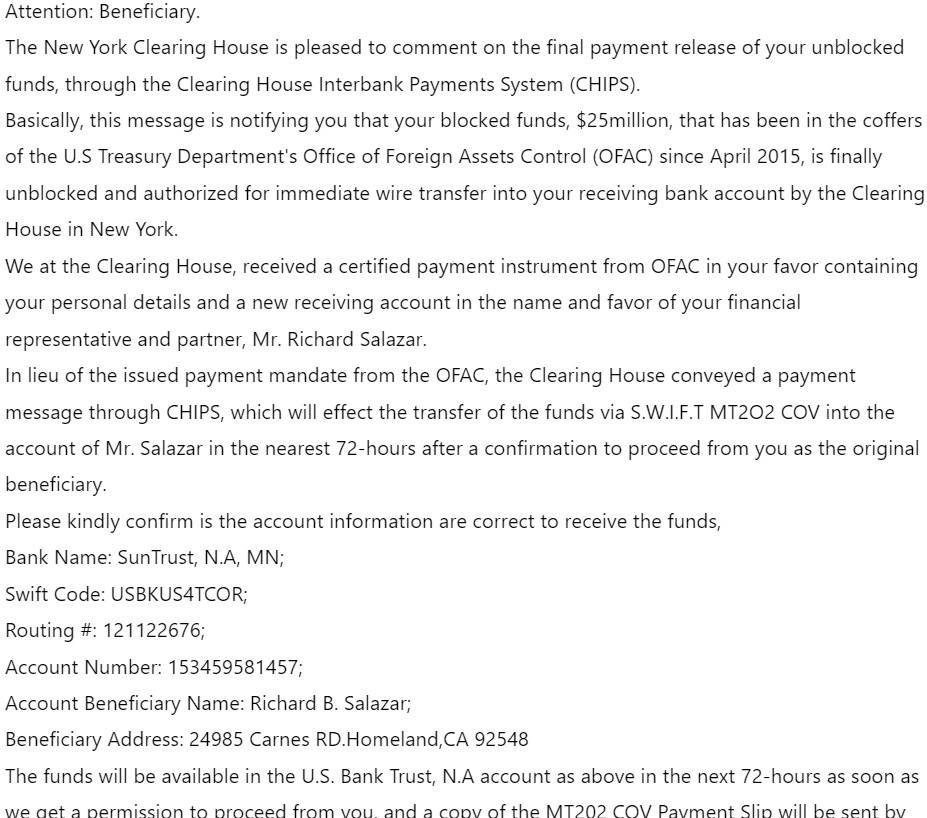
Here is how the Clearing House Interbank Payments System (CHIPS) Email Scam looks:
Subject: Clearing House {From Paul Woods}
Attention: Beneficiary.
The New York Clearing House is pleased to comment on the final payment release of your unblocked funds, through the Clearing House Interbank Payments System (CHIPS).
Basically, this message is notifying you that your blocked funds, $25million, that has been in the coffers of the U.S Treasury Department’s Office of Foreign Assets Control (OFAC) since April 2015, is finally unblocked and authorized for immediate wire transfer into your receiving bank account by the Clearing House in New York.
We at the Clearing House, received a certified payment instrument from OFAC in your favor containing your personal details and a new receiving account in the name and favor of your financial representative and partner, Mr. Richard Salazar.
In lieu of the issued payment mandate from the OFAC, the Clearing House conveyed a payment message through CHIPS, which will effect the transfer of the funds via S.W.I.F.T MT2O2 COV into the account of Mr. Salazar in the nearest 72-hours after a confirmation to proceed from you as the original beneficiary.
Please kindly confirm is the account information are correct to receive the funds,
Bank Name: SunTrust, N.A, MN;
Swift Code: USBKUS4TCOR;
Routing #: 121122676;
Account Number: 153459581457;
Account Beneficiary Name: Richard B. Salazar;
Beneficiary Address: 24985 Carnes RD.Homeland,CA 92548
The funds will be available in the U.S. Bank Trust, N.A account as above in the next 72-hours as soon as we get a permission to proceed from you, and a copy of the MT202 COV Payment Slip will be sent by fax to the receiving beneficiary bank, U.S. Bank Trust, N.A; Mr. Salazar, and also a copy of the wire slip to you for funds clearance at your receiving bank.
We hope this letter is understood, if not, kindly go over the content twice or more before responding, And If you have any questions as regards this matter, kindly reply me via (clearinghousechipny@gmail.com) or call the Clearing House at the number we will send you as soon as we recieve your response.
If you have any questions,we would be pleased to discuss any of our comments in more detail.
Thanks for your Co-Operation.
Sincerely,
Mr. Paul Woods
SWIFT Transfer Manager
The Clearing House Payments Company L.L.C.
New York, NY 10001
450 West 33rd Street
How does the Clearing House Interbank Payments System (CHIPS) Email Scam scam work?
The scam works by exploiting the victims’ greed, curiosity, or desperation. The victims may be people who are expecting to receive inheritance, lottery winnings, business deals, or compensation from abroad. The scammers may have obtained their contact information from previous scams, online databases, or social media platforms.
The scammers use various techniques to make their emails look legitimate and convincing. They may use official logos, letterheads, stamps, seals, or signatures of the New York Clearing House or other authorities. They may also use technical terms and jargon related to international banking and finance. They may also attach fake documents such as payment instruments, certificates, or receipts to support their claims.
The scammers then ask the victims to confirm their identity and bank account details by replying to the email or calling a phone number. They may also ask the victims to sign some forms or contracts to authorize the transfer of their funds. However, before the transfer can take place, the scammers tell the victims that they need to pay some fees or taxes to cover the cost of the transaction, clear some legal issues, or comply with some regulations. The scammers may claim that these fees or taxes are refundable or deductible from the total amount of their funds.
The scammers then instruct the victims to send the money through wire transfer, money order, prepaid card, gift card, cryptocurrency, or other untraceable methods. They may also ask the victims to send copies of their identification documents, bank statements, or other personal information. The scammers may use various excuses and pressure tactics to persuade the victims to pay as soon as possible and not to tell anyone about their transaction.
Once the scammers receive the money from the victims, they either disappear or ask for more money using different reasons. The victims eventually realize that they have been scammed and that they will not receive their funds.
What to do if you have fallen victim?
If you have fallen victim to this scam, you should take the following steps:
- Stop all communication with the scammers and do not send them any more money or information.
- Contact your bank and report any fraudulent transactions or attempts on your account.
- Report the scam to your local law enforcement authorities and provide them with any evidence you have.
- Report the scam to your national consumer protection agency or financial regulator and follow their advice.
- Report the scam to any online platforms where you encountered it and warn others about it.
- If you suspect your device is infected with malware, run a scan with Malwarebytes Free.
Conclusion
The Clearing House Interbank Payments System (CHIPS) email scam is a type of advance-fee fraud that uses fake emails and documents to impersonate the New York Clearing House and its payment system. The scammers claim that they can transfer millions of dollars to the victims’ bank accounts if they pay some fees or taxes first. However, this is a lie and the scammers will only take the money and run.
To avoid this scam, you should be wary of any unsolicited emails that offer you large sums of money from abroad. You should also verify the identity and legitimacy of any sender or organization before responding to them or sending them any money or information. You should also be careful about sharing your personal or financial details online or over the phone. Remember, if something sounds too good to be true, it probably is.

Join the discussion
0 commentsShare your experience or ask a question about this article.
Discussion
Start the conversation
Have a question or something useful to share? Add the first comment.