

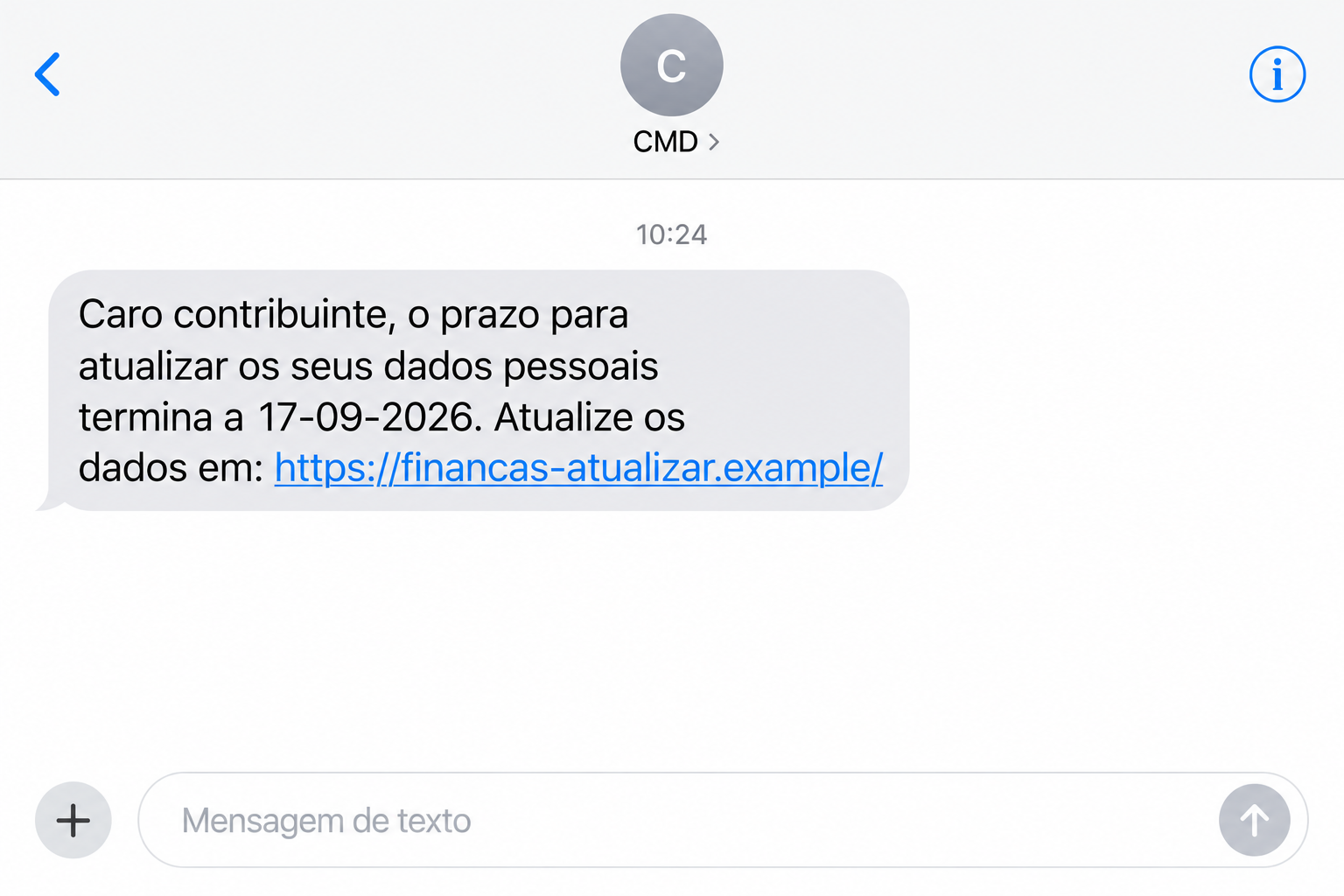
A text marked CMD says your tax details need updating before a deadline. It appears beside familiar authentication messages, making the request unusually easy to trust.
Before opening that link, look at the task it wants you to complete. The CMD tax update text scam depends on one surprisingly convincing detail.
Overview
The CMD label is being used to disguise tax phishing
These tax-update texts are a confirmed impersonation scam. Criminals borrow the name of Portugal’s Chave Móvel Digital to send people toward counterfeit government-looking websites.
Neither CMD nor Portugal’s tax authority is running the deception. The fraud is the message and the website pretending to speak for them.
The official September 24, 2026 warning identifies short update deadlines and addresses designed to resemble tax-administration services.
Depending on the page, the requested information can include personal details, banking information, or access codes. The official warning does not establish every field in every version.
The illustration above uses a fictional address to show the message’s basic shape. It is not an original victim’s text or a working phishing link.
A familiar conversation can contain an unfamiliar sender
The particularly misleading feature is placement. A fraudulent message using CMD as its sender can appear in the same conversation as genuine authentication codes.
Seeing older legitimate messages above it can make the new request feel checked already. Your phone’s grouping does not authenticate the person who sent that request.
This distinction matters because you may normally treat that conversation as a trusted place. The attacker benefits from trust established by someone else.
There is no need to assume the government service was breached. A familiar sender label alone does not establish that anyone accessed your CMD account.
Judge the new message by its destination and demand. An existing conversation does not give a new website permission to collect private information.
The safest check happens outside the message
Use a route you choose yourself to inspect your tax situation. The suspicious SMS should not decide where you sign in or which information you disclose.
- A deadline in a text is a claim to verify, not an instruction to obey immediately.
- Words such as gov or Autoridade Tributária inside an address do not make it an official government domain.
- CMD codes, passwords, and Citizen Card PINs are sensitive credentials, even when a form describes them as routine verification.
- A convincing logo cannot tell you who controls the page receiving your information.
- If banking details were entered, contact the bank promptly rather than waiting for the supposed update to finish.
Why a Tax Deadline Creates Such Effective Pressure
The message does not need an extravagant promise. It presents a dull administrative task, exactly the kind of thing people often complete quickly and move past.
Tax matters also bring uncertainty. You may wonder whether an address, phone number, or document has become outdated without realizing it.
A short deadline turns that uncertainty into a problem that seems easier to solve than investigate. Opening the link appears to be the efficient choice.
That is the useful pause: you do not yet know that a task exists. You only know that an unsolicited message says it does.
There is a difference between checking your tax account and complying with a text. Checking begins with your own access route and the actual account information.
Compliance begins with the sender’s link, then accepts whatever explanation the resulting page supplies. The scam tries to make those two activities feel interchangeable.
Even someone expecting a tax notification can receive an unrelated fake. Timing can make a message plausible without proving that it belongs to their case.
The same goes for a message addressed to a taxpayer. That broad description fits many recipients and should not be mistaken for evidence of personal knowledge.
How the CMD Tax Update Text Scam Works
Step 1: The SMS creates an unfinished administrative task
The opening request tells you to update personal information. In the reported September samples, dates make the request appear to have an approaching or recently missed deadline.
The text provides a direct link, so the reader does not have to search for the relevant office. Convenience becomes part of the persuasion.
At this stage, no authentic account record has confirmed the requirement. The entire reason for acting comes from the same message offering the shortcut.
Do not try to settle that uncertainty by replying. A response stays inside the communication route whose identity is already in doubt.
Step 2: The name CMD supplies borrowed credibility
CMD is associated with digital identification, so its name can make a tax-related instruction appear connected to an official authentication process.
A recipient who has previously used the service may recognize the conversation instantly. Recognition happens before the website address receives much attention.
The safest response is to treat each new demand separately. Old genuine codes say nothing about whether a later message is entitled to request more information.
Do not forward a screenshot containing those old codes to friends or public forums. You can describe the suspicious request without exposing unrelated authentication history.
Step 3: The address imitates the tax authority
The official warning lists autoridadetributariagov[.]com and portal-autoridade-tributariagovpt[.]online/at/ as deceptive destinations. These are campaign indicators, shown here in a non-clickable form.
They contain familiar institution words, but that wording is part of the address chosen by the operator. It is not a government endorsement.
A longer address can be especially distracting on a small screen. The recognizable beginning receives attention while the domain ending is overlooked.
You do not need to become a domain investigator to avoid this route. Open the official service independently and look for the alleged requirement there.
Step 4: The supposed update becomes a disclosure
A copied page can frame each field as necessary to complete your record. That explanation does not establish why the recipient needs the information.
Stop when an unexpected process begins asking for account credentials, codes, or banking details. More fields do not make the original claim more trustworthy.
Submitting some information can create a feeling that you should finish. Resist that pull. Additional disclosures can expand the problem without resolving the first one.
A final confirmation screen, success message, or error cannot reliably tell you whether information was retained. Explain what you entered when seeking help.
Step 5: The exposed information determines the next risk
A phone number creates different concerns from a banking password. An authentication code creates different concerns from an address. Your response should follow the actual disclosure.
Personal details may make later contacts sound more convincing. Treat an unexpected caller quoting those details as another contact to verify, not automatic support.
If you disclosed credentials, do not wait for visible misuse before protecting the affected service. Ask its real support team what controls require attention.
None of this proves that every recipient loses money or has their identity stolen. It explains why the information request itself deserves immediate action.
How to Check the Tax Request Without Feeding the Scam
Close the message route and type the official Portal das Finanças address yourself. Use an established bookmark if you already know it points to the right site.
Read the actual notices in your account. Compare the subject, requested action, and any case details with the SMS without entering information into its linked page.
If there is a real tax issue, address it through that official session. A real issue does not validate the separate instructions sent by an impostor.
If you cannot find the alleged requirement, contact the authority using contact details obtained independently. Avoid numbers or support buttons supplied only by the suspicious message.
Checking the address means reading the domain, not merely finding a familiar word. An official name in a page heading can be typed by anyone.
Encrypted connections are also a separate matter. A secure connection to the wrong operator still delivers your information to the wrong operator.
Do not enter a false password to experiment with the form. Testing keeps you on an untrusted page and gives no useful guarantee about its behavior.
Similarly, a page that no longer loads does not authenticate the earlier message. Websites can disappear after sending many recipients through them.
What to Do if You Have Fallen Victim to This Scam
-
Write down exactly what you disclosed. Separate personal details, passwords, card information, CMD codes, Citizen Card PINs, and any approvals you made.
Record the approximate time and the address shown. An accurate account of the interaction helps support staff choose the right protection steps.
-
Protect financial access first when it was exposed. Reach your bank through its normal app, a trusted number, or another established channel.
Explain whether you entered card details, banking credentials, or approved an action. Ask about blocking affected access, reviewing transactions, and handling suspicious payments.
If money moved, give the amount, time, and payment route. Ask what can still be stopped or investigated without expecting a guaranteed reversal.
-
Change exposed passwords through the genuine service. Leave the phishing page before doing this. A replacement password should never be entered into the same untrusted form.
Check other accounts only if they use the exposed password. Prioritize email when it shares that password because it may control account recovery elsewhere.
-
Get specific help for CMD or Citizen Card exposure. Tell the official support team whether a PIN, code, or approval was involved.
The official authentication help page provides Citizen Contact Centre details. Use the current published contacts to discuss the appropriate account response.
Do not assume changing an unrelated website password protects a disclosed authentication code. Different services require different controls.
-
Keep a useful copy of the suspicious message. Save the new text, sender label, link, and any relevant transaction confirmation before removing it.
Keep private copies of sensitive records. If sharing evidence publicly, conceal personal details and genuine codes from older messages in the conversation.
-
Report the impersonation using official routes. Portugal’s government fraud guidance lists police and other complaint channels.
Explain the deceptive request and your response. A report is more useful when it identifies the actual link and exposure rather than only saying CMD contacted you.
-
Check the device if the interaction went beyond viewing. If you installed software or noticed unexpected behavior, investigate that separately from account protection.
Malwarebytes can assist with a device scan when needed. AdGuard can reduce exposure to some unwanted advertising and known malicious destinations, but cannot undo disclosed credentials.
-
Reject follow-up offers to recover the account through another link. Continue with the support channels you opened yourself, particularly if someone demands a code or payment.
A person knowing your earlier interaction is not automatically an investigator. Ask the genuine institution to verify the contact through its own records.
If You Clicked but Did Not Enter Anything
Close the page and do not return to finish an update. Review whether the browser downloaded a file, requested notification permission, or prompted an installation.
Opening a page is not the same as surrendering an account password. Avoid treating every click as proof that your bank or digital identity was taken over.
If you did type information, include it in your exposure note even when you stopped before the final button. Some pages may handle input before completion.
If you are unsure what happened, say so to support. Uncertainty is useful information; guessing that everything was safe can hide an action that needs attention.
You can also warn relatives about the exact request. Explain that a familiar CMD conversation may contain a fraudulent tax-update text, rather than forwarding its active link.
For someone less comfortable with online tax services, help them reach the official account. Do not ask them to read authentication codes aloud while following unsolicited instructions.
Frequently Asked Questions
Is Chave Móvel Digital itself a scam?
No. CMD is a real Portuguese authentication service. This article concerns criminals impersonating that service and the tax authority through false texts and websites.
Can the fake text appear beside real CMD codes?
Yes. The official warning specifically describes that possibility. A familiar conversation layout does not authenticate the new message or the address it contains.
Does a deadline mean my tax account is in trouble?
The text alone does not establish that. Inspect your tax account through the official portal or contact the authority independently before acting on the claim.
Is an address containing gov automatically official?
No. Read the complete domain and use the genuine Portuguese government route. Words inside a lookalike address are not proof of the operator’s identity.
What should I do after giving a CMD code?
Stop following the message and contact official authentication support promptly. Explain the code and any related approvals; involve your bank if financial access was also exposed.
Can deleting the text remove the information I submitted?
No. Removing the message stops it remaining in your inbox, but does not retrieve data already disclosed. Protect the affected service and keep necessary evidence first.
The Bottom Line
The CMD tax update text scam uses a familiar identity label to make a false administrative task feel routine. Your phone’s message grouping is its strongest disguise.
Check the requirement through the real tax portal. If you already supplied information, protect the specific accounts or credentials involved and report the impersonation.

Join the discussion
0 commentsShare your experience or ask a question about this article.
Discussion
Start the conversation
Have a question or something useful to share? Add the first comment.