

Have you stumbled across a web page claiming you can receive a $750 Home Depot gift card just by completing a few simple steps? If you were redirected to Depotreview.com, you’re certainly not alone. Thousands of people every day click on similar too-good-to-be-true offers, only to end up disappointed, confused, or worse—trapped in a web of scam tactics that cost them money, time, and peace of mind.
This comprehensive guide reveals the full scope of the Depotreview.com Home Depot gift card scam, breaking down how it functions, how scammers earn money through deceptive marketing, and what immediate actions to take if you’ve already participated in the site.
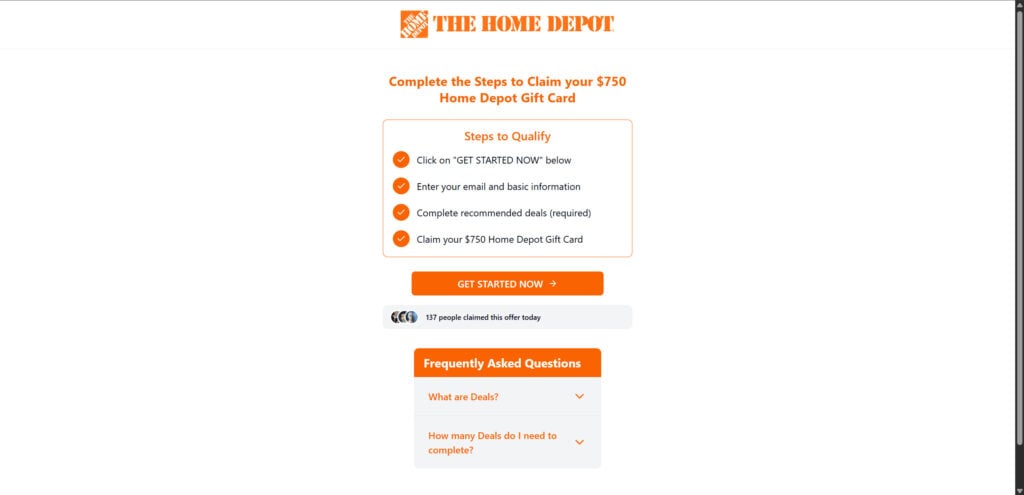
Scam Overview: False Promises, Real Consequences
Depotreview.com presents itself as an official promotion channel for Home Depot. According to the site, you can qualify for a $750 Home Depot gift card by following a few quick steps:
- Click the “Get Started Now” button
- Enter your name, email, and possibly more personal info
- Complete a list of “required deals”
- Receive your $750 gift card (allegedly)
The entire process is framed to look legitimate. With recognizable branding elements—like Home Depot’s logo and trademark orange color palette—the page seems professional and convincing. But once you begin the process, it becomes clear that you are not being guided toward a real gift card. Instead, you’re being led through a carefully constructed maze of affiliate offers, each one serving the scammer’s bottom line.
Why It Seems Trustworthy
These scams work so well because they exploit visual trust cues and psychological manipulation. On Depotreview.com, users typically encounter:
- The authentic-looking Home Depot logo and color scheme
- A linear, step-by-step format with a visible progress bar
- Fake urgency such as “Only 5 cards remaining”
- Social proof messages like “137 people claimed this today”
These cues are designed to make you act quickly without questioning the legitimacy of the offer. In reality, these visuals are just tools to encourage you to keep clicking and submitting your personal data.
What’s Really Happening Behind the Scenes
Despite appearances, Depotreview.com has no connection to Home Depot. The site is run by unknown third-party affiliate marketers whose sole objective is to earn commissions by sending users like you through monetized promotional offers. Each time you complete a “deal,” these scammers are paid a fee—sometimes a few cents, sometimes several dollars.
This scheme thrives on scale. By targeting thousands of users, scammers can generate significant passive income without delivering any actual reward.
How the Depotreview.com Scam Works
Step 1: The Bait
The scam starts with attention-grabbing headlines such as:
- “Claim your $750 Home Depot gift card now!”
- “You’ve been selected—confirm your reward before it expires!”
- “Hurry! Limited-time Home Depot promotion!”
These promotions are delivered through:
- Sponsored posts on Facebook, Instagram, or TikTok
- Clickbait ads on low-quality websites
- Mass emails and text messages with suspicious links
They’re all designed to create urgency and trigger impulsive behavior.
Step 2: The Illusion of a Legitimate Offer
Once you click the link, you land on Depotreview.com. You’ll see:
- A minimalist design that mimics Home Depot’s branding
- Instructions outlining the so-called “qualification” process
- A bold CTA (Call to Action) button prompting you to “Get Started Now”
At this point, most users believe they’re on the verge of receiving a substantial reward. What they don’t realize is they’ve just entered an affiliate funnel disguised as a reward program.
Step 3: Harvesting Your Personal Information
To proceed, the site requests:
- Full name
- Email address
- ZIP code and/or phone number
The moment you hit submit, your personal data is collected and can be used in several ways:
- Sold to data brokers or shady advertisers
- Used to build a profile for targeting future scams
- Leaked onto the dark web or stored for future identity theft attempts
Some users are even asked to provide additional sensitive information in later steps.
Step 4: The Affiliate Offer Gauntlet
Now comes the real purpose of the scam. You are pushed through a lengthy series of “deals” or “offers” that you must complete to claim your gift card. These deals can include:
- Downloading and installing mobile apps (which may include malware or adware)
- Registering for free trials that require credit card info
- Taking surveys that endlessly redirect to more surveys
- Signing up for newsletters or services with recurring charges hidden in the fine print
Each action benefits the scammer through affiliate commissions. Your effort, time, and data are monetized. You, however, are never compensated.
Step 5: No Reward, No Resolution
After completing what you believe are the required steps, you are usually met with one of the following:
- A vague message about needing to complete additional deals
- An error or failed verification screen
- No response at all
This infinite loop continues until the user abandons the process or becomes discouraged. Some users only realize too late that they’ve subscribed to unwanted services or have incurred hidden fees.
What to Do If You Fell for the Depotreview.com Scam
If you engaged with the scam or provided any personal or financial details, follow these steps immediately to secure your information:
1. Stop and Close the Site
Exit the site and don’t return to it. Close all browser tabs associated with the scam.
2. Clear Your Browser and Device Data
- Clear cookies, cache, and browsing history
- Remove any extensions or downloads you don’t recognize
3. Change Passwords Across All Accounts
If you used any passwords during signup, especially ones reused elsewhere, change them now. Enable two-factor authentication wherever possible.
4. Monitor Bank and Credit Card Activity
If you entered payment information:
- Check for unauthorized transactions
- Cancel any new or unknown subscriptions
- Contact your bank to block your card if needed
5. Run Security Scans
Use trusted antivirus and anti-malware software to ensure your device hasn’t been compromised. Recommended tools include:
- Malwarebytes
- Norton
- Bitdefender
6. Filter Spam and Block Numbers
You may begin receiving a surge of spam emails, calls, and texts. Use spam filters and call-blocking apps to reduce exposure to further scams.
7. Report the Incident
Help reduce the reach of this scam by reporting it to:
- The Federal Trade Commission (FTC): reportfraud.ftc.gov
- Internet Crime Complaint Center (IC3): www.ic3.gov
- Better Business Bureau (BBB)
- Home Depot’s official support team
8. Share What You Know
Warn friends, family, and your broader network about the scam. The more people who recognize the signs, the fewer will fall victim.
Is Your Device Infected? Run a Free Malware Scan
Slow performance, constant pop-ups, or strange behavior? These are classic signs of a malware infection. The fastest way to find out is to scan your device with Malwarebytes Free — one of the most trusted malware removal tools available.
The free version detects and removes the most common threats, including:
- Adware — the cause of those annoying pop-ups
- Browser hijackers — unwanted redirects and changed homepages
- Trojans and spyware — hidden programs stealing your data
- Potentially unwanted programs (PUPs) — software you never asked for
👉 Select your device below — Windows, Mac, or Android — then follow the simple steps to download Malwarebytes, scan your system, and remove any threats it finds. The scan usually takes 5 to 20 minutes.
Run a Malware Scan with Malwarebytes for Windows
Malwarebytes is one of the most popular and trusted anti-malware tools for Windows — and it’s completely free for removing infections. It catches threats that many antivirus programs miss, including adware, browser hijackers, and trojans. Follow the steps below to scan and clean your PC in just a few minutes.
Download Malwarebytes
Click the button below to download the latest version of Malwarebytes for Windows from the official source. The free version is all you need — it will scan your computer and remove adware, browser hijackers, and other malicious software at no cost.
Download MalwarebytesOfficial installer for Windows 11 and 10. Your download starts right away.Want real-time protection? See Malwarebytes Premium Malwarebytes Free for WindowsScans and removes malware at no cost
-
Install Malwarebytes
When the download finishes, open your Downloads folder and double-click the MBSetup file. If Windows shows a User Account Control pop-up, click “Yes” to allow the installation.

Follow the On-Screen Prompts to Install Malwarebytes
The setup wizard will walk you through a few quick screens:
-
Choose where you’re installing the program — “Personal Computer” or “Work Computer” — then click Next.

-
Malwarebytes will now install on your device. This usually takes under a minute.

-
When installation is complete, the “Welcome to Malwarebytes” screen will open automatically.

-
On the final screen, click Open Malwarebytes to launch the program.

-
Enable “Scan for Rootkits”
Before scanning, turn on rootkit detection so Malwarebytes can find even the most hidden threats. Click the Settings gear icon on the left side of the screen.

In the settings menu, find “Scan for rootkits” and click the toggle so it turns blue.

Done? Click “Dashboard” in the left pane to return to the main screen.
Start the Scan
Click the blue Scan button. Malwarebytes will automatically update its virus database and start checking your computer for malware.

-
Wait for the Scan to Finish
The scan checks your entire system for browser hijackers and other malicious programs, so it can take 5 to 20 minutes depending on your computer. Feel free to do something else — just check back occasionally to see the progress.

-
Quarantine the Detected Threats
When the scan is done, you’ll see a list of everything Malwarebytes found — malware, adware, and potentially unwanted programs. Click the “Quarantine” button to remove all of them at once.

Malwarebytes will now remove the malicious files and registry entries and move them safely into quarantine.

-
Restart Your Computer
Some threats can only be fully removed after a reboot. If Malwarebytes asks you to restart, click Yes. Once you’re logged back in, Malwarebytes has finished removing the threats it found.

That’s it — your Windows PC is now clean of trojans, adware, and other malware, and should be back to running smoothly.
If you are still having problems with your computer after completing these instructions, then please follow one of the steps:
- Run a computer scan with ESET Online Scanner
- Ask for help in our Windows Malware Removal Help & Support forum.
Run a Malware Scan with Malwarebytes for Mac
Malwarebytes for Mac is a free on-demand scanner that removes the malware other security software tends to miss — adware, browser hijackers, and unwanted programs included. Cleaning an infected Mac with Malwarebytes has always been completely free, and it’s our go-to recommendation. Follow the steps below to scan and clean your Mac in just a few minutes.
-
Download Malwarebytes for Mac
Click the button below to download the latest version of Malwarebytes for Mac.
Download MalwarebytesOfficial installer for macOS. Your download starts right away.Want real-time protection? See Malwarebytes PremiumMalwarebytes Free for MacScans and removes malware at no cost -
Open the Malwarebytes setup file
When the download finishes, open your Downloads folder and double-click the setup file to begin the installation.

-
Follow the On-Screen Prompts to Install Malwarebytes
The Malwarebytes for Mac Installer will guide you through a few quick screens. Click “Continue” and keep following the prompts until the installation completes.



When the installation is complete, Malwarebytes opens to the Welcome to Malwarebytes screen. Click “Get started“.
-
Select “Personal Computer” or “Work Computer”
Malwarebytes will ask what type of computer you’re installing it on. Click either Personal Computer or Work Computer, whichever applies.

-
Start the Scan
Click the “Scan” button. Malwarebytes will automatically update its detection database and begin checking your Mac for malware.

-
Wait for the Scan to Finish
Malwarebytes will scan your Mac for adware, browser hijackers, and other malicious programs. This can take a few minutes, so feel free to do something else — just check back occasionally to see the progress.

-
Quarantine the Detected Threats
When the scan is done, you’ll see a list of everything Malwarebytes found. Click the “Quarantine” button to remove all the threats at once.

-
Restart Your Mac
Malwarebytes will now remove all the malicious files it found. Some threats can only be fully removed after a reboot — if Malwarebytes asks you to restart, allow it. Once you’re logged back in, your Mac is clean.

That’s it — your Mac is now free of adware, rogue browser extensions, and other potentially harmful software.
If you are still experiencing problems while trying to remove a malicious program from your computer, please ask for help in our Mac Malware Removal Help & Support forum.
Run a Malware Scan with Malwarebytes for Android
Malwarebytes for Android automatically detects and removes dangerous threats like malware and ransomware so you don’t have to worry about your most-used device being compromised. Aggressive detection of adware and potentially unwanted programs keeps your Android phone or tablet running smooth.
-
Download Malwarebytes for Android.
You can download Malwarebytes for Android by clicking the link below.
Get Malwarebytes for AndroidOpens Google Play in a new tab.Want real-time protection? See Malwarebytes Premium for AndroidMalwarebytes for AndroidScans your phone and removes malware at no cost -
Install Malwarebytes for Android on your phone.
In the Google Play Store, tap “Install” to install Malwarebytes for Android on your device.

When the installation process has finished, tap “Open” to begin using Malwarebytes for Android. You can also open Malwarebytes by tapping on its icon in your phone menu or home screen.

-
Follow the on-screen prompts to complete the setup process
When Malwarebytes will open, you will see the Malwarebytes Setup Wizard which will guide you through a series of permissions and other setup options.
This is the first of two screens that explain the difference between the Premium and Free versions. Swipe this screen to continue.
Tap on “Got it” to proceed to the next step.
Malwarebytes for Android will now ask for a set of permissions that are required to scan your device and protect it from malware. Tap on “Give permission” to continue.
Tap on “Allow” to permit Malwarebytes to access the files on your phone.
-
Update database and run a scan with Malwarebytes for Android
You will now be prompted to update the Malwarebytes database and run a full system scan.

Click on “Update database” to update the Malwarebytes for Android definitions to the latest version, then click on “Run full scan” to perform a system scan.

-
Wait for the Malwarebytes scan to complete.
Malwarebytes will now start scanning your phone for adware and other malicious apps. This process can take a few minutes, so we suggest you do something else and periodically check on the status of the scan to see when it is finished.

-
Click on “Remove Selected”.
When the scan has been completed, you will be presented with a screen showing the malware infections that Malwarebytes for Android has detected. To remove the malicious apps that Malwarebytes has found, tap on the “Remove Selected” button.

-
Restart your phone.
Malwarebytes for Android will now remove all the malicious apps that it has found. To complete the malware removal process, Malwarebytes may ask you to restart your device.
That’s it — your Android phone is now clean — no more malicious apps, adware, or browser redirects.
If you are still having problems with your phone after completing these instructions, then please follow one of the steps:
- Restore your phone to factory settings by going to Settings > General management > Reset > Factory data reset.
- Ask for help in our Mobile Malware Removal Help & Support forum.
Stay Protected: Block Ads and Malicious Sites
Now that your device is clean, keep it that way. Most infections start with a malicious ad or a fake download button — so blocking them at the source is your best defense.
We recommend AdGuard, which blocks malicious ads, phishing pages, and dangerous redirects before they can reach you.
👉 Download AdGuard and browse safely
Frequently Asked Questions About the Depotreview.com Scam
Is Depotreview.com affiliated with Home Depot?
No. Depotreview.com is not affiliated with Home Depot in any way. It is a scam site that uses Home Depot’s branding and color scheme without authorization to mislead users into completing affiliate offers under false pretenses.
Can I actually receive a $750 Home Depot gift card from this site?
No. Despite its claims, no real users have reported receiving a $750 Home Depot gift card from Depotreview.com. The site exists to collect personal data and push users through monetized offers. The gift card reward is never delivered.
What are the “required deals” or “offers” I have to complete?
These are affiliate offers that may include:
- Signing up for free trials (often requiring your credit card)
- Downloading mobile apps
- Completing lengthy surveys
- Subscribing to services with recurring charges
Each action generates money for the scammer. You are never rewarded.
Is it safe to enter my personal or payment information?
No. Entering your name, email, phone number, or payment details puts you at risk of:
- Identity theft
- Credit card fraud
- Spam and robocalls
- Future scam targeting
What should I do if I already submitted my information?
Take the following steps immediately:
- Change your email and account passwords
- Monitor your bank statements
- Cancel any subscriptions you didn’t authorize
- Report the scam to the FTC and IC3
- Run a full antivirus scan on your device
Why does the website look so convincing?
The scam site uses visual trust signals such as:
- The Home Depot logo
- A clean, professional layout
- Step-by-step instructions and a fake progress bar
These elements are designed to create a false sense of legitimacy and urgency.
Will I be charged if I didn’t provide my credit card?
Not directly, but your data could still be sold. If you entered your phone or email, expect spam messages and phishing attempts. Scammers profit from your interaction whether or not you spend money.
Can I report Depotreview.com?
Yes. You can report the scam to:
- Federal Trade Commission (FTC): reportfraud.ftc.gov
- Internet Crime Complaint Center (IC3): www.ic3.gov
- Better Business Bureau (BBB)
- Home Depot’s official support team
How can I tell if a gift card offer is a scam?
Look for red flags like:
- Unusual reward amounts (e.g., $750 for just a few steps)
- Requests to complete unrelated third-party offers
- No mention of the promotion on the brand’s official website
- Urgent language like “Only 5 left” or “Claim within 10 minutes”
Are any online gift card promotions real?
Some promotions from legitimate companies exist, but they are usually:
- Promoted directly on the company’s verified website or app
- Limited to known loyalty programs or reward apps
- Transparent about terms, conditions, and data use
If a promotion asks you to complete numerous unrelated steps, it’s likely a scam.
The Bottom Line
The Depotreview.com $750 Home Depot gift card promotion is not legitimate. It’s a clever scam designed to exploit your trust in a well-known brand while quietly profiting from your interaction. There is no gift card. There is no reward. There is only an endless loop of affiliate offers, hidden fees, and data collection.
Always remember:
- Real promotions won’t ask you to complete 5+ unrelated offers
- Companies like Home Depot publish deals on their official websites only
- If something feels off or sounds too good to be true, it probably is
Protect your time, money, and identity by staying informed and cautious. The best defense against digital scams is awareness and vigilance.
Stay safe. Stay skeptical. And always verify before you click.

Reviews & discussion
0 commentsShare a firsthand experience, or ask a question.
Community reviews
depotreview.com
Moderated reader experiences, not an editorial verdict.
Reviews
Be the first to review
Approved reviews for this site or product will appear here.