

Have you received concerning emails demanding immediate funds to release stalled DHL shipments? Don’t fall for it. This emerging phishing tactic aims solely to steal financial data and money. Learn how to identify and evade this delivery services scam.
Overview of the DHL Outstanding Payment Scam
A new form of highly deceptive phishing is targeting DHL’s vast global customer base. Highly authentic-looking emails are being sent stating recipients have an urgent outstanding balance on a pending DHL delivery that must be paid immediately or the shipment will be cancelled and returned.
For example, an alarming notice may be received stating:
Subject: Urgent Payment Required for DHL#REF9222341
DHL
Dear Customer,
We deeply regret to inform you that the shipment of your package through DHL is currently on hold due to an outstanding payment. In order to ensure the smooth delivery of your order, we urgently require a payment of $1.99.
To make this payment immediately and avoid any further delays, please use our secure online system by clicking on the following link:
payment link
Please note that failure to make this payment within 24 hours may result in cancellation of your order and return of the package to our warehouse.
We understand the importance of receiving your package promptly and are committed to resolving this matter as quickly as possible.
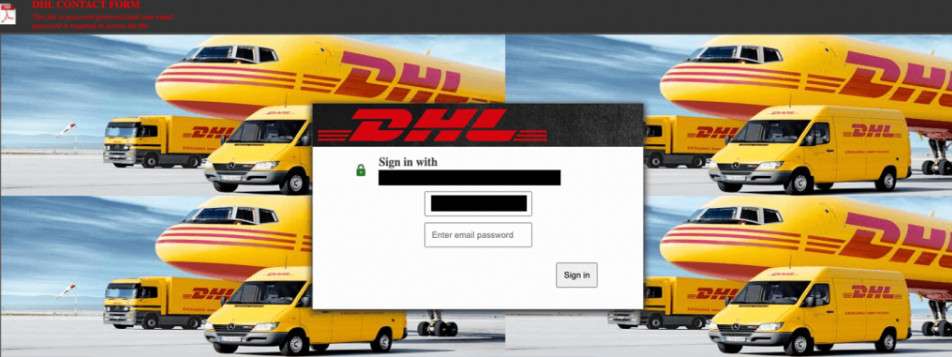
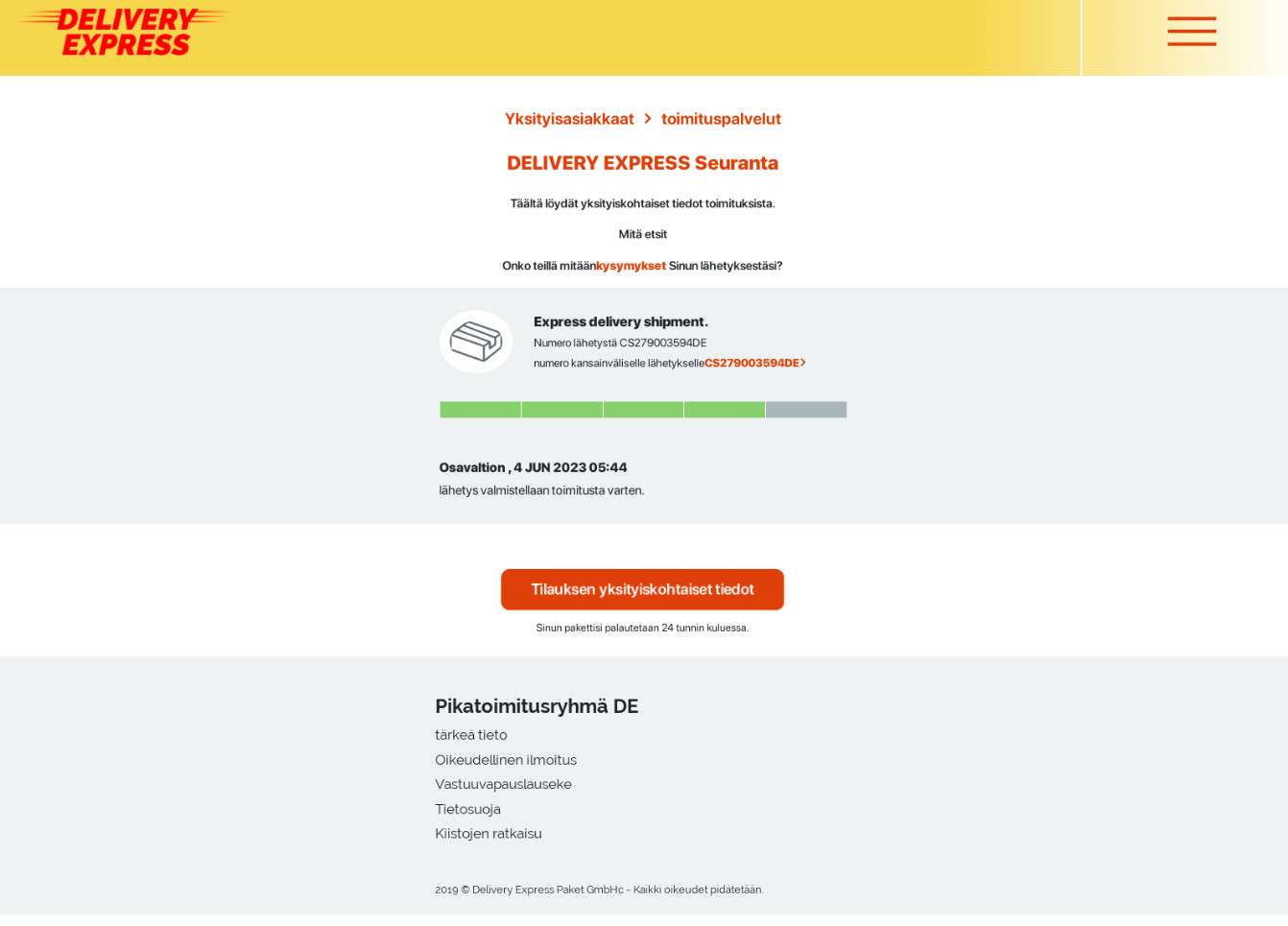
The scam message features official DHL branding, colors and fonts with an air of authority demanding this fictional unpaid balance get addressed right away. It includes a fake “Pay Balance” button linking to a flawlessly designed but fraudulent DHL payments portal where unsuspecting customers hastily enter financial account credentials like credit card info to supposedly clear the delay and ensure packages ship out.
With credit card numbers, CVV codes, addresses and identities gathered, scammers then commit payment fraud, identity theft and wipe out bank balances leaving victims empty-handed with no DHL delivery coming as promised at all.
Because DHL is ubiquitous in global shipping and logistics, any suggestion of an hurdle jeopardizing a pending delivery seems entirely plausible, especially involving bureaucracy like temporary unpaid balances. This familiarity causes even sophisticated users to let down their guard and comply by entering sensitive data without deeper scrutiny for fear of losing out on needed or coveted items stuck in fictional DHL shipment limbo.
However, there are subtle signs within the suspiciously urgent payment notices that can reveal the deception before falling into the trap:
- You don’t recall actually having a pending DHL delivery
- Poor grammar, spelling errors and awkward wording
- Links redirecting to misspelled or unofficial domains
- Demands for immediate payment on surprise balances using personal financial accounts
Staying vigilant for these red flags allows online shoppers and digital consumers to protect themselves from even creatively crafted phishing tactics like this DHL outstanding balance scam. Let’s explore further how the scam unfolds and how to respond if targeted.
How the DHL Outstanding Payment Scam Unfolds
While specifics fluctuate, here is the usual scam workflow leveraged currently against DHL consumers:
Step 1: Victims Receive Phishing Emails Threatening Order Cancelation
Recipients get emails cleverly designed to appear as legitimate DHL billing alerts regarding unpaid shipping fees associated with a pending delivery. These feature official color schemes, logos and fonts used by DHL on valid customer notices to boost perceived authenticity.
Messages assert there’s an urgent outstanding payment required or the order risks getting canceled and returned to the sender unless the past-due balance gets addressed immediately.
Of course, in reality there is no real pending shipment from DHL with fees owed. But the pressing verbiage spurs fear and concern convincing targets to take seriously fictional payment requirements included within.
Step 2: Emails Include Links to Fake DHL Billing Portals
The fraudulent emails feature clickable links or action buttons to conveniently process the time-sensitive balance payment before the fictional shipping deadline expires. The redirects send recipients to near perfect DHL payment portal copies cloned to precisely mimic real billing sites.
Although URLs may reflect slightly different domains or spelling oddities upon closer scrutiny, frantic victims are less apt to notice while racing to clear “obstacles” threatening delivery of supposedly essential items.
Step 3: Imitation Sites Gather Financial Data for Theft
On the imitation DHL payments pages, victims input full credit/debit card details, billing addresses and contact information to “settle outstanding delivery fees” and “continue shipment processing.”
Some may even request government ID uploads or scans of personal checks “to verify identity” before the fake sites will finalize taking payment details.
With this sensitive financial data and personally identifiable information obtained, criminals then enact card cloning fraud, empty bank accounts, and commit identity theft by impersonating compromised victims.
Step 4: Criminals Steal Money While No Packages Ship
Once fake portals compile payment card specifics and funds get illegally withdrawn from accounts, victims are left adrift. There are no real unsettled DHL shipments to arrive, just looted balances and canceled cards at best.
Attempts to follow up with DHL on disappeared packages simply confirm zero existing delivery attempts tied to victims’ names or addresses. Devastatingly, compromised financial data grants criminals perpetual access until new account numbers get established through fraud departments.
As this scam accelerates, consumers must learn how to catch misleading snippets aiming to dupe even vigilant online shoppers into voluntary data surrender.
How to Identify Fake DHL “Unpaid Balance” Payment Notices
With parcel and payment phishing attempts escalating, learning to spot scam emails impersonating shipping companies protects online shoppers from potential frauds. Watch for these common indicators within questionable messages insisting on immediate funds to release orders.
Grammatical Mistakes and Language Errors
If emails seem rife with spelling mistakes, formatting problems, or awkward verbiage, scam risks heighten. Cheap overseas labor often propels mass phishing campaigns resulting in quirks exposing English as secondary language.
Example: Email starts “Dear honorable customer, urgency is require for complete outstanding balance for to release shipment…”
Links Routing to Misspelled or Unofficial Domains
Scrutinize where provided shortcut links redirect. Devious phishers register highly convincing imposter web addresses.
Example: The “Pay Now” button links to “DHLsettlebalnce.com” instead of official “DHL.com”.
No Knowledge of Cited Pending Deliveries
DHL has existing communication trails on real shipments. Be skeptical of any sudden payment obligations mentioned without prior tracking details sent on the packages cited.
Example: Email demands overdue funds on alleged shipment #DHL8893416 you never received preceding tracking status for.
Threats and High Pressure Requests
Valid DHL policy allows reasonable timeframes for resolving legitimate payment issues. Disregard unrealistic ultimatums insisting on immediate payment via personal financial accounts only.
Example: Email states delivery cancellation will automatically occur in less than 24 hours unless past-due balance paid immediately through provided portal.
Staying alert to sly scam markers within questionable delivery notifications reduces risks getting ensnared by financial fraud traps. Independently verifying irregular payment claims directly with merchants also prevents getting phished.
What to Do If You Are Targeted by This Delivery Services Scam
If you shared financial information or paid fraudulent DHL duties, take these steps to reduce damages:
Step 1: Contact Banks and Credit Card Companies Immediately
Begin by notifying institutions associated with any compromised cards or linked payment accounts. Request emergency freezes on accounts to block additional fraudulent transactions. And dispute charges associated with any scam-related withdrawals or payments to try reclaiming lost funds urgently.
Step 2: Reset Associated Account Passwords That May Be Exposed
If you reused the same usernames or passwords you entered on fake DHL payment sites anywhere else, change those credentials immediately across the board. Email, retail accounts, or any other linked passwords should be reset while adding enhanced complexity for the future.
Step 3: Report Incidents to Relevant Fraud Authorities
File detailed reports outlining your experience dates, $ amounts lost, screen grabs of fraudulent pages etc. to agencies like the FTC, FBI IC3 cybercrime unit and your regional postal inspectors. These reports fuel bigger investigations and consumer alerts on the latest phishing trends.
Step 4: Enroll in Credit Monitoring or Identity Theft Protection
Even following prompt prevention efforts, leaked data still holds value for criminals to enact incremental exploits down the road. Proactive monitoring paired with quick fraud remediation support provides the fastest fixes and most closure recovering from digital theft encounters.
Turning scam situations into lessons on tighter personal security protocols prevents repeats in the years ahead as online and digitally-rooted commerce continues expanding across nearly every consumer sector.
Frequently Asked Questions about the DHL “Unpaid Balance” Scam
Find yourself questioning an email about an outstanding DHL delivery payment? Unsure if it’s a phishing ploy to steal financial data? Read on for answers surrounding fraudulent DHL billing notices.
1. What exactly is the DHL outstanding balance phishing scam?
Fraudsters send emails insisting DHL shipments require immediate payment of fictional unpaid balances or pending deliveries get canceled. Included links route to convincing duplicate DHL payments portals that steal entered financial account credentials. No packages exist, while criminals commit payment fraud and theft using stolen data.
2. What signs expose potential DHL billing scams?
Watch for:
- Unexpected emails about DHL shipments you never ordered
- Poor grammar, typos or awkward language
- Links leading to misspelled or slightly altered web addresses
- Threats of order cancellation if surprise balances aren’t paid urgently
- Requests for financial data and immediate payments
3. I received a DHL email demanding past-due funds. What should I do?
Do NOT click any links or enter payment data without verifying message legitimacy directly through DHL’s official website. Independently login to your real DHL account to confirm if money is actually owed. Contact DHL support regarding any billing emails initiated outside of your verified account.
4. Am I at risk if I paid a suspicious DHL balance by card?
Unfortunately, yes – scammers now have your financial credentials gained through phishing to steal money via payments fraud. Immediately alert affected banking institutions and credit card companies to report fraud, dispute unrecognized transactions, and freeze accounts from further fraudulent charges.
5. Can I get money back that I paid towards fictional DHL fees?
If paid via credit card, report charges as fraudulent to the provider right away, file disputes and escalate urgently to attempt recovering lost money. Debit card payments may have less direct recourse, but reporting details to the FTC aids law enforcement tracking such scams. Enroll in identity theft monitoring in case leaked information gets exploited in additional future frauds.
6. How can I avoid delivery and payment scams moving forward?
Learn phishing indicators like grammatical errors, threats demanding immediate account access, and odd URLs within messages. Independently verify any payment claims through official vendor apps and sites before providing data. Enable multifactor authentication across accounts requiring extra login verifications for added security.
The Bottom Line
DHL’s global delivery dominance and brand familiarity make their vast customer base prime targets for elaborate payment-based phishing schemes. Tactics leverage feared outcomes like cancelled shipments to prompt hasty financial data sharing outside recipients’ normal security comfort zones.
But a few simple precautions combat even the most clever tricks aiming to victimize unsuspecting shoppers and digital consumers at large. Verifying irregular payment claims directly with merchants protects against surprise requests invented solely to pilfer funds. Learning subtle email red flags also prevents blind clicking onto cunning fraudulent pages engineered explicitly to capture everyone from savvy users to those still building digital literacy.
Staying continually informed on the latest online fraud innovations pays forward substantial safety dividends over the long-term. Using confirmed scams as motivation to enact more vigilant security protocols allows online shoppers, or digital users of all kinds, to celebrate this season while keeping identities, assets and information guarded against even the shrewdest fraudsters’ evolving barrage of hacks for the years ahead.

Join the discussion
0 commentsShare your experience or ask a question about this article.
Discussion
Start the conversation
Have a question or something useful to share? Add the first comment.