

Online shopping has become increasingly popular in recent years, allowing consumers to easily purchase items from all over the world. However, the rise in e-commerce has also given way to new scams that seek to take advantage of unsuspecting shoppers. One such scam involves fraudulent emails and text messages impersonating shipping companies like DHL, claiming that the recipient’s package has an outstanding or underpaid fee that must be paid for delivery.
This “DHL You Package Has Underpaid Fee” scam aims to trick recipients into either paying a fake fee or downloading malware onto their device. If you receive a suspicious message about an underpaid shipping fee, you’ll want to be wary, as it’s likely a scam attempt. In this comprehensive guide, we’ll break down exactly how the DHL fee scam works, what to watch out for, and steps to take if you fall victim. With awareness and caution, you can protect yourself from this deceitful ploy.
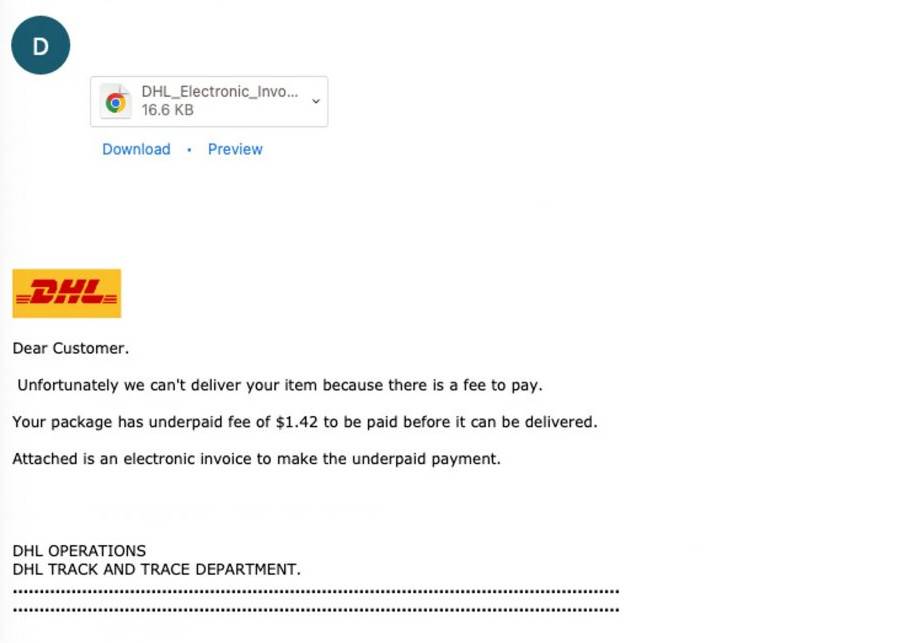
DHL You Package Has Underpaid Fee Scam Overview
The DHL You Package Has Underpaid Fee scam is a prime example of a phishing scam, which uses fraudulent emails, texts, and websites impersonating trusted entities to lure victims. Cybercriminals send messages claiming to be from DHL asking the recipient to pay an outstanding balance or fee in order to receive their package.
The messages often include subject lines like “DHL: You Have an Unpaid Shipping Fee” or “DHL: Important Delivery Update.” The body text explains that there is a small unpaid fee associated with an incoming package that must be paid immediately before the package can be delivered.
Some versions claim the underpaid amount is due to a sender error, while others blame a payment processing failure. The amount requested is usually relatively small, around $1 to $5, to seem more legitimate and convince victims to pay up.
The messages contain links or attachments that supposedly let you pay the fee, but in reality are designed to steal financial information or install malware. For example, the links often lead to fake DHL websites that mimic the look of legitimate DHL payment pages in order to phish for credit card details or login credentials.
Meanwhile, attached files contain malicious scripts or malware that can infect your device and give scammers access to sensitive data if opened. The messages are made to appear credible through the use of DHL logos, formatting, and urgent language about an undelivered package, preying on people’s desire to receive their items.
This scam exploits the widespread use of delivery services like DHL for online purchases. Millions rely on carriers like DHL to reliably ship and deliver items worldwide. Scammers bank on the fact that many customers expect tracking updates and delivery-related notifications from these services.
By posing as DHL and claiming a real issue needs resolving in order for you to receive your package, scammers know worried customers will be more inclined to take action. Furthermore, worried recipients may be less likely to scrutinize the legitimacy of the message and links/attachments contained therein.
This scam is often targeted at customers who have made online purchases and may be awaiting delivery of items. However, anyone can receive these phishing attempts, since scammers send the messages en masse. The ubiquity of delivery companies like DHL make their branding an ideal lure to use in phishing ploys aimed at tricking the general public.
How the DHL You Package Has Underpaid Fee Scam Works
The DHL fee scam typically operates in a few different ways to dupe unsuspecting recipients, using both email and SMS messaging:
Fraudulent Emails
One of the most common mediums for this scam is via fake emails mimicking DHL alerts:
- The scam emails have a subject line like “DHL: Unpaid Shipping Fee” or “DHL: Important Shipping Update” to grab attention.
- The sender email address is spoofed to make it look like the email is coming from DHL or a legitimate DHL domain, when the message actually originates from the scammer.
- The body contains an urgent warning about an underpaid shipping fee associated with your package and provides a link to resolve the issue.
- The link leads to a fake DHL website asking for personal and payment information to process the fee, which harvests your data.
- Other versions attach a malicious file, claiming it has a form to fill out and submit to pay the fee. Downloading the attachment infects your device.
- Official logos, colors, fonts, and messaging are copied from real DHL communications to appear authentic.
Fraudulent Text Messages
Scammers also send smishing text messages with similar phishing tactics:
- The texts are sent from phone numbers spoofed to resemble DHL customer service or tracking numbers.
- The message claims there is an urgent underpaid fee required for you to receive your package, asking you to click a link to resolve it.
- The link directs you to fake DHL sites asking for personal and payment data or downloading malware.
- The texts mimic DHL’s SMS delivery updates with branding and messaging about an undelivered package awaiting your action.
Malware Links and Attachments
No matter the delivery method, the scammer’s goal is getting you to click the fraudulent link or attachment:
- Links lead to convincing fake DHL payment pages that steal entered financial information.
- Links may also direct to sites with malware that infect your device and compromise your data.
- Downloaded attachments contain embedded malicious files that likewise install viruses, trojans, keyloggers, and other malware.
- The installed malware gives scammers access to your system data, passwords, banking info, and other sensitive information.
- Alternatively, the malware may encrypt your files until a ransom is paid, known as ransomware.
What to Watch Out For
There are a few indicators to help identify this scam:
- Requests for unusual fees: DHL and other delivery companies do not typically contact customers about underpaid fees out of the blue. Such fees would be billed to the sender or collected upon delivery.
- Suspicious sender address: The email address or phone number do not match official DHL domains or customer service lines, often containing misspellings.
- Poor grammar/spelling: Phishing emails often contain typos, grammatical errors, stilted language, or other textual indications they weren’t written professionally.
- Generic greetings: Fraudulent messages address recipients as “Dear Customer” rather than your name, since scammers don’t actually have your account details.
- Urgent demands: Scammers emphasize urgent action needed or consequences for inaction, trying to panic recipients into clicking without thinking.
- Logo/branding issues: Improperly sized logos or bad quality images are clues a message isn’t authentic.
- Requests for sensitive info: DHL would never ask for full financial or personal account details via email or SMS.
What to Do if You Get the DHL Fee Scam Message
If you receive a suspicious email or text about an alleged DHL fee, there are steps you should take to protect yourself:
- Avoid clicking: Do not click any links or download attachments, which are very likely malicious. Closing the message is the safest option.
- Beware requests for information: Never enter personal or financial information on websites linked in suspicious messages purporting be from companies like DHL.
- Report the scam: Forward scam emails to DHL at abuse@dhl.com. You can also report scam texts by forwarding the message to SPAM (7726).
- Contact DHL: If you are expecting a package and receive a fee scam message, proactively reach out to DHL customer service to confirm status. Use official contact channels like the company website or phone number.
- Update passwords: If you did provide info or click links/attachments, change passwords for any online accounts that may have been compromised.
- Scan your device: Install comprehensive antivirus software to detect and remove any malware that may have made it onto your device before it can do harm.
- Watch for fraud: Keep an eye out for signs of fraud like unauthorized charges if you did submit payment details and alert your bank of potential compromise.
What to Do if You Already Paid the Fake DHL Fee
If you unfortunately already fell for the scam and paid the fraudulent fee, take these steps to mitigate damage:
Report it to DHL
Notify DHL that you paid a suspicious fee so they can investigate the scam attempt:
- Contact DHL support and provide details about the message received and payment made.
- DHL will likely confirm that the fee request was illegitimate and issue a warning about ongoing scams impersonating their brand.
Contact your bank
If you paid the fake fee with a credit or debit card, contact your bank or card issuer immediately:
- Inform them you paid a fraudulent fee online and believe your card details are compromised.
- They can provide steps to get the charge reversed and get a new card number issued to prevent additional fraudulent charges.
Monitor accounts closely
Keep a very close watch on all your financial accounts for signs of misuse of your information over the next weeks and months:
- Look for further unauthorized charges or any suspicious activity and report it to your bank right away.
- The scammers may attempt more charges or otherwise abuse stolen data. Early detection can limit damages.
Run security checks
Be sure to scan all your devices involved to check for and remove any malware:
- Download malware scanners and run full system scans to detect viruses, keyloggers, or other threats that may have been downloaded.
- Remove any infections or suspicious programs found. Reset all account passwords from a safe device if your system was compromised.
Submit complaints
File complaints about the scam with relevant agencies so they can investigate and work to hold the scammers accountable:
- File an online complaint with the FBI’s Internet Crime Complaint Center (IC3).
- Also file with the Federal Trade Commission Consumer Complaint Assistant regarding identity theft or online fraud.
- Contact local law enforcement and file a police report about the scam payment for documentation.
Staying vigilant following a scam can help limit the damages and make sure the criminals are reported.
Frequently Asked Questions about the DHL You Package Has Underpaid Fee Scam
What is the DHL underpaid fee scam?
This is a phishing scam where scammers send fake emails and text messages pretending to be from DHL. The messages claim that the recipient has an unpaid shipping fee on an incoming package that must be paid immediately or the package won’t be delivered. The links and attachments in the messages are malicious and designed to steal financial information or install malware.
How do I recognize this scam?
Watch for urgent payment requests for small underpaid fee amounts from DHL when you are not actually expecting a package. Other red flags are non-official looking sender addresses, poor grammar/spelling, generic greetings, and requests for personal information.
I got an email about an underpaid DHL fee, what should I do?
Do not click any links or download attachments in the email, as they are likely malicious. Report the scam email to DHL and delete it immediately. If you’re expecting a package, proactively contact DHL customer service through official channels to confirm status.
Are the links in the scam emails dangerous?
Yes, the links likely lead to fake DHL payment pages designed to steal your financial details or sites with malware to infect your device. Never enter information or download files from suspicious emails.
I got a text about a DHL fee, is it real?
Probably not. Do not click any links in suspicious texts related to DHL fees. Report scam texts by forwarding to SPAM (7726). Reach out to DHL directly if you think there may be a legitimate issue.
What happens if I paid the fake underpaid fee?
If you paid the scam fee, contact your bank to reverse the charges and monitor closely for fraud. Run security checks on involved devices for malware. File reports about the scam with agencies like IC3, FTC, and the police.
How can I avoid this DHL scam?
Be wary of urgent payment requests related to packages you aren’t expecting. Never make payments via unsolicited emails/texts. Go directly to official DHL sites and numbers to verify irregularities. Use malware scanners and be cautious when clicking links and attachments.
Who is behind this scam?
Cybercriminals running phishing scams like this aim to steal personal information and money by impersonating trusted companies like DHL. Scammers rely on concerned customers anxiously awaiting packages to let their guard down and fall for fake fee requests.
Is DHL doing anything to stop this scam?
DHL is aware of scams impersonating their brand and encourages customers to report suspicious fee emails to their phishing email address at abuse@dhl.com so they can investigate them. But ultimately, consumers need to be vigilant to protect themselves.
Conclusion
The DHL You Package Has Underpaid Fee phishing scam is on the rise as scammers find new ways to take advantage of the proliferation of online shopping and reliance on delivery services. Through convincingly crafted emails and texts impersonating trusted brands, unsuspecting consumers are duped into paying fake fees and handing over personal information to criminals.
Keeping this scam on your radar and being wary of any unusual payment requests accompanying package deliveries can keep you from falling victim. With vigilance and awareness of common phishing techniques, consumers can protect themselves and their data. Preventing small-dollar scams like this helps maintain the trust and integrity of services many rely on to ship goods and deliver online purchases safely and securely.

Join the discussion
0 commentsShare your experience or ask a question about this article.
Discussion
Start the conversation
Have a question or something useful to share? Add the first comment.