

You might be going about your day when a sudden text message from the “DMV” hits your phone: “Final Notice: Your tolls are unpaid. Enforcement begins tomorrow. Click here to pay.” The message is alarming, urgent, and seemingly official. But here’s the truth: it’s a scam.
This rising wave of “DMV Final Notice” scam texts is duping thousands into handing over sensitive personal and financial information. In this comprehensive article, we uncover how the scam works, what to watch out for, and what to do if you’ve already been targeted. Stay informed, stay protected.
Scam Overview: The Growing Threat of Fake DMV Text Messages
The DMV Final Notice scam is a phishing attempt designed to manipulate victims into believing they owe unpaid toll fees. Typically delivered via SMS, these messages claim that legal enforcement, vehicle suspension, or credit damage will occur unless payment is made immediately. They often include a link to a fake website resembling a legitimate toll collection or Department of Motor Vehicles (DMV) page.
Why It’s So Dangerous
These scams are particularly dangerous because they exploit fear and urgency. Most recipients are not experts on DMV communications, so they may not question the legitimacy of the notice. The mention of enforcement, legal consequences, or vehicle suspension forces a snap judgment, often leading victims straight into the trap.
Common Characteristics of the Scam Texts
- Urgent Language: Words like “Final Notice,” “Immediate Action Required,” or “Enforcement Begins Tomorrow.”
- Threats of Consequences: Suspension of your vehicle registration, legal action, or damage to your credit score.
- Links to Fake Websites: These URLs may mimic official state domains but often include unusual endings like
.win,.info, or misspelled domain names. - Requests for Personal Information: The fraudulent sites often ask for sensitive data such as credit card numbers, birthdates, phone numbers, and sometimes Social Security Numbers.
Real-World Examples
Recent versions of the scam have included:
- URLs like
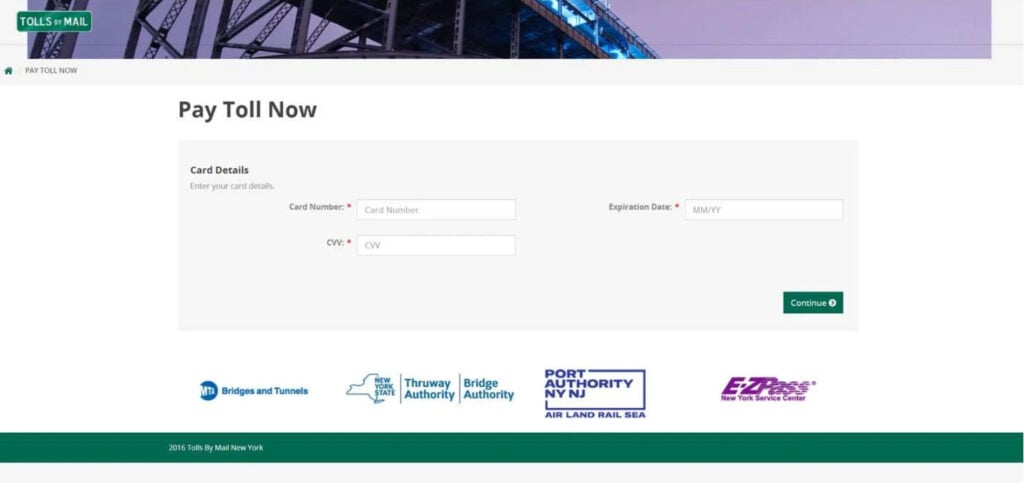
https://oregon.gov-ear.win/uspretending to be an official Oregon toll site. - Fake websites with “Tolls By Mail” branding that imitate real transportation authorities.
- Screens that request full credit card details, CVV, expiration dates, and sometimes even the user’s phone number and birthdate.
How Scammers Are Getting Smarter
Phishing operations have become more sophisticated. These aren’t just lazily thrown-together pages anymore. The fake websites look polished and professional. They mimic real DMV or transportation authority branding and sometimes include logos for entities like the Port Authority, E-ZPass, and state toll systems.
The grammar and spelling in messages have also improved, making it harder to detect scams based on poor language alone. Scammers are using web tools to clone real websites or scrape logos and text from government portals.
Who Is Being Targeted?
This scam doesn’t discriminate. Whether you’re a frequent toll road user or not, these messages are sent en masse. However, those living in states with extensive toll systems (like New York, New Jersey, California, and Florida) are prime targets. People who have actually missed a toll payment are especially vulnerable because the message seems plausible.
Financial and Personal Impact
Falling for this scam can result in:
- Financial Loss: Immediate theft from your bank account or credit card.
- Identity Theft: Long-term misuse of your personal data.
- Credit Damage: If scammers open accounts in your name.
- Time and Emotional Stress: Reclaiming your identity and dealing with law enforcement or credit bureaus.
Legal and Regulatory Action
Authorities such as the Federal Trade Commission (FTC) and state Attorneys General have issued multiple alerts about phishing scams posing as toll agencies or DMVs. However, scammers often use overseas servers and anonymizing tools, making it difficult to shut them down permanently.
How the Scam Works: Step-by-Step Breakdown
Step 1: The Initial Text Message
You receive a text claiming you owe money for unpaid tolls. The message includes:
- A warning of legal or financial consequences
- A deadline, often within 24 hours
- A clickable link to “resolve” the issue
The language is crafted to create panic, prompting immediate action without verifying the message.
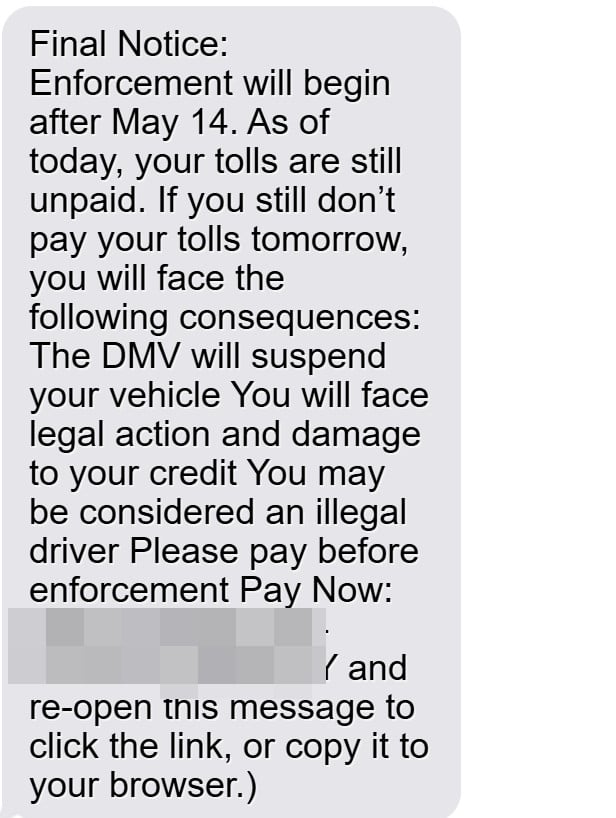
Here is how a scam message might look:
Final Notice: Enforcement will begin after May 8st
As of today, your tolls are still unpaid.
If you still don’t pay your tolls tomorrow, you will face the following consequences:
The DMV will suspend your vehicleYou will face legal action and damage to your credit
You may be considered an illegal driver
Please pay before enforcementPay Now:
https://oregon.gov-ear.win/us(Reply Y and re-open this message to click the link, or copy it to your browser.)
Step 2: The Fake Payment Portal
Clicking the link takes you to a fraudulent website. The site may resemble legitimate portals such as:
- Tolls by Mail (NY)
- EZPass (various states)
- State-specific DMV or toll authorities
Logos and color schemes are copied from real government sites, but the domain name is often suspicious or unrelated to official government addresses.
Step 3: Information Collection
Once on the site, you’re prompted to “verify” your identity or “pay now.”
You may be asked for:
- Full name
- Phone number
- Date of birth
- Mailing address
- Driver’s license number
- Credit/debit card details (number, CVV, expiration)
Some variations even ask for your Social Security number under the guise of confirming your DMV profile.
Step 4: Immediate Data Theft
The data entered is instantly captured by the scammers. You might receive a fake confirmation page or even a fake receipt. But behind the scenes, your information is either:
- Sold on the dark web
- Used to make unauthorized purchases
- Used to open fraudulent accounts in your name
Step 5: Continued Exploitation
After the initial scam, your phone number and identity may be added to more scammer lists. You might receive follow-up scams including:
- “IRS” or “Bank” fraud alerts
- “Loan approval” offers
- “Credit repair” scams
Victims are often targeted repeatedly once identified as vulnerable.
Red Flags to Watch For
- Government agencies do not send enforcement threats via text.
- URLs that don’t end in
.govor use unusual domain names. - Requests for full credit card information through non-secure websites.
- Sites lacking clear contact information or terms and conditions.
- Grammatical errors or inconsistent branding.
Technical Aspects Used by Scammers
- Spoofed Numbers: Messages may appear to come from legitimate sources.
- Cloned Websites: Scammers use tools to clone real portals.
- URL Shorteners: Sometimes used to disguise suspicious domains.
- Geotargeting: Some scams are tailored to your location based on area code.
What To Do If You’ve Fallen Victim to the Scam
If you’ve already clicked the link or entered your information, act quickly. Follow these steps:
1. Immediately Contact Your Bank or Credit Card Provider
- Report the fraud
- Freeze or cancel your card
- Monitor recent transactions
- Request a chargeback for unauthorized payments
2. Report the Scam to Authorities
- File a report with the FTC: https://reportfraud.ftc.gov
- Contact your state DMV or toll agency to inform them
- Notify local law enforcement
3. Enable Fraud Alerts on Your Credit Report
- Contact one of the three major credit bureaus (Equifax, Experian, TransUnion)
- Place a fraud alert, which requires creditors to take extra steps before opening new accounts
4. Consider a Credit Freeze
- A credit freeze prevents new credit accounts from being opened in your name
- This is a stronger step than a fraud alert but may require temporarily lifting if you apply for credit
5. Monitor Your Identity
- Sign up for a credit monitoring service (some banks offer this for free)
- Regularly check your credit report via AnnualCreditReport.com
6. Change Your Passwords
- If you used any personal info or passwords on the fake site, change them immediately
- Use strong, unique passwords for each account
- Consider enabling two-factor authentication where possible
7. Warn Others
- Share your experience with family and friends
- Report the scam to platforms like BBB Scam Tracker or your state’s consumer protection agency
- Posting publicly (without revealing your personal details) can help others stay safe
Frequently Asked Questions (FAQ)
Is the DMV allowed to send toll violation notices via text message?
No. Most DMVs and toll agencies do not use text messages to send toll violation or enforcement notices. Official communication is typically sent through mail or secure online portals.
What should I do if I clicked the link but didn’t enter any information?
If you clicked the link but didn’t provide any personal or financial information, you’re likely safe. However, clear your browser history, avoid visiting the site again, and consider running a virus or malware scan on your device.
How can I verify if I really owe a toll?
Visit the official website of your state’s toll agency or DMV. You can also call their customer service lines. Do not trust the information from unsolicited messages or unfamiliar websites.
Why do the scam websites look so real?
Scammers often clone the design and branding from official websites to make their fake sites appear trustworthy. They may use logos, fonts, and even wording directly copied from government websites.
Can my identity be stolen if I gave them my name and birthdate?
Possibly. While your name and birthdate alone may not allow full identity theft, they are valuable pieces of a larger puzzle. If you also provided financial or additional personal information, you should take steps to protect your identity immediately.
What if I paid through a scam site?
Contact your bank or card issuer immediately to dispute the charge and cancel your card. Then, report the fraud to the FTC and consider placing a fraud alert or credit freeze on your credit report.
Are there legitimate sites that look similar?
Yes, many state toll agencies have online payment portals. Always double-check the URL. Legitimate government websites usually end in “.gov” or a trusted state domain, and you can verify links directly from official state or DMV websites.
How can I protect myself from similar scams in the future?
- Don’t click on links in unsolicited texts or emails.
- Always verify suspicious claims through official channels.
- Use strong, unique passwords and enable two-factor authentication.
- Regularly monitor your bank and credit accounts for unusual activity.
The Bottom Line
The DMV Final Notice scam is a clear reminder of how convincing and dangerous modern phishing attacks have become. By understanding how these scams operate and staying cautious, you can protect yourself and your personal information.
Never click on unsolicited links claiming urgent action. When in doubt, contact the official DMV or toll agency directly. Stay informed, trust your instincts, and always verify before you click.

Join the discussion
0 commentsShare your experience or ask a question about this article.
Discussion
Start the conversation
Have a question or something useful to share? Add the first comment.