

Imagine receiving a text message that urgently warns you of a toll violation. It claims you owe a small amount—just $6.99—and that if you don’t act within 12 hours, your vehicle registration will be suspended and your credit score damaged. Scary, right? That’s exactly how scammers are luring in unsuspecting victims across the U.S. with the DMV Toll Violation Notice scam.
In this article, we’ll unpack how this scam works, how to recognize it, and what to do if you fall for it.
Scam Overview
The DMV Toll Violation Notice scam is a widespread phishing scheme that impersonates a legitimate government agency—typically the Department of Motor Vehicles (DMV). These scams are especially dangerous because they leverage urgency and authority to manipulate people into taking immediate action.
What the Scam Looks Like
Scammers send text messages, often labeled as a “Toll Violation Notice.” These messages mimic official language and sometimes include actual DMV terms and acronyms to appear authentic. The message typically includes:
- A small unpaid balance (e.g., $6.99)
- A due date within hours or a few days
- Threats of serious consequences such as vehicle registration suspension, late fees, or damage to credit
- A phishing link, often disguised to look like a legitimate DMV site
Why It’s Effective
This scam plays on a few key psychological principles:
- Urgency: The message emphasizes a narrow time frame—usually 12 to 24 hours—to scare recipients into acting without thinking.
- Authority: It impersonates the DMV, a trusted government agency, to make the request seem legitimate.
- Minimal Cost: The amount requested is small enough to avoid suspicion but large enough to be profitable when scaled across thousands of victims.
Geographic and Demographic Targeting
Victims report receiving these messages nationwide, but many scams are geo-targeted using publicly available data such as area codes or regional vehicle registration databases. Older adults and those unfamiliar with digital scams are especially vulnerable.
Digital Forensics
The URLs in these scam messages often include misleading domains like “quickpass” or “odmv”. While these might appear trustworthy, they often use obscure top-level domains (TLDs) such as “.win” or “.xyz” that are commonly associated with spam and phishing. Upon clicking the link, victims are redirected to a fake payment portal where they’re asked to enter personal and financial information.
Impact on Victims
Once a victim inputs their data, scammers can:
- Steal credit card and banking information
- Commit identity theft
- Install malware or spyware on the device
This can lead to severe financial loss, emotional stress, and a time-consuming recovery process.
Reports and Warnings
Multiple state DMVs and cybersecurity agencies have issued public warnings about this scam. However, the messages continue to evolve, using new domains and slightly modified wording to bypass spam filters and appear unique.
How the Scam Works
Understanding the mechanics of this scam is essential for recognizing and avoiding it. Here’s a detailed look at how the DMV Toll Violation Notice scam unfolds:
Step 1: Initial Contact
The victim receives a text message from an unknown number or spoofed number that appears to be official. The message:
- Mentions a toll violation
- Lists an unpaid balance
- Warns of dire consequences
- Includes a suspicious link
Step 2: Emotional Manipulation
The scam is designed to provoke panic. Victims are told they must act immediately—typically within 12 hours—or face severe repercussions like vehicle registration suspension or credit damage. This limits the recipient’s ability to think critically or verify the message.
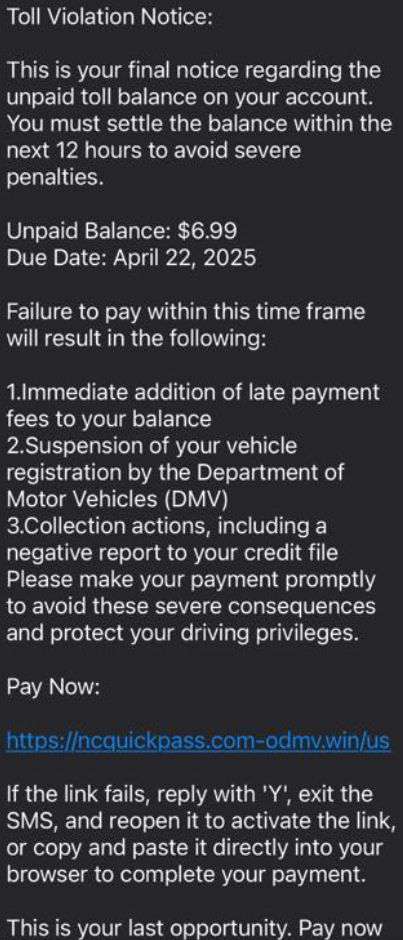
Here is how the scam texts might look:
Toll Violation Notice:
This is your final notice regarding the unpaid toll balance on your account. You must settle the balance within the next 12 hours to avoid severe penalties.
Unpaid Balance: $6.99
Due Date:Failure to pay within this time frame will result in the following:
- Immediate addition of late payment fees to your balance
- Suspension of your vehicle registration by the Department of Motor Vehicles (DMV)
- Collection actions, including a negative report to your credit file
Please make your payment promptly to avoid these severe consequences and protect your driving privileges.
Pay Now:
If the link fails, reply with ‘Y’, exit the SMS, and reopen it to activate the link, or copy and paste it directly into your browser to complete your payment.
This is your last opportunity. Pay now.
Step 3: Clickbait Link
The message contains a link, often shortened or using domains that seem DMV-related. Clicking the link directs the user to a fake website that mimics an official DMV page.
Common traits of these fake sites:
- DMV logos and branding
- Fields requesting personal info (e.g., name, address, license plate)
- Payment forms asking for credit card numbers
Step 4: Data Harvesting
Once the victim enters their information, the data is sent directly to the scammers. The fake site may even display a “confirmation” message or receipt to maintain the illusion of legitimacy.
Step 5: Financial Exploitation
Scammers now have enough information to:
- Make unauthorized transactions
- Open credit lines
- Commit identity theft
In some cases, malware may be installed on the user’s device to harvest additional data or monitor future activity.
Step 6: Ongoing Exploitation
The initial scam is just the beginning. Victims may receive follow-up messages or calls pretending to be from the bank, law enforcement, or the DMV, further deepening the scam.
How to Spot the DMV Toll Violation Scam Texts and Websites
Identifying a scam before it causes damage is key to protecting yourself and others. DMV toll violation scam messages are designed to look urgent and official, but several telltale signs can help you spot the fraud.
Warning Signs of Scam Texts
- Urgency and Threats
The text typically states that you must pay within a very short window (e.g., 12 hours) or face severe consequences like vehicle registration suspension, credit damage, or added late fees. Legitimate agencies do not make such threats via text. - Small, Odd Payment Amounts
Many scam texts request minor amounts such as $6.99. This tactic is used to avoid raising suspicion while still profiting from large-scale targeting. - Suspicious URLs
The message will often include a link that looks vaguely official but contains unusual domain extensions such as.win,.xyz, or obscure spellings like “odmv” instead of “dmv”. Official DMV websites will always use government or state-verified domains. - No Personalization
Scam messages usually do not include your name, vehicle details, or any identifying information. Legitimate notifications are personalized and typically reference specific accounts or violations. - Poor Grammar or Formatting
Many scam messages contain odd phrasing, inconsistent punctuation, or errors that would not appear in a professional government communication. - Contradictory Claims
For example, in South Carolina, the SCDMV (South Carolina Department of Motor Vehicles) has publicly stated that they do not collect toll payments, nor do they issue threats related to toll violations or license suspensions over text. Any message suggesting otherwise is fraudulent.
Warning Signs of Fake DMV Websites
- Unsecure Websites
Check for a secure connection: real DMV sites use HTTPS encryption. Fake sites may lack security certificates or show warnings in your browser. - Generic Design
Scam websites may use outdated or poorly designed templates that only vaguely resemble official government portals. - Unusual Payment Requests
Be wary if the site asks for full credit card information, Social Security numbers, or unrelated personal details. Government sites will only request what’s necessary and will always provide context. - No Contact Information
Legitimate websites include verified contact numbers, email addresses, and links to other official state services. Scam sites often have none of this.
What to Do If You’ve Fallen Victim to the DMV Toll Violation Scam
If you believe you’ve been scammed, take the following steps immediately:
- Do Not Make Additional Payments
- Avoid replying to the message or clicking any more links.
- Contact Your Bank or Credit Card Issuer
- Report the fraudulent transaction
- Request a freeze or cancellation of your card
- Monitor for unauthorized transactions
- Report to Authorities
- File a report with the FTC at ReportFraud.ftc.gov
- Contact your local DMV to inform them of the scam
- Report the phone number and website to your wireless carrier and cybersecurity agencies
- Change Affected Passwords
- If you used the same passwords elsewhere, change them immediately
- Use strong, unique passwords for each account
- Enable Fraud Alerts and Credit Monitoring
- Place a fraud alert on your credit reports via Experian, TransUnion, or Equifax
- Consider freezing your credit
- Sign up for credit monitoring services
- Scan Your Devices for Malware
- Use reputable antivirus or anti-malware software
- Remove any suspicious apps or browser extensions
- Educate and Share
- Inform friends and family about the scam to prevent them from falling victim
- Share legitimate news and warnings on social media
Frequently Asked Questions (FAQ) About the DMV Toll Violation Scam
Q: Is the DMV ever going to send toll violation notices by text message?
A: No, most legitimate DMVs do not send toll violation notices via text. These notices are typically delivered by mail or through official online portals. Any text message with a payment link should be treated with suspicion.
Q: What should I do if I clicked on the link but didn’t enter any information?
A: If you only clicked the link and didn’t enter personal or financial data, your risk is lower. However, you should still run a malware scan on your device and avoid clicking similar links in the future. It’s also wise to clear your browser history and cache.
Q: I paid the requested amount. Can I get my money back?
A: Possibly. Contact your bank or credit card issuer immediately to report the charge as fraudulent. In many cases, banks can reverse the payment or issue a chargeback if reported quickly.
Q: How can I identify a fake DMV toll notice?
A: Look for red flags such as:
- A sense of urgency (e.g., “Pay within 12 hours”)
- Small balance demands (e.g., $6.99)
- Suspicious URLs using domains like “.win” or “.xyz”
- Poor grammar or generic greetings
- Requests for sensitive personal or payment information
Q: I reported the scam. Should I still be worried?
A: Reporting the scam is a critical first step. If you shared any personal or financial information, continue monitoring your accounts and credit reports closely for the next several months. If you didn’t provide any information, your risk is minimal.
Q: Can these scam messages install malware on my phone?
A: In some cases, yes—especially if the link leads to a website that asks you to download something or exploits browser vulnerabilities. Always run a full device scan after clicking a suspicious link.
Q: Why do the scammers ask for such a small amount?
A: Small charges are less likely to raise suspicion. Victims may pay quickly without questioning the legitimacy of the notice. Scammers profit by targeting thousands of victims with these micro-transactions.
Q: Can I block the number sending the scam?
A: Yes, you can block the number on your device. However, scammers often use spoofed or rotating numbers, so new messages may come from different sources. Consider installing a call and SMS filtering app to help detect future attempts.
Q: Should I report the scam to the DMV?
A: Yes. While the DMV may not be able to resolve the scam directly, reporting it helps raise awareness and allows the agency to issue public warnings.
Q: How do I protect myself from similar scams in the future?
A: Use these best practices:
- Never click links in unsolicited messages
- Verify information directly through official websites
- Enable multi-factor authentication on accounts
- Keep your device’s security software up to date
- Educate yourself and others about common scam tactics
The Bottom Line
The DMV Toll Violation Notice scam is a dangerous and evolving threat that exploits urgency and trust to steal personal and financial information. While the text messages may seem official and the amount small, the consequences can be severe. Recognizing the warning signs and taking immediate action if targeted can protect you and those around you from significant harm.
Stay informed. Stay vigilant. And never trust a toll notice that comes via text with a sketchy link.

Join the discussion
0 commentsShare your experience or ask a question about this article.
Discussion
Start the conversation
Have a question or something useful to share? Add the first comment.