

Going through tolls is a routine part of driving for millions across the U.S. E-ZPass makes toll paying fast and convenient – as easy as driving through dedicated lanes. But some scammers are exploiting E-ZPass’s popularity to scam drivers through a phony “outstanding toll” text.
This widespread scam sends an unsolicited SMS message claiming the recipient has unpaid E-ZPass tolls. To avoid penalties, it tells them to click a link to settle the debt. However, it’s a sneaky fraud meant to steal your money and identity.
Keep reading to learn all about how this E-ZPass text scam ensnares victims, how to detect it, and most crucially, how to protect yourself.
Overview of the E-ZPass Final Reminder “Outstanding Toll” Text Scam
This toll scam starts with a text message sent to victims claiming that E-ZPass records show they have an unpaid toll balance.
The message threatens escalating penalties or legal consequences if the toll debts aren’t paid immediately by clicking a link.
However, the texts do not originate from any official E-ZPass agency or toll road authority. They are fraudulent messages sent by scammers to deceive the public and capture personal information and money.
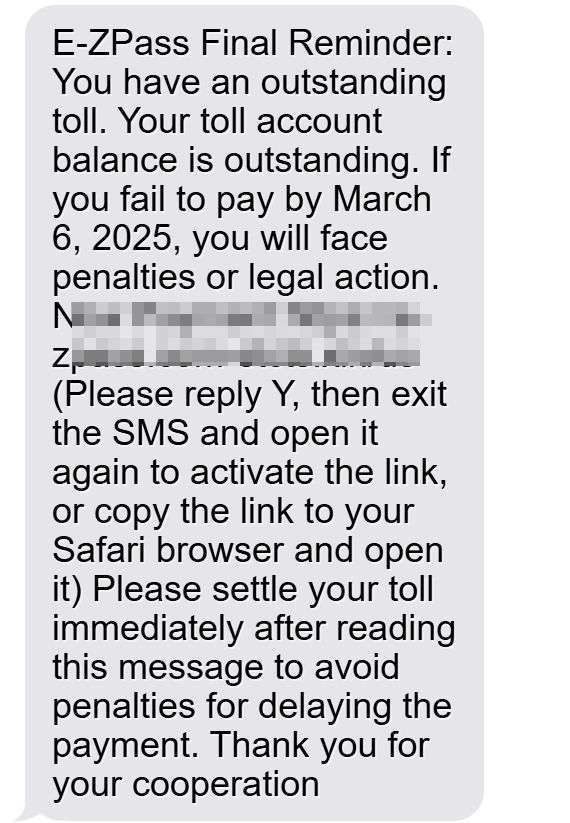
Here is how the text messag scam looks:
E-ZPass Final Reminder: You have an outstanding toll.
Your toll account balance is outstanding. If you fail to pay by March 6, 2025, you will face penalties or legal action.
Now Payment:https://e- zpass.com-etcts.xin/us
(Please reply Y, then exit the SMS and open it again to activate the link, or copy the link to your Safari browser and open
it)
Please settle your toll immediately after reading this message to avoid penalties for delaying the payment. Thank you for your cooperation
Some key facts about this E-ZPass scam:
- Originates from numbers with no verifiable caller ID.
- Pressures urgency to pay fake unpaid tolls within days.
- Threatens penalties, collections, or legal action for non-payment.
- Directs victims to click links leading to convincing but fake E-ZPass sites.
- Collects personal info and payment data for identity theft and unauthorized charges.
- Uses stolen details to loot victims’ accounts and create lasting identity theft issues.
This E-ZPass text scam first appeared around 2021 and has hit drivers across many states with toll roads managed by E-ZPass, including New York, New Jersey, Maryland, Ohio and more. With tolls a daily fact of life, millions of E-ZPass users are vulnerable to this fraud. But awareness is the key to avoiding this “outstanding toll” trap.
How the E-ZPass Final Reminder “Outstanding Toll” Scam Operates
Let’s break down step-by-step how scammers carry out this E-ZPass toll text scam:
1. Victims Receive Unsolicited Text Messages
The scam starts with an SMS text sent to victims out of the blue. The message claims to be from E-ZPass, with wording such as:
“E-ZPass: Our records indicate you have an outstanding balance of $4.15 for tolls. To avoid penalties, please pay by clicking here: [Scam link]”
The text appears to come from a legitimate source – but it doesn’t. The number is spoofed and cannot be replied to or traced.
2. Threats of Penalties for Non-Payment
The E-ZPass texts threaten consequences like account suspension, penalties, legal action, or collection referral if the unpaid tolls aren’t paid immediately.
These intimidation tactics pressure urgency to get victims to click the link rather than closely inspect the message first. But the threats are completely fabricated.
3. Fake E-ZPass Links Included
The scam texts include a link supposedly to make an E-ZPass bill payment for the outstanding toll debts.
But the link actually goes to sophisticated fake websites impersonating official E-ZPass toll agency sites. Everything from the URL to logos appears authentic at first glance.
4. Personal and Payment Data Stolen
On the phony sites, victims are prompted to log into their account to settle the fake toll balance. In doing so, they surrender personal info, passwords, and payment card data the scammers immediately capture.
5. Accounts Emptied and Identities Stolen
With the stolen financial details, scammers drain bank accounts and max out credit cards. Meanwhile, personal data enables new account identity theft.
Victims are often unaware until they spot unauthorized charges or collection calls for accounts opened in their name. Fixing the identity theft mess can take months or years.
What To Do If You Receive an E-ZPass Final Reminder “Outstanding Toll” Text
If you get a suspicious text demanding E-ZPass toll payment, take these steps:
- Don’t click any links in texts – they likely lead to fake scam sites.
- Don’t call any phone numbers in the texts – they cannot be trusted.
- Don’t reply to the text at all. Scammers may try to verify an active number.
- Don’t provide information if you followed a link before realizing it’s a scam.
- Take screenshots of the text message and site as evidence of fraud.
- Search online to confirm the text format matches known E-ZPass scams.
- Check your account directly through the official E-ZPass app or website.
- Contact E-ZPass to report the scam text.
- Monitor statements for any fraudulent charges by scammers.
- Consider blocking the phone number to prevent more scam texts.
How To Avoid Falling Victim to The E-ZPass Final Reminder “Outstanding Toll” Scam
Here are some tips to avoid being deceived by fake E-ZPass texts demanding payment:
- Know E-ZPass doesn’t text first. Legit toll agencies mail paper notices before any threats.
- Look for bad grammar/spelling. Scam texts often contain errors no official message would.
- Verify the phone number. Search online to confirm texts come from a real agency if unsure.
- Never click links in texts. Manually type known E-ZPass URLs or use your official app.
- Ignore unrealistic threats. No agency will instantly impose fees/penalties over a small toll debt.
- Avoid “updating” accounts via texts. E-ZPass won’t request sensitive info by text.
- Set up account alerts. Get notifications from E-ZPass for legitimate toll activity.
- Check statements routinely for any unauthorized charges from scammers.
The Bottom Line – Don’t Get Scammed
The E-ZPass “outstanding toll” text scam shows why drivers must stay alert in spotting the latest toll payment frauds. Any text demanding E-ZPass payment could be a phishing attempt.
Remember, E-ZPass and other agencies will only mail an invoice for any legit unpaid tolls – never text or call with threats out of the blue. Avoid clicking links and providing info in messages to protect yourself.
With caution, you can easily detect these E-ZPass toll scams, steer clear of tricks, and breeze safely through toll plazas using your E-ZPass worry-free. Don’t let scam texts derail your open road journey.
Frequently Asked Questions about the E-ZPass “Outstanding Toll” Text Scam
Confused about the E-ZPass “outstanding toll” text scam? Here are answers to some common questions.
What exactly is the E-ZPass text scam?
It’s a scam where scammers send fake texts claiming you owe E-ZPass money for unpaid tolls. The messages threaten penalties to get you to click phishing links and input your information.
Who really sends these E-ZPass scam texts?
They come from scammers pretending to be E-ZPass, not any official toll agency. The number calling is usually spoofed.
What threats do the scam texts make?
They often threaten escalating penalties, account suspension, collections referral, or legal action if you don’t pay immediately. But these are lies to trick you.
What’s the purpose of the link in the text?
It goes to a fake E-ZPass website impersonating the real one. There, scammers try to capture your personal and payment details to steal your identity and drain accounts.
What should I do if I get a text about an E-ZPass toll owed?
Don’t click any links, provide info, call back numbers, or reply. Check your E-ZPass account directly through the official app or site. Report the scam text.
How can I avoid falling for E-ZPass toll scams?
Remember real E-ZPass will only mail you an invoice first. Never click links or give info in texts. Ignore threats demanding immediate payment. Check statements routinely for any unauthorized charges.
Who can I contact to report scam texts impersonating E-ZPass?
You can report them to E-ZPass directly, the FTC’s scam reporting site, and your phone carrier to help warn others and get the scams shut down.

Join the discussion
0 commentsShare your experience or ask a question about this article.
Discussion
Start the conversation
Have a question or something useful to share? Add the first comment.