

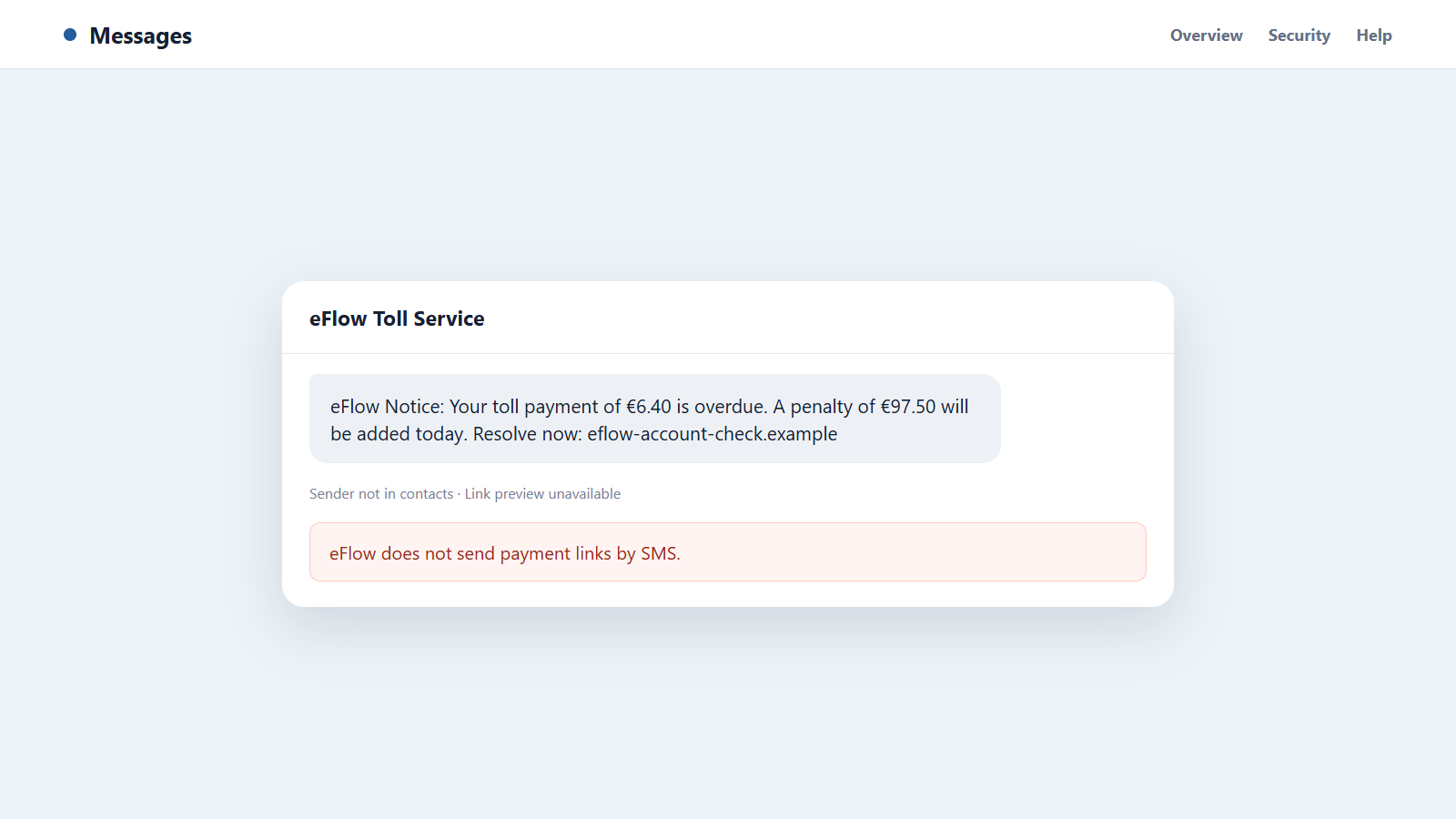
The text arrives after an ordinary day of driving and claims one small toll was missed. Pay now, it says, or a much larger penalty will be added before midnight.
An eFlow toll text scam works because many recipients have used Irish roads recently, while everyone knows that minor fees can grow when ignored. The message turns that uncertainty into a hurried click.
Overview
The message invents an unpaid toll or failed payment
Fraudulent texts claim that an M50 toll, eFlow account charge, or automatic payment remains outstanding. The amount is usually small enough to settle without a long discussion.
A deadline threatens penalties, legal action, vehicle-registration trouble, or collection activity. The link appears to offer the quickest way to prevent the problem from growing.
The link opens a professional eFlow lookalike
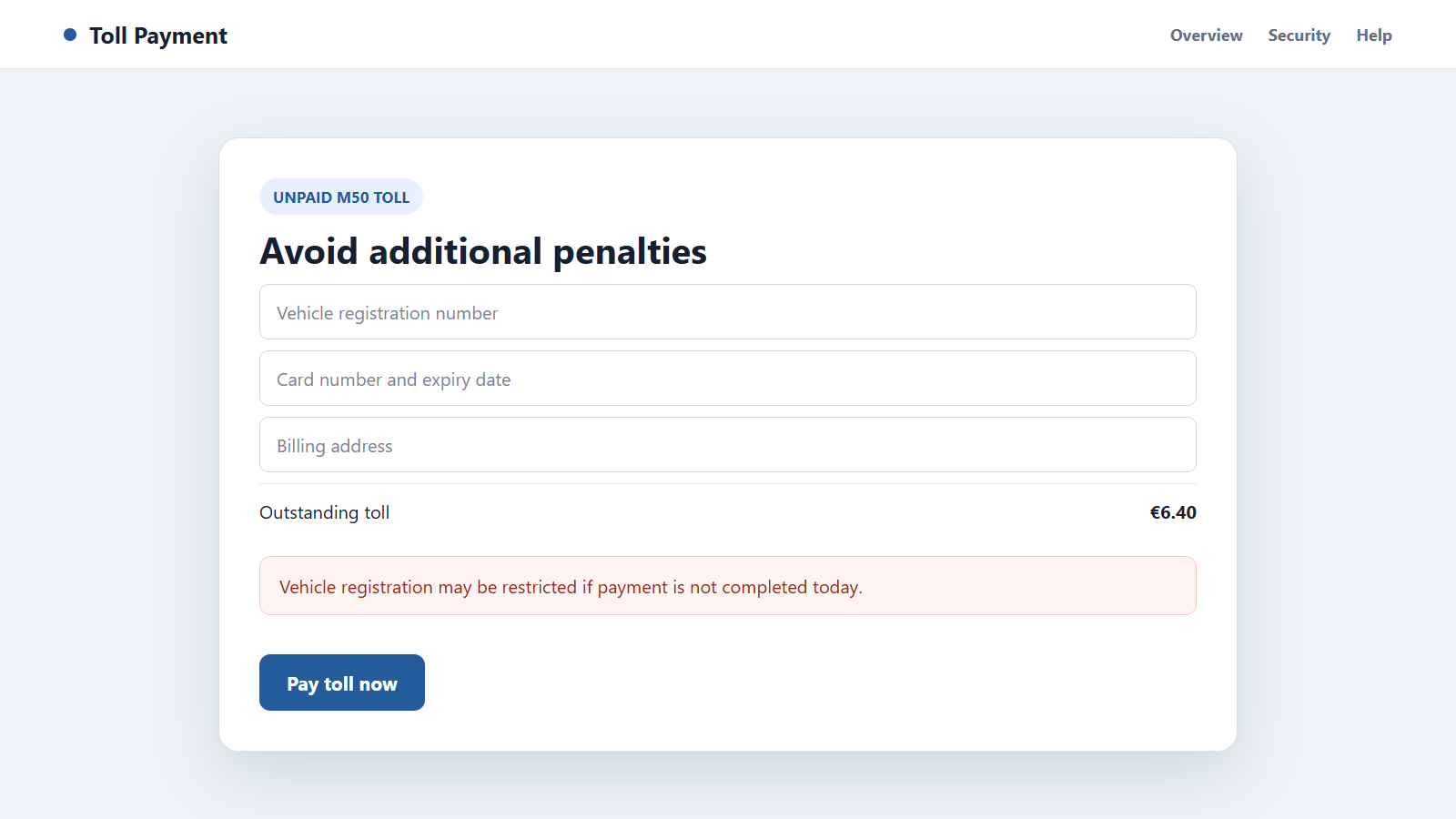
The page copies colors, language, and navigation from a real toll service. It may ask for a registration number before displaying a preselected balance.
That first step feels like a genuine lookup, but the site can show the same result for any registration. Its real purpose is to collect payment and identity information.
eFlow’s own policy makes the test straightforward
The official eFlow Security Hub says eFlow does not send text messages containing links and does not send SMS notices about failed payments or outstanding penalties.
Important warning signs include:
- An unexpected SMS contains a direct payment link.
- The domain adds words such as account, toll, payment, secure, or penalty.
- The sender demands action before the end of the day.
- The text threatens vehicle suspension for a small unpaid amount.
- The page requests full card details and billing information.
- The site accepts a registration number without showing a real journey.
- A reply is required before the link will supposedly become active.
- The message reaches someone who does not use the M50 or have an eFlow account.
Why an Unpaid Toll Text Feels Believable
Toll payments sit in an awkward part of everyday life. Drivers pass cameras and gantries without speaking to a person, and a journey can involve rental vehicles, visitors, business cars, or an account managed by someone else.
That uncertainty gives the scam a wide audience. A recipient does not need to be an eFlow customer to wonder whether a recent trip created a charge.
The amount is often carefully chosen. A demand for €6.40 looks like a routine fee, while the threatened penalty creates a reason to pay before checking.
Messages may arrive in the same conversation thread as genuine brand texts because sender names can be manipulated. Thread placement is convenient, not proof of origin.
The link can also resemble the real address at a glance. Hyphens, extra words, unusual endings, or letter substitutions disappear when the recipient reads only the eFlow name near the beginning.
Some campaigns ask the recipient to reply Y, then reopen the message and tap the link. That instruction can work around protections that restrict clickable links from unknown senders.
A polished fake page completes the illusion. It displays a registration field, Irish wording, a help section, and reassuring security icons before moving to card payment.
None of those visual details connect the page to the actual toll account. The user must verify the balance through the official website or app opened independently.
Bank of Ireland has warned that criminals created numerous fake eFlow sites while sending large volumes of fraudulent messages. The bank repeated eFlow’s advice that payment links are not sent by SMS.
How the eFlow Toll Text Scam Works
Step 1: A large list of Irish numbers is contacted
Criminals send messages broadly rather than identifying only drivers with unpaid tolls. Enough recipients have driven through a toll recently for the story to feel timely.
Leaked marketing data can make targeting more precise, but the scam does not require inside access to eFlow. A random campaign can still reach frequent M50 users.
Step 2: A familiar toll problem is invented
The text mentions a failed payment, overdue toll, final reminder, or account update. It may use a believable amount and a short reference number.
No journey date, time, vehicle, or toll location is provided because the sender does not know them. Vague wording lets each recipient supply the missing context.
Step 3: A penalty deadline creates urgency
The small balance is paired with a much larger fine that supposedly begins today. Some messages threaten enforcement, court action, or restrictions on the vehicle.
The recipient is encouraged to treat the link as the safer option. Waiting to check the claim is presented as more expensive than paying.
Step 4: The link hides behind a lookalike domain
The address may include eflow but end in an unrelated domain. A link shortener, redirect, or tracking page can conceal the final destination until it opens.
Fraud sites are disposable. When browsers or hosting companies block one address, the campaign moves to another with nearly identical content.
Step 5: A fake vehicle lookup builds confidence
The visitor enters a registration number and receives an alleged balance. The site may add a journey date or account status that looks specific.
Try not to test a suspicious page with invented data because visiting it still exposes device and network details. Open the official eFlow service instead.
Step 6: The payment form collects valuable data
The checkout asks for a name, address, telephone number, card number, expiry date, and security code. The fee itself may also be charged.
A page can display an error after submission while retaining every field. The victim may retry or use another card, giving the operator additional accounts.
Step 7: Bank verification is intercepted
A second screen may request a one-time code or approval in the banking app. The scammer can be using that confirmation for a larger transaction or card registration.
The amount shown in the fake page may not match the action being authorized. Read the bank’s own message carefully and reject anything unexpected.
Step 8: Stolen details fuel follow-up scams
A caller may pose as the bank and say it detected the fraudulent toll payment. Because the caller knows the recent submission, the warning sounds credible.
The follow-up aims for online-banking access, another code, or a transfer to a so-called safe account. The first small toll becomes the setup for a much larger theft.
How to Check an eFlow Balance Safely
Do not open the link in the message. Close the conversation and type eflow.ie yourself, use the established app, or call a number published on the official site.
Check the registration, journey, and account history through that trusted route. A real outstanding amount should exist independently of the SMS.
If the vehicle belongs to an employer, rental company, or family member, ask the account holder how tolls are handled. Do not assume the text reached the responsible person.
For a rental vehicle, consult the rental agreement and contact the company through its official customer-service details. The agreement may describe toll processing and administrative charges.
Do not search the suspicious domain merely to see whether others reported it. Search the message wording without opening the result, and prioritize the official security notice.
Check the complete URL, not only the first recognizable word. The legitimate eFlow service uses its established domain, while a padlock can appear on any encrypted fraudulent site.
Never provide a card or verification code to clear uncertainty. If you cannot confirm the trip and amount in the real account, ask eFlow support to investigate.
Keep toll receipts and account notifications long enough to compare them with future messages. A simple travel record can remove the ambiguity that scammers exploit.
Company, Address, and Fulfillment Checks
The website must be the official eFlow domain
Open eflow.ie independently and navigate from there. Do not trust a domain because it contains eFlow, displays the logo, or appears in a familiar message thread.
Search results can contain advertisements and misleading pages, so check the final address before signing in or entering a registration number.
The contact route must come from eFlow itself
Use support details published on the official website. A telephone number inside the text or fake payment page may connect to the same criminal operation.
A legitimate agent should be able to discuss the account without asking you to open an SMS link or install remote-access software.
The journey record must be specific
A genuine toll issue should relate to a vehicle, date, and road use that can be checked. A generic deadline sent to an unrelated number does not establish liability.
Ask how the balance was created and how earlier notices were delivered. Do not accept a fabricated reference as the only evidence.
The payment must update the real account
Pay only through a route listed by eFlow, such as the official website, customer service, or an authorized retail channel. Confirm that the account reflects the transaction.
A receipt from an unrelated domain does not settle a toll. If you paid the fake page, the real balance may still require separate attention.
How to Report the Message Without Spreading It
Take screenshots that show the sender, wording, time, and complete link. Do not tap the link merely to capture the landing page.
eFlow advises recipients to report the fraudulent website to Netcraft. Copy the domain carefully without opening it and follow the instructions on the official Security Hub.
You can also report the sender through your mobile provider’s official fraud or spam channel. Follow the provider’s current instructions rather than forwarding the message to a code used in another country.
Mark the conversation as junk or spam after preserving evidence. Blocking one sender will not stop every version, but it can remove an immediate repeat contact.
When warning family or colleagues, send a screenshot with the link obscured. Reposting a clickable fraud address can accidentally send another person into the checkout.
Report paid advertisements or social posts separately to the platform. The SMS sender and the hosting account may be controlled through different providers.
What to Do if You Have Fallen Victim to This Scam
- Stop interacting with the fake page. Close it, do not resubmit the form, and do not respond to support messages that appear after payment.
- Contact your bank immediately. Use the official app or number on the card. Explain exactly what you entered and ask about blocking the card, reversing charges, and monitoring account access.
- Reject unexpected approvals. If a banking prompt or one-time code arrives, read the amount and merchant in the bank’s own message. Deny anything you did not initiate.
- Check eFlow independently. Open the official service and determine whether a genuine toll remains due. Paying the fraudulent site does not update the real account.
- Change reused credentials. Replace any password entered on the fake page, starting with email and banking. Revoke unfamiliar sessions and enable multifactor authentication.
- Preserve the evidence. Save the text, full URL, screenshots, card descriptor, bank alerts, receipt, and any follow-up calls or emails.
- Report the scam. Notify eFlow through its official support route, report the domain as its Security Hub recommends, and contact An Garda Síochána if money or identity data was stolen.
- Monitor for a bank-impersonation call. A criminal who knows about the card submission may pretend to be fraud support. Hang up and call the bank yourself.
- Scan after any download. If the page installed an app, configuration profile, attachment, or browser add-on, remove it and run a full Malwarebytes scan.
- Reduce exposure to malicious domains. AdGuard can help block many known phishing pages, harmful advertisements, and trackers, though it cannot confirm a toll balance.
- Review the next statements closely. Look for small test charges, recurring billing, cash transfers, wallet additions, or merchants you do not recognize.
- Avoid paid recovery promises. Work with the bank, eFlow, and Gardaí. A stranger who guarantees the return of funds for an upfront fee is likely starting another fraud.
Frequently Asked Questions
Does eFlow send payment links by text?
No. eFlow states that it does not send SMS messages with links and does not text about failed payments or outstanding penalties.
What if the message appeared in an existing eFlow thread?
Thread placement does not authenticate the sender. Names and routing can be manipulated, so open the official account independently.
Can the scam know my vehicle registration?
Some campaigns use leaked or public data, but many simply ask you to enter it. Knowing the registration still does not prove access to a toll record.
Is the padlock icon proof that the payment page is safe?
No. It indicates an encrypted connection, not an approved operator. Fraudulent sites can use HTTPS and display copied security badges.
Should I reply STOP or Y?
No. A reply can confirm that the number is active or make a link clickable. Report, block, and delete the message after saving evidence.
What if I really drove on the M50 recently?
That makes independent checking sensible, not the text genuine. Review the journey and balance through eflow.ie, the official app, or verified support.
The Bottom Line
An eFlow toll text scam pairs a believable small charge with a frightening deadline, then sends the driver to a copied payment page. The SMS link itself contradicts eFlow’s published policy.
Do not settle doubt inside the message. Open the official service separately, verify the journey, and contact the bank at once if any card or security details reached the fake site.

Join the discussion
0 commentsShare your experience or ask a question about this article.
Discussion
Start the conversation
Have a question or something useful to share? Add the first comment.